
Android Material Design--TextInputLayout
1. 简介
官网开篇:
Layout which wraps an EditText (or descendant) to show a floating label when the hint is hidden due to the user inputting text.
Also supports showing an error via setErrorEnabled(boolean) and setError(CharSequence), and a character counter via setCounterEnabled(boolean).
Password visibility toggling is also supported via the setPasswordVisibilityToggleEnabled(boolean) API and related attribute. If enabled, a button is displayed to toggle between the password being displayed as plain-text or disguised, when your EditText is set to display a password.
Note: When using the password toggle functionality, the 'end' compound drawable of the EditText will be overridden while the toggle is enabled. To ensure that any existing drawables are restored correctly, you should set those compound drawables relatively (start/end), opposed to absolutely (left/right).
大致意思:
将布局控件TextInputLayout套在编辑框TextInputEditText或EditText外,当用户编辑时会把指定的hint(无输入时的提示信息)内容上浮显示为标题,支持计数、错误及密码可见控制图标等属性的设置。
详细介绍和用使用案例建议前往官网浏览,毕竟越没有经过加工的信息越接近真相,毕竟写文章是为了自我总结和抛砖引玉,而不是写教程。
用户名和密码常见的输入样式有以下两种(其他还有很多):
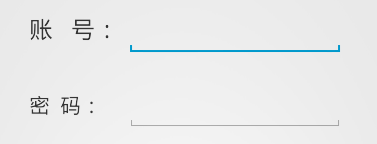
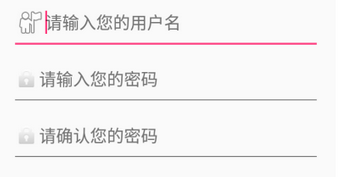
而利用Material Design的TextInputLayout可以轻松地实现下面这种效果:
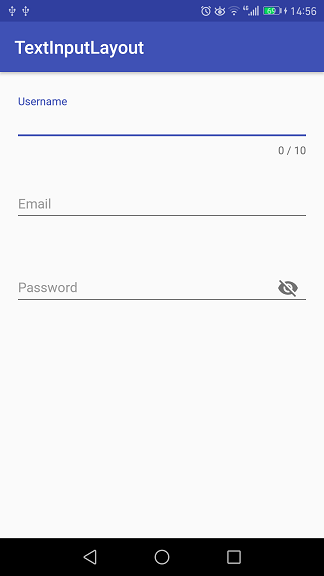
只需给TextInputLayout设置好hint属性,那么当其包含的TextInputEditText或EditText处于编辑状态时,hint内容会上浮作为标题显示,如图中的Username。
从图中还可以看到,分别对Username的最大字数限制,Password的是否可见属性进行了设置,其实Email同样设置了格式检测,下面就通过具体的代码来看看用TextInputLayout实现这些功能的便捷与高效。
2. 实例
项目代码放在Github上,感兴趣的朋友自行下载。
先在module build.gradle文件中添加dependencies项:
compile 'com.android.support:design:25.1.0'
Username的布局代码:
 <android.support.design.widget.TextInputLayout

   android:id="@+id/til_username"

   style="@style/TextInputLayoutStyle"

   app:errorEnabled="true"

   app:counterEnabled="true"

   app:counterMaxLength=""

   app:hintTextAppearance="@style/HintAppearance"

   app:errorTextAppearance="@style/TextErrorAppearance"

   app:counterOverflowTextAppearance="@style/HintErrorAppearance">

   <android.support.design.widget.TextInputEditText

     android:id="@+id/et_username"

     android:hint="@string/username"

     style="@style/EditTextStyle" />

 </android.support.design.widget.TextInputLayout>
其中用到的五个style定义:
 <style name="TextInputLayoutStyle">

   <item name="android:layout_width">match_parent</item>

   <item name="android:layout_height">wrap_content</item>

   <item name="android:layout_marginTop">@dimen/edit_top_margin</item>

 </style>

 <style name="EditTextStyle">

   <item name="android:layout_width">match_parent</item>

   <item name="android:layout_height">wrap_content</item>

   <item name="android:textSize">@dimen/edit_content_size</item>

   <item name="android:textColor">@color/colorEditContent</item>

 </style>

 <style name="HintAppearance" parent="TextAppearance.AppCompat">

   <item name="android:textSize">@dimen/edit_hint_size</item>

   <item name="android:textColor">@color/colorAccent</item>

 </style>

 <style name="HintErrorAppearance" parent="TextAppearance.AppCompat">

   <item name="android:textSize">@dimen/edit_hint_size</item>

   <item name="android:textColor">@color/colorHintError</item>

   <item name="textColorError">@color/colorHintError</item>

 </style>

 <style name="TextErrorAppearance" parent="TextAppearance.AppCompat">

   <item name="android:textSize">@dimen/edit_hint_size</item>

   <item name="android:textColor">@color/colorTextError</item>

   <item name="textColorError">@color/colorTextError</item>

 </style>
首先看一下字数限制的文本样式设置:
 app:counterEnabled="true"

 app:counterMaxLength=""

 app:counterOverflowTextAppearance="@style/HintErrorAppearance"
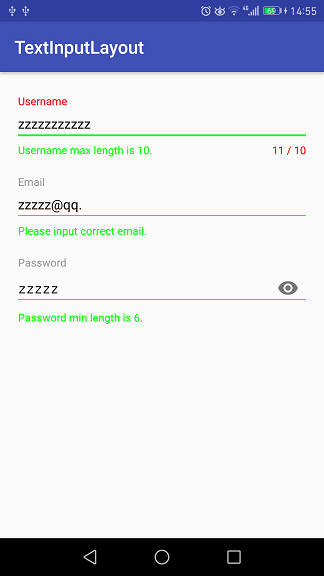
Username设置了最大字数限制--10,当输入字数超过上限之后就会将hint标题显示为counterOverflowTextAppearance样式。

颜色设置给出截图,可以直观地看到代码对应的颜色:
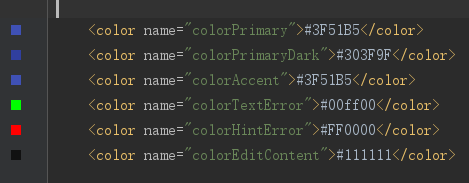
colorTextError对应编辑框左下角的错误提示,colorHintError对应右下角的字数限制和左上角的hint标题。
从运行结果可以看出,设置了字数限制后,Design会自动在编辑框右下角显示最大字数和当前输入字数(随着输入情况实时变化)。当字数在限制范围内时,hint样式为hintTextAppearance;字数超过之后,hint样式为counterOverflowTextAppearance。当然,如果没有设置counterOverflowTextAppearance属性,Design一般会将错误文本显示为红色,至于不同设备不同主题会有些差别。
接下来看看编辑框左下角的错误提示是怎么设置的,布局代码:
 app:errorEnabled="true"

 app:errorTextAppearance="@style/TextErrorAppearance"
还需要在Java代码中指定显示的时机和文本:
 private TextInputLayout mTILUsername;

 private EditText mETUsername;

 ...

 mETUsername.addTextChangedListener(new TextWatcher() {

     @Override

     public void beforeTextChanged(CharSequence s, int start, int count, int after) {}

     @Override

     public void onTextChanged(CharSequence s, int start, int before, int count) {

         if (s.length() > ) {

             mTILUsername.setErrorEnabled(true);

             mTILUsername.setError("Username max length is 10.");

         } else {

             mTILUsername.setErrorEnabled(false);

         }

     }

     @Override

     public void afterTextChanged(Editable s) {}

 });
给编辑框mETUsername设置了编辑状态改变监听器,参数为TextWatcher匿名类,实现onTextChanged方法。当字数超过限制之后将错误属性enable,同时设置错误提示内容;否则,就将错误属性disable。
测试后发现,布局代码中的app:errorEnabled="true"和Java中的mTILUsername.setErrorEnabled(true)是可以不设置的,调用setError方法就够了。
从截图中可以看出,编辑框下方那条线的颜色是跟随errorTextAppearance样式变化的,而不是counterOverflowTextAppearance。
再来看看邮箱格式的检测,这里是利用正则表达式,而且是比较基础的:
 private static final Pattern EMAIL_PATTERN = Pattern.compile(

             "\\w+([-+.]\\w+)*@\\w+([-.]\\w+)*\\.\\w+([-.]\\w+)*");
 if (!EMAIL_PATTERN.matcher(s.toString().trim()).matches()) {

     mTILEmail.setErrorEnabled(true);

     mTILEmail.setError("Please input correct email.");

 } else {

     mTILEmail.setErrorEnabled(false);

 }
matches方法返回false时表示输入内容不匹配邮箱格式,进而给出错误提示信息。
错误的情况上面已经给出了,正确的情况见下图:
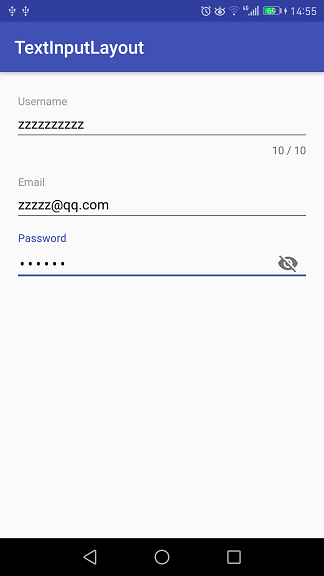
密码编辑框右边带有一个类似眼睛的图标,这就是内容是否可见的开关。布局代码如下:
 <android.support.design.widget.TextInputLayout

     android:id="@+id/til_password"

     android:layout_below="@id/til_email"

     style="@style/TextInputLayoutStyle"

     app:errorEnabled="true"

     app:passwordToggleEnabled="true"

     app:hintTextAppearance="@style/HintAppearance"

     app:errorTextAppearance="@style/TextErrorAppearance">

     <android.support.design.widget.TextInputEditText

         android:id="@+id/et_password"

         android:hint="@string/password"

         android:inputType="textPassword"

         style="@style/EditTextStyle" />

 </android.support.design.widget.TextInputLayout>
设置passwordToggleEnabled为true,inputType为textPassword,默认情况下输入内容是以点的形式显示。点击图标之后便会显示明文,再点一下又会显示密文,如此反复切换。明文形式如下:
3. 总结
上面通过例子简单地描述了TextInputLayout的基本用法,官网上的介绍还包含了其他的一些方法,能实现更多的效果。Android Design中文学习资料点这里。
Android Material Design--TextInputLayout的更多相关文章
- Android Material Design控件学习(三)——使用TextInputLayout实现酷市场登录效果
前言 前两次,我们学习了 Android Material Design控件学习(一)--TabLayout的用法 Android Material Design控件学习(二)--Navigation ...
- Android Material Design 兼容库的使用
Android Material Design 兼容库的使用 mecury 前言:近来学习了Android Material Design 兼容库,为了把这个弄懂,才有了这篇博客,这里先推荐两篇博客: ...
- Android Material Design Ripple Effect在Android5.0(SDK=21)以下Android版本崩溃问题解决
Android Material Design Ripple Effect在Android5.0(SDK=21)以下Android版本崩溃问题解决 附录1的Android Ripple Effect水 ...
- Android Material Design : Ripple Effect水波波纹荡漾的视觉交互设计
Android Material Design : Ripple Effect水波波纹荡漾的视觉交互设计 Android Ripple Effect波纹荡漾效果,是Android Materia ...
- Android Material Design的FloatingActionButton,Snackbar和CoordinatorLayout
如果是为了兼容低版本的Android系统,则需要引用Android Material Design的扩展支持库,我在之前的一篇文章张,较为详细的说明了如何导入Android Material Desi ...
- MaterialEditText——Android Material Design EditText控件
MaterialEditText是Android Material Design EditText控件.可以定制浮动标签.主要颜色.默认的错误颜色等. 随着 Material Design 的到来, ...
- Android Material Design控件使用(二)——FloatButton TextInputEditText TextInputLayout 按钮和输入框
FloatingActionButton 1. 使用FloatingActionButton的情形 FAB代表一个App或一个页面中最主要的操作,如果一个App的每个页面都有FAB,则通常表示该App ...
- Android Material Design(一)史上最全的材料设计控件大全
主要内容: 本文将要介绍Material design和Support library控件,主要包括TextInputLayout.SwitchCompat.SnackBar.FloatingActi ...
- Android Material Design系列之主题样式介绍说明
今天这篇文章应该算是Material Design系列的补充篇,因为这篇文章本来应该放到前面讲的,因为讲的是主题嘛,对于一些状态和颜色的介绍,因为我们一新建一个项目时,系统自带了三个属性的颜色,现在就 ...
- Android Material design
1.Material Design:扁而不平 2.Android Support Design 库 之 Snackbar使用及源码分析 3.十大Material Design开源项目,直接拿来用!
随机推荐
- Git环境搭建以及上传到GitHub全文记录
1.百度搜索下载git,官网可能很慢,我在百度软件里面下载的.当然可能不是最新版本.一路回车安装就好. 2.设置本机git的用户名和邮箱地址 查看当前电脑是否设置了用户名称 $ git config ...
- 【转】nginx配置:location配置方法及实例详解
location匹配的是nginx的哪个变量? $request_uri location的匹配种类有哪些? 格式 location [ 空格 | = | ~ | ~* | !~ | !~* ] /u ...
- spring或springmvc自动生成applicationcontext.xml或springmvc文件(此文转载和借鉴多篇文章)
在用spring或者springmvc框架进行开发时,编辑applicationcontext.xml等配置文件是必不可少的,在eclipse中打开applicationcontext.xml通常是这 ...
- 基于Spring Cloud和Netflix OSS构建微服务,Part 2
在上一篇文章中,我们已使用Spring Cloud和Netflix OSS中的核心组件,如Eureka.Ribbon和Zuul,部分实现了操作模型(operations model),允许单独部署的微 ...
- Javascript:面试经典套路-查重(reduce)
今天在偶然间查看到了一段代码,代码使用了很短的篇幅完成了字符串统计相同字符次数这个经典面试题,其中用到了reduce这个方法,网上查了查,没有查到什么有价值的东西,导致浪费了我一些时间才看懂,现将我的 ...
- kvm的sshd起不来
同事不知道在一台KVM虚拟机执行了chmod -R 777 / 将更目录中的所有文件的权限都改为777,重启该虚拟机之后发现该虚拟机登不上去了,来找我,我尝试重启了几次虚拟机之后,发现总是可以被pi ...
- iPhone与iWatch连接、控制、数据传递(Swift)
最近在做一个项目,涉及到iPhone设备和手表传输数据.控制彼此界面跳转,在网上找了很多资料,发现国内的网站这方面介绍的不多,而国外的网站写的也不是很全,所以在这写这篇博客,给大家参考一下,望大神指点 ...
- 关于js参数传递矛盾新理解
之前看了很多人的解释,说js中,函数的参数传递都是值传递中不理解. 他们无非举了两个例子 在这两个例子中,第二个例子可以看出参数是由值传递的.因为函数内对象的变化没有影响到函数外对象的变化.但是在第一 ...
- java做单用户的多重并发会话数限制
判定条件很简单,就是在同一时刻,同一帐号仅在一个终端上可正常操作. 我这里用简单的key,value进行判定,将用户存储在map里面,新登录用户登陆进系统后,判断map里是否存在当前用户,若存在就删除 ...
- JDBC连接Oracle数据库代码
import java.sql.Connection;import java.sql.DriverManager;import java.sql.ResultSet;import java.sql.S ...