
vue实现仿淘宝结账页面
这个demo,是小颖基于之前的 vue2.0在table中实现全选和反选 文章进行更新后的demo,主要功能呢,是仿照淘宝页面的结算购物车商品时自动算出合计价格的页面,具体页面效果请看下面的动图:(如果大家发现有什么问题请及时提出帮小颖改正错误呦,谢谢啦嘻嘻)
效果图:
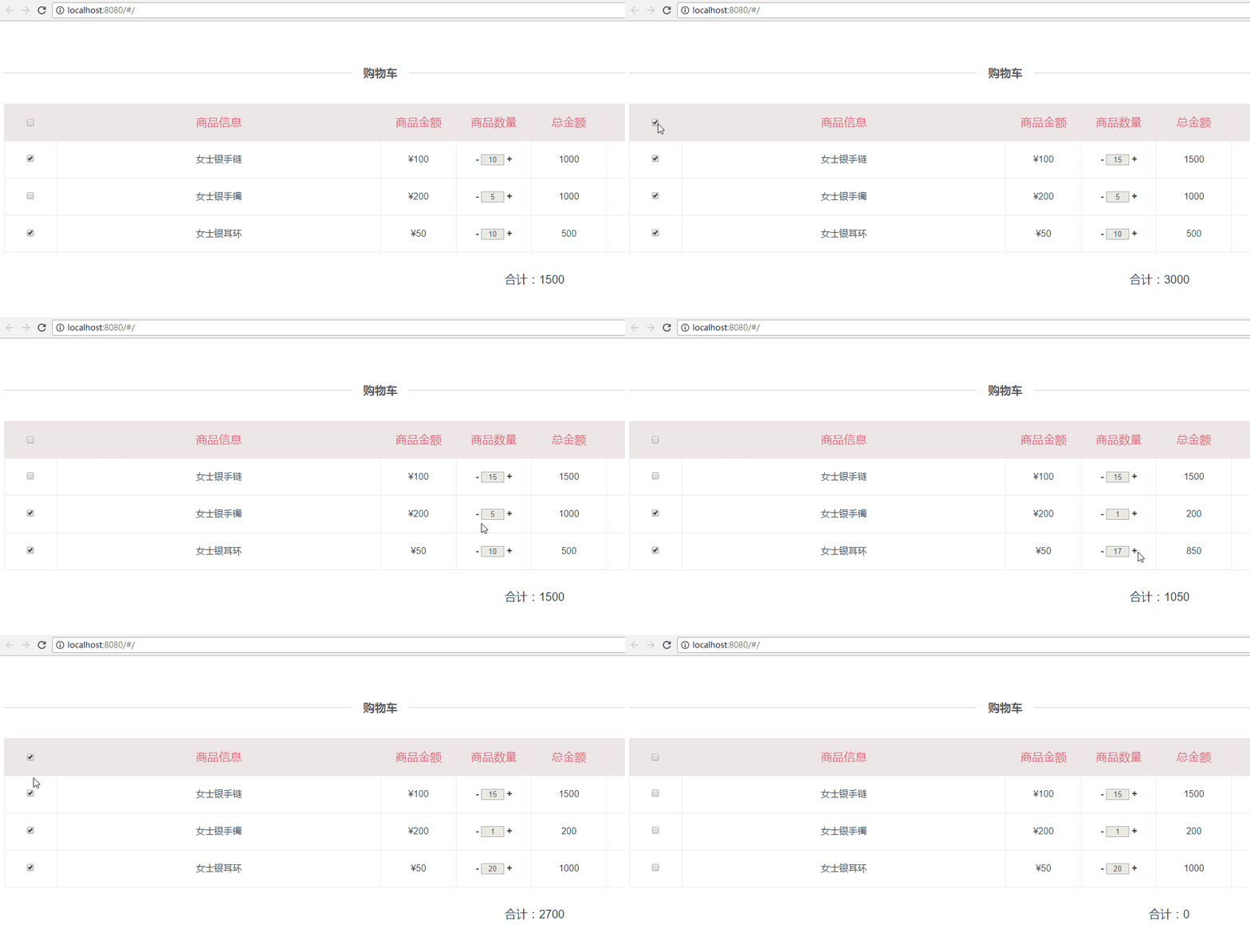
更新后的home.vue
<template>
<div class="container">
<div class="checkout-title">
<span>购物车</span>
</div>
<table class="product_table">
<tbody>
<template v-for="(list,index) in table_list">
<tr>
<td width="7%" min-width="94px" v-if="index===0">
<input type="checkbox" v-model='checked' @click='checkedAll'>
</td>
<td width="7%" v-if="index!==0">
<input type="checkbox" v-model='checkList' :value="list.id" @click=checkProductFun(index,$event)>
</td>
<td width="43%">{{list.product_inf}}</td>
<td width="10%" v-if="index===0">{{list.product_price}}</td>
<td width="10%" v-if="index!==0">¥{{list.product_price}}</td>
<td width="10%" v-if="index===0">{{list.product_quantity}}</td>
<td width="10%" v-if="index!==0">
<a class="numbers plus" href="javascript:void(0)" @click="changeMoney(index,-1)">-</a>
<input class="txt_number" type="text" v-model="list.product_quantity" size="1" disabled>
<a class="numbers reduce" href="javascript:void(0)" @click="changeMoney(index,1)">+</a>
</td>
<td width="10%">{{list.total_amount}}</td>
<td width="20%" v-if="index===0">编辑</td>
<td width="20%" v-if="index!==0">
<a href="javascript:void(0)" class="update">修改</a>
<a href="javascript:void(0)" class="delete">删除</a>
</td>
</tr>
</template>
</tbody>
</table>
<div class="price_total_bottom">
<div class="price_total_ms">
<label>合计:{{allProductTotal}}</label>
<router-link to="/userAddress">结账</router-link>
</div>
</div>
</div>
</template>
<script>
import userAddress from './address'
export default {
components: {
userAddress
},
data() {
return {
table_list: [{
'id': 0,
'product_inf': '商品信息',
'product_price': '商品金额',
'product_quantity': '商品数量',
'total_amount': '总金额'
}, {
'id': '1',
'product_inf': '女士银手链',
'product_price': 100,
'product_quantity': 10,
'total_amount': 1000
}, {
'id': '2',
'product_inf': '女士银手镯',
'product_price': 200,
'product_quantity': 5,
'total_amount': 1000
}, {
'id': '3',
'product_inf': '女士银耳环',
'product_price': 50,
'product_quantity': 10,
'total_amount': 500
}],
checked: false,
allProductTotal: null,
checkList: ['1', '3']
}
},
mounted: function() {
var _this = this;
// 根据data中默认勾选的checkbox,计算当前勾选的商品总价
_this.allProductTotal = 0;
this.checkList.forEach(function(element1, index1) {
_this.table_list.forEach(function(element2, index2) {
if (element1 == element2.id) {
_this.$set(_this.table_list[index2], 'checked', true);
_this.allProductTotal += element2.product_price * element2.product_quantity;
}
});
});
},
methods: {
checkedAll: function() {
var _this = this;
_this.allProductTotal = 0;
if (_this.checked) { //实现反选
_this.checkList = [];
_this.table_list.forEach(function(item, index) {
if (_this.table_list[index].checked) {
_this.table_list[index].checked = false;
}
});
} else { //实现全选
_this.checkList = [];
_this.table_list.forEach(function(item, index) {
if (index > 0) {
_this.checkList.push(item.id);
if (!_this.table_list[index].checked) {
_this.$set(_this.table_list[index], 'checked', true);
} else {
_this.table_list[index].checked = true;
}
if (item.checked) {
_this.allProductTotal += item.product_price * item.product_quantity;
}
}
});
}
},
checkProductFun(index, event) { //根据checkbox是否勾选,计算勾选后的商品总价
var _this = this;
_this.allProductTotal = 0;
if (event.target.checked) {
if (!_this.table_list[index].checked) {
_this.$set(_this.table_list[index], 'checked', true);
}
} else {
if (_this.table_list[index].checked) {
_this.table_list[index].checked = false;
}
}
this.table_list.forEach(function(item, index) {
if (item.checked) {
_this.allProductTotal += item.product_price * item.product_quantity;
}
});
},
changeMoney: function(index, way) {
if (way > 0) {
this.table_list[index].product_quantity++;
} else {
this.table_list[index].product_quantity--;
if (this.table_list[index].product_quantity < 1) {
this.table_list[index].product_quantity = 1;
}
}
this.calcTotalPrice();
},
calcTotalPrice: function() {
var _this = this;
_this.allProductTotal = 0;
this.table_list.forEach(function(item, index) {
if (index > 0) { //因为第一行为表头不需要进行计算
item.total_amount = item.product_price * item.product_quantity; //根据商品数量计算每一个商品对应的总金额
}
if (item.checked) {
_this.allProductTotal += item.product_price * item.product_quantity; //根据是否否选该商品的checkbox,计算总价
}
});
},
},
watch: { //深度 watcher
'checkList': {
handler: function(val, oldVal) {
if (val.length === this.table_list.length - 1) {
this.checked = true;
} else {
this.checked = false;
}
},
deep: true
}
}
} </script>
<!-- Add "scoped" attribute to limit CSS to this component only -->
<style scoped>
.container {
padding: 69px 0 54px 0;
} table {
border-collapse: collapse;
border-color: transparent;
text-align: center;
} .product_table,
.product_table tbody {
width: 100%
} .product_table tr:first-child {
background: #ece6e6;
color: #e66280;
font-size: 20px;
} .product_table td {
border: 1px solid #f3e8e8;
height: 62px;
line-height: 62px;
} .product_table a.update:link,
.product_table a.update:visited,
.product_table a.update:hover,
.product_table a.update:active {
color: #1CE24A;
} .product_table a.delete:link,
.product_table a.delete:visited,
.product_table a.delete:hover,
.product_table a.delete:active {
color: #ffa700;
} .product_table .txt_number {
text-align: center;
} .product_table .numbers {
font-weight: bold;
} .price_total_bottom {
font-size: 20px;
padding: 20px 10px;
} .price_total_ms {
text-align: right;
} .price_total_bottom .price_total_ms label {
margin-right: 100px;
} .price_total_bottom .price_total_ms a {
cursor: default;
text-align: center;
display: inline-block;
font-size: 20px;
color: #fff;
font-weight: bold;
width: 220px;
height: 54px;
line-height: 54px;
border: 0;
background-color: #f71455;
} </style>
vue实现仿淘宝结账页面的更多相关文章
- Vue实现仿淘宝商品详情属性选择的功能
Vue实现仿淘宝商品详情属性选择的功能 先看下效果图:(同个属性内部单选,属性与属性之间可以多选) 主要实现过程: 所使用到的数据类型是(一个大数组里面嵌套了另一个数组)具体格式如下: attrA ...
- vue仿淘宝结账订单
<template> <div class="container"> <div class="checkout-title"& ...
- swiper 仿淘宝详情页面 视频图片切换
1.好兄弟,看一下是否是你需要的 2.废话不多说 直接上代码,复制粘贴一下 自己引用一下swiper.js和css 然后就可以开始玩儿了 <!DOCTYPE html> <html& ...
- jquery仿淘宝购物车页面商品结算(附源码)
1.效果图如下: 2.源码如下: html部分: <!doctype html> <html lang="en"> <head> <met ...
- 转::iOS 仿淘宝,上拉进入详情页面
今天做的主要是一个模仿淘宝,上拉进入商品详情的功能,主要是通过 tableView 与 webView 一起来实现的,当然也可根据自己的需要把 webView 替换成你想要的 // // ViewCo ...
- 基于Bootstrap仿淘宝分页控件实现
.header { cursor: pointer } p { margin: 3px 6px } th { background: lightblue; width: 20% } table { t ...
- Android中仿淘宝首页顶部滚动自定义HorizontalScrollView定时水平自动切换图片
Android中仿淘宝首页顶部滚动自定义HorizontalScrollView定时水平自动切换图片 自定义ADPager 自定义水平滚动的ScrollView效仿ViewPager 当遇到要在Vie ...
- JS仿淘宝详情页菜单条智能定位效果
类似于淘宝详情页菜单条智能定位 对于每个人来说并不陌生!如下截图所示:红色框的那部分! 基本原理: 是用JS侦听滚动事件,当页面的滚动距离(页面滚动的高度)大于或者等于 "对象"( ...
- 淘宝购物车页面 智能搜索框Ajax异步加载数据
如果有朋友对本篇文章的一些知识点不了解的话,可以先阅读此篇文章.在这篇文章中,我大概介绍了一下构建淘宝购物车页面需要的基础知识. 这篇文章主要探讨的是智能搜索框Ajax异步加载数据.jQuery的社区 ...
随机推荐
- java编程基础复习-------第二章
一.标识符 java中标识符的命名规则: 以数字.字母.下划线和$符号组成:不能用数字开头:不能是java的关键字. 注意:不要用$命名标识符.习惯上,$只用在机器自动产生的源代码中. 二.关键字 1 ...
- 自己写实现char TO wchar_t 的转换
wchar_t CharToWChart(char nChar){ wchar_t nR; nR=nChar+32*256; return nR;}//--------------- ...
- Count(*), Count(1) 和Count(字段)的区别
1. count(1) and count(*) 当表的数据量大些时,对表作分析之后,使用count(1)还要比使用count(*)用时多了! 从执行计划来看,count(1)和count(*)的 ...
- 编译LNMP之nginx+php-fpm
html { font-family: sans-serif } body { margin: 0 } article,aside,details,figcaption,figure,footer,h ...
- jsp web JavaBean MVC 架构 EL表达式 EL函数 JSTL
一.JavaBean概念(非常重要) 1.JavaBean就是遵循一定书写规范的Java类型(开发中:封装数据) a.必须有默认的构造方法,类必须是public的 public class ...
- 胡小兔的OI日志3 完结版
胡小兔的 OI 日志 3 (2017.9.1 ~ 2017.10.11) 标签: 日记 查看最新 2017-09-02 51nod 1378 夹克老爷的愤怒 | 树形DP 夹克老爷逢三抽一之后,由于采 ...
- WPF 如何画出1像素的线
如何有人告诉你,请你画出1像素的线,是不是觉得很简单,实际上在 WPF 上还是比较难的. 本文告诉大家,如何让画出的线不模糊 画出线的第一个方法,创建一个 Canvas ,添加一个线 界面代码 < ...
- 张高兴的 Xamarin.Android 学习笔记:(二)“Hello World”
完成环境配置后开始第一个简单项目.打开 Visual Studio 新建一个 Xamarin.Android 项目 "HelloAndroid".(GitHub:https://g ...
- python学习之第三课时--基本数据类型及区别,变量
基本数据类型及区别 1. 数字类型(int) 数字型--变量值直接是数字,没有双引号"" 整数 2. 浮点数(float) 肤浅理解小数点后有有效数字 1.55 0.22 ...
- BZOJ-3709-[PA2014]Bohater(贪心)
Description 在一款电脑游戏中,你需要打败n只怪物(从1到n编号).为了打败第i只怪物,你需要消耗d[i]点生命值,但怪物死后会掉落血药,使你恢复a[i]点生命值.任何时候你的生命值都不能降 ...