
【ASP.NET MVC系列】浅谈表单和HTML辅助方法
ASP.NET MVC系列文章
【02】浅谈Google Chrome浏览器(操作篇)(上)
【03】浅谈Google Chrome浏览器(操作篇)(下)
【04】浅谈ASP.NET框架
【07】浅谈ASP.NET MVC 路由
【08】浅谈ASP.NET MVC 视图
【10】浅谈jqGrid 在ASP.NET MVC中增删改查
【13】浅谈NuGet在VS中的运用
【14】浅谈ASP.NET 程序发布过程

一 概述
基于ASP.NET MVC基架开发模式中,我们很清楚View的扩展名:.cshtml,对该扩展名,不知是否有朋友研究过为啥将其如此命名?我且将它拆分成.cshtml=.cs(后台代码)+html(前端纯html标签代码)。
我们知道,MVC的本质目的是尽量做到前后端分离,View这样命名,是否有违背前后端分离这一原则呢?当然不是,相反,这样做却提高了代码的复用性,提高了编程的效率。
那有什么工具来解决该问题呢?HTML辅助方法。
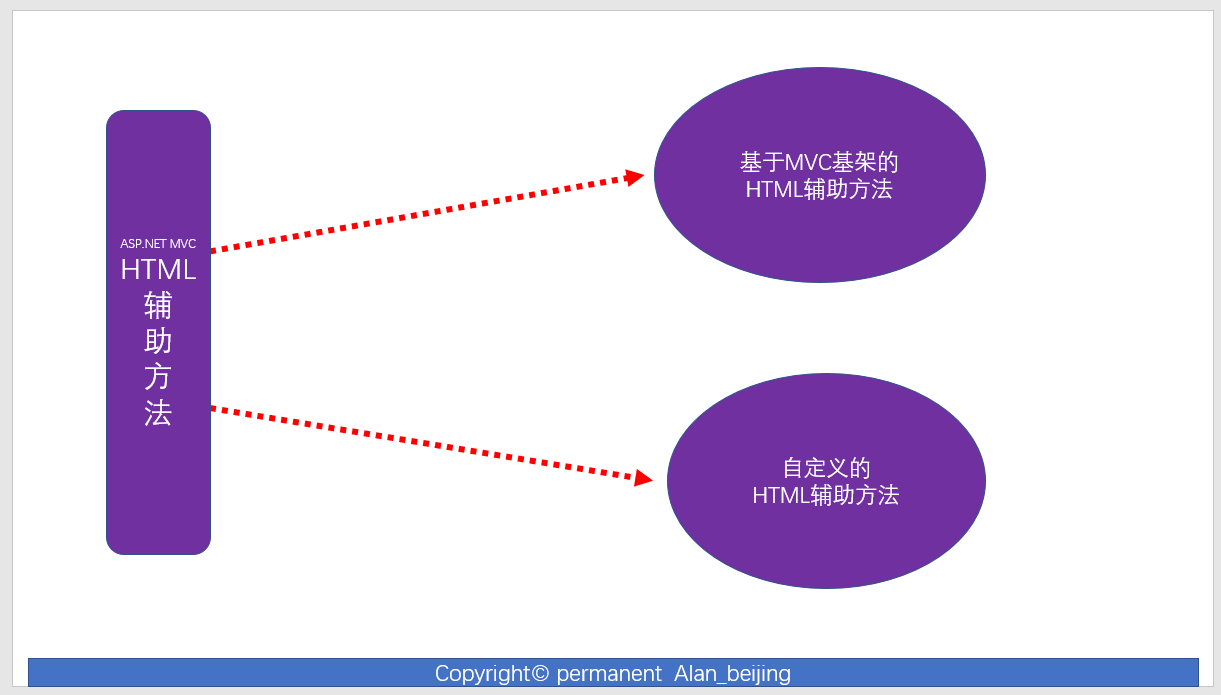
本文将与大家分享HTML辅助方法,当然,HTML辅助方法是在表单上运用的,所以,我们会先大致提一些表单(Form)。HTML辅助方法,我们可大致归结为基于ASP.NET MVC基架的HTML辅助方法和自定义的
HTML扩展方法,前者不作为本章的重点(因为非常简单,使用时,只需调用相应的方法即可),后者才是本章的重点。
二 表单
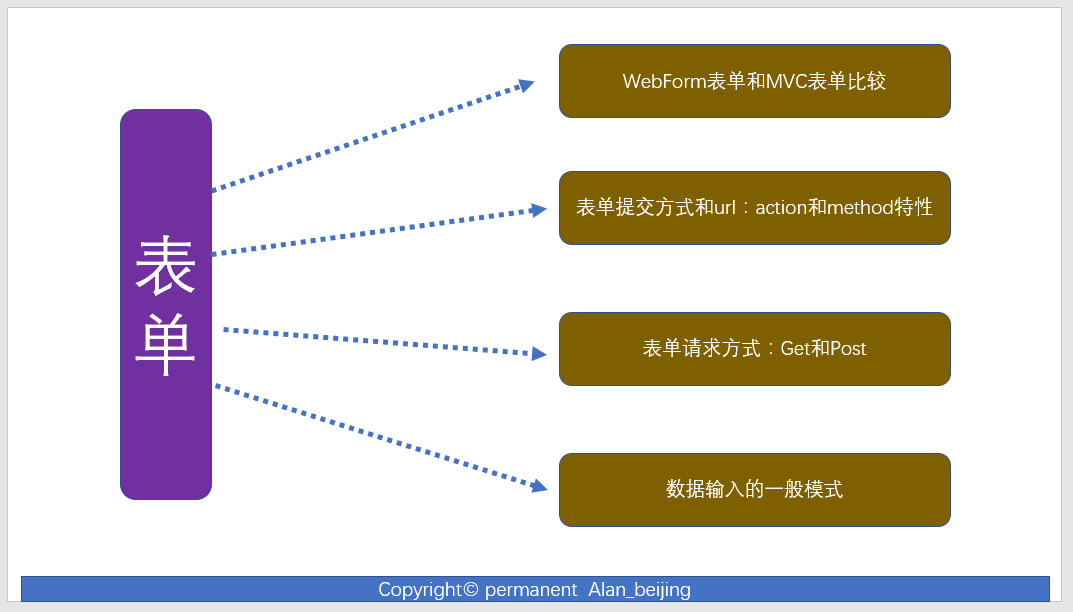
关于表单的内容,将会从下图的四个方面的来论述:
(1)WebFormb表单与MVC表单的比较
(2)表单提交的方式和url:action和method特性
(3)表单请求方式
(4)数据输入的一般模式
(一)WebForm表单与MVC表单比较
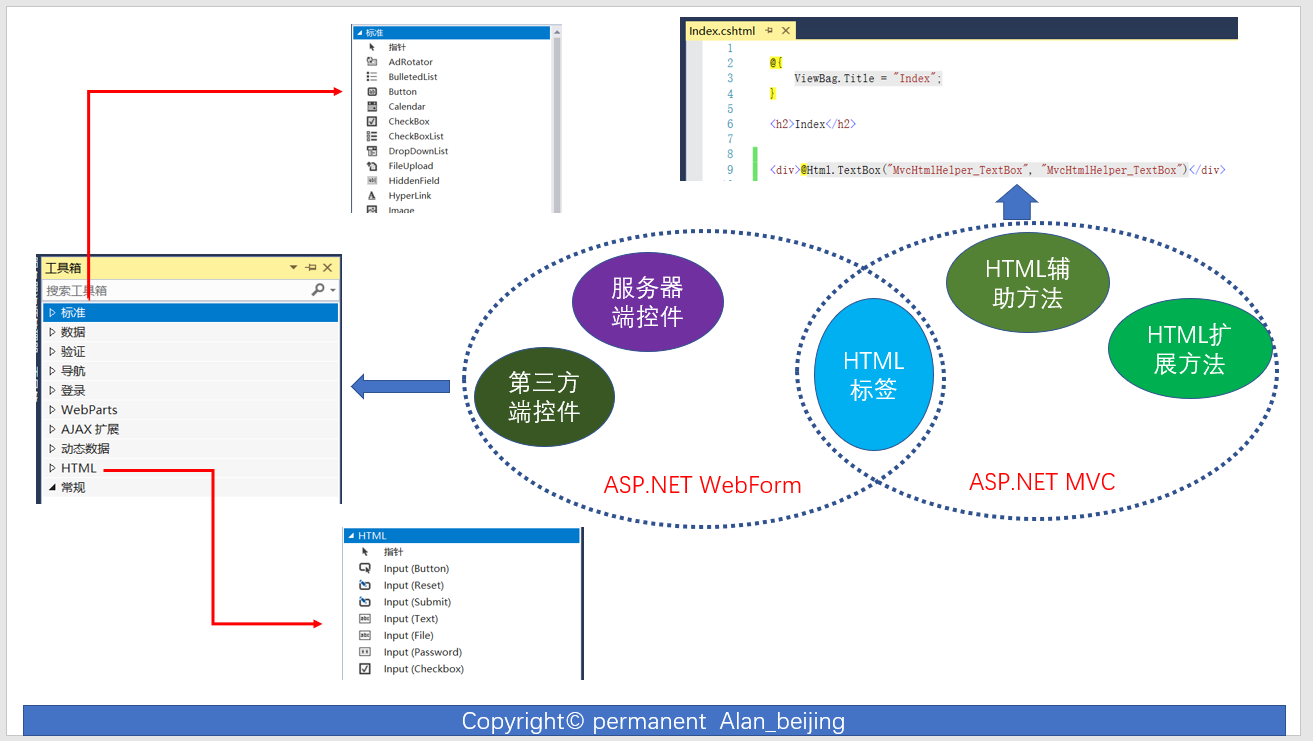
1.WebForm表单主要是利用其强大的<form>标签,而MVC并未完全利用<form>标签;

2.WebForm主要利用服务器端控件,MVC主要利用基于MVC基架的HTML辅助方法,两者都用HTML标签
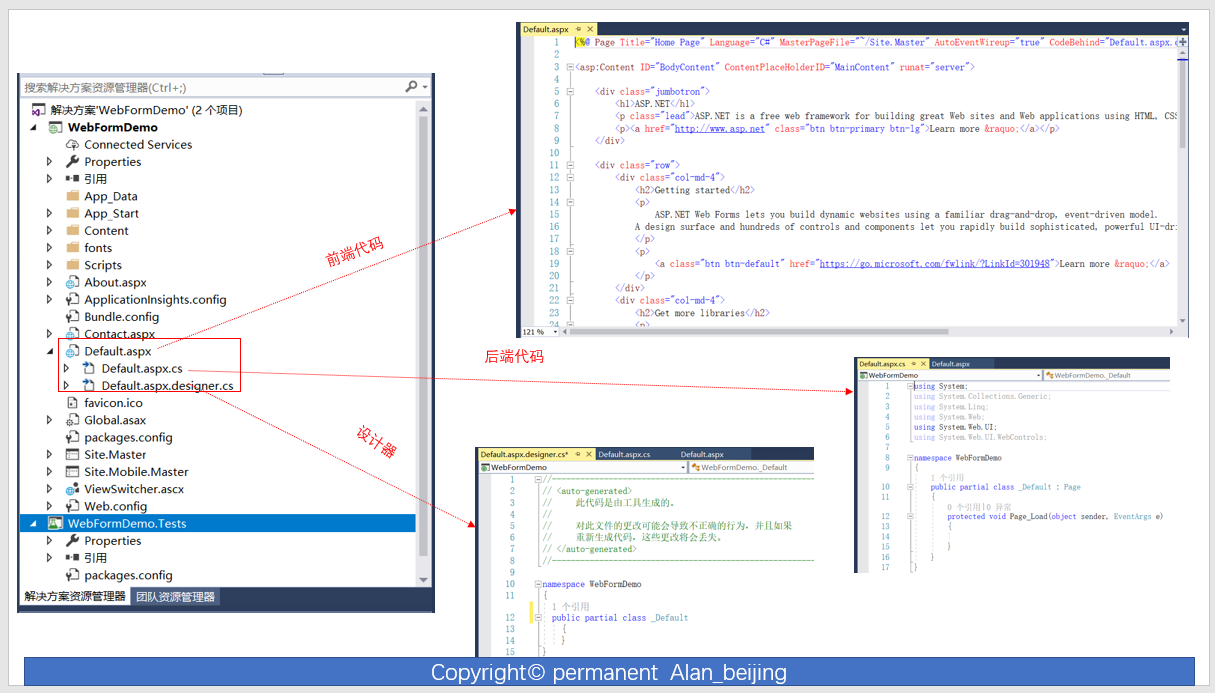
3.WebForm页面与后台代码强绑定,而MVC与后台代码松耦合
(1)WebForm中,每个页面对应一个类,页面泪继承Page类,我们称为页面类,如上图中Default页面对应的类为_Default,
(2)每个页面由三部分组成:前端代码(Default.aspx),后台代码(Default.aspx.cs)和设计器(Default.aspx.designer.cs);
4.从性能上看,MVC比WebForm性能高。WebForm性能低的主要因素有如下几点:
(1)服务器端控件,消耗带宽,吃内存;
(2)ViewState垃圾数据;
(二)表单提交的方式和url:action和method特性
action和method为<form>标签两个重要的特性
(1)action:指将<form>标签提交到何处,本质就是一个url;
(2)method:提交form的方法,主要为post和get,默认为get;
(三)表单请求方式
表单请求方式,主要为post和get,默认为get;
(四)数据输入的一般模式
数据输入模式,一般分为两种模式:编辑-提交模式(Edit-and-Post)和选择-编辑-提交模式(Selct-Edit-Post)
三 HTML辅助方法
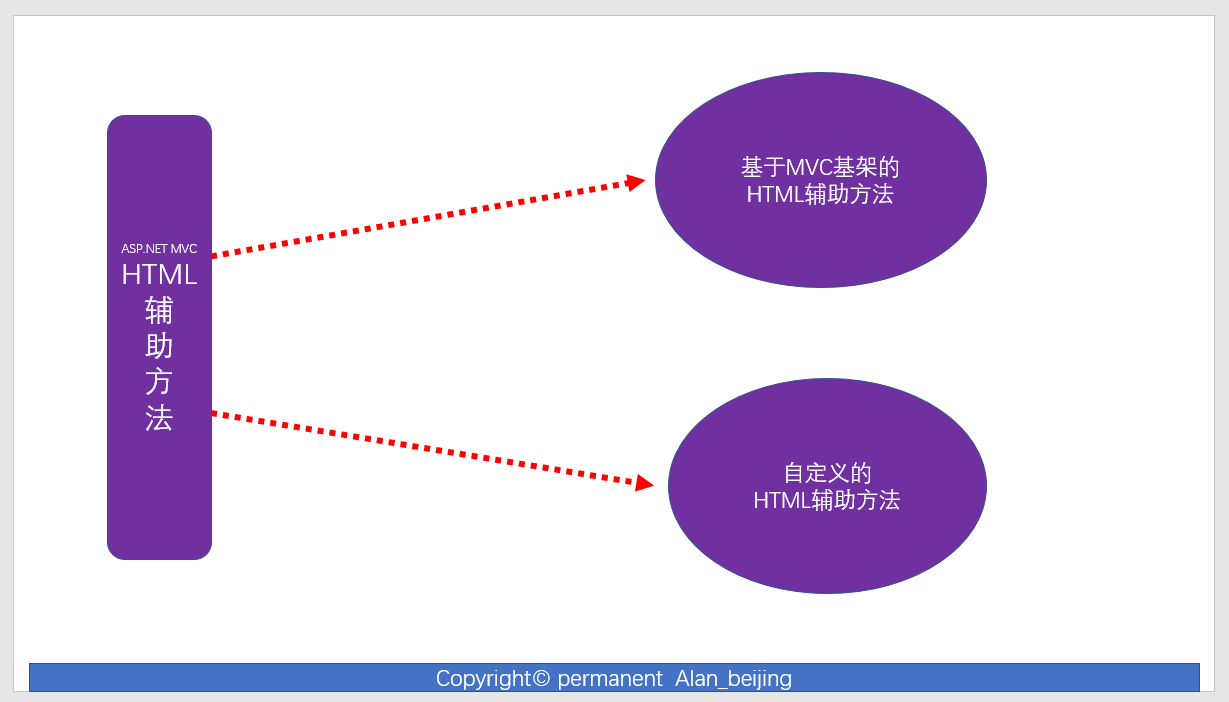
基于ASP.NET MVC基架的HTML辅助方法,大致分为内置HTM辅助方法(也叫基于MVC基架的HTML辅助方法)和自定义HTML辅助方法。
(一)基于MVC基架的HTML辅助方法
通过反汇编工具查看System.Web.Mvc.Html下的辅助方法,如下图所以。
由于基于MVC基架的辅方法比较简单,使用时只需调用即可,故本节不会花较大篇幅讲解,只是大致提及一下。
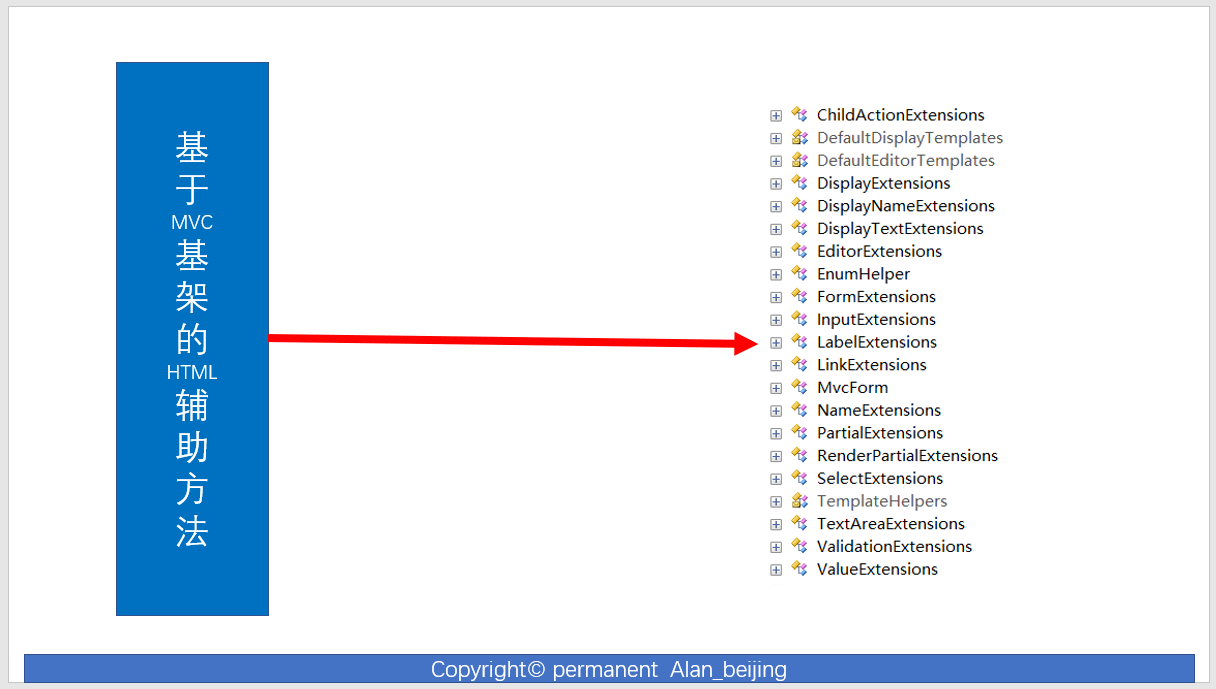
1.我们随便查看InputExtensions和LableExtensions辅助方法
InputExtensions
public static class InputExtensions

{

    // Methods

    public static MvcHtmlString CheckBox(this HtmlHelper htmlHelper, string name);

    public static MvcHtmlString CheckBox(this HtmlHelper htmlHelper, string name, bool isChecked);

    public static MvcHtmlString CheckBox(this HtmlHelper htmlHelper, string name, IDictionary<string, object> htmlAttributes);

    public static MvcHtmlString CheckBox(this HtmlHelper htmlHelper, string name, object htmlAttributes);

    public static MvcHtmlString CheckBox(this HtmlHelper htmlHelper, string name, bool isChecked, IDictionary<string, object> htmlAttributes);

    public static MvcHtmlString CheckBox(this HtmlHelper htmlHelper, string name, bool isChecked, object htmlAttributes);

    public static MvcHtmlString CheckBoxFor<TModel>(this HtmlHelper<TModel> htmlHelper, Expression<Func<TModel, bool>> expression);

    public static MvcHtmlString CheckBoxFor<TModel>(this HtmlHelper<TModel> htmlHelper, Expression<Func<TModel, bool>> expression, IDictionary<string, object> htmlAttributes);

    public static MvcHtmlString CheckBoxFor<TModel>(this HtmlHelper<TModel> htmlHelper, Expression<Func<TModel, bool>> expression, object htmlAttributes);

    private static MvcHtmlString CheckBoxHelper(HtmlHelper htmlHelper, ModelMetadata metadata, string name, bool? isChecked, IDictionary<string, object> htmlAttributes);

    public static MvcHtmlString Hidden(this HtmlHelper htmlHelper, string name);

    public static MvcHtmlString Hidden(this HtmlHelper htmlHelper, string name, object value);

    public static MvcHtmlString Hidden(this HtmlHelper htmlHelper, string name, object value, IDictionary<string, object> htmlAttributes);

    public static MvcHtmlString Hidden(this HtmlHelper htmlHelper, string name, object value, object htmlAttributes);

    public static MvcHtmlString HiddenFor<TModel, TProperty>(this HtmlHelper<TModel> htmlHelper, Expression<Func<TModel, TProperty>> expression);

    public static MvcHtmlString HiddenFor<TModel, TProperty>(this HtmlHelper<TModel> htmlHelper, Expression<Func<TModel, TProperty>> expression, IDictionary<string, object> htmlAttributes);

    public static MvcHtmlString HiddenFor<TModel, TProperty>(this HtmlHelper<TModel> htmlHelper, Expression<Func<TModel, TProperty>> expression, object htmlAttributes);

    private static MvcHtmlString HiddenHelper(HtmlHelper htmlHelper, ModelMetadata metadata, object value, bool useViewData, string expression, IDictionary<string, object> htmlAttributes);

    private static MvcHtmlString InputHelper(HtmlHelper htmlHelper, InputType inputType, ModelMetadata metadata, string name, object value, bool useViewData, bool isChecked, bool setId, bool isExplicitValue, string format, IDictionary<string, object> htmlAttributes);

    public static MvcHtmlString Password(this HtmlHelper htmlHelper, string name);

    public static MvcHtmlString Password(this HtmlHelper htmlHelper, string name, object value);

    public static MvcHtmlString Password(this HtmlHelper htmlHelper, string name, object value, IDictionary<string, object> htmlAttributes);

    public static MvcHtmlString Password(this HtmlHelper htmlHelper, string name, object value, object htmlAttributes);

    public static MvcHtmlString PasswordFor<TModel, TProperty>(this HtmlHelper<TModel> htmlHelper, Expression<Func<TModel, TProperty>> expression);

    public static MvcHtmlString PasswordFor<TModel, TProperty>(this HtmlHelper<TModel> htmlHelper, Expression<Func<TModel, TProperty>> expression, IDictionary<string, object> htmlAttributes);

    public static MvcHtmlString PasswordFor<TModel, TProperty>(this HtmlHelper<TModel> htmlHelper, Expression<Func<TModel, TProperty>> expression, object htmlAttributes);

    private static MvcHtmlString PasswordHelper(HtmlHelper htmlHelper, ModelMetadata metadata, string name, object value, IDictionary<string, object> htmlAttributes);

    public static MvcHtmlString RadioButton(this HtmlHelper htmlHelper, string name, object value);

    public static MvcHtmlString RadioButton(this HtmlHelper htmlHelper, string name, object value, bool isChecked);

    public static MvcHtmlString RadioButton(this HtmlHelper htmlHelper, string name, object value, IDictionary<string, object> htmlAttributes);

    public static MvcHtmlString RadioButton(this HtmlHelper htmlHelper, string name, object value, object htmlAttributes);

    public static MvcHtmlString RadioButton(this HtmlHelper htmlHelper, string name, object value, bool isChecked, IDictionary<string, object> htmlAttributes);

    public static MvcHtmlString RadioButton(this HtmlHelper htmlHelper, string name, object value, bool isChecked, object htmlAttributes);

    public static MvcHtmlString RadioButtonFor<TModel, TProperty>(this HtmlHelper<TModel> htmlHelper, Expression<Func<TModel, TProperty>> expression, object value);

    public static MvcHtmlString RadioButtonFor<TModel, TProperty>(this HtmlHelper<TModel> htmlHelper, Expression<Func<TModel, TProperty>> expression, object value, IDictionary<string, object> htmlAttributes);

    public static MvcHtmlString RadioButtonFor<TModel, TProperty>(this HtmlHelper<TModel> htmlHelper, Expression<Func<TModel, TProperty>> expression, object value, object htmlAttributes);

    private static MvcHtmlString RadioButtonHelper(HtmlHelper htmlHelper, ModelMetadata metadata, object model, string name, object value, bool? isChecked, IDictionary<string, object> htmlAttributes);

    public static MvcHtmlString TextBox(this HtmlHelper htmlHelper, string name);

    public static MvcHtmlString TextBox(this HtmlHelper htmlHelper, string name, object value);

    public static MvcHtmlString TextBox(this HtmlHelper htmlHelper, string name, object value, IDictionary<string, object> htmlAttributes);

    public static MvcHtmlString TextBox(this HtmlHelper htmlHelper, string name, object value, object htmlAttributes);

    public static MvcHtmlString TextBox(this HtmlHelper htmlHelper, string name, object value, string format);

    public static MvcHtmlString TextBox(this HtmlHelper htmlHelper, string name, object value, string format, IDictionary<string, object> htmlAttributes);

    public static MvcHtmlString TextBox(this HtmlHelper htmlHelper, string name, object value, string format, object htmlAttributes);

    public static MvcHtmlString TextBoxFor<TModel, TProperty>(this HtmlHelper<TModel> htmlHelper, Expression<Func<TModel, TProperty>> expression);

    public static MvcHtmlString TextBoxFor<TModel, TProperty>(this HtmlHelper<TModel> htmlHelper, Expression<Func<TModel, TProperty>> expression, IDictionary<string, object> htmlAttributes);

    public static MvcHtmlString TextBoxFor<TModel, TProperty>(this HtmlHelper<TModel> htmlHelper, Expression<Func<TModel, TProperty>> expression, object htmlAttributes);

    public static MvcHtmlString TextBoxFor<TModel, TProperty>(this HtmlHelper<TModel> htmlHelper, Expression<Func<TModel, TProperty>> expression, string format);

    public static MvcHtmlString TextBoxFor<TModel, TProperty>(this HtmlHelper<TModel> htmlHelper, Expression<Func<TModel, TProperty>> expression, string format, IDictionary<string, object> htmlAttributes);

    public static MvcHtmlString TextBoxFor<TModel, TProperty>(this HtmlHelper<TModel> htmlHelper, Expression<Func<TModel, TProperty>> expression, string format, object htmlAttributes);

    private static MvcHtmlString TextBoxHelper(this HtmlHelper htmlHelper, ModelMetadata metadata, object model, string expression, string format, IDictionary<string, object> htmlAttributes);

    private static RouteValueDictionary ToRouteValueDictionary(IDictionary<string, object> dictionary);

}
LableExtensions
public static class LabelExtensions

{

    // Methods

    public static MvcHtmlString Label(this HtmlHelper html, string expression);

    public static MvcHtmlString Label(this HtmlHelper html, string expression, IDictionary<string, object> htmlAttributes);

    public static MvcHtmlString Label(this HtmlHelper html, string expression, object htmlAttributes);

    public static MvcHtmlString Label(this HtmlHelper html, string expression, string labelText);

    public static MvcHtmlString Label(this HtmlHelper html, string expression, string labelText, IDictionary<string, object> htmlAttributes);

    public static MvcHtmlString Label(this HtmlHelper html, string expression, string labelText, object htmlAttributes);

    internal static MvcHtmlString Label(this HtmlHelper html, string expression, string labelText, IDictionary<string, object> htmlAttributes, ModelMetadataProvider metadataProvider);

    internal static MvcHtmlString Label(this HtmlHelper html, string expression, string labelText, object htmlAttributes, ModelMetadataProvider metadataProvider);

    public static MvcHtmlString LabelFor<TModel, TValue>(this HtmlHelper<TModel> html, Expression<Func<TModel, TValue>> expression);

    public static MvcHtmlString LabelFor<TModel, TValue>(this HtmlHelper<TModel> html, Expression<Func<TModel, TValue>> expression, IDictionary<string, object> htmlAttributes);

    public static MvcHtmlString LabelFor<TModel, TValue>(this HtmlHelper<TModel> html, Expression<Func<TModel, TValue>> expression, object htmlAttributes);

    public static MvcHtmlString LabelFor<TModel, TValue>(this HtmlHelper<TModel> html, Expression<Func<TModel, TValue>> expression, string labelText);

    public static MvcHtmlString LabelFor<TModel, TValue>(this HtmlHelper<TModel> html, Expression<Func<TModel, TValue>> expression, string labelText, IDictionary<string, object> htmlAttributes);

    public static MvcHtmlString LabelFor<TModel, TValue>(this HtmlHelper<TModel> html, Expression<Func<TModel, TValue>> expression, string labelText, object htmlAttributes);

    internal static MvcHtmlString LabelFor<TModel, TValue>(this HtmlHelper<TModel> html, Expression<Func<TModel, TValue>> expression, string labelText, IDictionary<string, object> htmlAttributes, ModelMetadataProvider metadataProvider);

    internal static MvcHtmlString LabelFor<TModel, TValue>(this HtmlHelper<TModel> html, Expression<Func<TModel, TValue>> expression, string labelText, object htmlAttributes, ModelMetadataProvider metadataProvider);

    public static MvcHtmlString LabelForModel(this HtmlHelper html);

    public static MvcHtmlString LabelForModel(this HtmlHelper html, IDictionary<string, object> htmlAttributes);

    public static MvcHtmlString LabelForModel(this HtmlHelper html, object htmlAttributes);

    public static MvcHtmlString LabelForModel(this HtmlHelper html, string labelText);

    public static MvcHtmlString LabelForModel(this HtmlHelper html, string labelText, IDictionary<string, object> htmlAttributes);

    public static MvcHtmlString LabelForModel(this HtmlHelper html, string labelText, object htmlAttributes);

    internal static MvcHtmlString LabelHelper(HtmlHelper html, ModelMetadata metadata, string htmlFieldName, string labelText = null, IDictionary<string, object> htmlAttributes = null);

}
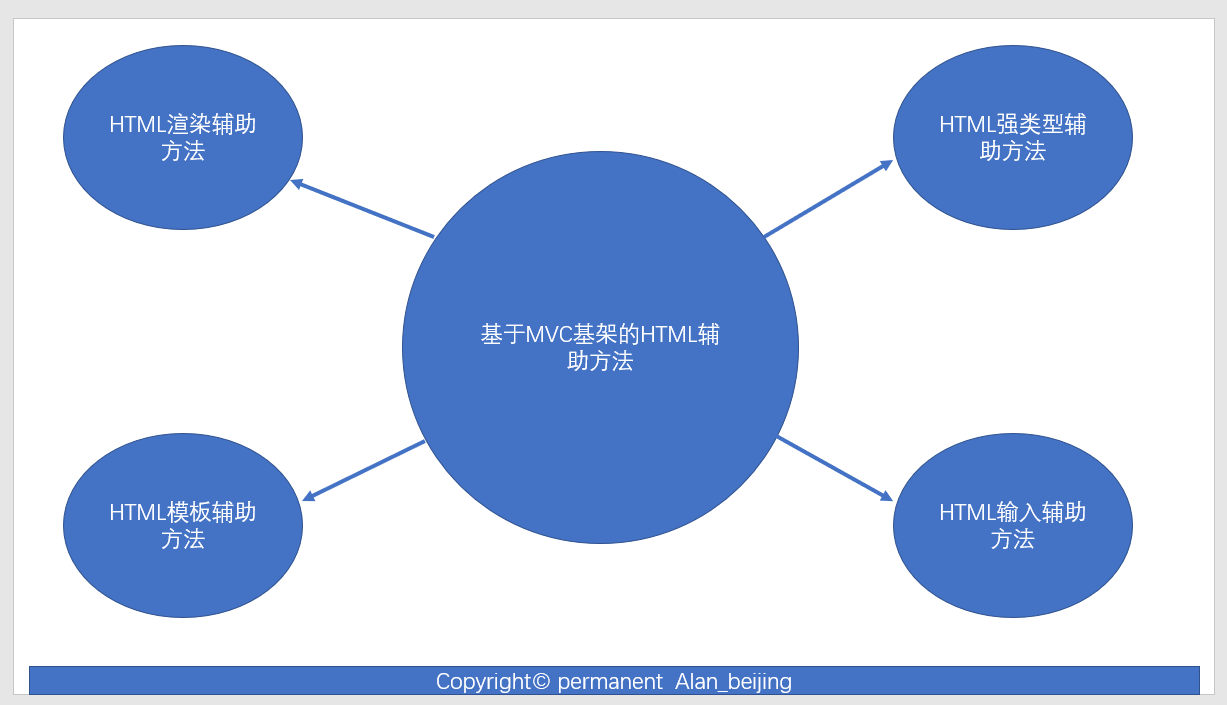
2.在ASP.NET MVC5 高级编程(Jon Galloway,Brad Wilson,K.Scott Allen,David Matson 著 ,孙远帅 译) 中,作者将HTML辅助方法大致分为下图几类
(二)自定义的HTML辅助方法
关于自定义HTML辅助方法,主要从下图五个角度讲解。
1.为什么要扩展辅助方法
(1)何为扩展?
从汉语字面意义理解,即在现有的基础上进行修改(修改现有辅助方法)、增加(自定义MVC基架没有的辅助方法)等操作。
(2)扩展的作用?
首先,从MVC基架现有的某些HTML辅助方法,其某些属性,如样式等无法满足现有需求,需要扩展;
其次,现有需求的某些辅助方法,如Image辅助辅助方法,File辅助方法等,MVC基架并未提供,需要扩展;
最后,扩展的最终目的是提高代码的复用,提高编码效率;
2.用反汇编工具查看MVC源码是如何扩展的
(1)我们查看MVC是如何定义强类型和弱类型的,以Html.Lable为例,我们容易得出三个结论:
1)程序集为System.Web.Mvc
2)命名空间为System.Web.Mvc.Html
3)弱类型方法名字直接为纯html对应名字
4)强类型方法名字=若类型名字+For
5)辅助方法的返回类型均为MvcHtmlString
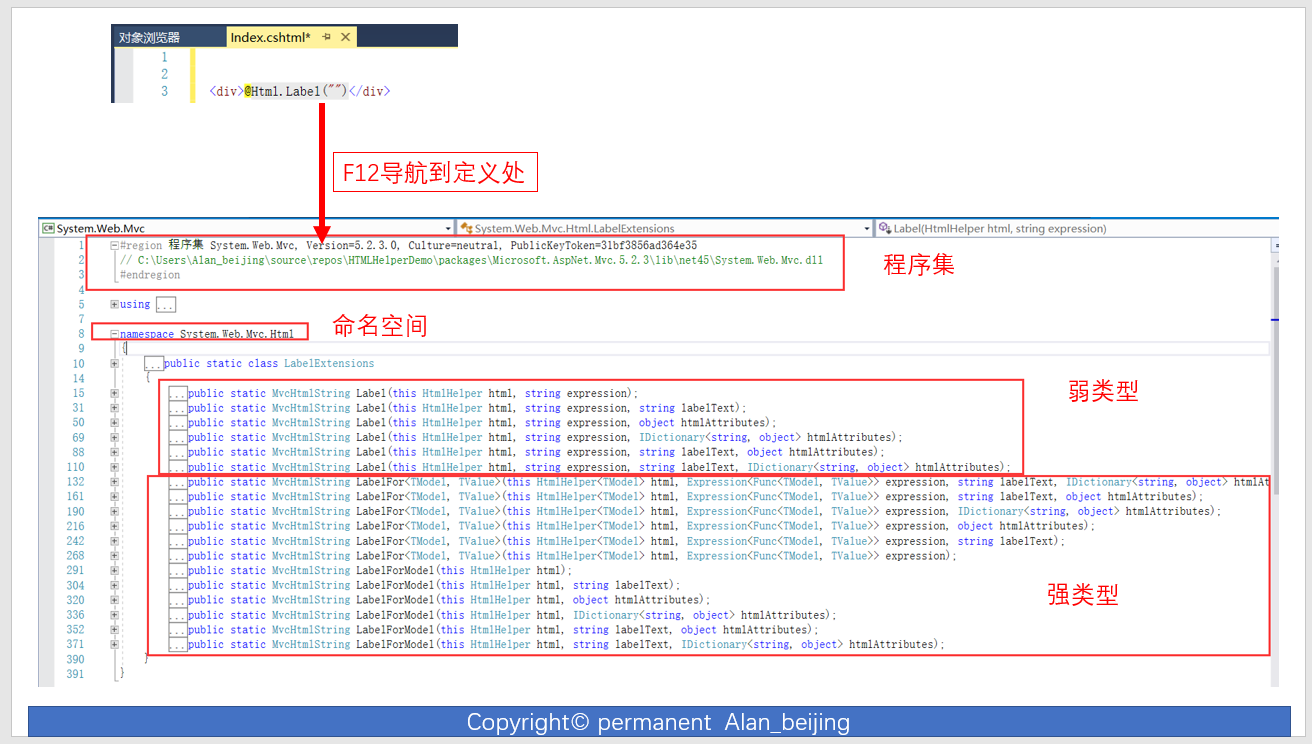
(2)我们用反汇编工具查看一下
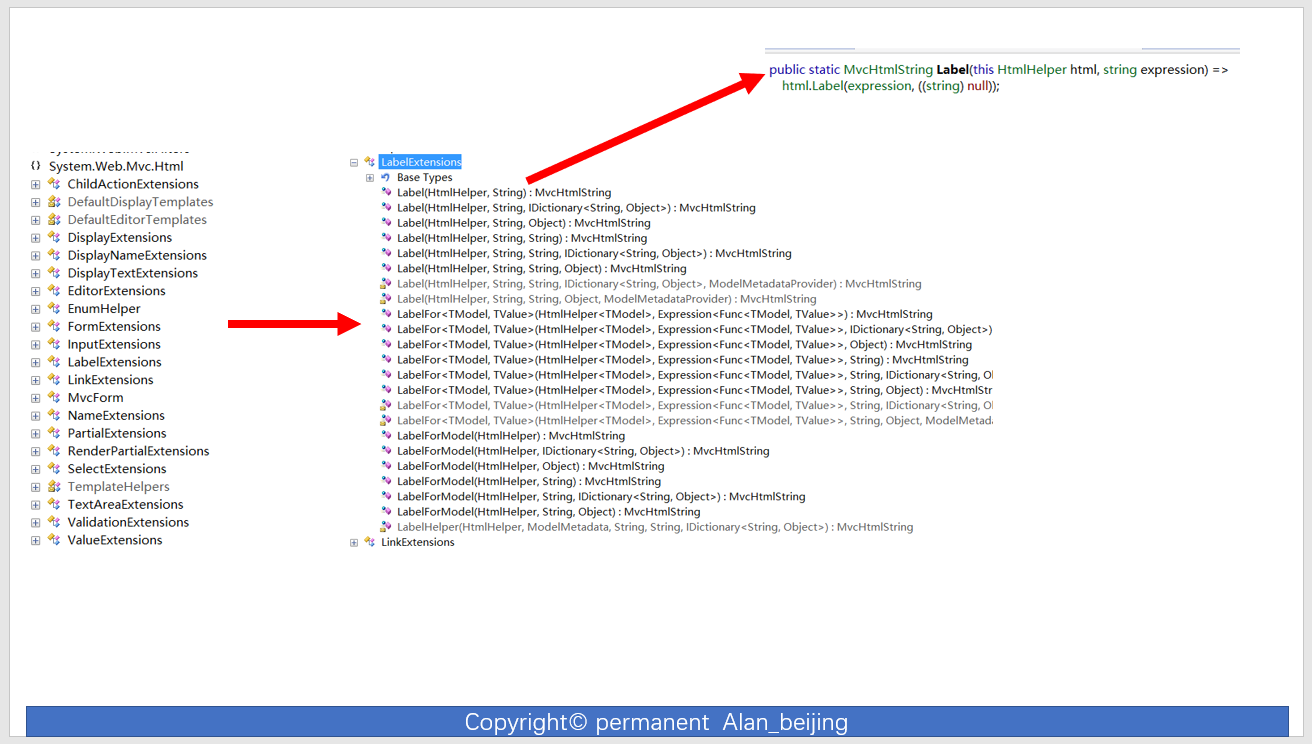
(3)总结
根据如上(1)(2)分析,我们知道定义一个HTML辅助方法的步骤
1)命名空间为System.Web.Mvc
2)弱类型方法名字直接为纯html对应名字
3)强类型方法名字=若类型名字+For
4)辅助方法的返回类型均为MvcHtmlString
3.扩展弱类型辅助方法
 //Image弱类型

 public static MvcHtmlString Image(this HtmlHelper helper, string id, string url, string width, string height, string alternateText, object htmlAttributes)

         {

             //创建img标签

             TagBuilder imgTagBulider = new TagBuilder("img");

             //为img标签添加属性:id,url,alternateText,htmlAttributes

             imgTagBulider.GenerateId(id);

             imgTagBulider.MergeAttribute("src", url);

             imgTagBulider.MergeAttribute("width", width);

             imgTagBulider.MergeAttribute("height", height);

             imgTagBulider.MergeAttribute("src", url);

             imgTagBulider.MergeAttribute("alt", alternateText);

             imgTagBulider.MergeAttributes(new RouteValueDictionary(htmlAttributes));

             // 输出img标签

             return MvcHtmlString.Create(imgTagBulider.ToString());

         }
4.扩展强类型辅助方法
  //Image强类型

 public static MvcHtmlString ImageFor<TModel, TValue>(this HtmlHelper<TModel> html,Expression<Func<TModel,TValue>> expression,string url, string width, string height, string alternateText, Dictionary<TModel, TValue> htmlAttributes)

         {

             string modelName = ExpressionHelper.GetExpressionText(expression);//从Lambda表达式中获取模型对应属性的名称

             //创建img标签

             TagBuilder imgTagBulider = new TagBuilder("img");

             //为img标签添加属性:id,url,alternateText,htmlAttributes

             imgTagBulider.GenerateId(modelName);

             imgTagBulider.MergeAttribute("src", url);

             imgTagBulider.MergeAttribute("width", width);

             imgTagBulider.MergeAttribute("height", height);

             imgTagBulider.MergeAttribute("src", url);

             imgTagBulider.MergeAttribute("alt", alternateText);

             imgTagBulider.MergeAttributes(new RouteValueDictionary(htmlAttributes));

             return MvcHtmlString.Create(imgTagBulider.ToString(TagRenderMode.SelfClosing));

         }
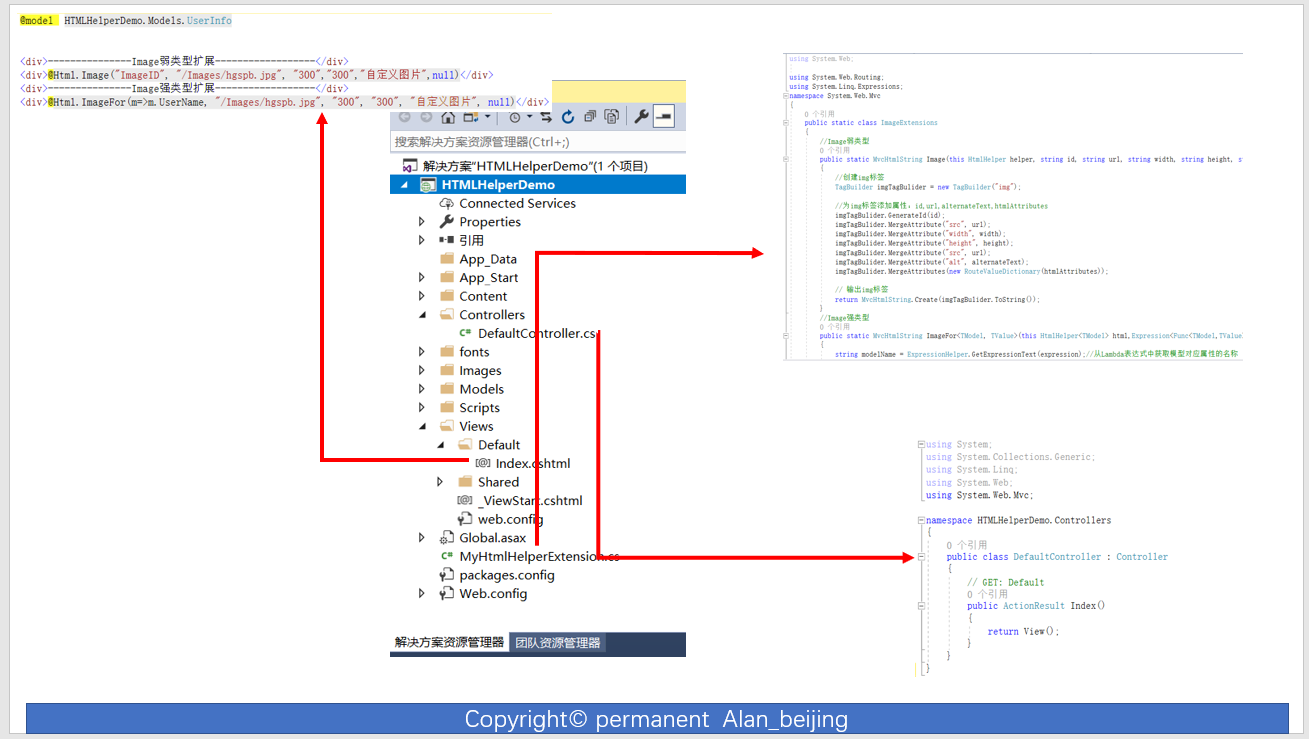
5.完整代码
Index.cshtml
 @model  HTMLHelperDemo.Models.UserInfo

 <div>---------------Image弱类型扩展------------------</div>

 <div>@Html.Image("ImageID", "/Images/hgspb.jpg", "300","300","自定义图片",null)</div>

 <div>---------------Image强类型扩展------------------</div>

 <div>@Html.ImageFor(m=>m.UserName, "/Images/hgspb.jpg", "300", "300", "自定义图片", null)</div>
DefaultController
 using System;

 using System.Collections.Generic;

 using System.Linq;

 using System.Web;

 using System.Web.Mvc;

 namespace HTMLHelperDemo.Controllers

 {

     public class DefaultController : Controller

     {

         // GET: Default

         public ActionResult Index()

         {

             return View();

         }

     }

 }
MyHtmlHelperExtension.cs
 using System;

 using System.Collections.Generic;

 using System.Linq;

 using System.Web;

 using System.Web.Routing;

 using System.Linq.Expressions;

 namespace System.Web.Mvc

 {

     public static class ImageExtensions

     {

         //Image弱类型

         public static MvcHtmlString Image(this HtmlHelper helper, string id, string url, string width, string height, string alternateText, object htmlAttributes)

         {

             //创建img标签

             TagBuilder imgTagBulider = new TagBuilder("img");

             //为img标签添加属性:id,url,alternateText,htmlAttributes

             imgTagBulider.GenerateId(id);

             imgTagBulider.MergeAttribute("src", url);

             imgTagBulider.MergeAttribute("width", width);

             imgTagBulider.MergeAttribute("height", height);

             imgTagBulider.MergeAttribute("src", url);

             imgTagBulider.MergeAttribute("alt", alternateText);

             imgTagBulider.MergeAttributes(new RouteValueDictionary(htmlAttributes));

             // 输出img标签

             return MvcHtmlString.Create(imgTagBulider.ToString());

         }

         //Image强类型

         public static MvcHtmlString ImageFor<TModel, TValue>(this HtmlHelper<TModel> html,Expression<Func<TModel,TValue>> expression,string url, string width, string height, string alternateText, Dictionary<TModel, TValue> htmlAttributes)

         {

             string modelName = ExpressionHelper.GetExpressionText(expression);//从Lambda表达式中获取模型对应属性的名称

             //创建img标签

             TagBuilder imgTagBulider = new TagBuilder("img");

             //为img标签添加属性:id,url,alternateText,htmlAttributes

             imgTagBulider.GenerateId(modelName);

             imgTagBulider.MergeAttribute("src", url);

             imgTagBulider.MergeAttribute("width", width);

             imgTagBulider.MergeAttribute("height", height);

             imgTagBulider.MergeAttribute("src", url);

             imgTagBulider.MergeAttribute("alt", alternateText);

             imgTagBulider.MergeAttributes(new RouteValueDictionary(htmlAttributes));

             return MvcHtmlString.Create(imgTagBulider.ToString(TagRenderMode.SelfClosing));

         }

     }

 }
图解
四 HTML辅助方法的工作原理
关于HTML辅助方法工做原理,这里不做深入研讨,只是描述一下工作原理的轮廓。
1.MVC中,View的后缀为.cshtml,我们可以将其拆分为:.cshtml=.cs+html,即由后台.cs代码+html标签构成;
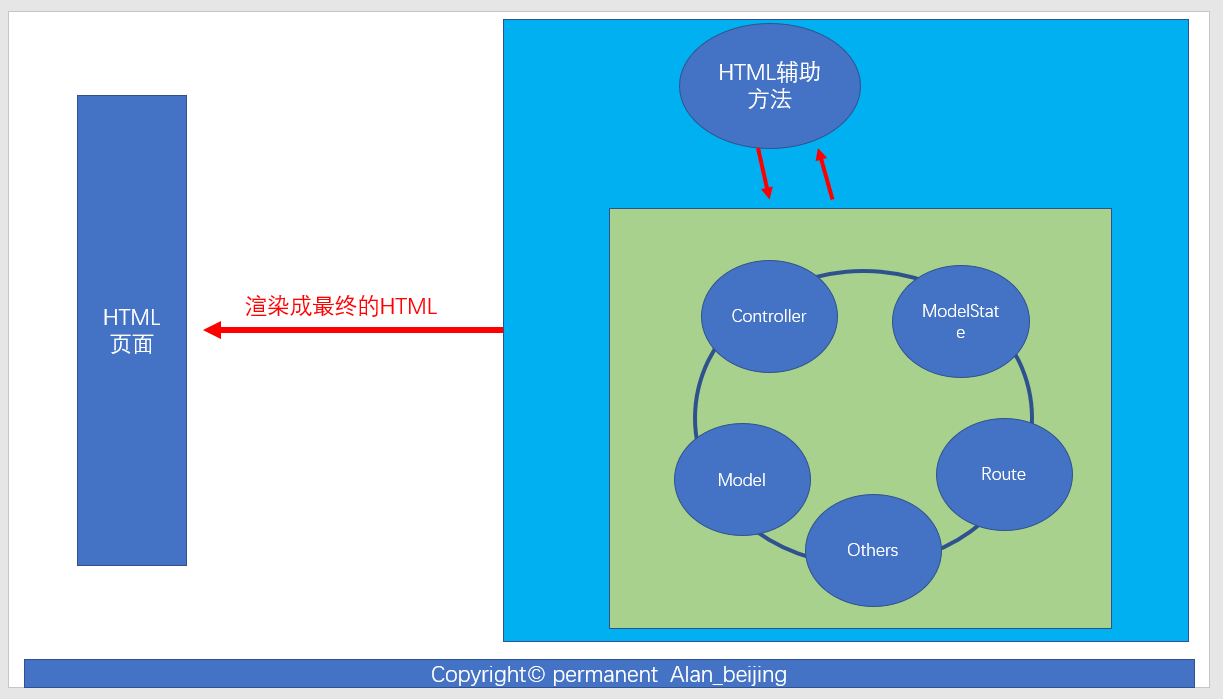
2.既然View是由后台代码.cs+html标签构成,那么什么标签能满足这两个条件呢?HTML辅助方法。由此,我们知道HTML辅助方法扮演后台代码和前端HTML代码的中间者,桥梁;
3.既然HTML代码扮演后台代码和前端HTML桥梁,那么其与后台有哪些联系呢?
(1)与Model的联系,如HTML强辅助方法,使用Lambda表达式
(2)与Conteller联系,如Html.ActonLink
(3)与Route联系,如Html.RouteLink;
(4)与ModelState联系,如在验证输入值的合法性时,若验证错误,错误消息存在模型状态中,然后返回给Html相应的辅助方法
.......
4.我们知道了HTML辅助方法与后台的联系,那么与后台联系之后,接下来做什么呢?渲染成HTML,返回给浏览器
如上,我们大致分析了HTML辅助方法的工作原理步骤,下面我们将要的画图分析一下
四 参考文献
【01】C#高级编程(第七版) (Christian Nagel,Bill Evjen和Jay Glynn 编著,李铭 译,黄静 审校)
五 作者关于评论的建议
欢迎读者朋友们广提意见,您宝贵的意见,是我写作的动力。相互学习,共同进步!
(一) 关于文章内容
1.简单,回复1(请指出简单因素)
2.一般,回复2
3.适度,回复3
4.较难,回复4
5.很难,回复5(请指出很难因素)
(二) 文章讲解
1.一般,回复6
2.良好,回复7
3.易懂,回复8
4.复杂,回复9(请指出复杂因素)
(三) 关于其他意见
10.若有其他意见,在评论区评价即可;
11.关于评价内容,不好的评价内容(除人身攻击外),具有建设性建议的评价内容,一定保存
12.其他评价,有可能会被删除
六 版权区
- 感谢您的阅读,若有不足之处,欢迎指教,共同学习、共同进步。
- 博主网址:http://www.cnblogs.com/wangjiming/。
- 极少部分文章利用读书、参考、引用、抄袭、复制和粘贴等多种方式整合而成的,大部分为原创。
- 如您喜欢,麻烦推荐一下;如您有新想法,欢迎提出,邮箱:2098469527@qq.com。
- 可以转载该博客,但必须著名博客来源。
【ASP.NET MVC系列】浅谈表单和HTML辅助方法的更多相关文章
- ASP.NET MVC 3 之表单和 HTML 辅助方法(摘抄)
——选自<ASP.NET MVC3 高级编程(第5章) 孙远帅 译> 第5章 表单和HTML辅助方法 本章内容简介: * 理解表单 * 如何利用HTML辅助方法 * 编辑和输入的辅助方法 ...
- Asp.net MVC4高级编程学习笔记-模型学习第五课MVC表单和HTML辅助方法20171101
MVC表单和HTML辅助方法 一.表单的使用. 表单中的action与method特性.Action表示表单要提交往那里,因此这里就有一个URL.这个URL可以是相对或绝对地址.表单默认的method ...
- ASP.NET MVC5 高级编程 第5章 表单和HTML辅助方法
参考资料<ASP.NET MVC5 高级编程>第5版 第5章 表单和HTML辅助方法 5.1 表单的使用 5.1.1 action 和 method 特性 默认情况下,表单发送的是 HTT ...
- APS.NET MVC + EF (07)---表单和HTML辅助方法
在ASP.NET MVC中,可以借助HtmlHelper 对象来输出页面内容,提高开发效率.下面,我们将介绍一些常用的辅助方法. 7.1 HTML辅助方法 BeginForm 该辅助方法主要用来产生& ...
- 《ASP.NET MVC高级编程(4版)》读书笔记(5)表单和HTML辅助方法
5.1 表单使用 5.1.1 action 和 method 特性 <form action="/Home/Index"> <input name=&qu ...
- Mvc5 表单和HTML辅助方法
①表单的使用 在WebFrom里面你创建一个页面,页面上就会出<from></from>. 1,action和method属性 action表示目的,method表示表单传值方 ...
- 表单和 HTML 辅助方法– ASP.NET MVC 4 系列
这里有一个疑问,诸如在文本编辑器中输入 HTML 元素如此简单的任务,也需要任何帮助吗?的确,输入标签名称是很容易的事,但是确保 HTML 页面链接中的 URL 指向正确的位置.表单元素 ...
- ASP.NET MVC5 学习系列之表单和HTML辅助方法
一.表单 (一)Action和Method特性 Action特性用以告知浏览器信息发往何处,因此,Action特性后面需要包含一个Url地址.这里的Url地址可以是相对的,也可以是绝对的.如下Form ...
- Asp.net Mvc Ajax.BeginForm提交表单
之前Mvc中一直用Html.BeginForm提交表单,即如下: @using (Html.BeginForm("Add", "News", FormMetho ...
随机推荐
- 设置两个div是总是不能重合,浏览器user agent stylesheet问题
如图 两个div之间总是有一个空行,设置了margin为0还是没卵用,f12调试发现 多了一个user agent stylesheet样式,经百度是浏览器自带的样式 重新为div内的元素ul设置cs ...
- 《C++程序设计语言(英文第四版)》【PDF】下载
<C++程序设计语言(英文第四版)>[PDF]下载链接: https://u253469.pipipan.com/fs/253469-230382177 内容简介 本书是C++领域经典的参 ...
- iOS动态性:动态添加属性的方法——关联(e.g. 向Category添加属性)
想到要如何为所有的对象增加实例变量吗?我们知道,使用Category可以很方便地为现有的类增加方法,但却无法直接增加实例变量.不过从Mac OS X v10.6开始,系统提供了Associative ...
- ES6常用语法
ECMAScript 6(以下简称ES6)是JavaScript语言的下一代标准.因为当前版本的ES6是在2015年发布的,所以又称ECMAScript 2015. 也就是说,ES6就是ES2015. ...
- bzoj 3932: [CQOI2015]任务查询系统
Description 最近实验室正在为其管理的超级计算机编制一套任务管理系统,而你被安排完成其中的查询部分.超级计算机中的 任务用三元组(Si,Ei,Pi)描述,(Si,Ei,Pi)表示任务从第Si ...
- 8.nginx防DDOS
配置详解,查看链接:http://www.myhack58.com/Article/60/sort096/2015/59453.htm 配置文件: http { #白名单 ...
- Java_Date_02_截断日期到日
oracle 的 trunc 函数能很方便的将日期截断.现在有个需求,需要用java实现与 oracle 的 trunc 函数 相同的功能. 1.需求:将日期截断到日 即 将格式为 2018-01-0 ...
- css中使用if条件在各大浏览器(IE6\IE7\IE8)中hack方法解决教程
一个滚动代码,其他浏览器都滚的好好的,就IE出现错误,DIV+CSS if条件hack,这里DIVCSS5为大家介绍针对各大浏览器(IE6\IE7\IE8)中使用if条件hack方法教程,DIV CS ...
- Ajax异步提交登录(2)--登录使用
http://cjp1989.iteye.com/blog/1740964 1.Ajax的原理: Ajax的原理就是:通过javascript的方式,将前台数据通过xmlhttp对象传递到后台,后台在 ...
- SQL基础学习_04_视图
视图 1. 视图的创建 视图就是保存好的SELECT语句,这些SELECT语句执行之后会产生新的表,所以在SQL中,视图和表是不做差别对待的,也就是SQL也可以对视图做一些操作: 由于 ...