
Macaca环境搭建踩坑总结
1、使用命令 npm i macaca-android -g 安装一直不成功,使用Macaca doctor 一直没有显示出android
C:\Users\ABC>npm i macaca-android -g

npm WARN deprecated tough-cookie@2.2.2: ReDoS vulnerability parsing Set-Cookie https://nodesecurity.io/advisories/130

npm WARN deprecated node-uuid@1.4.8: Use uuid module instead

npm WARN deprecated win-spawn@2.0.0: use [cross-spawn](https://github.com/IndigoUnited/node-cross-spawn) or [cross-spawn-async](https://github.com/Ind

igoUnited/node-cross-spawn-async) instead.

> macaca-chromedriver@1.0.40 install C:\Users\ABC\AppData\Roaming\npm\node_modules\macaca-android\node_modules\macaca-chromedriver

> node ./bin/macaca-chromedriver install

>> version: 2.33

>> chromedriver cdn url: https://chromedriver.storage.googleapis.com/2.33/chromedriver_win32.zip

internal/streams/legacy.js:59

      throw er; // Unhandled stream error in pipe.

      ^

Error: read ECONNRESET

    at exports._errnoException (util.js:1029:11)

    at TLSWrap.onread (net.js:575:26)

C:\Users\ABC\AppData\Roaming\npm

`-- (empty)

npm ERR! Windows_NT 6.1.7601

npm ERR! argv "F:\\Appium\\nodejs\\node.exe" "F:\\Appium\\nodejs\\node_modules\\npm\\bin\\npm-cli.js" "i" "macaca-android" "-g"

npm ERR! node v7.7.1

npm ERR! npm  v4.1.2

npm ERR! code ELIFECYCLE

npm ERR! macaca-chromedriver@1.0.40 install: `node ./bin/macaca-chromedriver install`

npm ERR! Exit status 1

npm ERR!

npm ERR! Failed at the macaca-chromedriver@1.0.40 install script 'node ./bin/macaca-chromedriver install'.

npm ERR! Make sure you have the latest version of node.js and npm installed.

npm ERR! If you do, this is most likely a problem with the macaca-chromedriver package,

npm ERR! not with npm itself.

npm ERR! Tell the author that this fails on your system:

npm ERR!     node ./bin/macaca-chromedriver install

npm ERR! You can get information on how to open an issue for this project with:

npm ERR!     npm bugs macaca-chromedriver

npm ERR! Or if that isn't available, you can get their info via:

npm ERR!     npm owner ls macaca-chromedriver

npm ERR! There is likely additional logging output above.

npm ERR! Please include the following file with any
修改了一下命令:cnpm i macaca-android -g 安装成功
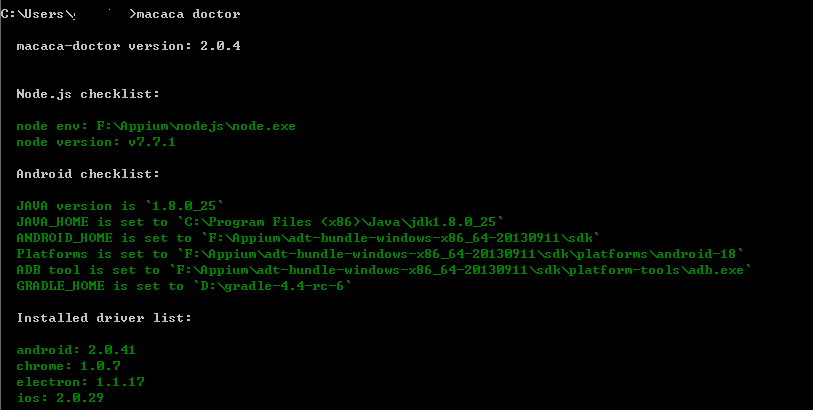
2、安装android驱动,虽然显示出上面的内容,但没有真正的安装成功,报错信息中有提到:NDK is missing....之类的,具体信息没有复制下来
解决:下载了一个NDK的工具包,放置到android-sdk下,然后配置环境变量,在执行安装时变没有提示该错误
3、报如下错误:
Checking the license for package Android SDK Build-Tools 25.0.2 in F:\Appium\android-sdk-windows20171206\licenses

FAILURE: Build failed with an exception.

* What went wrong:

A problem occurred configuring project ':app'.

> You have not accepted the license agreements of the following SDK components:

  [Android SDK Build-Tools 25.0.2, Android SDK Platform 26].

  Before building your project, you need to accept the license agreements and complete the installation of the missing components using the Android St

udio SDK Manager.

  Alternatively, to learn how to transfer the license agreements from one workstation to another, go to http://d.android.com/r/studio-ui/export-licens

es.html

* Try:

Run with --stacktrace option to get the stack trace. Run with --info or --debug option to get more log output. Run with --scan to get full insights.

* Get more help at https://help.gradle.org

BUILD FAILED in 3s

Warning: License for package Android SDK Build-Tools 25.0.2 not accepted.

Checking the license for package Android SDK Platform 26 in F:\Appium\android-sdk-windows20171206\licenses

Warning: License for package Android SDK Platform 26 not accepted.

Error: build failed

    at ChildProcess.<anonymous> (C:\Users\AppData\Roaming\npm\node_modules\macaca-android\node_modules\_gradle@1.0.8@gradle\lib\gradle.js:57:1

6)

    at emitTwo (events.js:106:13)

    at ChildProcess.emit (events.js:194:7)

    at Process.ChildProcess._handle.onexit (internal/child_process.js:215:12)

[1/3] scripts.install unlock-apk@~1.0.3 finished in 4s

[2/3] scripts.install macaca-chromedriver@~1.0.1 run "node ./bin/macaca-chromedriver install"

>> version: 2.33

>> chromedriver cdn url: https://tnpm-hz.oss-cn-hangzhou.aliyuncs.com/dist/chromedriver/2.33/chromedriver_win32.zip

>> chromedriver local in C:\Users\AppData\Roaming\npm\node_modules\macaca-android\node_modules\_macaca-chromedriver@1.0.40@macaca-chromedriver

\exec\chromedriver2.33.exe

[2/3] scripts.install macaca-chromedriver@~1.0.1 finished in 1s

[3/3] scripts.install uiautomatorwd@~1.0.45 run "node ./scripts/build.js"

Checking the license for package Android SDK Build-Tools 25.0.2 in F:\Appium\android-sdk-windows20171206\licenses

FAILURE: Build failed with an exception.

* What went wrong:

A problem occurred configuring project ':app'.

> You have not accepted the license agreements of the following SDK components:

  [Android SDK Build-Tools 25.0.2, Android SDK Platform 26].

  Before building your project, you need to accept the license agreements and complete the installation of the missing components using the Android St

udio SDK Manager.

  Alternatively, to learn how to transfer the license agreements from one workstation to another, go to http://d.android.com/r/studio-ui/export-licens

es.html

* Try:

Run with --stacktrace option to get the stack trace. Run with --info or --debug option to get more log output. Run with --scan to get full insights.

* Get more help at https://help.gradle.org

BUILD FAILED in 1s

Warning: License for package Android SDK Build-Tools 25.0.2 not accepted.

Checking the license for package Android SDK Platform 26 in F:\Appium\android-sdk-windows20171206\licenses

Warning: License for package Android SDK Platform 26 not accepted.
解决:Android ADK API 26 下载下来,原先没有下载
安装成功提示:BUILD SUCCESSFUL in 1m 48s...
4、如提示若下错误:说明安卓相关环境没有配置完全,需要通过Android SDk Manager下载相应的sdk.

Macaca支持Android最低版本为API18, 请注意,另外build-tool请不要安装预览版
5、TesterHome上关于常见问题记录:https://testerhome.com/topics/8659
6、不接受Android SDK许可协议
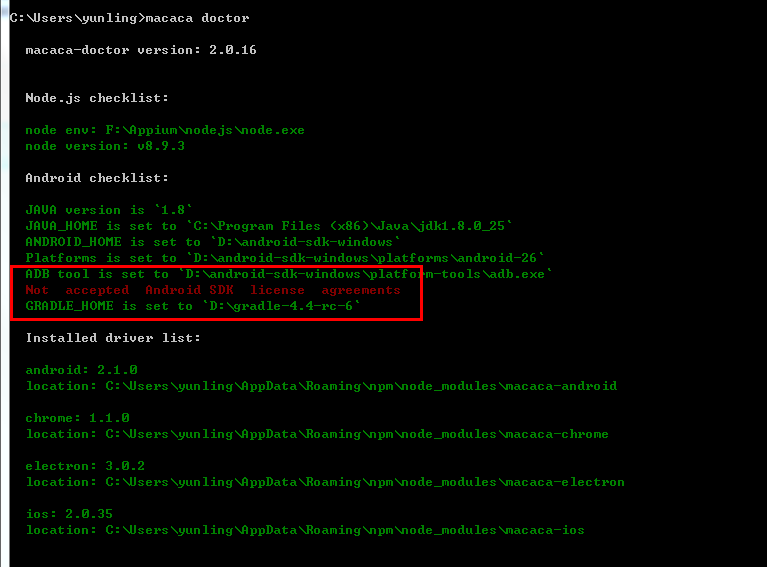
解决办法:在android-sdk目录下在新建一个licenses文件,并创建一个文件为android-sdk-license的文件名,内容为8933bad161af4178b1185d1a37fbf41ea5269c55
没有后缀名
7、提示Android SDK Platforms directory is not exist, please install the whole thing
adb 没有安装和配置环境变量
8、淘宝镜像cnpm安装后提示“不是内部命令”解决方法
解决方法就是在环境变量里添加cnpm的安装路径 一般默认路径为:C:\Users\Administrator\AppData\Roaming\npm; (这是我的安装路径,具体视你的安装路径为准)
Macaca环境搭建踩坑总结的更多相关文章
- React Native 环境搭建踩坑
React Native (web Android)环境搭建踩坑(真的是一个艰辛的过程,大概所有坑都被我踩了 官方文档地址 : https://facebook.github.io/react-nat ...
- windows kafka 环境搭建踩坑记
版本介绍(64位): Windows 10 JDK1.8.0_171 zookeeper-3.4.8/ kafka_2.11-0.10.0.1.tgz 点击链接进行下载 1. JDK安装和环境搭建 自 ...
- windows 下 react-native(v0.56) Android 环境搭建踩坑记录
debugservicereact-native 安装官网 https://reactnative.cn/docs/getting-started.html 根据官网步骤一步步执行下去.还能碰到一些问 ...
- macaca 环境搭建篇,(web 和安卓)
appium研究一段时间,感觉appium太不稳定了, 后来听说了阿里开源了macaca,那么我就想尝尝鲜,啥都不说,我感觉还是赶紧上手搭建环境吧. macaca介绍: Macaca是一套完整的自动化 ...
- Macaca环境搭建全教程
首先想要会Macaca,还得先会用github,不然你得死……因为各种例子都在git上,官网也一样,蛋疼的很…… #基础环境 1.JDK:jdk1.8-配置变量 2.Android SDK:sdk ...
- Flutter环境搭建遇坑小结(一)
对flutter的了解与开发也有一段时间了,总的来说,搭建开发环境遇到的各种坑也是很多,尤其对于初次接触Android开发的人员来说 一.flutter运行提示Running Gradle task ...
- Macaca环境搭建(二)----uirecorder PC录制
上一节我们安装好了macaca环境,这节我们来进行PC录制: 一.安装UI Recorder 命令窗口输入:npm install uirecorder mocha -g 二.初始化配置 1.创建文件 ...
- hyperledger-fabric环境快速搭建踩坑集锦(实用)
安装docker 及 docker-compose 安装docker没什么好说的,一部分教程都给出了指令,在这里就不谈了. docker-compose不同的教程给出了不同的方法,在这里介绍一种极为快 ...
- spring源码解析(一) 环境搭建(各种坑的解决办法)
上次搭建spring源码的环境还是两年前,依稀记得那时候也是一顿折腾,奈何当时没有记录,导致两年后的今天把坑重踩了一遍,还遇到了新的坑,真是欲哭无泪;为了以后类似的事情不再发生,这次写下这篇博文来必坑 ...
随机推荐
- C# 中枚举的一点研究(跳过一些net坑的研究而已)
之前一直使用Enum.Parse()将字符串转为枚举,没有深究,后面发现一个问题后对下面的Enum有了一个初步研究(.net 4.0).看下面代码. (留意,枚举类型是值类型,其值不能为Null,所以 ...
- CentOS 7.2 配置mysql5.7
准备篇:一.配置防火墙,开启80端口.3306端口CentOS 7.0默认使用的是firewall作为防火墙,这里改为iptables防火墙.1.关闭firewall:systemctl stop f ...
- zzuli 1812: sort 排序
1812: sort Time Limit: 1 Sec Memory Limit: 128 MB Submit: 352 Solved: 216 SubmitStatusWeb Board De ...
- Openssl 生成证书server.key and server.crt
1.key的生成 openssl genrsa -des3 -out server.key 2048 这样是生成rsa私钥,des3算法,openssl格式,2048位强度.server.key是密钥 ...
- POST和GET有什么区别?
1. GET主要用于从服务器查询数据,POST用于向服务器提交数据 2. GET通过URL传递数据,POST通过http请求体传递数据 3. GET传输数据量有限制,不能大于2kb,POST传递的数据 ...
- UWP 应用程序内购
今天来说一下应用程序内购的问题,这里面有坑,给自己做个笔记,也给需要的人提个醒. 我目前的需要是可以允许用户捐赠赞助App的形式内购,最终效果如下 只讲上面的列表部分,下面的就是图片布局啥的,没意思了 ...
- google软件测试之道读后感(一)
这几天在抽空读一本新书,久负盛名的<google软件测试之道>.之前在网络上一点一点地看过它的英文版,很受触动,还做了很长的读书笔记,现在看到了中文版,才恍觉之前的好些理解存在不恰当的地方 ...
- tyvj4865 天天和树tree
#include<bits/stdc++.h> #define MAXN 100000+10 using namespace std; *MAXN]; ,head[MAXN],pre[MA ...
- C# (using Newtonsoft.Json) Json 转换用法小总结
//序列化 string Json字符串 = JsonConvert.SerializeObject(目标对象); // 字符串转化为对象 string UserJson = "{\&quo ...
- PHP中的会话控制
了解HTTP(超文本传输协议)可以知道,它采用请求与响应的模式,最大的特点就是无连接无状态. 无连接:每次连接仅处理一个客户端的请求,得到服务器响应后,连接就结束了 无状态:每个请求都是独立的,服务器 ...