
C#实现按键计算器功能2(增强版)
1. 实验目的
( 1)熟悉C#语言的使用和语法知识
2. 实验要求
(1)设计简单的含交互界面的计算器软件,具有较强的用户体验感。
(2)使用C#语言进行编程,创建窗体应用程序。
(3)实现较简单加减乘除等运算。
3. 运行效果如下:
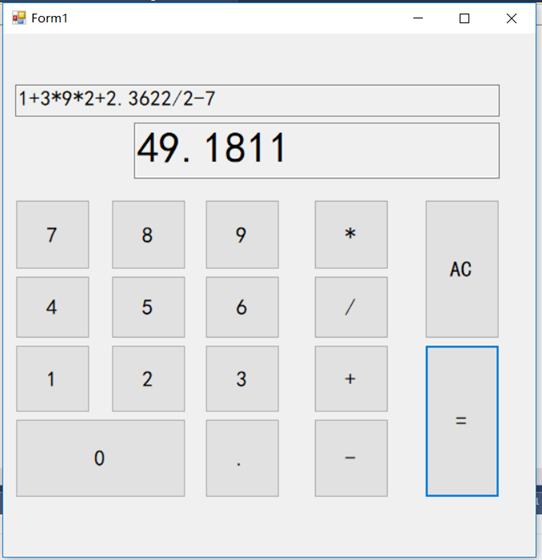
4. 效果特点:
(1)每个按钮均可输入,但会阻止一些非法输入,例如,在没有输入数字的时候就输入运算符,点号的多次输入,这些都会阻止。
(2)实现了运算的优先级,即乘除是先与加减计算的。
(3)可实现小数的计算,即弥补了整型无法得打小数的缺陷
(4)增加了归零按钮,一键返回到初始状态
(5)按钮和键盘绑定,可实现键盘敲击时,界面按钮同时相应
(6)结果可继续运算,在点击“=”完成后,可在第二个文本框中输出结果,这时,如果在点击运算符,可对这个结果继续进行操作,实现完美的可继续性
5.代码如下:
using System;
using System.Collections.Generic;
using System.ComponentModel;
using System.Data;
using System.Drawing;
using System.Linq;
using System.Text;
using System.Threading.Tasks;
using System.Windows.Forms; namespace 按键计算器
{
public partial class Form1 : Form
{
double[] number = new double[];
char[] operat = new char[];
bool isNumber = false;
bool isDot = false;
bool isOperat = false;
bool isEqual = false; int numberIndex = ;
int operatIndex = ; int dotCount = ; public Form1()
{
InitializeComponent();
btnleft.Hide();
btnright.Hide(); } //将键盘与按钮关联
protected override bool ProcessCmdKey(ref Message msg, Keys keyData)
{
if (keyData == Keys.NumPad1||keyData==Keys.D1)
{
this.btn1.Focus();
this.btn1.PerformClick();
}
if (keyData == Keys.NumPad2 || keyData == Keys.D2)
{
this.btn2.Focus();
this.btn2.PerformClick();
}
if (keyData == Keys.NumPad3 || keyData == Keys.D3)
{
this.btn3.Focus();
this.btn3.PerformClick();
}
if (keyData == Keys.NumPad4 || keyData == Keys.D4)
{
this.btn4.Focus();
this.btn4.PerformClick();
}
if (keyData == Keys.NumPad5 || keyData == Keys.D5)
{
this.btn5.Focus();
this.btn5.PerformClick();
}
if (keyData == Keys.NumPad6 || keyData == Keys.D6)
{
this.btn6.Focus();
this.btn6.PerformClick();
}
if (keyData == Keys.NumPad7 || keyData == Keys.D7)
{
this.btn7.Focus();
this.btn7.PerformClick();
}
if (keyData == Keys.NumPad8 || keyData == Keys.D8)
{
this.btn8.Focus();
this.btn8.PerformClick();
}
if (keyData == Keys.NumPad9 || keyData == Keys.D9)
{
this.btn9.Focus();
this.btn9.PerformClick();
}
if (keyData == Keys.NumPad0 || keyData == Keys.D0)
{
this.btn0.Focus();
this.btn0.PerformClick();
}
if (keyData == Keys.Add)
{
this.btnadd.Focus();
this.btnadd.PerformClick();
}
if (keyData == Keys.Subtract || keyData == Keys.OemMinus)
{
this.btnsub.Focus();
this.btnsub.PerformClick();
}
if (keyData == Keys.Multiply)
{
this.btnmul.Focus();
this.btnmul.PerformClick();
}
if (keyData == Keys.Divide)
{
this.btndiv.Focus();
this.btndiv.PerformClick();
}
if (keyData == Keys.Enter || keyData == Keys.Oemplus)
{
this.btnequ.Focus();
this.btnequ.PerformClick();
}
if (keyData == Keys.Back)
{
this.btncle.Focus();
this.btncle.PerformClick();
}
return base.ProcessCmdKey(ref msg, keyData);
} private void btn1_Click(object sender, EventArgs e)
{
if (isEqual == true)
{ textBox1.Text ="";
textBox2.Text = ""; dotCount = ;
isNumber = false;
isDot = false;
isOperat = true;
isEqual = false; }
textBox1.Text = textBox1.Text + "";
textBox2.Text = textBox2.Text + ""; isNumber = true;
isDot = false;
isOperat = false;
isEqual = false; } private void btn2_Click(object sender, EventArgs e)
{
if (isEqual == true)
{ textBox1.Text = "";
textBox2.Text = ""; dotCount = ;
isNumber = false;
isDot = false;
isOperat = true;
isEqual = false; } textBox1.Text = textBox1.Text + "";
textBox2.Text = textBox2.Text + ""; isNumber = true;
isDot = false;
isOperat = false;
isEqual = false; } private void btn3_Click(object sender, EventArgs e)
{
if (isEqual == true)
{ textBox1.Text = "";
textBox2.Text = ""; dotCount = ;
isNumber = false;
isDot = false;
isOperat = true;
isEqual = false; } textBox1.Text = textBox1.Text + "";
textBox2.Text = textBox2.Text + ""; isNumber = true;
isDot = false;
isOperat = false;
isEqual = false; } private void btn4_Click(object sender, EventArgs e)
{
if (isEqual == true)
{ textBox1.Text = "";
textBox2.Text = ""; dotCount = ;
isNumber = false;
isDot = false;
isOperat = true;
isEqual = false; } textBox1.Text = textBox1.Text + "";
textBox2.Text = textBox2.Text + ""; isNumber = true;
isDot = false;
isOperat = false;
isEqual = false; } private void btn5_Click(object sender, EventArgs e)
{
if (isEqual == true)
{ textBox1.Text = "";
textBox2.Text = ""; dotCount = ;
isNumber = false;
isDot = false;
isOperat = true;
isEqual = false; } textBox1.Text = textBox1.Text + "";
textBox2.Text = textBox2.Text + ""; isNumber = true;
isDot = false;
isOperat = false;
isEqual = false; } private void btn6_Click(object sender, EventArgs e)
{
if (isEqual == true)
{ textBox1.Text = "";
textBox2.Text = ""; dotCount = ;
isNumber = false;
isDot = false;
isOperat = true;
isEqual = false; } textBox1.Text = textBox1.Text + "";
textBox2.Text = textBox2.Text + "";
isNumber = true;
isDot = false;
isOperat = false;
isEqual = false;
} private void btn7_Click(object sender, EventArgs e)
{
if (isEqual == true)
{ textBox1.Text = "";
textBox2.Text = ""; dotCount = ;
isNumber = false;
isDot = false;
isOperat = true;
isEqual = false; } textBox1.Text = textBox1.Text + "";
textBox2.Text = textBox2.Text + ""; isNumber = true;
isDot = false;
isOperat = false;
isEqual = false;
} private void btn8_Click(object sender, EventArgs e)
{
if (isEqual == true)
{ textBox1.Text = "";
textBox2.Text = ""; dotCount = ;
isNumber = false;
isDot = false;
isOperat = true;
isEqual = false; } textBox1.Text = textBox1.Text + "";
textBox2.Text = textBox2.Text + ""; isNumber = true;
isDot = false;
isOperat = false;
isEqual = false;
} private void btn9_Click(object sender, EventArgs e)
{
if (isEqual == true)
{ textBox1.Text = "";
textBox2.Text = ""; dotCount = ;
isNumber = false;
isDot = false;
isOperat = true;
isEqual = false; }
textBox1.Text = textBox1.Text + "";
textBox2.Text = textBox2.Text + ""; isNumber = true;
isDot = false;
isOperat = false;
isEqual = false;
} private void btn0_Click(object sender, EventArgs e)
{
if (isEqual == true)
{ textBox1.Text = "";
textBox2.Text = ""; dotCount = ;
isNumber = false;
isDot = false;
isOperat = true;
isEqual = false; }
textBox1.Text = textBox1.Text + "";
textBox2.Text = textBox2.Text + ""; isNumber = true;
isDot = false;
isOperat = false;
isEqual = false;
} private void btnf_Click(object sender, EventArgs e)
{
if ((isNumber == true)&&(dotCount==))
{
textBox1.Text = textBox1.Text + ".";
textBox2.Text = textBox2.Text + "."; dotCount++;
isNumber = false;
isDot = true;
isOperat = false;
isEqual = false;
}
} private void btnadd_Click(object sender, EventArgs e)
{
if (isEqual == true)
{
number[numberIndex] = double.Parse(textBox2.Text);
operat[operatIndex] = '+';
textBox1.Text = textBox2.Text + "+";
textBox2.Text = ""; numberIndex++;
operatIndex++; dotCount = ;
isNumber = false;
isDot = false;
isOperat = true;
isEqual = false; } if ((isOperat==false)&&(isDot==false)&&(isNumber == true))
{ number[numberIndex] = double.Parse(textBox2.Text);
operat[operatIndex] = '+';
textBox1.Text = textBox1.Text + "+";
textBox2.Text = ""; numberIndex++;
operatIndex++; dotCount = ;
isNumber = false;
isDot = false;
isOperat = true;
isEqual = false; } } private void textBox1_TextChanged(object sender, EventArgs e)
{
} private void btnmul_Click(object sender, EventArgs e)
{
if (isEqual == true)
{
number[numberIndex] = double.Parse(textBox2.Text);
operat[operatIndex] = '*';
textBox1.Text = textBox2.Text + "*";
textBox2.Text = ""; numberIndex++;
operatIndex++; dotCount = ;
isNumber = false;
isDot = false;
isOperat = true;
isEqual = false; } if ((isOperat == false) && (isDot == false) && (isNumber == true))
{ number[numberIndex] = double.Parse(textBox2.Text);
operat[operatIndex] = '*';
textBox1.Text = textBox1.Text + "*";
textBox2.Text = ""; numberIndex++;
operatIndex++; dotCount = ;
isNumber = false;
isDot = false;
isOperat = true;
isEqual = false; } } private void btndiv_Click(object sender, EventArgs e)
{ if (isEqual == true)
{
number[numberIndex] = double.Parse(textBox2.Text);
operat[operatIndex] = '/';
textBox1.Text = textBox2.Text + "/";
textBox2.Text = ""; numberIndex++;
operatIndex++; dotCount = ;
isNumber = false;
isDot = false;
isOperat = true;
isEqual = false; }
if ((isOperat == false) && (isDot == false) && (isNumber == true))
{ number[numberIndex] = double.Parse(textBox2.Text);
operat[operatIndex] = '/';
textBox1.Text = textBox1.Text + "/";
textBox2.Text = ""; numberIndex++;
operatIndex++; dotCount = ;
isNumber = false;
isDot = false;
isOperat = true;
isEqual = false; } } private void btnsub_Click(object sender, EventArgs e)
{
if (isEqual == true)
{
number[numberIndex] = double.Parse(textBox2.Text);
operat[operatIndex] = '-';
textBox1.Text = textBox2.Text + "-";
textBox2.Text = ""; numberIndex++;
operatIndex++; dotCount = ;
isNumber = false;
isDot = false;
isOperat = true;
isEqual = false; }
if ((isOperat == false) && (isDot == false) && (isNumber == true))
{ number[numberIndex] = double.Parse(textBox2.Text);
operat[operatIndex] = '-';
textBox1.Text = textBox1.Text + "-";
textBox2.Text = ""; numberIndex++;
operatIndex++; dotCount = ;
isNumber = false;
isDot = false;
isOperat = true;
isEqual = false; }
} private void btnequ_Click(object sender, EventArgs e)
{
if (textBox2.Text != "")
{
number[numberIndex] = double.Parse(textBox2.Text); //判断乘除
for (int i = ; i < operatIndex;)
{ //对乘号分析
if (operat[i] == '*')
{
number[i] = number[i] * number[i + ];
for (int j = i + ; j < operatIndex; j++)
{
number[j] = number[j + ];
operat[j - ] = operat[j]; }
numberIndex--;
operatIndex--; }
//对除号分析
else if (operat[i] == '/')
{
number[i] = number[i] / number[i + ];
for (int j = i + ; j < operatIndex; j++)
{
number[j] = number[j + ];
operat[j - ] = operat[j]; }
numberIndex--;
operatIndex--; }
else
{ i++; } } //判断加减
for (int i = ; i < operatIndex;)
{ //对加号分析
if (operat[i] == '+')
{
number[i] = number[i] + number[i + ];
for (int j = i + ; j < operatIndex; j++)
{
number[j] = number[j + ];
operat[j - ] = operat[j]; }
numberIndex--;
operatIndex--; }
//对减号分析
else if (operat[i] == '-')
{
number[i] = number[i] - number[i + ];
for (int j = i + ; j < operatIndex; j++)
{
number[j] = number[j + ];
operat[j - ] = operat[j]; }
numberIndex--;
operatIndex--; }
else { i++; } } textBox2.Text = number[].ToString();
isNumber = false;
isDot = false;
isOperat = false;
isEqual = true;
numberIndex = ;
operatIndex = ;
} }
private void btncle_Click(object sender, EventArgs e)
{
isNumber = false;
isDot = false;
isOperat = false;
isEqual = false; numberIndex = ;
operatIndex = ; dotCount = ; textBox1.Text = "";
textBox2.Text = ""; } private void btnleft_Click(object sender, EventArgs e)
{ } private void btnright_Click(object sender, EventArgs e)
{ }
}
}
C#实现按键计算器功能2(增强版)的更多相关文章
- C#实现按键计算器功能
C#实现按键计算器功能 (一次失败的编程) 界面: 代码如下: using System; using System.Collections.Generic; using System.Compone ...
- python模块——re模块(简单的计算器功能实现_eval版)
#!/usr/bin/env python # -*- coding:utf-8 -*- __author__ = "loki" # Usage: Make a Diy Calcu ...
- 微慕WordPress小程序增强版
2017年1月9日,张小龙在2017微信公开课Pro上发布的微信小程序正式上线.在过去的2年多的时间里,微信小程序领头,各大互联网平台也不甘落后,陆续推出自己的小程序.2018年7月4日,百度智能小程 ...
- jQuery 1.4版本的15个新功能(现在已经发布到jquery1.8,特别是增强版的live事件,支持 submit , change , focus 和 blur 事件)
1.jQuery()创建DOM元素:支持传参设置属性 之前,jQuery可以通过 attr 方法设置元素的属性,既可传属性的名和值,也可以是包含几组特定 属性名值对 的 对象.在 jQuery 1.4 ...
- 个人永久性免费-Excel催化剂功能第60波-数据有效性验证增强版,补足Excel天生不足
Excel在数据处理.数据分析上已经是公认的最好用的软件之一,其易用性和强大性也吸引无数的初中高级用户每天都在使用Excel.但这些优点的同时,也带出了一些问题,正因为其不同于一般的专业软件,需要专业 ...
- 将表里的数据批量生成INSERT语句的存储过程 增强版
将表里的数据批量生成INSERT语句的存储过程 增强版 有时候,我们需要将某个表里的数据全部或者根据查询条件导出来,迁移到另一个相同结构的库中 目前SQL Server里面是没有相关的工具根据查询条件 ...
- 最新GHOST XP系统下载旗舰增强版 V2016年
系统来自:系统妈:http://www.xitongma.com 深度技术GHOST xp系统旗舰增强版 V2016年3月 系统概述 深度技术ghost xp系统旗舰增强版集合微软JAVA虚拟机IE插 ...
- 最新深度技术GHOST XP系统旗舰增强版 V2016年
来自系统妈:http://www.xitongma.com 深度技术GHOST xp系统旗舰增强版 V2016年 系统概述 深度技术ghost xp系统旗舰增强版集合微软JAVA虚拟机IE插件,增强浏 ...
- WinNTSetup v3.8.7 正式版绿色增强版
最强系统安装利器:WinNTSetup 现已更新至 v3.8.7 正式版!这次更新修复调整了诸多问题,新版非常好用接近完美!WinNTSetup 现在已经自带BCDBoot 选项,并且完全支持Wind ...
随机推荐
- 前端经典面试题之CSS实现三栏布局,左右宽度固定,中间宽度自适应
前端常问的面试题,题目:假设高度一定,请写出三栏布局,左右宽度300px,中间自适应. 看到这里我希望你能停下来思考几分钟, 1分钟~2分钟~3分钟~4分钟~5分钟! 好了,那么你想出了几种答案呢? ...
- dubbo服务暴露
想熟悉dubbo源码,首先要知道dubbo extensionLoader,而dubbo的这种扩展机制,是根据java spi衍生而来. 这是基础,但是我放在后面说明. 一:dubbo demo pr ...
- 一个通过GINA拦截 盗窃登陆口令的病毒分析
病毒行为: 1\将资源中的DLL释放到当前目录下 2\设置注册表,将GINA DLL设置为上一步中释放的DLL DLL行为: 1\在DLL被进程装载时, 装载正常的msgina.dll, 并保存句柄, ...
- Unity协程实现伪加载页面
先上效果图预览. ============================开始写实现方法================================ 1.我用的是UGUI,先在空场景中新建Slid ...
- flask 第三章 特殊装饰器 CBV Flask-Session WTForms
1.flask中的特殊装饰器 前面我们讲过的装饰器函数中,用来登录验证,这次我们来介绍几个flask中的特殊装饰器 1). @app.before_request 具体的用途是: 在请求进入视图函数之 ...
- CodeForce-955C
C. Sad powerstime limit per test2 secondsmemory limit per test256 megabytesinputstandard inputoutput ...
- 【教程】CRX格式插件不能离线安装?本地扩展CRX无法安装怎么办?
http://www.cnplugins.com/zhuanti/how-to-make-crx-install.html
- ES6常用方法总结
1.声明变量用let,声明常量用const(定义唯一的值),都没有预解释,也不存在变量提升: 2.箭头函数:有如下两种写法 1).表达式(函数体只有一行代码) a).let fn = p => ...
- 原生js实现下拉菜单
简单给两段代码: html和css部分: <style> .one li{ width:100px; height:30px; line-height:30px; background:u ...
- c++中,如果访问数组越界,程序可能会意外终止(像死循环)
#include<iostream> using namespace std; ];// int main(){ vis[]=;//访问越界 ; } 程序错误表现: