
maven+jenkins+jmeter性能测试:maven把项目依赖拷贝到项目指定位置
先上pom.xml配置:
 <project xmlns="http://maven.apache.org/POM/4.0.0" xmlns:xsi="http://www.w3.org/2001/XMLSchema-instance"

   xsi:schemaLocation="http://maven.apache.org/POM/4.0.0 http://maven.apache.org/maven-v4_0_0.xsd">

   <modelVersion>4.0.0</modelVersion>

   <groupId>com.tongdun</groupId>

   <artifactId>jmeter-demo</artifactId>

   <packaging>jar</packaging>

   <version>1.0-SNAPSHOT</version>

   <name>jmeter-demo</name>

   <url>http://maven.apache.org</url>

 <!-- <dependencyManagement> -->

         <dependencies>

   <dependency>

     <groupId>kg.apc</groupId>

     <artifactId>jmeter-plugins-casutg</artifactId>

     <version>2.1</version>

 </dependency>

 <dependency>

     <groupId>kg.apc</groupId>

     <artifactId>jmeter-plugins-graphs-basic</artifactId>

     <version>2.0</version>

 </dependency>

 <dependency>

     <groupId>kg.apc</groupId>

     <artifactId>jmeter-plugins-graphs-additional</artifactId>

     <version>2.0</version>

 </dependency>

 </dependencies>

 <!-- </dependencyManagement> -->

   <build>

       <plugins>

     <plugin>

         <groupId>org.apache.maven.plugins</groupId>

         <artifactId>maven-dependency-plugin</artifactId>

         <version>2.8</version>

         <executions>

             <execution>

                 <phase>package</phase>

                 <goals>

                     <goal>copy-dependencies</goal>

                 </goals>

             </execution>

         </executions>

          <configuration>

                  <includeArtifactIds>jmeter-plugins-casutg,jmeter-plugins-graphs-basic,jmeter-plugins-graphs-additional</includeArtifactIds>

                  <outputDirectory>target/jmeter/lib/ext</outputDirectory>

          </configuration>

     </plugin>

         <!-- <plugin>

           <groupId>kg.apc</groupId>

           <artifactId>jmeter-plugins-casutg</artifactId>

           <version>2.1</version>

           <executions>

           <execution>

             <id>copy-dependencies</id>

             <phase>package</phase>

             <goals>

               <goal>copy-dependencies</goal>

             </goals>

             <configuration>

               <outputDirectory>/var/lib/jenkins/workspace/jmeter-demo/target/jmeter/lib/ext</outputDirectory>

               <overWriteReleases>false</overWriteReleases>

               <overWriteSnapshots>false</overWriteSnapshots>

               <overWriteIfNewer>true</overWriteIfNewer>

             </configuration>

           </execution>

         </executions>

         </plugin> -->

           <plugin>

               <groupId>com.lazerycode.jmeter</groupId>

               <artifactId>jmeter-maven-plugin</artifactId>

               <!-- <version>1.10.0</version> -->

               <executions>

                   <execution>

                       <id>jmeter-tests</id>

                       <phase>verify</phase>

                       <goals>

                           <goal>jmeter</goal>

                           <!-- <goal>copy</goal> -->

                       </goals>

                   </execution>

               </executions>

               <configuration>

                 <appendResultsTimestamp>true</appendResultsTimestamp>

                 <resultsFileNameDateFormat>yyyyMMddHHmmss</resultsFileNameDateFormat>

                 <propertiesUser>

                   <test_url>${webapp.url}</test_url>

                   <port>${webapp.port}</port>

                 </propertiesUser>

                 <propertiesJMeter>

                   <test_url>${webapp.url}</test_url>

                   <port>${webapp.port}</port>

                 </propertiesJMeter>

               </configuration>

           </plugin>

           <plugin>

             <groupId>com.lazerycode.jmeter</groupId>

             <artifactId>jmeter-analysis-maven-plugin</artifactId>

             <executions>

                 <execution>

                     <phase>verify</phase>

                     <goals>

                         <goal>analyze</goal>

                     </goals>

                     <configuration>

                         <source>${project.build.directory}/**/*.jtl</source>

                         <targetDirectory>${project.build.directory}/results</targetDirectory>

                         <processAllFilesFound>true</processAllFilesFound>

                     </configuration>

                 </execution>

             </executions>

           </plugin>

       </plugins>

   </build>

   <properties>

     <webapp.url>http</webapp.url>

     <webapp.port>80</webapp.port>

     <!-- <project.build.directory>/Users/zzf/test/jmeter-demo/target/jmeter</project.build.directory> -->

   </properties>

 </project>
1、maven使用jmeter进行性能测试的时候,所使用的jmeter插件,只有jmeter默认自带的插件
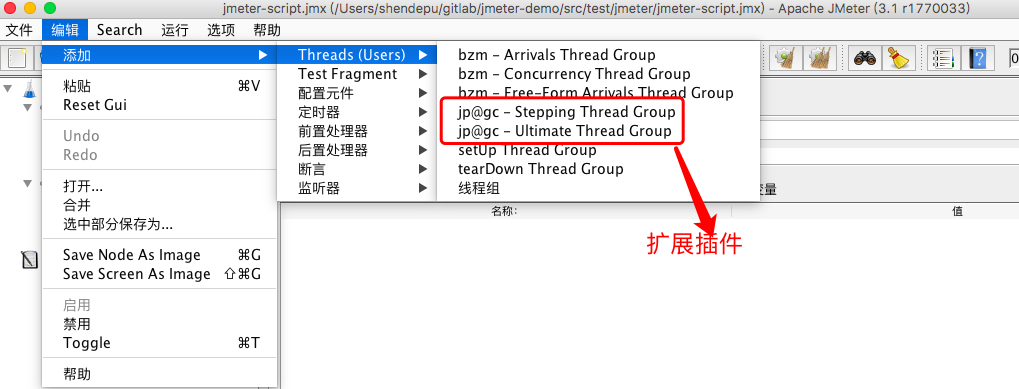
2、图示jmeter配置中带“@”符号的,都是扩展插件的功能
3、如何在maven使用场景下使用扩展插件?
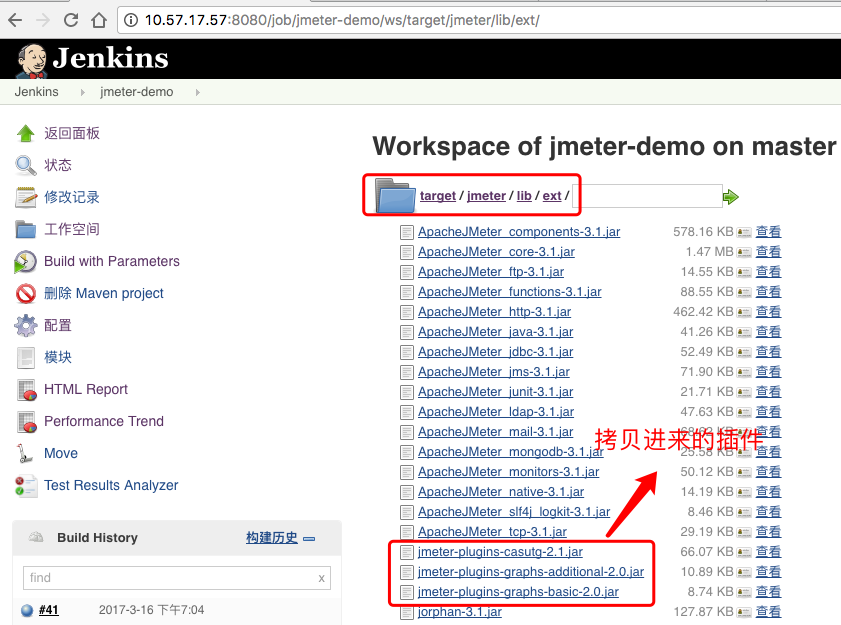
方法就是在pom.xml里添加依赖,把需要的插件通过依赖下载下来,然后再把依赖拷贝到项目的jmeter的扩展插件路径下jmeter/lib/ext
添加依赖:
 <dependencies>

   <dependency>

     <groupId>kg.apc</groupId>

     <artifactId>jmeter-plugins-casutg</artifactId>

     <version>2.1</version>

 </dependency>

 <dependency>

     <groupId>kg.apc</groupId>

     <artifactId>jmeter-plugins-graphs-basic</artifactId>

     <version>2.0</version>

 </dependency>

 <dependency>

     <groupId>kg.apc</groupId>

     <artifactId>jmeter-plugins-graphs-additional</artifactId>

     <version>2.0</version>

 </dependency>

 </dependencies>
pom.xml依赖
copy依赖到jmeter扩展插件所在路径下
 <build>

    <plugins>

     <plugin>

         <groupId>org.apache.maven.plugins</groupId>

         <artifactId>maven-dependency-plugin</artifactId>

         <version>2.8</version>

         <executions>

             <execution>

                 <phase>package</phase>

                 <goals>

                     <goal>copy-dependencies</goal>

                 </goals>

             </execution>

         </executions>

          <configuration>

                  <includeArtifactIds>jmeter-plugins-casutg,jmeter-plugins-graphs-basic,jmeter-plugins-graphs-additional</includeArtifactIds>

                  <outputDirectory>target/jmeter/lib/ext</outputDirectory>

          </configuration>

     </plugin>

   </plugins>

 </build>
view code
includeArtifactIds表示只拷贝指定的插件,多个插件之间,逗号分割,不然会拷贝大量的无关插件
maven+jenkins+jmeter性能测试:maven把项目依赖拷贝到项目指定位置的更多相关文章
- Maven jenkins +Jmeter自动化测试
Maven jenkins +Jmeter自动化测试 1. Jenkins中集成jmeter-maven插件 http://my.oschina.net/u/1377774/blog/168969 2 ...
- Eclipse使当前项目依赖另一个项目
实例说明 在Eclipse中可以创建多个项目实现不同的软件开发,也可以使用多个项目来开发单独的大型软件,每个项目负责单独的模块部门,这样可以使软件的模块分类更清晰,可以单独的维护每个模块部分.但是项目 ...
- Win10系统Jmeter+maven+Jenkins接口自动化环境搭建(一)
Jmeter+maven+Jenkins实现接口自动化,需要使用idea或eclipse配置maven项目,这里我使用的是idea.具体步骤如下: 1.安装jmeter+jdk jmeter安装之前需 ...
- [maven]idea+maven的多项目依赖
如下两个项目: test-main test-utils 其中test-main需要引用test-utils. 最终效果如下: 实现步骤: 1:新建一个Empty Project作为框架项目 输入框架 ...
- Maven学习归纳(四)——传递依赖和依赖的规则
一.传递依赖 官方文档解释的传送门:http://ifeve.com/maven-dependency-mechanism/ 当存在传递依赖的情况时,主工程对间接依赖的jar可以访问吗? 例如:A.j ...
- 项目依赖模块解决、二次封装Response、后台数据库配置、user模块user表设计、前台创建及配置
今日内容概要 二次封装Response 后台数据库配置 user模块user表设计 前台创建及配置 内容详细 补充--项目依赖模块 # 导出项目依赖模块和安装项目依赖模块 第三方模块--->导出 ...
- Node.js笔记07——不使用generator自定义一个项目,深入了解项目结构
一.初始化项目 新建项目 git init manager 新建view文件夹,建几个静态文件夹 新建app.js 快速初始化项目依赖 npm init -y 安装express npm instal ...
- Jmeter+maven+Jenkins构建云性能测试平台(mark 推荐)
转自:http://www.cnblogs.com/victorcai0922/archive/2012/06/20/2555502.html Jmeter+maven+Jenkins构建云性能测试平 ...
- 基于Jmeter+maven+Jenkins构建性能自动化测试平台
一.目的: 为能够将相关系统性能测试做为常规化测试任务执行,且可自动无人值守定时执行并输出性能测试结果报告及统计数据,因此基于Jmeter+maven+Jenkins构建了一套性能自动化测试平台 ...
随机推荐
- USACO 6.5 Checker Challenge
Checker Challenge Examine the 6x6 checkerboard below and note that the six checkers are arranged on ...
- hdoj2159 FATE(完全背包)
题目链接 http://acm.hdu.edu.cn/showproblem.php?pid=2159 思路 每种怪都有无限个,所以使用完全背包来解决.这题比普通完全背包多了一个条件,就是杀怪的个数不 ...
- Linux教程 - 管道和重定向
管道和重定向! 保持数据流动 介绍 在前两节中,我们看了一些可以为我们操作数据的过滤器.在本节中,我们将看到我们如何将它们结合在一起来执行更强大的数据操作. 本节涉及一些阅读.即使这些机制及其 ...
- [SQL]197. Rising Temperature
Given a Weather table, write a SQL query to find all dates' Ids with higher temperature compared to ...
- Revit二次开发示例:AutoStamp
该示例中,在Revit启动时添加打印事件,在打印时向模型添加水印,打印完成后删除该水印. #region Namespaces using System; using System.Collect ...
- python 列表的浅拷贝和深拷贝
转自:https://www.cnblogs.com/laolibk/p/7821369.html 浅拷贝 shallow copy 和深拷贝 deep copy list.copy() 浅拷贝:复制 ...
- python opencv3 摄像头人脸检测
git:https://github.com/linyi0604/Computer-Vision # coding:utf8 import cv2 def detect(): # 创建人脸检测的对象 ...
- C#管理windows服务
.NET Framework中提供了现成的类库可以很方便的实现对windows服务的安装.卸载.启动.停止.获取运行状态等功能.这些类都在System.ServiceProcess命名空间下. 安装w ...
- [BZOJ5305][HAOI2018]苹果树(DP)
首先注意到每种树都是等概率出现的,于是将问题转化成计数求和问题. f[n]表示所有n个点的树的两两点距离和的总和. g[n]表示所有n个点的树的所有点到根的距离和的总和. h[n]表示n个点的树的可能 ...
- bzoj 1658: [Usaco2006 Mar]Water Slides 滑水
题解: 很神奇的做法,把点分成入度大于出度和入度小于出度两种. 然后入度大于出度的点必须走到某个点,所以排序贪心. #include<stdio.h> #include<iostre ...