
[翻译] USING GIT IN XCODE [5] 在XCODE中使用GIT[5]
USING GIT IN XCODE

USING BRANCHES
Branches can be a very effective tool to isolate new features or experiments in code. Xcode has pretty good support for branches, but it is not shown in the project view. The first method you can use to commit code to a branch is to select “Commit to Branch…” instead of “Commit X Files” from the commit view.
分支控制是一个非常有用的隔离新特性的一种开发方式。Xcode对于分支支持得很好,但是没在视图中显示出来。你可以在 “Commit to Branch…”中选择向那个分支提交,而不是在“Commit X Files”上提交。
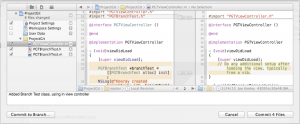
Xcode will ask you to select a branch to commit to, or will allow you to create a new branch.
Xcode会问你要向哪一个分支上提交代码,抑或你自己再创建一个分支出来。
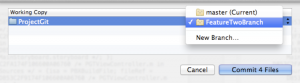
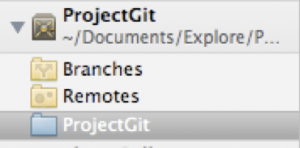
Once you have committed to a branch from master, you will be automatically switched to that branch. You can continue making changes and commits to the branch. So how do you know what branch you are on in Xcode, or get back to the master branch, or switch to another branch? Visit the Repositories in the Organizer, find the repository for your project, and select the working copy.
一旦你从主分支向子分支提交了代码,你将会自动切换到子分支当中去。你可以继续进行修改提交到这个子分支中。所以,你怎么知道你是在Xcode中的哪一个分支呢?你可以通过访问Organizer中的Repositories,在那里你可以发现你的分支。
To see what branch you are currently on, look in the upper right hand corner of the Repository view.
为了查看当前是在哪一个分支上,查看右上角的view。
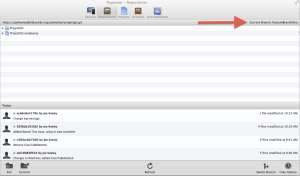
To switch back to master or to another branch, click the “Switch Branch” button in the lower right hand corner. Select another branch, and your Xcode project workspace will be updated to reflect the current contents of the other branch.
为了切换到主分支或者是其他分支中去,点击右下角的按钮“Switch Branch”。选择另外一个分支,然后,你的Xcode project workspace会自动的切换到另外一个分支中的内容。
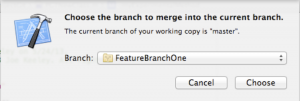
When you are ready to merge a branch, switch to the branch you want to merge into first from the Organizer. Then switch back to the project view, and select File | Source Control | Merger from the Xcode menu. Xcode will ask which branch you would like to merge into your current branch.
当你准备比较两个分支的代码时,先在Organizer中切换到你要比对的分支当中去。然后回到工程中,选择File | Source Control | Merger from the Xcode menu,Xcode会询问你要与哪一个分支比较代码。
Xcode will then present a merge view, which will allow you to review each difference between the current branch and merge branch.
Xcode之后会显示出一个比较的view,允许你检查两个分支的不同之处。
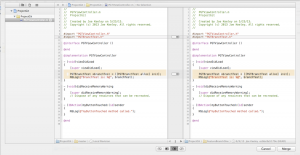
Use the sliders to selectively include or exclude changes from the branch in the merge.
If there is a conflict in the merge, the merge view will highlight the conflict in the merge view with red and a question mark in the center.
使用sliders来选择或者取消修改过的代码。
如果存在着冲突,比较代码的工具会高亮冲突的代码,然后在中间的地方用红色的带有疑问的标记显示着。
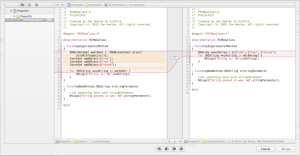
The merge view will offer four choices for resolving the conflict: keep both changes, placing the left before right, keep only the left changes, keep only the right changes, and keep both changes, placing the right before left. In addition the code can be directly edited in the merge view.
比较代码的工具会提供4种选择解决冲突:保持两个改变,使用左边的变化,使用右边的变化,另外,你可以直接在merge上修改代码。
[翻译] USING GIT IN XCODE [5] 在XCODE中使用GIT[5]的更多相关文章
- git篇之二----团体项目中使用git
上篇说了git的简单入门,本篇来说一下在团体项目中我们该如何简单使用git 一般来说,当我们进入公司之后,就前端项目而言,若是有多个同事共同开发一个系统,我们可能会每个人去负责各自的模块. 若是人员较 ...
- [.net 面向对象程序设计进阶] (27) 团队开发利器(六)分布式版本控制系统Git——在Visual Studio 2015中使用Git
[.net 面向对象程序设计进阶] (26) 团队开发利器(六)分布式版本控制系统Git——在Visual Studio 2015中使用Git 本篇导读: 接上两篇,继续Git之旅 分布式版本控制系统 ...
- (转载)在Visual Studio 2015中使用Git
原文:http://blog.csdn.net/damon316/article/details/51885802 1. VS2015在对Git的支持 VS2015是微软IDE集成开发环境的重量级升级 ...
- Git权威指南学习笔记(二)Git暂存区
例如以下图所看到的: 左側为工作区,是我们的工作文件夹. 右側为版本号库,当中: index标记的是暂存区(stage),所处文件夹为.git/index,记录了文件的状态和变更信息. master标 ...
- 如何在cmd中集成git
1.要在cmd中集成git,要解决在cmd中输入git命令时不提示git不是内部或外部命令: 即需要将git添加到path变量中,即将D:\Git\mingw64\bin和D:\Git\mingw64 ...
- 不懂Git,别说自己是程序猿–20分钟git快速上手(转)
在Git如日中天的今天,不懂git都不好意思跟人说自己是程序猿.你是不是早就跃跃欲试了,只是苦于没有借口(契机). 好吧,机会就在今天. 给我20分钟,是的,只要20分钟, 让你快速用上git. 我们 ...
- [翻译] USING GIT IN XCODE [3] 在XCODE中使用GIT[3]
USING GIT IN XCODE MAKING AND COMMITTING CHANGES Once you have a working copy of your project, it’s ...
- [翻译] USING GIT IN XCODE [1] 在XCODE中使用GIT[1]
USING GIT IN XCODE http://www.cimgf.com/2013/12/10/using-git-in-xcode/ Git has become a very popular ...
- 在Xcode中使用Git进行源码版本控制
http://www.cocoachina.com/ios/20140524/8536.html 资讯 论坛 代码 工具 招聘 CVP 外快 博客new 登录| 注册 iOS开发 Swift Ap ...
随机推荐
- Golang gRPC 使用
一.概念 1.gRPC默认使用protocol buffers,这是google开源的一套成熟的结构数据序列化机制(当然也可以使用其他数据格式如JSON),可以用proto files创建gRPC服务 ...
- Java直接用javac来编译带package的类
在没有package语句的java类, 我们可以直接使用: javac Test.java 就可以了, 如果Test.java中包含package语句,如:package abc; 编译后,是要求Te ...
- Java 集合框架(三)—— LinkedList
三.链表 —— LinkedList ArrayList 虽然好用,但是数组和数组列表都有一个重大的缺陷:从数组的中间位置删除一个元素要付出很大的代价,其原因是数组中处于被删除元素之后的所有元素都要向 ...
- springboot启动太慢优化
需求缘起:有人在[springboot]微信公众号问:springboot启动慢的问题何时有个分享就好了,谢谢.粉丝的问题还是要认真的回答的. 我们先看看本节的大纲: (1)组件自动扫描带来的问题(@ ...
- MySQL 学习 --- 数据结构和索引
本文参考了多篇文章集成的笔记,希望各位学习之前可以阅读以下参考资料先 概述 文章分几个部分 :第一部分介绍了B-Tree 和 B+Tree 这种数据结构作为索引:第二部分介绍索引的最左前缀原则和覆盖索 ...
- JPA注解@GeneratedValue
@GeneratedValue是JPA的标准用法, JPA提供四种标准用法,由@GeneratedValue的源代码可以看出. public enum GenerationType { TABLE, ...
- CentOS 7 yum安装配置mysql
首先去官网下载要用的yum源 传送门:http://dev.mysql.com/downloads/repo/yum/ yum源文件:/home/mysql57-community-release-e ...
- Mysql最左匹配原则实践(原创)
mysql最左匹配原则 什么叫最左匹配原则 最左匹配原则的误区 实战 结论: 1 条件查询中条件顺序没有关系 2 在最左匹配原则中,有如下说明: 最左前缀匹配原则,非常重要的原则,mysql会一直向右 ...
- Java方法的参数传递方式为: 值传递
Java方法的参数传递方式为: 值传递 对于基本数据类型作为参数传递时, 是"按值传递", 这点都认识很清楚. 但是, 当对象或者说引用作为参数传递, Java 的参数传递方式是& ...
- OAuth2学习笔记
参考:https://aaronparecki.com/oauth-2-simplified/ 1.角色定义 应用程序(客户) 需要获取用户的账号信息,获得相关权限. API服务器 资源服务器就是AP ...