
[翻译] USING GIT IN XCODE [1] 在XCODE中使用GIT[1]
USING GIT IN XCODE

http://www.cimgf.com/2013/12/10/using-git-in-xcode/
Git has become a very popular version control system in iOS and Mac development. Git comes with a set of command line tools to check status, commit changes, view logs, make and merge branches, and coordinate commits with a remote repository. There are a number of desktop apps that can perform these functions, including Xcode. When I ask other iOS and Mac developers how they interact with Git, most say they use the command line or a separate desktop app like Tower. I find very few developers use Xcode for even some basic Git tasks, and many developers are not aware of the Git support Xcode offers.
Git已经成为了非常流行的版本控制工具。Git是一系列的命令行工具,用以检查状态、提交更改、查看日志、创建和对比分支、并将源码远程提交到服务器上。有很多很多工具都能做这项事情,Xcode自身也有Git的功能。我问了很多iOS以及Mac的开发者他们是怎么使用Git的,大部分都说他们使用命令行工具,或者是一个独立的app例如Tower。我发现很少有人使用Xcode自带的Git来进行最基本的一些操作,还有,很多开发者根本就不知道Xcode自身就支持Git,提供了Git的相关服务。
For my own workflow, I like to minimize the number of tools used and number of switches between apps needed to complete a task. So, I decided to attempt to use Xcode exclusively to interact with Git and share my results. So far I have been pleasantly surprised at what all Xcode can do with Git. If you have not taken a look at Xcode’s support for Git, you may be surprised how much you can accomplish.
在我的大部分工程当中,我喜欢用最少的工具来控制不同版本的app。所以,我决定尝试一下使用Xcode自带的Git以及分享我的经验。至今为止,我发现Xcode可以用Git做到很多相当不错的功能。如果你还没有用过Xcode自带的Git,当你在使用它的时候也许会被惊艳到。
This article assumes basic familiarity with Xcode and Git, and describes Git functionality present in Xcode version 4.6.2.
这篇文章假定你熟悉Xcode以及Git的使用,文章中的Git的功能描述是在Xcode的4.6.2版本上进行的。
NEW GIT PROJECT SETUP IN XCODE
Since Git is a distributed version control system, a repository can be created locally when starting a project, or on a remote server and then cloned. Xcode can handle both situations.
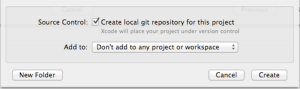
When creating a new Xcode project, you can include a local git repository by checking the “Create local git repository for this project” option. Xcode will initialize the repository and perform an initial commit with the template files for you.
自从发布了Git这个版本控制工具之后,一个工程拷贝既可以在本地创建,也可以通过从服务器的拷贝来完成。Xcode能处理这两种情形。
当在创建一个新的Xcode工程项目时,你可以在选项 Create local git repository for this project 来包含一个本地的git拷贝。Xcode会初始化这个拷贝并获取到文件供你使用。
If you are sharing your project with a team or just want a backup of your project on another machine, you can set up a remote copy of the repository. The typical way this is done is to create an empty repository on a git service like GitHub or Bitbucket. Once the repository is available, return to Xcode and open the Organizer. Select Repositories to view all the version control repositories that Xcode is aware of, and find the new project repository. Select Remotes for the new project, add then click the Add Remote button.
如果你是团队开发,或者仅仅只想在另外的一台电脑上获取一个拷贝,你可以创建一个远程的拷贝。常用的方式是在Github或者Bitbucket上创建一个空的拷贝。一旦这个拷贝可以被你使用了,回到Xcode后打开Organizer。选择 Repositories 后可以查看所有你可以操作的版本,然后找到创建新版本那一项,然后点击 Add Remote 按钮添加。

Xcode will present a dialog to add the remote. You can follow the default naming standard for a git remote and give it the name “origin”, or you use a custom name. Then specify the remote URL for the repository, which will be provided by Bitbucket.
Xcode会显示一个提示框来添加远程版本,你可以根据默认值给个名字抑或自己起个名字。然后,你提供一个远程版本的URL地址,这个地址是由远程服务器提供的(比如Github或者Bitbucket)。

If the remote repository is private and requires authentication, you can enter it after the remote is added. Select the remote in the Organizer list, and an authentication interface will appear below the list.
如果这个远程的版本是私有的需要你提供验证信息,你可以在添加完了之后输入验证信息。你在Organizer选择这个远程版本,一个提示框会提示你输入信息的。

Once the remote is added and authentication provided, the master branch needs to be pushed to it. Return to the Xcode project window. From the Xcode menu, select File | Source Code | Push… Xcode will present a sheet which will allow you to select a remote to push to, and a branch to push. Note that Xcode has checked with the remote repository, and indicates that the master branch will be created in the remote repository with the push.
一旦远程的版本被添加了,你也输入了验证信息,你就需要选择要push的主分支了。回到Xcode工程当中,在Xcode菜单中,选择 File | Source Code | Push… Xcode 后会出现提示框,让你选择一个版本来作为你push所用。

Once the push is complete, the remote repository is available for updates and for other users.
一旦push操作成功了,你就可以使用这个远程版本用来提交代码了。
[翻译] USING GIT IN XCODE [1] 在XCODE中使用GIT[1]的更多相关文章
- git篇之二----团体项目中使用git
上篇说了git的简单入门,本篇来说一下在团体项目中我们该如何简单使用git 一般来说,当我们进入公司之后,就前端项目而言,若是有多个同事共同开发一个系统,我们可能会每个人去负责各自的模块. 若是人员较 ...
- [.net 面向对象程序设计进阶] (27) 团队开发利器(六)分布式版本控制系统Git——在Visual Studio 2015中使用Git
[.net 面向对象程序设计进阶] (26) 团队开发利器(六)分布式版本控制系统Git——在Visual Studio 2015中使用Git 本篇导读: 接上两篇,继续Git之旅 分布式版本控制系统 ...
- (转载)在Visual Studio 2015中使用Git
原文:http://blog.csdn.net/damon316/article/details/51885802 1. VS2015在对Git的支持 VS2015是微软IDE集成开发环境的重量级升级 ...
- Git权威指南学习笔记(二)Git暂存区
例如以下图所看到的: 左側为工作区,是我们的工作文件夹. 右側为版本号库,当中: index标记的是暂存区(stage),所处文件夹为.git/index,记录了文件的状态和变更信息. master标 ...
- 如何在cmd中集成git
1.要在cmd中集成git,要解决在cmd中输入git命令时不提示git不是内部或外部命令: 即需要将git添加到path变量中,即将D:\Git\mingw64\bin和D:\Git\mingw64 ...
- 不懂Git,别说自己是程序猿–20分钟git快速上手(转)
在Git如日中天的今天,不懂git都不好意思跟人说自己是程序猿.你是不是早就跃跃欲试了,只是苦于没有借口(契机). 好吧,机会就在今天. 给我20分钟,是的,只要20分钟, 让你快速用上git. 我们 ...
- [翻译] USING GIT IN XCODE [5] 在XCODE中使用GIT[5]
USING GIT IN XCODE USING BRANCHES Branches can be a very effective tool to isolate new features or e ...
- [翻译] USING GIT IN XCODE [3] 在XCODE中使用GIT[3]
USING GIT IN XCODE MAKING AND COMMITTING CHANGES Once you have a working copy of your project, it’s ...
- 在Xcode中使用Git进行源码版本控制
http://www.cocoachina.com/ios/20140524/8536.html 资讯 论坛 代码 工具 招聘 CVP 外快 博客new 登录| 注册 iOS开发 Swift Ap ...
随机推荐
- php的explode()和split()的区别
都是分割,区别就是,split要用转移字符: 1. $test = end(explode('.', 'abc.txt')); echo $test;//output txt 2. ...
- Java并发编程笔记之ThreadLocalRandom源码分析
JDK 并发包中 ThreadLocalRandom 类原理剖析,经常使用的随机数生成器 Random 类的原理是什么?及其局限性是什么?ThreadLocalRandom 是如何利用 ThreadL ...
- java面试③Web部分
2.2.1 讲一下http get和post请求的区别 get和post请求都是http的请求方式,用户通过不同的http请求方式完成对资源(url)的不同操作,具体点来讲get一般用于获取/查询资源 ...
- ruby中数组的常用函数
在程序中定义一个数组 在程序中定义一个数组,因为我们在下面说明. fruits = ["apple", "orange", "lemon"] ...
- vs2010查看quartz.net 2.1.2的源码时其中一报错的解决方法
问题: 使用vs2010查看quartz.net 2.1.2的源码时,报错: ..\Quartz.NET-2.1.2\server\Quartz.Server\Quartz.Server.2010.c ...
- Idea生成Javadoc
Idea tools菜单下:Generate Javadoc...,在弹出的对话框中选择指定的包或文件,也可滤掉指定的包或文件.如果有自定义的javadoc标签,则需要在other command l ...
- python多线程之threading模块
threading模块中的对象 其中除了Thread对象以外,还有许多跟同步相关的对象 threading模块支持守护线程的机制 Thread对象 直接调用法 import threading imp ...
- vue.js 项目打包
vuejs是个前端框架,npm run dev的目的在于前端开发的时候可以实时调试.所以npm run dev 只是开发时期会用到,在生产环境中我们应该使用nginx,apahce tomcat等应用 ...
- 移除button点击时的黑边
input[type=submit], input[type=reset], input[type=button]{ outline:none; filter: chroma(color=#00000 ...
- [转]c# winform tcp connect timeout 连接超时设置
转自:https://www.cnblogs.com/jhlong/p/5622336.html 简单的c# TCP通讯(TcpListener) C# 的TCP Socket (同步方式) C# 的 ...