
jQuery之前端国际化jQuery.i18n.properties[转]
http://www.ibm.com/developerworks/cn/web/1305_hezj_jqueryi18n/
jQuery.i18n.properties是一款轻量级的jQuery国际化插件,能实现Web前端的国际化。
国际化英文单词为:Internationalization,又称i18n,“i”为单词的第一个字母,“18”为“i”和“n”之间单词的个数,而“n”代表这个单词的最后一个字母。jQuery.i18n.properties采用.properties文件对JavaScript进行国际化。jQuery.i18n.properties插件首先加载默认的资源文件(strings.properties),然后加载针对特定语言环境的资源文件(strings_zh.properties),这就保证了在未提供某种语言的翻译时,默认值始终有效。
资源文件命名有以下三种格式:
basename.properties
basename_language.properties
basname_language_country.properties
jQuery.i18n.properties API
jQuery.i18n.properties的API只有几个:jQuery.i18n.properties()、jQuery.i18n.prop()、jQuery.i18n.browserLang(),当然也可以采用.i18n.properties()、.i18n.prop()、$.i18n.browserLang()的形式使用这些API。
jQuery.i18n.properties(settings)
该方法加载资源文件,其中settings是配置加载选项的一系列键值对。各项配置项的具体描述如下:
| 选项 | 描述 | 类型 | 可选 |
| name | 资源文件的名称,例如strings或[strings1,strings2],前者代表一个资源文件,后者代表资源文件数组 | string或string[] | 否 |
| path | 资源文件所在路径 | string | 是 |
| mode |
加载模式: “vars”表示以JavaScript变量或函数的形式使用资源文件中的Key “map”表示以Map的方式使用资源文件中的Key “both”表示以同时使用两种方式。如果资源文件中的Key包含JavaScript关键字,则只能采用“map”。默认值是“vars”。 |
string | 是 |
| language |
ISO-639指定的语言编码(例如“en”表示英文,“zh”表示中文),或者同时使用ISO-639和ISO-3166编码(例如:“en_US”,“zh_CN”)。如果不指定,则采用浏览器报告的语言编码。 |
string | 是 |
| cache |
指定浏览器是否对资源文件进行缓存,默认值为false |
boolean | 是 |
| encoding |
加载资源文件时使用的编码。默认值为UTF-8 |
string | 是 |
| callback |
代码执行完成时运行的回调函数 |
function | 是 |

function loadProperties() {

            jQuery.i18n.properties({//加载资浏览器语言对应的资源文件

                name : 'strings', //资源文件名称

                path : '/i18n/', //资源文件路径

                mode : 'map', //用Map的方式使用资源文件中的值

                language : 'zh',

                callback : function() {//加载成功后设置显示内容

                    $('.l-btn-text').each(function() {

                        $(this).text($.i18n.prop($(this).text()));

                    });

                }

            });

        }
jQuery.i18n.prop(key)
该方法以map方式使用资源文件中的值,其中key指的是资源文件中的key。当key指定的值含有占位符时,可用使用jQuery.i18n.prop(key,val1,val2……)的形式,其中val1,val2……对点位符进行顺序替换。
jQuery.i18n.browserLang()
用于获取浏览器的语言信息。
使用的方式
项目组织结构
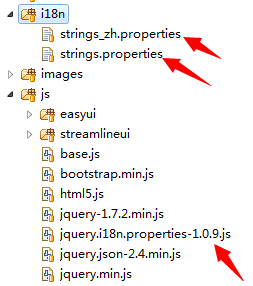
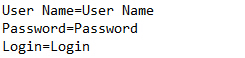
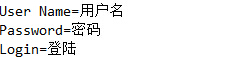
在i18n目录下,strings.properties对应默认翻译,strings_zh.properties对应中文翻译。
strings.properties
strings_zh.properties
<script type="text/javascript" src="/js/jquery-1.7.2.min.js"></script>

<script type="text/javascript" src="/js/jquery.i18n.properties-1.0.9.js"></script>
 <div id="content">

     <div>

         <label id="label_username"></label>

         <input type="text" id="username"></input>

     </div>

     <div>

         <label id="label_password"></label>

         <input type="password" id="password"></input>

     </div>

     <input type="button" id="button_login"/>

 </div>
<script type="text/javascript">

    $(function(){

        jQuery.i18n.properties({

            name : 'strings', //资源文件名称

            path : '/i18n/', //资源文件路径

            mode : 'map', //用Map的方式使用资源文件中的值

            language : 'zh',

            callback : function() {//加载成功后设置显示内容

                $('#button-login').html($.i18n.prop('Login'));

                $('#label-username').html($.i18n.prop('User Name'));

                $('#label-password').html($.i18n.prop('Password'));

            }

        });

    });

</script>
下载地址:
https://code.google.com/p/jquery-i18n-properties/downloads/list
jQuery之前端国际化jQuery.i18n.properties[转]的更多相关文章
- 【转】jQuery之前端国际化jQuery.i18n.properties
jQuery之前端国际化jQuery.i18n.properties 基于jQuery.i18n.properties 实现前端页面的资源国际化 jquery-i18n-properties
- jQuery之前端国际化jQuery.i18n.properties
jQuery.i18n.properties是一款轻量级的jQuery国际化插件,能实现Web前端的国际化. 国际化英文单词为:Internationalization,又称i18n,"i& ...
- 使用 jQuery.i18n.properties 实现 Web 前端的国际化
jQuery.i18n.properties 简介 在介绍 jQuery.i18n.properties 之前,我们先来看一下什么是国际化.国际化英文单词为:Internationalization, ...
- jquery.i18n.properties前端国际化解决方案“填坑日记”
但现在的情况是老的项目并没有使用这类架构.说起国际化,博主几年前就做过,在MVC里面实现国际化有通用的解决方案,主要就是通过资源文件的方式定义多语言.最初接到这个任务,并没有太多顾虑,毕竟这种东西有很 ...
- 前端系列——jquery.i18n.properties前端国际化解决方案“填坑日记”
前言:最近,新的平台还没有开发完成,原来的老项目又提出了新的需求:系统国际化.如果是前后端完全分离的开发模式,要做国际化,真的太简单了,有现成的解决方案,基于Node构建的时下热门的任何一种技术选型都 ...
- Web前端国际化之jQuery.i18n.properties
Web前端国际化之jQuery.i18n.properties jQuery.i18n.properties介绍 国际化是如今Web应用程序开发过程中的重要一环,jQuery.i18n.propert ...
- jquery.i18n.properties前端国际化方案
如果新项目要做系统国际化, 时下热门的任何一种技术选型都有成熟的方案,比如: vue + vue-i18n angular + angular-translate react + react-intl ...
- jQuery国际化插件 jQuery.i18n.properties 【轻量级】
jQuery.i18n.properties是一款轻量级的jQuery国际化插件,能实现Web前端的国际化. 国际化英文单词为:Internationalization,又称i18n,“i”为单词的第 ...
- 基于jQuery.i18n.properties实现前端网站语言多版本
我是参考播客做了个demo:http://blog.csdn.net/aixiaoyang168/article/details/49336709 jQuery.i18n.properties采用.p ...
随机推荐
- Codeforces Round #293 (Div. 2) D. Ilya and Escalator 概率DP
D. Ilya and Escalator time limit per test 2 seconds memory limit per test 256 megabytes input standa ...
- 读书笔记_Effective_C++_条款四十:明智而审慎地使用多重继承
多重继承是一种比较复杂的继承关系,它意味着如果用户想要使用这个类,那么就要对它的父类也了如指掌,所以在项目中会带来可读性的问题,一般我们都会尽量选择用单继承去替代它. 使用多重继承过程容易碰到的问题就 ...
- CentOS使用chkconfig增加开机服务提示service xxx does not support chkconfig的问题解决
在shell文件的第二行增加如下内容即可: # chkconfig: 2345 10 90 #服务必须在运行级2,3,4,5下被启动或关闭,启动的优先级是90,关闭的优先级是10. # descrip ...
- 使用jquery加载部分视图02-使用$.ajax()
本篇体验使用$.ajax()加载部分视图.与加载部分视图相关的包括: RenderPartial和RenderAction区别 使用jquery加载部分视图01-使用$.get() □ ...
- Office Word等双击空白处的“隐藏的模块中的编译错误:MTW5”解决
Microsoft Visual Basic for Applications 隐藏的模块中的编译错误:MTW5. ...
- [转载] C# matlab联合编程简介
原作者 文月 主要操作说明: 1. 找到matlab安装目录下的MCRInstaller.exe安装 MCRInstaller.exe 在安装目录下的 ..\MATLAB7\toolbox\comp ...
- andriod 浏览文件
protected void browse() { Intent it = new Intent(Intent.ACTION_GET_CONTENT); //创建动作为 "选取" ...
- Selenium2+python自动化53-unittest批量执行(discover)
前言 我们在写用例的时候,单个脚本的用例好执行,那么多个脚本的时候,如何批量执行呢?这时候就需要用到unittet里面的discover方法来加载用例了. 加载用例后,用unittest里面的Text ...
- eclipse无法启动
-startupplugins/org.eclipse.equinox.launcher_1.0.201.R35x_v20090715.jar-showsplashorg.eclipse.platfo ...
- 网站功能操作分布引导插件:Intro.js介绍;React里如何使用Intro.js以及如何进行分页导航
插件作用:使用向导,引导新用户正确使用Web网站.我的环境是React+Mobx. 基本使用介绍,参加代码地址里的README.md:https://github.com/usablica/intro ...