
jquery php ajax多图片上传.上传进度,生成缩略图
本例用到其他2个php class.upload.php和 functions.php还有css和js以及img文件
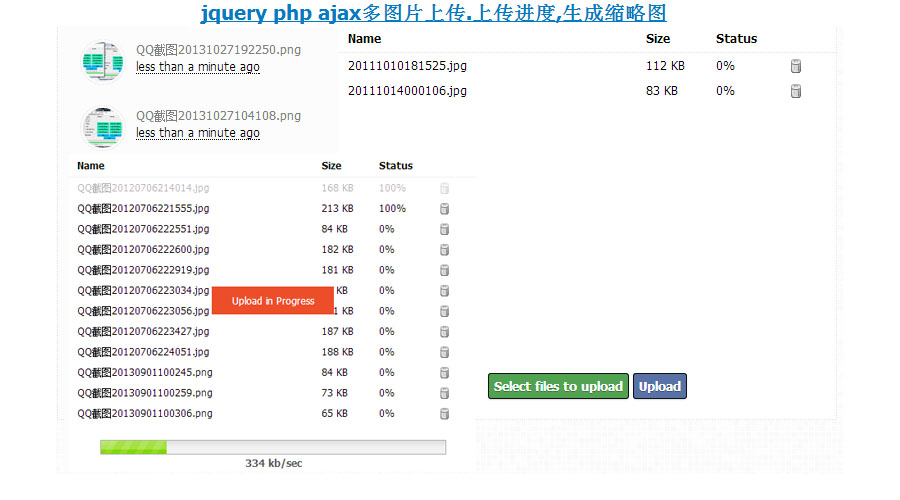
- <script type="text/javascript">
- $(document).ready(function() {
- $("#filelist").niceScroll({
- cursorwidth: "8px",
- cursorborderradius: "0px",
- cursoropacitymin: 0.1,
- cursoropacitymax: 0.3
- });
- $(".side-pane").niceScroll({
- cursorwidth: "8px",
- cursorborderradius: "0px",
- cursoropacitymin: 0.1,
- cursoropacitymax: 0.3
- });
- $(".time").timeago();
- });
- </script>
- <script type="text/javascript">
- // <![CDATA[
- $('#upload_button').click(function() {
- $('.side-pane').html('');
- $('#upload_button').hide();
- $('#pickfiles').hide();
- $('#upload_info').show();
- $('#upload_info').css("display","inherit");
- uploader.start();
- $('#filelist').block({
- message: '<center><div class="start-message">Upload in Progress</div></center>',
- css: {
- border: 'none',
- backgroundColor: 'none'
- },
- overlayCSS: {
- backgroundColor: '#fff',
- opacity: '0',
- cursor: 'wait'
- }
- });
- });
- var uploader = new plupload.Uploader({
- runtimes : 'flash, html5',
- browse_button : 'pickfiles',
- container : 'uploader',
- max_file_size : '10mb',
- url : 'upload.php',
- flash_swf_url : 'uploader/uploader.swf',
- filters : [
- { title : "Image files", extensions : "jpg,jpeg,gif,png" }
- ]
- });
- uploader.bind('Init', function(up, params) {});
- uploader.init();
- uploader.bind('FilesAdded', function(up, files) {
- /*
- @@ Show / hide various elements
- */
- $('.upload-message').hide();
- $('.info-message').hide();
- $('#upload_button').show();
- $('#filelist_header').show();
- $.each(files, function(i, file) {
- $('#filelist').append(
- '<div id="' + file.id + '" class="filecontainer">' +
- '<div class="filename"> '+file.name + '</div>'+
- '<div class="filesize">' + plupload.formatSize(file.size) + '</div>'+
- '<div class="filestatus" id="status_'+file.id+'">0%</div>'+
- '<div class="filedel"><a id="remove_'+file.id+'" href="javascript:;"><img src="img/uploader/delete.gif" /></a></div>' +
- '</div>');
- $('#remove_'+file.id).click(function(e) {
- uploader.removeFile(file)
- $('#'+file.id).hide('slow', function() { ('#'+file.id).remove(); });
- });
- });
- up.refresh();
- $('#filelist').animate({scrollTop: $('#filelist').attr("scrollHeight")}, 1500);
- });
- uploader.bind('UploadProgress', function(up, file) {
- $('#status_' + file.id).html(file.percent + "%");
- if(file.percent == 100) {
- $('#' + file.id).block({
- message: '',
- css: {
- border: 'none',
- backgroundColor: 'none'
- },
- overlayCSS: {
- backgroundColor: '#fff',
- opacity: '0.7',
- cursor: 'wait'
- }
- });
- }
- $('#percent').width(uploader.total.percent+"%");
- $('#upRate').text(Math.ceil(uploader.total.bytesPerSec/1024)+" kb/sec");
- });
- uploader.bind('FileUploaded', function(up, file, response) {
- var input = $("#uploaded_photos");
- var data = response.response;
- var details = data.split(',');
- if(details[0] == 'success') {
- var photo_html = '<div class="padding-10 hm-photo clearfix"><a href="../upload/source/'+details[4]+'" target="_blank"><img src="../upload/small/'+details[4]+'"></a><p class="small-text light-text">'+details[1]+'</p><abbr class="time small-text" title="'+details[2]+'"></abbr></div>';
- input.val(input.val() + details[1] + ":");
- } else {
- var photo_html = '<div class="clearfix">'+details[1]+'</div>';
- }
- $('.side-pane').prepend(photo_html);
- $('.time').timeago();
- });
- uploader.bind('UploadComplete', function(up, files) {
- $('#upload_info').hide();
- $('#filelist').unblock({
- onUnblock: function () {
- $('#filelist_header').hide();
- $('#filelist').html('<div style="margin-top: 180px; text-align: center;"><strong>ok</strong><br/>All photos have been uploaded.</div>');
- }
- });
- });
- // ]]>
- </script>
上面2个js都放在index.php里面
- <div id="uploader" class="main-pane">
- <div id="filelist_header" class="clearfix">
- <div class="filename">Name</div>
- <div class="filesize">Size</div>
- <div class="filestatus">Status</div>
- <div class="filedel"></div>
- <div></div>
- </div>
- <div id="filelist"></div>
- <div class="action-btns">
- <a id="pickfiles" class="login-button btn">Select files to upload</a>
- <a href="javascript:;" id="upload_button" class="login-button upload hide">Upload</a>
- </div>
- <center>
- <div id="upload_info">
- <div id="upload_info_inner">
- <div class="progressbg">
- <div id="percent" class="progress"></div>
- </div>
- </div>
- <div id="unknown">
- <div id="time2go"></div>
- <div id="upRate"></div>
- </div>
- </div>
- </center>
- <form method="POST" action="process.php" id="processupload">
- <input type="hidden" name="uploaded_photos" id="uploaded_photos" />
- <input type="hidden" name="fkey" value="<?php echo $fkey; ?>" />
- </form>
- </div>
upload.php
- <?php
- /*
- @@ Including the functions.php for using the necessary functions.
- */
- include('functions.php');
- /*
- @@ This is the file upload class which does all the uploading work.
- */
- include('class.upload.php');
- if(isset($_FILES["file"])) {
- /*
- @@ Generating unique name for the photo.
- */
- $time = time();
- $rand_1 = rand(999, 999999);
- $rand_2 = rand(999999, 999999999);
- $rand_3 = rand();
- $unique_value = $time.'_'.$rand_1.'_'.$rand_2.'_'.$rand_3;
- /*
- @@ Folder creation for each and every day. This ensures performance even with millions of images.
- */
- $folder = date('zY');
- if(substr($folder, 0) == 0) {
- $folder = '367'.date('Y');
- }
- /*
- @@ This folder is for the source image files.
- */
- $pfolder = '../upload/source/';
- if(!is_dir($pfolder)) {
- mkdir($pfolder, 0755);
- }
- /*
- @@ This folder is for the image files with 120x120 dimensions.
- */
- $tfolder = '../upload/small/';
- if(!is_dir($tfolder)) {
- mkdir($tfolder, 0755);
- }
- /*
- @@ Assigning the upload file to the upload class for all the processing.
- */
- $handle = new Upload($_FILES["file"]);
- if($handle->uploaded) {
- $extension = $handle->file_src_name_ext;
- $mime = $handle->file_src_mime;
- if(($mime == 'image/gif') || ($mime == 'image/jpg') || ($mime == 'image/png') || ($mime == 'image/bmp') || ($mime == 'image/pjpeg') | ($mime == 'image/jpeg')) {
- /*
- @@ Check if the uploaded filetype is an image or not.
- */
- if(($extension == 'gif') || ($extension == 'jpg') || ($extension == 'jpeg') || ($extension == 'png') || ($extension == 'bmp') || ($extension == 'pjpeg')) {
- if($handle->image_src_x > 500) {
- /*
- @@ Check if the filesize is smaller than 10 MB. 10 MB = 10485760 bytes.
- */
- if($handle->file_src_size < 10485760) {
- /*
- @@ Getting the actual file name (with and without extension) and sanitizing it for inserting in the database.
- */
- $real_name = clean_input($handle->file_src_name);
- $body_name = clean_input($handle->file_src_name_body);
- $handle->file_new_name_body = $unique_value.'_'.$body_name;
- $handle->Process($pfolder);
- $handle->image_resize = true;
- $handle->image_ratio_crop = 'T';
- $handle->image_y = 120;
- $handle->image_x = 120;
- $handle->file_new_name_body = $unique_value.'_'.$body_name;
- $handle->Process($tfolder);
- if($handle->processed) {
- $actual_name = $handle->file_dst_name;
- $size = ceil($handle->file_src_size / 1024);
- ## Sending photo details back to the uploader.
- $date = date("c", $time);
- ## Reducing the length of real name if it exceeds 50 characters.
- if(strlen($real_name) > 50) {
- $real_name = substr($real_name, 0, 50).'..';
- }
- echo 'success,'.$real_name.','.$date.','.$folder.','.$actual_name;
- } else {
- echo 'error,<div class="alert alert-error"><strong>Upload Error</strong><br/>There was an error uploading the photo.</div>';
- }
- } else {
- echo 'error,<div class="alert alert-error"><strong>Upload Error</strong><br/>The photo is bigger than the allowed upload size of <strong>10MB</strong>.</div>';
- }
- } else {
- echo 'error,<div class="alert alert-error"><strong>Upload Error</strong><br/>You are trying to upload a photo with smaller dimensions.</div>';
- }
- } else {
- echo 'error,<div class="alert alert-error"><strong>Upload Error</strong><br/>Only photo uploads are allowed.</div>';
- }
- } else {
- echo 'error,<div class="alert alert-error"><strong>Upload Error</strong><br/>Only photo uploads are allowed.</div>';
- }
- } else {
- echo 'error,<div class="alert alert-error"><strong>Upload Error</strong><br/>An upload error occured.</div>';
- }
- /*
- @@ Return the json response to the script.
- */
- $handle->Clean();
- } else {
- echo 'error,<div class="alert alert-error"><strong>Upload Error</strong><br/>An upload error occured.</div>';
- }
jquery php ajax多图片上传.上传进度,生成缩略图的更多相关文章
- Android_Bitmap_图片的二次采样并生成缩略图
1.Bitmap概述 Android系统支持几种图片(.png (preferred), .jpg (acceptable), .gif (discouraged)), 其中Bitmap位图#ffff ...
- java图片处理(加水印、生成缩略图)等之Thumbnailator库
Thumbnailator 是一个为Java界面更流畅的缩略图生成库.从API提供现有的图像文件和图像对象的缩略图中简化了缩略过程,两三行代码就能够从现有图片生成缩略图,且允许微调缩略图生成,同时保持 ...
- jQuery的ajax实现文件上传大小限制
用jquery的ajax实现简单的文件上传功能,并且限制文件大小,先上代码. <!DOCTYPE html> <html> <head> <meta char ...
- CI自带的文件上传及生成缩略图
/* * 文件上传 * @param $upload_path 文件上传路径 * @param $formpic 表单name属性名称 */ private function doUpload($up ...
- nginx实时生成缩略图到硬盘上
现在随着各终端的出现(手机,ipad等平板),以及各种终端的手机分辨率和尺寸都不同,现在手机用户流量都是宝,网上出现了各种各样的生成缩略图功能的架构,有使用php实时生成缩略图的,也有用nginx + ...
- jQuery+AJAX实现网页无刷新上传
新年礼,提供简单.易套用的 jQuery AJAX上传示例及代码下载.后台对文件的上传及检查,以 C#/.NET Handler 处理 (可视需要改写成 Java 或 PHP). 有时做一个网站项目 ...
- 在php中使用jquery uploadify进行多图片上传
jquery uploadify是一款Ajax风格的批量图片上传插件,在PHP中使用jquery uploadify很方便,请按照本文介绍的方法和步骤,为你的PHP程序增加jquery uploadi ...
- Uploadify & jQuery.imgAreaSelect 插件实现图片上传裁剪
在网站中需要一个图片上传裁剪的功能,借鉴这篇文章 Ajax+PHP+jQuery图片截图上传 的指点,找到了jquery.imgAreaSelect这个不错插件,能对图片进行自定义区域选择并给出坐标, ...
- jQuery+php+ajax实现无刷新上传文件功能
jQuery+php+ajax实现无刷新上传文件功能,还带有上传进度条动画效果,支持图片.视频等大文件上传. js代码 <script type='text/javascript' src='j ...
随机推荐
- Internet History, Technology and Security (Week 9)
Week 9 Security: Web Security We are now on the second to last week of the class and finishing up ou ...
- 【硬件】- 英特尔CPU命名中的产品线后缀
产品线后缀是CPU命名体系里最复杂最难懂的,在英特尔冗长的产品线中,CPU的后缀也是千变万化.不带后缀的CPU一般就是最普通的桌面级处理器,不管是性能还是价格都比较中庸,比如当前性价比较高的Core ...
- VNC Server (CentOS 7 GNOME)
1. 安装VNC服务 sudo yum install tigervnc-server -y 2. 启动VNC服务,设置密码,然后停止 vncserver :1 vncserver -kill :1 ...
- 深入理解JAVA虚拟机阅读笔记1——JAVA内存区域
一.Java内存区域 1.程序计数器 线程私有. 当前线程所执行的字节码的行号指示器.由于JAVA是多线程的,因此每个线程都独立的程序计数器. 异常:没有规定任何OutOfMemeryError情况的 ...
- Java的StringBuIlder扩容机制
JDK 1.6中,扩容的源码是这样: void expandCapacity(int minimumCapacity) { int newCapacity = (value.length + 1) * ...
- 先验算法(Apriori algorithm) - 机器学习算法
Apriori is an algorithm for frequent item set mining and association rule learning over transactiona ...
- Qt4程序在windows平台下打包发布
一.打包成绿色版 将源码编译成release版,运行*.exe文件,提示缺少*.dll,在Qt安装目录中找到相应的dll文件(一般在bin目录下),将dll文件复制到exe文件目录下即可. 二.打包成 ...
- 【Java并发编程】之十一:线程间通信中notify通知的遗漏
notify通知的遗漏很容易理解,即threadA还没开始wait的时候,threadB已经notify了,这样,threadB通知是没有任何响应的,当threadB退出synchronized代码块 ...
- vyos 基础配置
vyos 基础配置 http://www.lowefamily.com.au/2015/11/29/using-a-vyos-router-with-hyper-v/1/http://thomasvo ...
- 【刷题】BZOJ 5415 [Noi2018]归程
www.lydsy.com/JudgeOnline/upload/noi2018day1.pdf Solution 考试的时候打的可持久化并查集,没调出来QAQ 后面知道了kruskal重构树这个东西 ...