
简易博客[ html + css ] 练习
1. 前言
通过使用 html + css 编写一个简易的博客作为入门练习
2. 代码及实现
2.1 目录结构
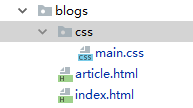
2.2 代码部分
<!DOCTYPE html>

<html lang="zh-CN">

<head>

    <meta charset="UTF-8">

    <link href="https://cdn.bootcss.com/normalize/8.0.1/normalize.min.css" rel="stylesheet">

    <link rel="stylesheet" href="css/main.css">

    <title>Blogs</title>

</head>

<body>

    <div class="side-bar">

        <div class="header">

            <a href="" class="logo">周杰伦</a>

            <div class="intro">哼哼哈嘿</div>

        </div>

        <div class="nav">

            <a href="#" class="item">关于我</a>

            <a href="#" class="item">关于你</a>

            <a href="#" class="item">关于他</a>

        </div>

        <div class="tag-list">

            <a href="#" class="item">HTML</a>

            <a href="#" class="item">CSS</a>

            <a href="#" class="item">JS</a>

        </div>

    </div>

    <div class="main">

        <div class="article-list">

            <div class="item">

                <a href="article.html" class="title">彩虹</a>

                <div class="status">发布于:2019-10-10 | 阅读:3500 | #HTML #CSS</div>

                <div class="content">看不见你的笑,我怎么睡的着.</div>

            </div>

            <div class="item">

                <a href="#" class="title">彩虹</a>

                <div class="status">发布于:2019-10-10 | 阅读:3500 | #HTML #CSS</div>

                <div class="content">看不见你的笑,我怎么睡的着.</div>

            </div>

            <div class="item">

                <a href="#" class="title">彩虹</a>

                <div class="status">发布于:2019-10-10 | 阅读:3500 | #HTML #CSS</div>

                <div class="content">看不见你的笑,我怎么睡的着.</div>

            </div>

        </div>

    </div>

</body>

</html>
index.html
<!DOCTYPE html>

<html lang="zh-CN">

<head>

    <meta charset="UTF-8">

    <link href="https://cdn.bootcss.com/normalize/8.0.1/normalize.min.css" rel="stylesheet">

    <link rel="stylesheet" href="css/main.css">

    <title>Blogs</title>

</head>

<body>

    <div class="side-bar">

        <div class="header">

            <a href="" class="logo">周杰伦</a>

            <div class="intro">哼哼哈嘿</div>

        </div>

        <div class="nav">

            <a href="#" class="item">关于我</a>

            <a href="#" class="item">关于你</a>

            <a href="#" class="item">关于他</a>

        </div>

        <div class="tag-list">

            <a href="#" class="item">HTML</a>

            <a href="#" class="item">CSS</a>

            <a href="#" class="item">JS</a>

        </div>

    </div>

    <div class="main">

            <div class="article">

                <h1 class="title">彩虹</h1>

                <div class="content">

                    <div>Lorem ipsum dolor sit amet, consectetur adipisicing elit. Alias, aliquam aspernatur commodi

                        corporis ducimus in inventore iusto laborum libero maxime nemo nobis nostrum omnis perspiciatis

                        quibusdam saepe, sequi tempora velit.

                    </div>

                    <div>Cupiditate dolore est maxime vero? Cum illum minima modi nobis qui reprehenderit sed?

                        Consequatur distinctio eius nam quae vitae! Alias, beatae dolorum enim hic id impedit nobis

                        suscipit temporibus veniam.

                    </div>

                    <div>Ab, architecto aspernatur autem enim fuga maxime odio reiciendis reprehenderit suscipit velit?

                        Itaque labore porro recusandae vel velit. Ad at, dignissimos error illo iusto laboriosam maxime

                        non odit quod voluptatem.

                    </div></div>

            </div>

    </div>

</body>

</html>
article.html
body {

    background-color: #454545;

    line-height: 1.7;

}

body, a {

    color: white;

}

a {

    text-decoration: none;

}

.side-bar {

    float: left;

    width: 20%;

    position: fixed;

}

.main {

    float: right;

    width: 80%;

    color: #454545;

}

.side-bar > * {

    padding: 10px 15px;

}

.side-bar .header .logo {

    line-height:;

    display: inline-block;

    font-size: 30px;

    border: 3px solid white;

    padding: 10px 20px;

    margin-bottom: 10px;

}

.side-bar .nav a,

.side-bar .tag-list a {

    display: block;

    padding: 5px;

    transition: color 200ms;

    color: #666666;

}

.side-bar .nav a:hover,

.side-bar .tag-list a:hover {

    color: #eeeeee;

}

.side-bar .nav a {

    font-weight:;

}

.side-bar .tag-list a:before {

    content: '#';

}

.main .article-list,

.main .article {

    margin-right: 30%;

    background-color: white;

    padding: 20px 30px;

}

.article-list .item {

    margin-bottom: 25px;

}

.article-list .item .title {

    color: #454545;

    font-size: 22px;

    font-weight:;

}

.article-list .item .status {

    color: #cccccc;

    font-size: 13px;

}

.article-list .item > * {

    margin-bottom: 10px;

}
main.css
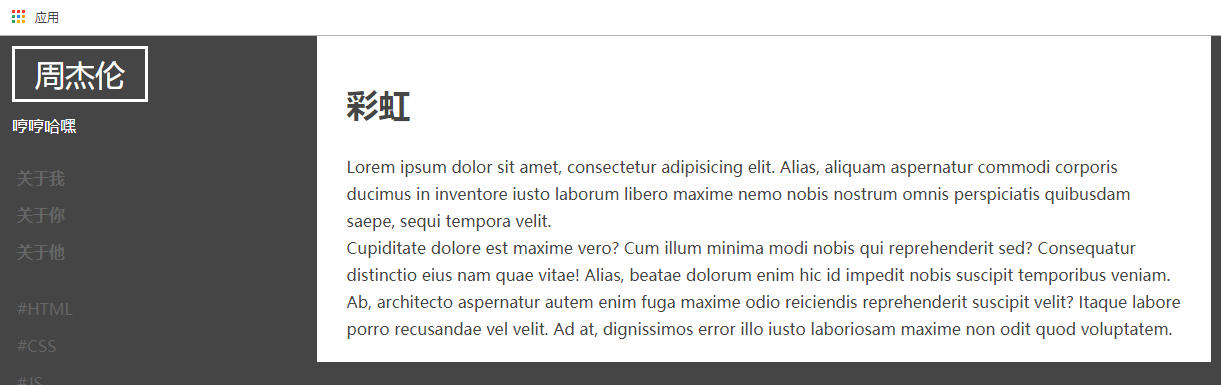
2.3 展示图
index.html

article.html
3. 总结
通过 简易博客 的练习,总结知识点如下:
1. 在编写 页面的时候,首先应该讲 HTML 布局写出来,也就是应该先架构 HTML 代码部分,HTML 代码部分完成,再进行 CSS 部分的编写。
2. 写 HTML 代码的时候,应该从整体上规划布局,比如 index.html 我第一次看到的时候以为是 三个 div 的 【左 中 右】,其实应该是两个 div 一个背景图而已。
3. CSS 代码中,要总结的知识点比较多,重点总结如下:
a {

    text-decoration: none;

}

text-decoration: none; 取消 a 标签的下划线

display: inline-block;

注意 display 的使用,参考:

http://www.w3school.com.cn/cssref/pr_class_display.asp

transition: color 200ms;

延迟 2 毫秒,这样看起来更加丝滑

.side-bar .nav a:hover

hover 鼠标指针选中时的样式

.side-bar {

    float: left;

    width: 20%;

    position: fixed;

}

float: left;

width: 20%;

float 一般为 left 和 right ,而且配合 width 使用 left 和 right 加起来 100%

position: fixed 生成绝对定位的元素

position 参考:

http://www.w3school.com.cn/cssref/pr_class_position.asp

border: 3px solid white;    画边框必要属性,solid 为实线

其他还要注意:

padding

margin

应该使用在什么地方比较合适。
简易博客[ html + css ] 练习的更多相关文章
- django 简易博客开发 5 markdown支持、代码高亮、gravatar头像服务
上一篇博客介绍了comments库使用及ajax支持,现在blog已经具备了基本的功能,但是只能发表文字,不支持富文本编辑.今天我们利用markdown添加富文本支持. markdown语法说明: h ...
- django 简易博客开发 3 静态文件、from 应用与自定义
首先还是贴一下源代码地址 https://github.com/goodspeedcheng/sblog 上一篇博客我们介绍了 django 如何在views中使用templates以及一些常用的数 ...
- Django搭建简易博客
Django简易博客,主要实现了以下功能 连接数据库 创建超级用户与后台管理 利用django-admin-bootstrap美化界面 template,view与动态URL 多说评论功能 Markd ...
- Nodejs+MongoDB+Bootstrap+esj搭建的个人简易博客
github:https://github.com/yehuimmd/myNodeBloy Nodejs+MongoDB+jQuery+Bootstrap-esj搭建的个人简易博客 主要功能 前台 : ...
- django 简易博客开发 4 comments库使用及ajax支持
首先还是贴一下源代码地址 https://github.com/goodspeedcheng/sblog 上一篇文章我们介绍了静态文件使用以及如何使用from实现对blog的增删改,这篇将介绍如何给 ...
- django 简易博客开发 2 模板和数据查询
首先还是贴一下项目地址 https://github.com/goodspeedcheng/sblog 因为代码全在上面 上一篇博客我们介绍了 django的安装配置,新建project,新建a ...
- django 简易博客开发 1 安装、创建、配置、admin使用
首先贴一下项目地址吧 https://github.com/goodspeedcheng/sblog 到现在位置项目实现的功能有: 1.后台管理使用Admin ,前端显示使用bootstrap 2. ...
- django 简易博客开发 1 安装、创建、配置、admin使用(转)
Django 自称是“最适合开发有限期的完美WEB框架”.本文参考<Django web开发指南>,快速搭建一个blog 出来,在中间涉及诸多知识点,这里不会详细说明,如果你是第一次接触D ...
- Vue简易博客总结
项目结构: 首先,编写博客的导航栏组件BlogHeader.vue: <template> <nav> <ul> <li> <router-lin ...
随机推荐
- Java EE之表达式语言EL(下)
1.在EL表达式中使用作用域变量 表达式语言对作用域变量的支持,以及它解析变量的方式都使它变得非常有用. 1.1 EL表达式的隐式变量 EL表达式的作用域中定义了11个隐式变量. 当EL表达式引用了一 ...
- Android源码批量下载及导入到Eclipse
1.去http://code.google.com/p/msysgit/downloads/list 下载Git,进行安装 2.生成批量下载脚本文件 下载批量工具CreatAutoGetSh(工具 ...
- bzoj3533【Sdoi2014】向量集
题目描述 维护一个向量集合,在线支持以下操作:"A x y (|x|,|y| < =10^8)":加入向量(x,y);" Q x y l r (|x|,|y| &l ...
- Hibernate中常见问题 No row with the given identifier exists问题
收集:Hibernate中常见问题 No row with the given identifier exists问题的原因及解决 2007年11月21日 15:02:00 eyejava 阅读数:2 ...
- 在Struts2的Action中获得request response session几种方法
转载自~ 在Struts2中,从Action中取得request,session的对象进行应用是开发中的必需步骤,那么如何从Action中取得这些对象呢?Struts2为我们提供了四种方式.分别为se ...
- Qt ------ 截图、获取鼠标指定的RGB值
获取RGB值思路:截图,获取图片的(0,0)的RGB值 int x = QCursor::pos().x(); int y = QCursor::pos().y(); // QPixmap pixma ...
- golang 中的 time 包的 Ticker
真实的应用场景是:在测试收包的顺序的时候,加了个 tick 就发现丢包了 那么来看一个应用例子: package main import ( "fmt" "runtime ...
- windows10下基于vs2015的 caffe安装教程及python接口实现
啦啦啦:根据网上的教程前一天安装失败,第二天才安装成功.其实caffe的安装并不难,只是网上的教程不是很全面,自己写一个,留作纪念. 准备工作 Windows10 操作系统 vs2015(c++编译器 ...
- python---基础知识回顾(九)图形用户界面-------WxPython
主要使用wxPython(最成熟的跨平台python GUI工具包) wxPython手册 前戏:基础了解 import wx class MyFrame(wx.Frame): #创建自定义Frame ...
- expect嵌套shell循环
#!/bin/bash Detailtxt="test.txt" while read line do dest=`echo $line|awk '{print $1}'` ip= ...