
微信小程序基于scroll-view实现锚点定位
一、前期准备工作
软件环境:微信开发者工具
官方下载地址:https://mp.weixin.qq.com/debug/wxadoc/dev/devtools/download.html
1、基本需求。
- 基于scroll-view实现锚点定位
2、案例目录结构
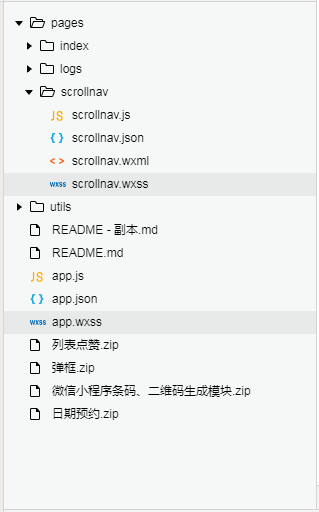
二、程序实现具体步骤
1.锚点index.wxml代码
a.导航滚动
<!--pages/scrollnav/scrollnav.wxml-->

<!--导航滚动  -->

<scroll-view class="tui-city-scroll" scroll-x="true" scroll-into-view="NAV{{status}}" scroll-with-animation="true">

  <text bindtap="getStatus" id="NAV{{index}}" class="tui-nav-li {{index === status ? 'tui-nav-active' : ''}}" data-index="{{index}}" wx:for="{{navList}}" wx:key="">{{item}}</text>

</scroll-view>
b.列表滚动区
<!--列表滚动区  -->

<view class="tui-fixed-y">

  <scroll-view class="tui-city-scroll-y" scroll-y="true" scroll-into-view="NAV{{status}}" scroll-with-animation="true">

    <view wx:for="{{navList}}" wx:key="">

      <view id="NAV{{index}}" class="tui-list-head">{{item}}</view>

      <view class="tui-list-li">{{item}} 列表 {{index}}</view>

    </view>

  </scroll-view>

</view>
2.锚点index.wxss代码
/* pages/scrollnav/scrollnav.wxss */

.tui-fixed-x{

  width: 100%;

  position: fixed;

  top: 0;

  left: 0;

}

.tui-city-scroll{

  height: 220rpx;

  line-height: 80rpx;

  width: 100%;

  white-space: nowrap;

}

.tui-city-scroll text{

  height: 120rpx;

  line-height: 80rpx;

  width: 100%;

  white-space: nowrap;

}

.tui-nav-li{

  font-size: 33rpx;

  padding: 0 10rpx;

}

.tui-nav-li:first-child{padding-left: 16rpx;}

.tui-nav-li:last-child{padding-right: 16rpx;}

.tui-nav-active{

  color: red;

  border-bottom: 3rpx solid red;

}

.tui-fixed-y{

  width: 100%;

  height: calc(100% - 80rpx);

  position: fixed;

  bottom: 0;

  left: 0;

}

.tui-city-scroll-y{

  padding: 0 20rpx;

  height: 100%;

  box-sizing: border-box;

}

.tui-list-head{

  height: 50px;

  line-height: 50px;

  text-align: center;

  font-size: 30rpx;

  color: blue;

}

.tui-list-li{

  height: 400px;

  padding: 10rpx;

  color: #fff;

  font-size: 50rpx;

  background-color: #2EB3FF;

}
3.锚点index.js逻辑代码
a.锚点切换部分的功能实现
getStatus(e){

    this.setData({ status: e.currentTarget.dataset.index})

  }
三、案例运行效果图
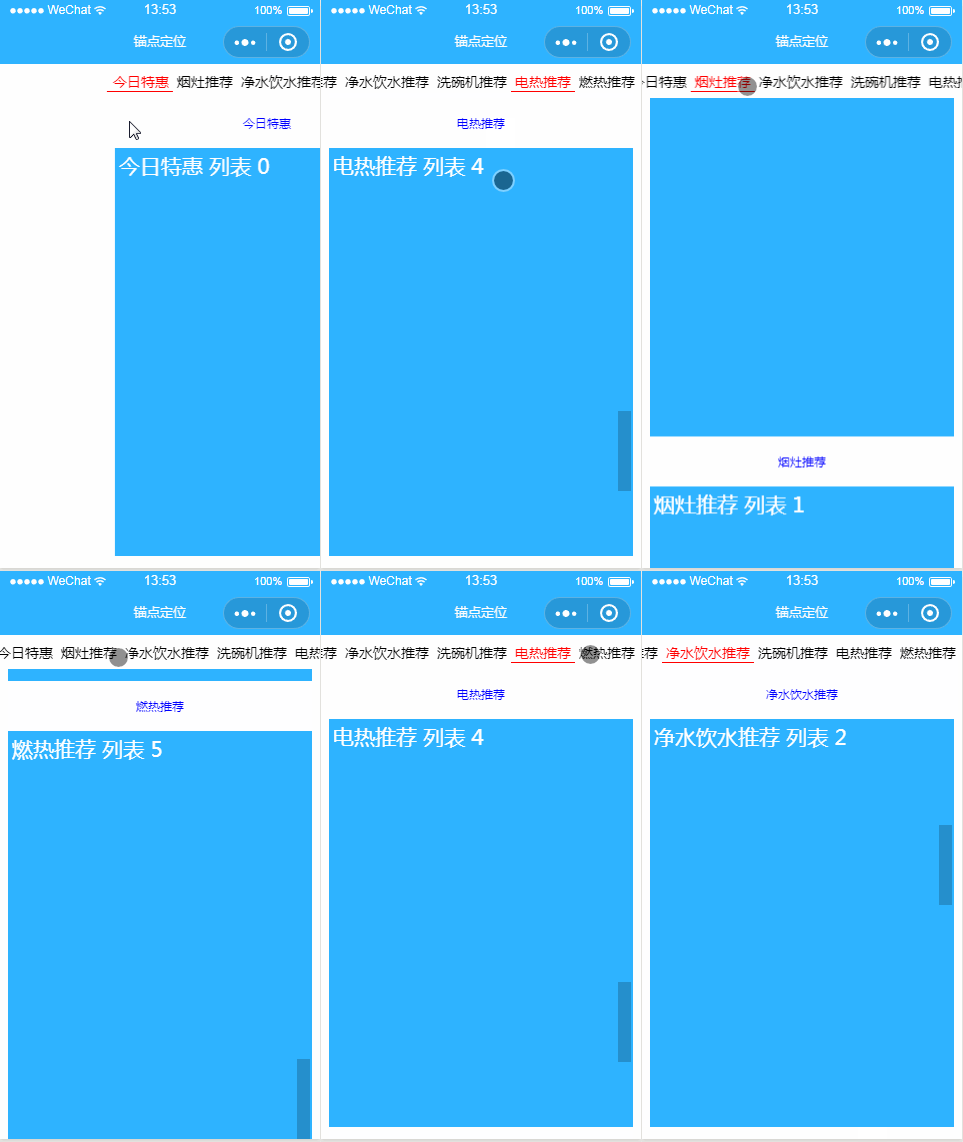
四、总结与备注
暂时没微信小程序基于scroll-view实现锚点定位
注:本文著作权归作者,由demo大师代发,拒绝转载,转载需要作者授权
微信小程序基于scroll-view实现锚点定位的更多相关文章
- 微信小程序-基于canvas画画涂鸦
代码地址如下:http://www.demodashi.com/demo/14461.html 一.前期准备工作 软件环境:微信开发者工具 官方下载地址:https://mp.weixin.qq.co ...
- 微信小程序基于swiper组件的tab切换
代码地址如下:http://www.demodashi.com/demo/14010.html 一.前期准备工作 软件环境:微信开发者工具 官方下载地址:https://mp.weixin.qq.co ...
- 微信小程序-基于高德地图API实现天气组件(动态效果)
微信小程序-基于高德地图API实现天气组件(动态效果) 在社区翻腾了许久,没有找到合适的天气插件.迫不得已,只好借鉴互联网上的web项目,手动迁移到小程序中使用.现在分享到互联网社区中,帮助后续有 ...
- 微信小程序--基于ColorUI构建皮皮虾短视频去水印组件(仅供学习使用)
微信小程序--基于ColorUI构建皮皮虾短视频去水印组件(仅供学习使用) 没错,我是皮友,我想学习舞蹈(/doge)和瑜伽 ,要无水印的那种有助于我加深学习. 1.组件效果展示 2.组件引入准备 h ...
- 微信小程序 -- 基于 movable-view 实现拖拽排序
微信小程序 -- 基于 movable-view 实现拖拽排序 项目基于colorui样式组件 ColorUI组件库 (color-ui.com) 1.实现效果 2. 设计思路 movable-vie ...
- 微信小程序:scroll滑到指定位置
概述 这是我开发微信小程序遇到的坑中的一个,专门记录下来,供以后开发时参考,相信对其他人也有用. scroll滑到指定位置,有两种解决方案,一种是用scroll-view标签,另一种是用wx.page ...
- 微信小程序_(组件)view视图容器
微信小程序view组件官方文档 传送门 Learn 一.hover-class属性 二.hover-start-time与hover-stay-time属性 三.hover-stop-propagat ...
- 微信小程序基于腾讯云对象存储的图片上传
在使用腾讯云对象存储之前,公司一直使用的是传统的FTP的上传模式,而随着用户量的不断增加,FTP所暴露出来的问题也越来越多,1.传输效率低,上传速度慢.2.时常有上传其他文件来攻击服务器,安全上得不到 ...
- 微信小程序基于第三方websocket的服务器端部署
微信小程序后台请求越来越严格 1.request要求用https 2.websocket要求用wss 3.测试后发现websocket只能走433端口 作为.net开发,websocket又是使用的第 ...
随机推荐
- Apache2.2.16+PHP5.3.3+MySQL5.1.49的配置方法
第一步:下载安装的文件 1. MySQL:下载地址mysql-5.1.49-win32.msi: 2. Apache: 下载地址httpd-2.2.16-win32-x86-openssl-0.9.8 ...
- bit byte哪些事
1.bit 电脑中最小的计量单位,比如0或1代表一个bit,简称“位” 2.byte 电脑存储的基本单位.因为上面的bit小弟太小了,所以产生了byte.由8个bit存成了byte,最小为0最大为11 ...
- Lambda与委托
Lambda 表达式是一个可用于创建委托或表达式树类型的匿名函数. 通过使用 lambda 表达式,可以可作为参数 或 返回为函数调用值的本地函数.Lambda 表达式对于编写 LINQ 查询表达式特 ...
- RecyclerView源码分析(一)--整体设计
RecyclerView这个控件出来已经有一段时间了,如果看这篇文章的你,还没有使用过这个控件.那请先去学习怎样使用.不然看也白看.这里奉上一些关于介绍RecyclerView使用方法的优秀博客: 鸿 ...
- 2012年及之后的ImageNet比赛的冠军、亚军和季军ImageNet winners after 2012
2012 0.15 - Supervision (AlexNet) - ~ 60954656 params 0.26 - ISI (ensemble of features) 0.27 - LEAR ...
- 洛谷P1772 [ZJOI2006]物流运输 题解
题目描述 物流公司要把一批货物从码头A运到码头B.由于货物量比较大,需要n天才能运完.货物运输过程中一般要转停好几个码头.物流公司通常会设计一条固定的运输路线,以便对整个运输过程实施严格的管理和跟踪. ...
- 数据库实例: STOREBOOK > 用户
ylbtech-Oracle:数据库实例: STOREBOOK > 用户 用户 1.返回顶部 1.1, 1.2, 2. 用户列表(用户状态=OPEN)返回顶部 2.1, DBSNMP 2.2 ...
- C++设计模式实现--模板(Template)模式
一. 问题 在面向对象系统的分析与设计过程中常常会遇到这样一种情况:对于某一个业务逻辑(算法实现)在不同的对象中有不同的细节实现,可是逻辑(算法)的框架(或通用的应用算法)是同样的.Template提 ...
- [置顶] 自定义的解压进度条 关于ProgressBar的使用
整体布局 <?xml version="1.0" encoding="utf-8"?> <LinearLayout xmlns:android ...
- Java的泛型中,通配符可以设置上限和下限
上限:<? extends T> ?是T和T的子类 下限:<? super T> ?是T和T的父类 怎么看待这个上限和下限呢 首先应该想 其实对于Java来说 <? ex ...