
dockercompose up build fail (node no such file or directory packages.json )
docker构建项目遇到如下问题:

npm ERR! Darwin 15.0.0

npm ERR! argv "/usr/local/lib/node_modules/iojs-bin/node_modules/iojs-darwin-x64/iojs-v3.3.0-darwin-x64/bin/iojs" "/usr/local/bin/npm" "i"

npm ERR! node v3.3.0

npm ERR! npm  v3.3.3

npm ERR! path /Users/aredridel/Projects/npm/newww/node_modules/hapi/node_modules/inert/node_modules/lru-cache

npm ERR! code ENOENT

npm ERR! errno -2

npm ERR! syscall rename

npm ERR! enoent ENOENT:
npm ERR! Darwin 15.0.0
npm ERR! argv "/usr/local/lib/node_modules/iojs-bin/node_modules/iojs-darwin-x64/iojs-v3.3.0-darwin-x64/bin/iojs" "/usr/local/bin/npm" "i"
npm ERR! node v3.3.0
npm ERR! npm v3.3.3
npm ERR! path /Users/aredridel/Projects/npm/newww/node_modules/hapi/node_modules/inert/node_modules/lru-cache
npm ERR! code ENOENT
npm ERR! errno -2
npm ERR! syscall rename
npm ERR! enoent ENOENT: no such file or directory, rename '/Users/aredridel/Projects/npm/newww/node_modules/hapi/node_modules/inert/node_modules/lru-cache' -> '/Users/aredridel/Projects/npm/newww/node_modules/inert/node_modules/lru-cache'
npm ERR! enoent This is most likely not a problem with npm itself
npm ERR! enoent and is related to npm not being able to find a file.
npm ERR! enoent
npm ERR! Please include the following file with any support request:
npm ERR! /Users/aredridel/Projects/npm/newww/npm-debug.log, rename '/Users/aredridel/Projects/npm/newww/node_modules/hapi/node_modules/inert/node_modules/lru-cache' -> '/Users/aredridel/Projects/npm/newww/node_modules/inert/node_modules/lru-cache' npm ERR! enoent This is most likely not a problem with npm itself npm ERR! enoent and is related to npm not being able to find a file. npm ERR! enoent npm ERR! Please include the following file with any support request: npm ERR! /Users/aredridel/Projects/npm/newww/npm-debug.log
solve method: the path fo source not mount volumes correctly . use kitematice and select the right path
这里的找不到packages.json 和找不到代码路径有关,主要问题在于kitematic 的版本可能无法识别 docker的compose 文件中mount路径,需要手动挂载项目路径到 volumns 下
挂载到目录后遇到 找不到express 的错误, 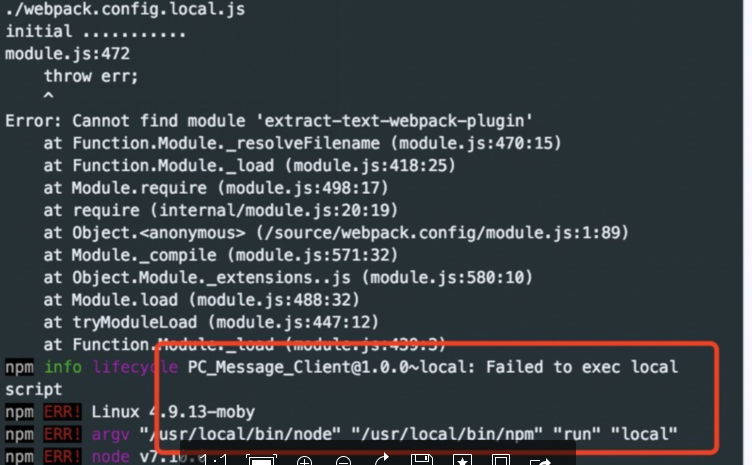
此时,kitematic 管理器中可以使用exec 控制台,进入路径后执行 npm install --save
other question: windows 上docker 默认 default ip 192.168.99.100,如何修改ip:
Close Kitematic
Delete the current default VM: docker-machine rm -f default
Create a new default machine docker-machine create -d virtualbox --virtualbox-hostonly-cidr " 192.168.99.1/24"
Open Kitematic and it should be using this VM.
这个方案是先停掉kitematic,然后用docker-machine删除默认的vm实例,重新创建一个vm,指定ip,然后启动kitematic,刚创建的就可以自动识别了
dockercompose up build fail (node no such file or directory packages.json )的更多相关文章
- Cannot install NodeJs: /usr/bin/env: node: No such file or directory
安装doxmate时,doxmate地址是:https://github.com/JacksonTian/doxmatenpm install doxmate -g 安装完后把错误:Cannot in ...
- /usr/bin/env: node: no such file or directory
今天在安装gulp的之后,运行gulp命令出现了如下报错: /usr/bin/env: node: no such file or directory 网上找了好久,终于解决了,所以记录一下,便于下次 ...
- 【node错误】/usr/bin/env: node: No such file or directory
背景 安装了node后,执行npm run xxx的命令的时候,报错,提示如下: /usr/bin/env: node: No such file or directory 步骤 1. 什么玩意,执行 ...
- dockercompose up build fail
docker https://auth.docker.io/token dial tcp lookup auth.docker.io i/o timeo Error response from dae ...
- 安装nodejs和grunt以后出现 /usr/bin/env: node: No such file or directory
安装完成以后需要执行此命令 sudo ln -s /usr/bin/nodejs /usr/bin/node
- docker jenkins 前端node项目 自动化部署异常 env: ‘node’: No such file or directory
出现问题是docker jenkins 里面没有自动安装node导致找不到这个Node命令 解决方案:手动安装nodejs # 进入jenkins对应容器中 # docker exec -it [对应 ...
- 解决Ubuntu16.04 fatal error: json/json.h: No such file or directory
参考博客 错误产生 安装json-c库之后,根据GitHub上面的readme文件链接到json-c库时出现以下错误: SDMBNJson.h:9:23: fatal error: json/json ...
- Docker build 安装报错, Could not open requirments file: [Errno 2] No such file or directory:'requirements.txt'
docker安装教程 https://docs.docker.com/get-started/part2/#build-the-app 相关帖子 https://stackoverflow.com/q ...
- docker build no such file or directory
在我构建新的镜像的时候, 发生 了 no such file or directory 的错误. 这个错误找了半天, 没头绪, 后来灵光一现, 原来是我的文件夹名字写错了 我的目录结构是这样的 [ ...
随机推荐
- [.NET开发] C#使用doggleReport生成pdf报表的方法
本文实例讲述了C#使用doggleReport生成pdf报表的方法.分享给大家供大家参考,具体如下: 1. 安装nuget -install package DoddleReport -install ...
- 新概念 Lesson 4 Are you a teacher
打招呼用语: Good morning, Good afternoon,Good evening Nice to meet you. How do you do? She is French. 她是法 ...
- XML删除节点
XmlDocument doc = new XmlDocument(); doc.Load("Order.xml"); XmlNode xn = doc.SelectSingleN ...
- oaf 动态创建table vo (转)
原文地址:如何动态创建table 需求: 因为系统中有几千个QA plan 但是不能手动创建几千个 质量收集页面所有需要根据 不同的plan 动态创建对应的 质量收集页面. 但是创建tabel 都要绑 ...
- 体验异步的终极解决方案-ES7的Async/Await
阅读本文前,期待您对promise和ES6(ECMA2015)有所了解,会更容易理解.本文以体验为主,不会深入说明,结尾有详细的文章引用. 第一个例子 Async/Await应该是目前最简单的异步方案 ...
- 配置postgres9.3间的fdw——实现不同postgres数据库间的互访问
下面是安装.配置.使用fdw实现postgres数据库间互访问的方法,转载注明出处: 1.源码安装fdw支持(要求数据库源码安装) cd /usr/local/postgresql-9.3.2/con ...
- ES 分布式搜索
ES整个查询过程是scatter/gather的过程,具体如下: 图见 https://blog.csdn.net/thomas0yang/article/details/78572596?utm_s ...
- SVM学习(五):松弛变量与惩罚因子
https://blog.csdn.net/qll125596718/article/details/6910921 1.松弛变量 现在我们已经把一个本来线性不可分的文本分类问题,通过映射到高维空间而 ...
- Instantclient安装
Instantclient安装 成功
- Python - Learn Note (3)
Python之模块 包就是文件夹:包可以有多级: 模块就是 xxx.py文件:可以创建自己的模块,并且导入它们,模块的名字就和文件的名字相同: Python使用import语句导入一个模块. impo ...