
Python GIL 系列之再谈Python的GIL
1. 之前写过一篇《通过实例认识Python的GIL》的文章,感觉有些意犹未尽
2. 这次对例子作了些扩展,进一步的分析GIL对Python程序的影响
2.1 先来看例子:
- from threading import Thread
- from threading import Event as TEvent
- from multiprocessing import Process
- from multiprocessing import Event as PEvent
- from timeit import Timer
- def countdown(n,event):
- while n > 0:
- n -= 1
- event.set()
- def io_op(n,event):
- f = open('test.txt','w')
- while not event.is_set():
- f.write('hello,world')
- f.close()
- def t1():
- COUNT=100000000
- event = TEvent()
- thread1 = Thread(target=countdown,args=(COUNT,event))
- thread1.start()
- thread1.join()
- def t2():
- COUNT=100000000
- event = TEvent()
- thread1 = Thread(target=countdown,args=(COUNT//2,event))
- thread2 = Thread(target=countdown,args=(COUNT//2,event))
- thread1.start(); thread2.start()
- thread1.join(); thread2.join()
- def t3():
- COUNT=100000000
- event = PEvent()
- p1 = Process(target=countdown,args=(COUNT//2,event))
- p2 = Process(target=countdown,args=(COUNT//2,event))
- p1.start(); p2.start()
- p1.join(); p2.join()
- def t4():
- COUNT=100000000
- event = TEvent()
- thread1 = Thread(target=countdown,args=(COUNT,event))
- thread2 = Thread(target=io_op,args=(COUNT,event))
- thread1.start(); thread2.start()
- thread1.join(); thread2.join()
- def t5():
- COUNT=100000000
- event = PEvent()
- p1 = Process(target=countdown,args=(COUNT,event))
- p2 = Process(target=io_op,args=(COUNT,event))
- p1.start(); p2.start()
- p1.join(); p2.join()
- if __name__ == '__main__':
- t = Timer(t1)
- print('countdown in one thread:%f'%(t.timeit(1),))
- t = Timer(t2)
- print('countdown use two thread:%f'%(t.timeit(1),))
- t = Timer(t3)
- print('countdown use two Process:%f'%(t.timeit(1),))
- t = Timer(t4)
- print('countdown in one thread with io op in another thread:%f'%(t.timeit(1),))
- t = Timer(t5)
- print('countdown in one process with io op in another process:%f'%(t.timeit(1),))
2.2 再来看输出:
2.2.1 先来看多核CPU禁用其它CPU,只运行一个CPU,Windows系统,Python2.7.6上运行的结果:
- countdown in one thread:', 5.9650638561501195
- countdown use two thread:', 5.8188333656781595
- countdown use two Process', 6.197559396296269
- countdown in one thread with io op in another thread:', 11.369204522553051
- countdown in one process with io op in another process:', 11.79234388645473
2.2.2 再来看下四核CPU,Windows系统,Python2.7.6上运行的结果:
- countdown in one thread:6.479085
- countdown use two thread:24.266131
- countdown use two Process4.360930
- countdown in one thread with io op in another thread:29.967870
- countdown in one process with io op in another process:6.478644
2.2.3 再来看下四核64位CPU,Widonws系统,Python3.4上运行的结果:
- countdown in one thread:12.333187
- countdown use two thread:19.358091
- countdown use two Process:7.105101
- countdown in one thread with io op in another thread:10.443203
- countdown in one process with io op in another process:18.682883
为了方便对比,还是上张图吧:
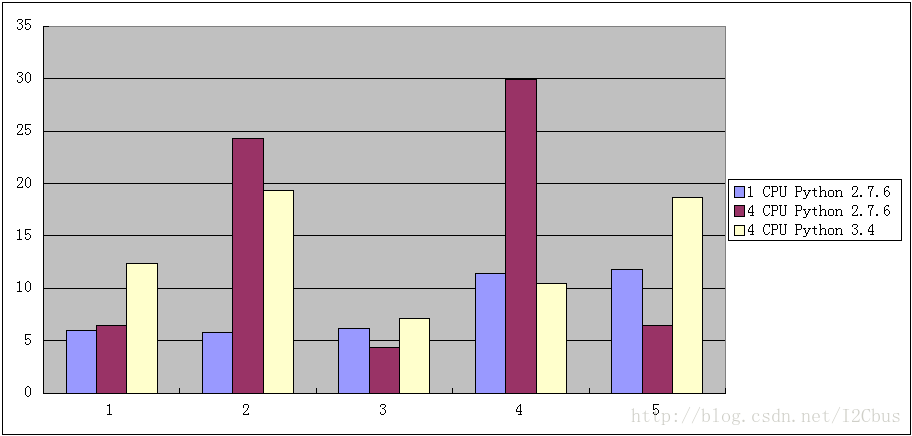
1)、单线程
2)、两线程
3)、二进程
4)、CPU计算线程+I/O线程
5)、CPU计算进程+I/O进程
2.3 总结:
2.3.1 在单核CPU上,一切都很美好
单线程和多线程的运行效率差不多。
多进程和多线程的表现一致,多进程稍微慢些,可能是进程切换更耗时间所致。
CPU和IO混合操作时,多进程和多线程的表现也一致
2.3.2 但是到了多核CPU上时,多线程和多进程的区别就暴露无余了:
使用多线程情况下,执行同样的计算量,CPU的计算时间比单线程慢了四倍(6.479085比24.266131)
如果是多线程情况下的CPU计算和IO混合操作,情况变得更糟(29.967870秒),这里的时间还算是好的,如果开的程序多了,其它程序也在执行IO操作,所耗的时间还会更多。
多进程情况下,一切依然美好。
2.3.3 在Python3.4上,由于对GIL作了很大的优化,多线程情况下的运行效率有了很大 改善,I/O操作对CPU计算的影响也比较小了,而没有3.2版本上那么大了,但是整体的运行速度比Python2.7慢了2倍!
3. 从上面这个例子来看,情况是非常不妙的,Python在多核CPU的情况下,Thread似乎变得一无是处,但是要不要这么悲观呢?我们来接着看下一个例子:
4. 我们对原来例子作下优化,将countdown移到c代码中进行处理:
4.1 先看代码:
4.1.1 utility.pyx
- def countdown(int n):
- with nogil:
- while n > 0:
- n -= 1
4.1.2 Setup.py
- from distutils.core import setup
- from distutils.extension import Extension
- from Cython.Build import cythonize
- ext = Extension("utility",
- define_macros = [('MAJOR_VERSION', '1'),
- ('MINOR_VERSION', '0')],
- sources = ["utility.pyx", ])
- setup(
- name = 'callback',
- version = '1.0',
- description = 'This is a callback demo package',
- author = '',
- author_email = 'shi19@163.com',
- url = '',
- long_description = '',
- ext_modules=cythonize([ext,]),
- )
4.1.3 count.py
- from threading import Thread
- from threading import Event as TEvent
- from multiprocessing import Process
- from multiprocessing import Event as PEvent
- import utility
- from timeit import Timer
- def countdown(n,event):
- for i in range(100):
- utility.countdown(n)
- event.set()
- def io_op(n,event):
- f = open('test.txt','w')
- while not event.is_set():
- f.write('hello,world')
- f.close()
- def t1():
- COUNT=100000000
- event = TEvent()
- thread1 = Thread(target=countdown,args=(COUNT,event))
- thread1.start()
- thread1.join()
- def t2():
- COUNT=100000000
- event = TEvent()
- thread1 = Thread(target=countdown,args=(COUNT//2,event))
- thread2 = Thread(target=countdown,args=(COUNT//2,event))
- thread1.start(); thread2.start()
- thread1.join(); thread2.join()
- def t3():
- COUNT=100000000
- event = PEvent()
- p1 = Process(target=countdown,args=(COUNT//2,event))
- p2 = Process(target=countdown,args=(COUNT//2,event))
- p1.start(); p2.start()
- p1.join(); p2.join()
- def t4():
- COUNT=100000000
- event = TEvent()
- thread1 = Thread(target=countdown,args=(COUNT,event))
- thread2 = Thread(target=io_op,args=(COUNT,event))
- thread1.start(); thread2.start()
- thread1.join(); thread2.join()
- def t5():
- COUNT=100000000
- event = PEvent()
- p1 = Process(target=countdown,args=(COUNT,event))
- p2 = Process(target=io_op,args=(COUNT,event))
- p1.start(); p2.start()
- p1.join(); p2.join()
- if __name__ == '__main__':
- t = Timer(t1)
- print('countdown in one thread:%f'%(t.timeit(1),))
- t = Timer(t2)
- print('countdown use two thread:%f'%(t.timeit(1),))
- t = Timer(t3)
- print('countdown use two Process:%f'%(t.timeit(1),))
- t = Timer(t4)
- print('countdown in one thread with io op in another thread:%f'%(t.timeit(1),))
- t = Timer(t5)
- print('countdown in one process with io op in another process:%f'%(t.timeit(1),))
4.2 几点说明:
4.2.1 utility.pyx是cython的脚本,用cython可以实现python和c的混合编程,并可以最终生成c文件。其中with nogil的意思是,在执行while循环的时候释放gil,因为接下来的计算不涉及到Python对象的操作,可以放心大胆的把gil的枷锁给去掉。
4.2.2 Setup.py是utility.pyx的编译脚本,执行python Setup.py build_ext --inplace即可在Windows下生成utility.pyd的动态库,在linux下生成的动态库叫utility.so,在python代码中就可以通过import utility来引用扩展。
4.2.3 count.py,修改后的测试程序,请注意countdown,这里将会比原来的代码多调用100次countdown!!
4.3 运行后得到输出:
- countdown in one thread:16.968686
- countdown use two thread:9.333422
- countdown use two Process:9.620321
- countdown in one thread with io op in another thread:17.754015
- countdown in one process with io op in another process:17.867098
4.4 嗯,世界又变得很美好了,请记住,上面的输出是countdown比原来多调用100倍的输出结果,可见将数字计算的操作移到c代码会获得怎么的性能提升!!
5. 好了,最后来作个总结:
5.1 Python的GIL在单核情况下对性能的影响可以忽略不计,几乎没有。
5.2 Python由于其GIL的存在在多核CPU的情况下Thread的表现真的是非常的糟糕,但是Process则不受GIL的影响。
5.3 Python内置的数据类是不适合用于大量的数学计算的,当然这也不仅仅是Python的问题,其它完全面向对象的语言都有这个问题, 要进行大量的数学计算就要用把代码移到C/C++中去实现,这样不仅可以去除gil的影响,更可以让性能获得几十倍上百倍的提升, 或者用numpy之类的扩展在执行科学计算时也可以让性能大幅的提升。
5.4 Python慢其实就是慢在数字计算上,想想就知道,如果每一个数字都是一个对象, 在计算的时候就免不了不断的为对象申请内存,释放内存,速度肯定就慢下来。
5.5 但是,Python对数据结构的操作是非常高效的,像Python内置的强大的dict,str,list等类, 不是说大话,其处理的速度真的可以和C媲美,因为它们的实现本身就是用C实现的。 我们在编程刚入门的时候就被告知:数据结构+算法=程序,这个道理也许只会在用Python这样的语言时才会有更切身的体会。
5.6 在用Python开发程序时,你不得不花点时间在性能优化上来, 过程也很简单:用cProfile类查找出比较耗时的操作,然后将其移到C中去实现, 另外,如果是使用多核CPU的情况,一定要小心使用Thread,尽量用Process来替代Thread,通过本文对GIL的分析,将对性能的优化提供很好的帮助。 其实,Python的性能优化过程也是程序开发中有挑战又非常有成就感的部分。
5.7 但是,记住一点,不要过早的对程序进行优化,过早优化是罪恶之源 ---Donald Knuth。前期开发应该把注意力放在功能实现以及代码的可读性和可维护性上来。
5.8 最后,愿以一句话作为本篇文件的结束语:都说爱一个人就要爱他(她)的全部,包括他(她)的缺点,对人如此,对物呢?
(完)
Python GIL 系列之再谈Python的GIL的更多相关文章
- Python学习系列(四)Python 入门语法规则2
Python学习系列(四)Python 入门语法规则2 2017-4-3 09:18:04 编码和解码 Unicode.gbk,utf8之间的关系 2.对于py2.7, 如果utf8>gbk, ...
- Python 基础系列一:初识python
为什么是Python而不是其他语言? C 和 Python.Java.C#等 C语言: 代码编译得到 机器码 ,机器码在处理器上直接执行,每一条指令控制CPU工作. 其他语言: 代码编译得到 字节码 ...
- flask开发restful api系列(8)-再谈项目结构
上一章,我们讲到,怎么用蓝图建造一个好的项目,今天我们继续深入.上一章中,我们所有的接口都写在view.py中,如果几十个,还稍微好管理一点,假如上百个,上千个,怎么找?所有接口堆在一起就显得杂乱无章 ...
- Python 基础系列一:初识python(二)基本数据类型
上节拾遗 1.编码转换过程,utf-8转换gbk 过程 经过解码(py27): x.decode('utf-8')-->unicode-->编码x.encode('gbk') ps:py3 ...
- Python fullstack系列【2】Python数据类型
基本数据类型 学习一门编程语言通常都是先了解其不同的数据类型,以及每种数据类型对象所附带的方法,Python也不例外,本篇就详细介绍下这部分. Python基本数据类型总览: 1.Booleans(布 ...
- Python学习系列(三)Python 入门语法规则1
一.注释 ''' 多行注释 ''' #单行注释 ''' #example1.1 测试程序 时间:4/17/2017 i1=input("请输入用户名:") i2=input ...
- JVM系列之:再谈java中的safepoint
目录 safepoint是什么 safepoint的例子 线程什么时候会进入safepoint safepoint是怎么工作的 总结 safepoint是什么 java程序里面有很多很多的java线程 ...
- Hadoop概念学习系列之再谈hadoop集群里的本地模式、伪分布模式和全分布模式(三十七)
能看懂博主我此博文,相信你已经有了一定基础了. 对于本地模式.伪分布模式和全分布模式的概念,这里,我不多赘述.太多资料和博客,随便在网上一搜就好. 比如<hadoop实战 第二版>陆嘉恒老 ...
- Python学习系列:目录
Python学习系列(二)Python 编译原理简介 Python学习系列(三)Python 入门语法规则1 Python学习系列(四)Python 入门语法规则2
随机推荐
- [异常记录-12]Web Deploy部署:未能连接到远程计算机,请确保在远程计算机上安装了 Web Deploy 并启动了所需的进程("Web Management Service")
Web Deploy 安装 请参考:图文详解远程部署ASP.NET MVC 5项目 如此安装后还不行, 可以在卸载后重新安装 Web Deploy 时,不要选那个经典还是典型的安装选项,选自定义安装 ...
- VisualStudio使用技巧及快捷键
1. 怎样调整代码排版的格式? 选择:编辑—>高级—>设置文档的格式或编辑—>高级—>设置选中代码的格式. 格式化cs代码:Ctrl+k+f 格式化aspx代码:Ctrl+k+ ...
- Elasticsearch 多字段搜索
查询很少是对一个字段做 match 查询,通常都是一个 query 查询多个字段,比如一个 doc 有 title.content.pagetag 等文本字段,要在这些字段查询含多个 term 的 q ...
- UI自动化测试篇 :webdriver+ant+jenkins自动化测试实践
http://www.cnblogs.com/chengtch/p/6063360.html 前面基本弄清楚了webdriver+ testng 的测试环境部署,现在这里记录一下结合ant及jenki ...
- 《剑指offer》第十九题(正则表达式匹配)
// 面试题19:正则表达式匹配 // 题目:请实现一个函数用来匹配包含'.'和'*'的正则表达式.模式中的字符'.' // 表示任意一个字符,而'*'表示它前面的字符可以出现任意次(含0次).在本题 ...
- 机器学习 Numpy库入门
2017-06-28 13:56:25 Numpy 提供了一个强大的N维数组对象ndarray,提供了线性代数,傅里叶变换和随机数生成等的基本功能,可以说Numpy是Scipy,Pandas等科学计算 ...
- R语言plot函数参数合集
最近用R语言画图,plot 函数是用的最多的函数,而他的参数非常繁多,由此总结一下,以供后续方便查阅. plot(x, y = NULL, type = "p", xlim = N ...
- linux使用flock文件锁
使用linux flock 文件锁实现任务锁定,解决冲突 格式: flock [-sxun][-w #] fd# flock [-sxon][-w #] file [-c] command flock ...
- ccf画图
问题描述 在一个定义了直角坐标系的纸上,画一个(x1,y1)到(x2,y2)的矩形指将横坐标范围从x1到x2,纵坐标范围从y1到y2之间的区域涂上颜色. 下图给出了一个画了两个矩形的例子.第一个矩形是 ...
- 计时(.NET)
using System.Diagnostics; // 开始计时 Stopwatch stopwatch = new Stopwatch(); stopwatch.Start(); // 要计时的操 ...