
Postman + newman + jenkins 的API自动化测试应用
一、环境配置
Postman
postman 的具体使用可以参考另外一篇文章:postman 做接口测试之学习笔记
Newman
第一步,安装nodejs。
第二步,在nodejs命令行安装newman,即命令行输入如下命令:
npm install -g newman
jenkins
去官网(https://jenkins.io/index.html)下载jenkins
二、Postman + Newman + jenkins 的使用
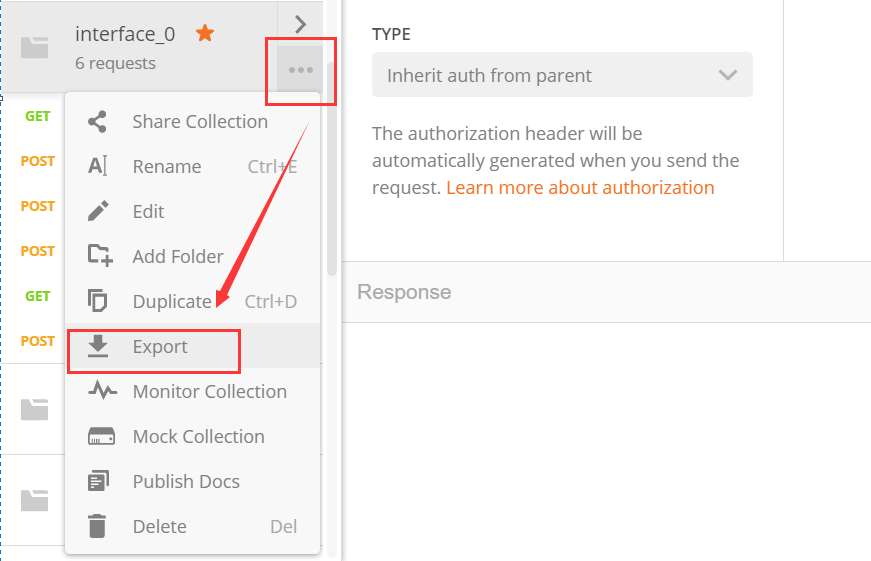
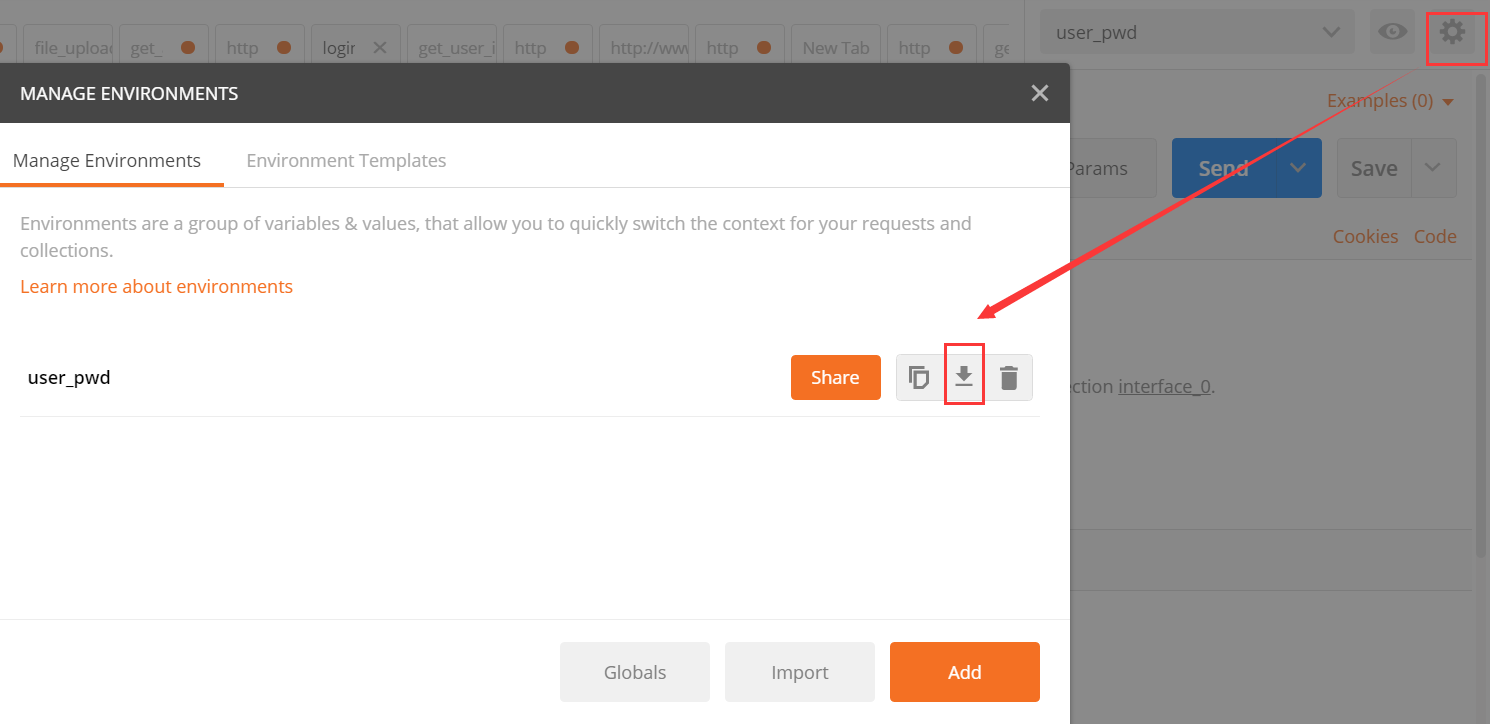
1. 在postman中导出testcase 文件夹(即存各个接口的collection文件夹)和设置的环境变量文件。
如下所示,导出来的是个json 格式的文件
2. jenkins配置
注意:如果是安装在本地的Jenkins,要将jenkins开启,切换到jenkins.war 的路径下, 执行 java -jar jenkins.war 则可以开启了。

在jenkins上配置如下图,这个路径就是上面通过postman导出文件的路径。
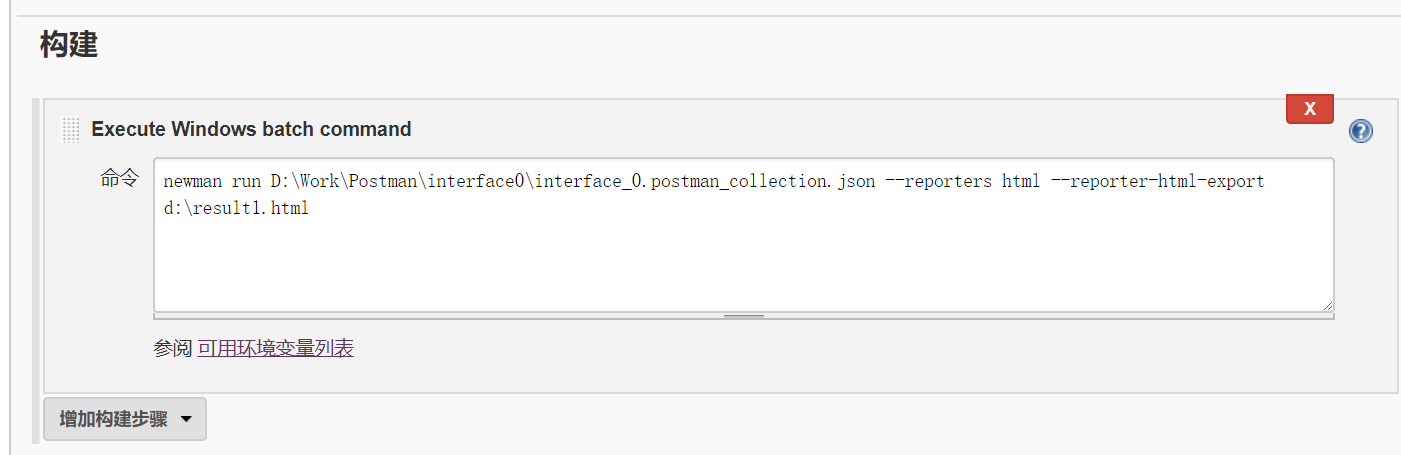
剩下的就是jenkins的常规操作了,比如设置好邮箱后点击立即构建或者设置多久构建一次,这样自动化就跑起来了,等待自动化测试结束后我们就可以收到测试成功或者失败的测试报告邮件了(依赖于设置)。
通过上面这些步骤即可完成基于postman和Jenkins的自动化接口测试。
Newman的使用:
可以参考:
Newman - Running collections in the command line
Usage: newman [options]

  Options:

    -h, --help                      output usage information

    -V, --version                   output the version number

    -c, --collection [file]         Specify a Postman collection as a JSON [file]

    -u, --url [url]                 Specify a Postman collection as a [url]

    -f, --folder [folder-name]      Run a single folder from a collection. To be used with -c or -u

    -e, --environment [file]        Specify a Postman environment as a JSON [file]

    --environment-url [url]         Specify a Postman environment as a URL

    -E, --exportEnvironment [file]  Specify an output file to dump the Postman environment before exiting [file]

    -d, --data [file]               Specify a data file to use either json or csv

    -g, --global [file]             Specify a Postman globals file [file]

    -G, --exportGlobals [file]      Specify an output file to dump Globals before exiting [file]

    -y, --delay [number]            Specify a delay (in ms) between requests

    -r, --requestTimeout [number]   Specify a request timeout (in ms) for requests (Defaults to  if not set)

    -R, --avoidRedirects            Prevents Newman from automatically following redirects

    -s, --stopOnError               Stops the runner with code= when a test case fails

    -j, --noSummary                 Doesn't show the summary for each iteration

    -n, --number [number]           Define the number of iterations to run

    -C, --noColor                   Disable colored output

    -S, --noTestSymbols             Disable symbols in test output and use PASS|FAIL instead

    -k, --insecure                  Disable strict ssl

    -l, --tls                       Use TLSv1

    -N, --encoding [encoding-type]  Specify an encoding for the response. Supported values are ascii,utf8,utf16le,ucs2,base64,binary,hex

    -x, --exitCode                  Continue running tests even after a failure, but exit with code=. Incompatible with --stopOnError

    -o, --outputFile [file]         Path to file where output should be written [file]

    -O, --outputFileVerbose [file]  Path to file where full request and responses should be logged [file]

    -t, --testReportFile [file]     Path to file where results should be written as JUnit XML [file]

    -i, --import [file]             Import a Postman backup file, and save collections, environments, and globals [file] (Incompatible with any option except pretty)

    -p, --pretty                    Enable pretty-print while saving imported collections, environments, and globals

    -H, --html [file]               Export a HTML report to a specified file [file]

    -W, --whiteScreen               Black text for white screen

    -L, --recurseLimit [limit]      Do not run recursive resolution more than [limit] times. Default = . Using  will prevent any variable resolution

  Newman is a command-line collection runner for Postman. You must specify a collection file or a collection URL to run newman

  A collection file or URL is mandatory

  Examples:

    newman -c POSTMAN_COLLECTION

    newman -u POSTMAN_COLLECTION -e POSTMAN_ENVIRONMENT

    newman -c POSTMAN_COLLECTION -f SAMPLE_FOLDER

  For more documentation, issues and examples head over to https://github.com/postmanlabs/newman
Postman + newman + jenkins 的API自动化测试应用的更多相关文章
- Postman+Newman+jenkins实现API自动化测试
最近自己在学习用postman+newman+jenkins实现API自动化测试,这里做个回顾和记录.(此次是在windows上进行的环境搭建) 一.说明 1.大致思路:利用postman做接口调试所 ...
- Postman+newman+jenkins+git实战
一.接口分类,流程,用例设计 接口分类: 外部接口:被测系统与外部其他系统之间的接口. 承保系统(被测系统),核算系统. 内部接口:被测系统内部各个子模块之间的接口. 承保系统(A模块,B模块) 测试 ...
- postman+newman+jenkins环境部署
postman+newman+jenkins 环境部署 2017年4月27日 14:33 阅读 11 新浪博客 1.postman: http://itfish.net/article/59864.h ...
- Postman+Newman+Jenkins APItest自动化集成测试
postman做接口测试简单易用很容易上手,但是接口越来越多,每次手动点击runner进行测试不灵活,最近就研究了下newman,利用newman实现接口的自动化测试,但是每次需要命令行操作也不方便, ...
- Newman+Jenkins实现接口自动化测试
目录 一.是什么Newman 二.如何安装 三.如何使用 1.运行本地文件 2.运行在线文件 3.以node.js库运行 4.导出报告 四.命令行测试真实接口 1.导出collection文件 2.导 ...
- SpringBoot集成Swagger,Postman,newman,jenkins自动化测试.
环境:Spring Boot,Swagger,gradle,Postman,newman,jenkins SpringBoot环境搭建. Swagger简介 Swagger 是一款RESTFUL接口的 ...
- Web API 持续集成:PostMan+Newman+Jenkins(图文讲解)
本文由葡萄城技术团队于博客园原创并首发 转载请注明出处:葡萄城官网,葡萄城为开发者提供专业的开发工具.解决方案和服务,赋能开发者. 上篇文章我们已经完成了API测试工具选型,接下来是一系列周期性的开发 ...
- postman+newman+jenkins 接口自动化问题
声明:个人原创,转载请注明 1.安装postman工具 下载地址:https://www.getpostman.com/点击下载,选择自己的系统,我的是windows系统,64位 2.postman ...
- postman+newman+jenkins
1.postman: http://itfish.net/article/59864.html(网上参考资料) 1)安装(要用爬墙软件): 进入下面地址https://chrome.google.co ...
随机推荐
- 利用腾讯云COS云对象存储定时远程备份网站
版权声明:本文由张戈 原创文章,转载请注明出处: 文章原文链接:https://www.qcloud.com/community/article/942851001487125915 来源:腾云阁 h ...
- php guzzle post async
use GuzzleHttp\Pool;use GuzzleHttp\Client;//use GuzzleHttp\Psr7\Request;use Psr\Http\Message\Respons ...
- 【CF708E】Student's Camp 组合数+动态规划
[CF708E]Student's Camp 题意:有一个n*m的网格,每一秒钟,所有左面没有格子的格子会有p的概率消失,右面没有格子的格子也会有p的概率消失,问你t秒钟后,整个网格的上边界和下边界仍 ...
- [图书] C++
作者 书名 Bjarne Stroustrup The Design and Evolution of C++Stanley B. Lippman C++ PrimerStanley B. ...
- python---使用md5加密
python中使用md5进行加密字符串: __author__ = 'Administrator' #-*- coding: utf-8 -*- import hashlib aa = ' #需要加密 ...
- thinkCMF----如何写标签
ThinkCMF写标签的地方:
- Mongodb 副本集 数据同步简单测试
副本集的搭建,请见 CENTOS6.5 虚拟机MONGODB创建副本集 接下来将简单说明下副本集之间的数据同步. 1.首先,进入primary节点 MOGO_PATH/bin/mongo -por ...
- Centos6.5 (或Linux) 安装Elasticsearch
一.可以在网上下载对饮的版本:https://github.com/elastic/elasticsearch,本次安装的是5.5.3. 首先保证虚拟机上安装了jdk,jdk的版本只是是1.7或以上 ...
- Django之ContentType详解
contenttypes 是Django内置的一个应用,可以追踪项目中所有app和model的对应关系,并记录在ContentType表中. models.py文件的表结构写好后,通过makemigr ...
- vue之单表输入绑定
vue的核心:声明式的指令和数据的双向绑定. 那么声明式的指令,已经给大家介绍完了.接下来我们来研究一下什么是数据的双向绑定? 另外,大家一定要知道vue的设计模式:MVVM M是Model的简写,V ...