
Working with Entity Relations in OData
Working with Entity Relations in OData
前言
阅读本文之前,您也可以到Asp.Net Web API 2 系列导航进行查看 http://www.cnblogs.com/aehyok/p/3446289.html。
本文的示例代码的下载地址为http://pan.baidu.com/s/1o6lqXN8
大多数的数据集定义实体间的关系:客户有订单、书籍有作者、产品有供应商。客户端可以使用OData操作实体间的关系。给定一个产品,你可以找到该产品的供应商。您也可以创建或者删除关系。例如,您也可以为一个产品设置一个供应商。
本教程将会展示在Asp.Net Web API中支持这些操作。本文的教程是建立在上一节的教程之上http://www.cnblogs.com/aehyok/p/3545824.html。
Add a Supplier Entity添加一个供应商实体类
首先我们需要来添加一个Supplier的实体类

namespace OData.Models

{

    public class Supplier

    {

        [Key]

        public string Key { get; set; }

        public string Name { get; set; }

    }

}
这个类使用了一个字符串类型的实体键。在实践中,这可能比使用整形键不太常见的。但它是值得的看到OData如何处理除了整数以外的其他键类型。
接下来,我们将通过在Product类上添加一个Supplier的属性来建立一个关系。
    public class Product

    {

        public int ID { get; set; }

        public string Name { get; set; }

        public decimal Price { get; set; }

        public string Category { get; set; }

        // New code

        [ForeignKey("Supplier")]

        public string SupplierId { get; set; }

        public virtual Supplier Supplier { get; set; }

    }
添加一个新的DbSet到ProductServiceContext类,从而使实体框架将包括Supplier在数据库表中。
    public class ProductServiceContext : DbContext

    {

        public ProductServiceContext() : base("name=ProductServiceContext")

        {

        }

        public DbSet<Product> Products { get; set; }

        ///New Code

        public DbSet<Supplier> Suppliers { get; set; }

    }
在WebApiConfig.cs,添加一个“Suppliers”实体的EDM模型:
            ODataConventionModelBuilder builder = new ODataConventionModelBuilder();

            builder.EntitySet<Product>("Products");

            // New code:

            builder.EntitySet<Supplier>("Suppliers");
Navigation Properties导航属性
为了得到一个产品的供应商,客户端发送了一个Get请求:
GET /Products(1)/Supplier
在Product类型上有一个Supplier的导航属性。在这个实例中,Supplier是一个单一的项。但是一个导航属性也能返回一个集合(一对多或者多对多的 关系)。
为了支持这个请求,在ProductsController上添加如下方法:
        // GET /Products(1)/Supplier

        public Supplier GetSupplier([FromODataUri] int key)

        {

            Product product = db.Products.FirstOrDefault(p => p.ID == key);

            if (product == null)

            {

                throw new HttpResponseException(HttpStatusCode.NotFound);

            }

            return product.Supplier;

        }
key这个参数就是这个Product的键。这个方法返回关联的实体——在这个实例中,就是一个Supplier对象。方法的名称和参数的名称都是非常重要的。总之,如果导航属性被命名为一个“X”,你需要添加一个被命名为“GetX”的方法。这个方法必须采用一个命名为“key”的参数,用来匹配父类数据类型的key。
它也是很重要的在键参数上拥有【FromOdataUri】的属性。当它从请求的URL中解析键时,这个属性将会告诉Web API去使用Odata语法规则。
Creating and Deleting Links
OData支持创建和删除两个实体之间的关系。在OData术语中,这个关系就是一个“link”。每个link有一个携带entity/$links/entity的Url。例如,由产品到供应商的链接看起来像这样:
/Products(1)/$links/Supplier
为了创建一个新的链接,这个客户端发送了一个post请求到这个链接URI。请求的消息体就是目标实体的URI。例如,假设有一个供应商的键为“CTSO”。为了创建一个链接由“Product(1)”到”Supplier('CTSO')“,客户端发送一个请求如下:
POST http://localhost/odata/Products(1)/$links/Supplier

Content-Type: application/json

Content-Length: 50

{"url":"http://localhost/odata/Suppliers('CTSO')"}
对于删除一个链接,客户端发送了一个DELETE 请求到链接URI。
Creating Links
为启用一个客户端去创建产品-供应商的链接,需要在ProductsController类中添加如下的代码:
[AcceptVerbs("POST", "PUT")]

public async Task<IHttpActionResult> CreateLink([FromODataUri] int key, string navigationProperty, [FromBody] Uri link)

{

    if (!ModelState.IsValid)

    {

        return BadRequest(ModelState);

    }

    Product product = await db.Products.FindAsync(key);

    if (product == null)

    {

        return NotFound();

    }

    switch (navigationProperty)

    {

        case "Supplier":

            string supplierKey = GetKeyFromLinkUri<string>(link);

            Supplier supplier = await db.Suppliers.FindAsync(supplierKey);

            if (supplier == null)

            {

                return NotFound();

            }

            product.Supplier = supplier;

            await db.SaveChangesAsync();

            return StatusCode(HttpStatusCode.NoContent);

        default:

            return NotFound();

    }

}
这个方法有三个参数:
第一个key:就是引导到父类实体的键
第二个navigationProperty: 导航属性的名称。例如,最合适的导航属性Supplier。
第三个link:被链接实体的OData的URI。这个值是从消息体中获得。例如,这个链接URI可能是”http://localhost/odata/Suppliers('CTSO')“,也就是供应商中有ID="CTSO"。
这个方法用这个链接去查找Supplier。如果匹配的供应商被发现,这个方法将会设置Product实体类的Supplier的属性,并且保存结果到数据库。
其中最难的部分是解析链接URI。从根本上来说,你需要模拟发送一个get请求到那个URI。接下来的辅助方法将会展示如何处理它。这个方法调用Web API路由过程,返回一个OData实体,展现被转换的OData路径。对于一个链接URI,这个片段数中应该有一个实体键。
// Helper method to extract the key from an OData link URI.

private TKey GetKeyFromLinkUri<TKey>(Uri link)

{

    TKey key = default(TKey);

    // Get the route that was used for this request.

    IHttpRoute route = Request.GetRouteData().Route;

    // Create an equivalent self-hosted route.

    IHttpRoute newRoute = new HttpRoute(route.RouteTemplate,

        new HttpRouteValueDictionary(route.Defaults),

        new HttpRouteValueDictionary(route.Constraints),

        new HttpRouteValueDictionary(route.DataTokens), route.Handler);

    // Create a fake GET request for the link URI.

    var tmpRequest = new HttpRequestMessage(HttpMethod.Get, link);

    // Send this request through the routing process.

    var routeData = newRoute.GetRouteData(

        Request.GetConfiguration().VirtualPathRoot, tmpRequest);

    // If the GET request matches the route, use the path segments to find the key.

    if (routeData != null)

    {

        ODataPath path = tmpRequest.GetODataPath();

        var segment = path.Segments.OfType<KeyValuePathSegment>().FirstOrDefault();

        if (segment != null)

        {

            // Convert the segment into the key type.

            key = (TKey)ODataUriUtils.ConvertFromUriLiteral(

                segment.Value, ODataVersion.V3);

        }

    }

    return key;

}
Deleting Links
对于删除一个链接,在ProductsController类中添加如下代码:
public async Task<IHttpActionResult> DeleteLink([FromODataUri] int key, string navigationProperty)

{

    Product product = await db.Products.FindAsync(key);

    if (product == null)

    {

        return NotFound();

    }

    switch (navigationProperty)

    {

        case "Supplier":

            product.Supplier = null;

            await db.SaveChangesAsync();

            return StatusCode(HttpStatusCode.NoContent);

        default:

            return NotFound();

    }

}
在这个例子中,这个导航属性是一个简单的Supplier实体。如果导航属性是一个集合,对于删除一个链接的URI必须在被关联的实体中有一个键。例如:
DELETE /odata/Customers(1)/$links/Orders(1)
这里展示的则是1对多的关系中,删除其中的一个的例子。
这个请求就是从客户1中移除订单为1的。这个DeleteLink方法将会有如下签名:
void DeleteLink([FromODataUri] int key, string relatedKey, string navigationProperty);
简单测试结果
1、http://localhost:3629/Odata/Products(1)/Supplier

2、
将ID=2的Supplier修改为WING
请求Header
POST http://localhost/odata/Products(2)/$links/Supplier

Content-Type: application/json

Content-Length: 50
请求Body
{"url":"http://localhost/odata/Suppliers('WING')"}
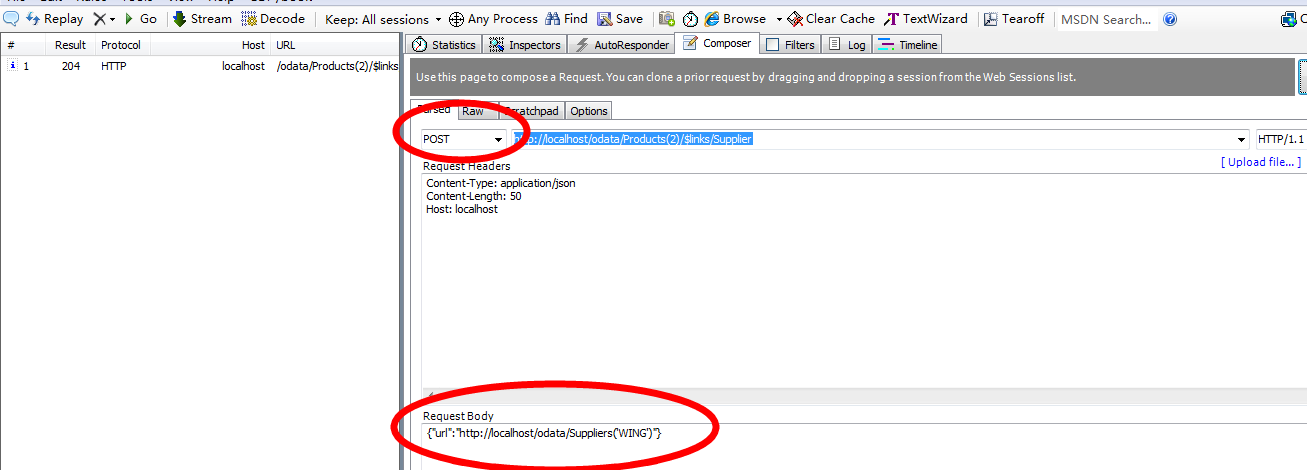
现在再次查看http://localhost/Odata/Products

3、DELETE http://localhost/odata/Products(2)/$links/Supplier那么这样就可以将上面的SupplierId=WING修改为null
然后再次执行http://localhost/Odata/Products查看

总结
本文所参考链接为http://www.asp.net/web-api/overview/odata-support-in-aspnet-web-api/working-with-entity-relations
本文示例代码下载地址为http://pan.baidu.com/s/1o6lqXN8
Working with Entity Relations in OData的更多相关文章
- Asp.Net Web API 2第十八课——Working with Entity Relations in OData
前言 阅读本文之前,您也可以到Asp.Net Web API 2 系列导航进行查看 http://www.cnblogs.com/aehyok/p/3446289.html. 本文的示例代码的下载地址 ...
- [转]Upgrading to Async with Entity Framework, MVC, OData AsyncEntitySetController, Kendo UI, Glimpse & Generic Unit of Work Repository Framework v2.0
本文转自:http://www.tuicool.com/articles/BBVr6z Thanks to everyone for allowing us to give back to the . ...
- [转]Creating an OData v3 Endpoint with Web API 2
本文转自:https://docs.microsoft.com/en-us/aspnet/web-api/overview/odata-support-in-aspnet-web-api/odata- ...
- Asp.Net Web API 2
Asp.Net Web API 2第十八课——Working with Entity Relations in OData 前言 阅读本文之前,您也可以到Asp.Net Web API 2 系列导 ...
- Web API 2
Asp.Net Web API 2 官网菜鸟学习系列导航[持续更新中] 前言 本来一直参见于微软官网进行学习的, 官网网址http://www.asp.net/web-api.出于自己想锻炼一下学 ...
- 杂项:ASP.NET Web API
ylbtech-杂项:ASP.NET Web API ASP.NET Web API 是一种框架,用于轻松构建可以访问多种客户端(包括浏览器和移动设备)的 HTTP 服务. ASP.NET Web A ...
- [转]Calling an OData Service From a .NET Client (C#)
本文转自:https://docs.microsoft.com/en-us/aspnet/web-api/overview/odata-support-in-aspnet-web-api/odata- ...
- [转]ASP.NET web API 2 OData enhancements
本文转自:https://www.pluralsight.com/blog/tutorials/asp-net-web-api-2-odata-enhancements Along with the ...
- [转]Using $select, $expand, and $value in ASP.NET Web API 2 OData
本文转自:https://docs.microsoft.com/en-us/aspnet/web-api/overview/odata-support-in-aspnet-web-api/using- ...
随机推荐
- mysql三学习sql声明学习
SQL 是一门 ANSI 的标准计算机语言,用来訪问和操作数据库系统.SQL 语句用于取回和更新数据库中的数据.SQL 可与数据库程序协同工作,比方MySQL. MS Access.DB2.Infor ...
- 如何让格斗游戏的横版过关(2) Cocos2d-x 2.0.4
在第一章<如何使横版格戏>基础上.添加角色运动.碰撞.敌人.AI和音乐音效,原文<How To Make A Side-Scrolling Beat 'Em Up Game Like ...
- DevExpress Report的简单应用
原文:DevExpress Report的简单应用 创建一个简单的WPF应用程序包含一个报告的过程中,使用Microsoft®Visual Studio®中.您将学习如何添加一个静态文本一份报告,为您 ...
- Nlog 配置总结
Writes log messages to one or more files. Since NLog 4.3 the ${basedir} isn't needed anymore for rel ...
- EF4.1: Add/Attach and Entity States(EF中的实体状态转换说明)
实体的状态,连接以及 SaveChanges 方法 数据库上下文对象维护内存中的对象与数据库中数据行之间的同步.这些信息在调用 SaveChanges方法被调用的时候使用.例如,当使用 Add 方法传 ...
- Web前端开发实用的Chrome插件
Web前端开发实用的Chrome插件 越来越多的前端开发人员喜欢在Chrome里开发调试代码,Chrome有许多优秀的插件可以帮助前端开发人员极大的提高工作效率.尤其Chrome本身是可以登录的,登录 ...
- HDU多赛学校9 HDU4969 Just a Joke 【数学积分】
数学题目 意甲冠军:的男孩向圆上的女孩跑去,保持男孩女孩圆心在同一条直线上.这过程中,男孩女孩均匀速 给出男孩女孩速度,圆的半径,男孩最长能跑的距离 问男孩是否能跑到女孩那里 能够用积分来解这道题,我 ...
- Linux通过编辑器vi使用介绍
vi编辑器是所有Unix和Linux在标准的编辑系统. 对Unix和Linux该系统无论是什么版本号,vi编辑器是完全一样. 基本上vi它可分为三种状态,每一个是命令模式(commandmode).插 ...
- WebService它CXF注释错误(两)
WebService它CXF注解 1.详细报错例如以下 五月 04, 2014 11:24:12 下午 org.apache.cxf.wsdl.service.factory.ReflectionSe ...
- 观察者模式的程序实例C++
一.什么是观察者模式 Observer模式也叫观察者模式,是由GoF提出的23种软件设计模式的一种.Observer模式是行为模式之中的一个,它的作用是当一个对象的状态发生变化时,可以自己主动通知其它 ...