
python之数据驱动Txt操作
一、新建数据Mail163.txt文本
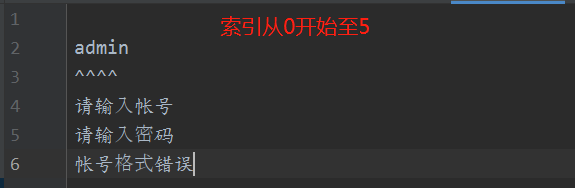
二、Txt_Mail163.py脚本如下:
import unittest
from selenium import webdriver
from selenium.webdriver.common.by import By
import time

#未封装的读取文本信息方法
# with open('Mail163.txt', 'r', encoding='utf-8') as fp:
#     file = fp.readlines()
#     aa = ''.join(file).split('\n')
#     print(aa[2],type(aa[2]))

def MailInfo(index):
    '''封装读取文本信息方法,index为读取的行数'''
    with open('Mail163.txt','r',encoding='utf-8') as fp:
        file = fp.readlines()
        aa = "".join(file).split('\n')
        return aa[index]

#报错信息 --添加encoding='utf-8'
#UnicodeDecodeError: 'gbk' codec can't decode byte 0xb7 in position 29: illegal multibyte sequence
# print(MailInfo(2))
#字符串切割\n -->用split('\n')
#['\n', 'admin\n', '^^^^\n', '请输入帐号\n', '请输入密码\n', '帐号格式错误']

class Mail_163(unittest.TestCase):
    def setUp(self) -> None:
        self.driver = webdriver.Chrome()
        self.driver.maximize_window()
        self.driver.implicitly_wait(5)
        self.driver.get("https://mail.163.com/")

    def tearDown(self) -> None:
        self.driver.quit()

    def login_163(self,username,password):
        #验证登录163邮箱N中情况
        self.driver.find_element(By.ID,"switchAccountLogin").click()
        iframe = self.driver.find_element(By.TAG_NAME,'iframe')
        self.driver.switch_to_frame(iframe)
        self.driver.find_element(By.NAME,'email').send_keys(username)
        self.driver.find_element(By.NAME,'password').send_keys(password)
        time.sleep(1)
        self.driver.find_element(By.ID,"dologin").click()

    def Assert_Text(self):
        #断言 :文本断言
        try:
            divtext = self.driver.find_element(By.CSS_SELECTOR, 'div.ferrorhead').text
            return divtext
        except Exception as msg:
            print("断言失败{}".format(msg))
        self.driver.switch_to_default_content()

    def test_username_password_null(self):
        '''验证:用户名为空密码为空的错误信息提示'''
        self.login_163(MailInfo(0),MailInfo(0))
        self.assertEqual(self.Assert_Text(),MailInfo(3))

    def test_username_null(self):
        '''验证:用户名为空密码不为空的错误信息提示'''
        self.login_163(MailInfo(0),MailInfo(1))
        self.assertEqual(self.Assert_Text(), MailInfo(3))

    def test_passwd_null(self):
        '''验证:用户名不为空密码为空的错误信息提示'''
        self.login_163(MailInfo(1), MailInfo(0))
        self.assertEqual(self.Assert_Text(),MailInfo(4))

    def test_username_input_format(self):
        '''验证:用户名输入非法字符的错误信息提示'''
        self.login_163(MailInfo(2), MailInfo(1))
        self.assertEqual(self.Assert_Text(), MailInfo(5))

if __name__ == '__main__':
    unittest.main(verbosity=2) #详细日志信息
python之数据驱动Txt操作的更多相关文章
- python之数据驱动ddt操作(方法一)
下载ddt并安装 Pip install ddt 或者官网下载安装 http://ddt.readthedocs.io/en/latest/ https://github.com/txels/ddt ...
- python之数据驱动ddt操作(方法三)
import unittestfrom selenium import webdriverfrom selenium.webdriver.common.by import Byimport unitt ...
- python之数据驱动ddt操作(方法二)
import unittestfrom ddt import ddt,unpack,datafrom selenium import webdriverfrom selenium.webdriver. ...
- python之数据驱动ddt操作(方法四)
from ddt import ddt,data,unpackfrom selenium import webdriverfrom selenium.webdriver.common.by impor ...
- python之数据驱动Excel操作(方法一)
一.Mail163.xlsx数据如下: 二.Mail163.py脚本如下 import xlrdimport unittestfrom selenium import webdriverfrom se ...
- python之数据驱动yaml操作
Mail163.yaml配置文件如下: login_data: url : 'https://mail.163.com/'case1: user : '' passwd : '' errorText ...
- python webdriver 测试框架-数据驱动txt文件驱动,带报告的例子
数据驱动txt文件驱动的方式,带报告 data.txt: gloryroad test||光荣之路 摔跤爸爸||阿米尔 超人||电影 data_driven_by_txt_file.py: #enco ...
- Python中关于txt的简单读写模式与操作
Python中关于txt的简单读写操作 常用的集中读写模式: 1.r 打开只读文件,该文件必须存在. 2.r+ 打开可读写的文件,该文件必须存在. 3.w 打开只写文件,若文件存在则文件长度清为0,即 ...
- 【Python数据分析】Python3操作Excel(二) 一些问题的解决与优化
继上一篇[Python数据分析]Python3操作Excel-以豆瓣图书Top250为例 对豆瓣图书Top250进行爬取以后,鉴于还有一些问题没有解决,所以进行了进一步的交流讨论,这期间得到了一只尼玛 ...
随机推荐
- nvGRAPH API参考分析(二)
nvGRAPH API参考分析(二) nvGRAPH Code Examples 本文提供了简单的示例. 1. nvGRAPH convert topology example void check( ...
- video视频标签自定义显示隐藏播放控件&Shadow DOM
方法一:controlslist属性 controlslist="nodownload nofullscreen noremoteplayback" controlslist仅三种 ...
- Python_Selenium之basepage 识别元素、浏览器操作、获取属性、鼠标事件、键盘事件、弹窗、切换frame、切换句柄等封装
#coding=gbkimport osimport timefrom selenium import webdriverfrom selenium.webdriver.common.by impor ...
- Pipeline模式与Factory+Provider模式的应用
前言 我正在写FastGithub这个小麻雀项目,里面主要涉及了Pipeline模式和Factory+Provider模式,这两种设计模式,让这个项目在"ip扫描"和"i ...
- 一文说透 Go 语言 HTTP 标准库
本篇文章来分析一下 Go 语言 HTTP 标准库是如何实现的. 转载请声明出处哦~,本篇文章发布于luozhiyun的博客:https://www.luozhiyun.com/archives/561 ...
- 20201123 《python程序设计》实验四报告
20201123 2020-2021-2 <python程序设计>实验三报告 课程:<Python程序设计>班级:2011姓名:晏鹏捷学号:20201123实验教师:王志强实验 ...
- ClickHouse源码笔记6:探究列式存储系统的排序
分析完成了聚合以及向量化过滤,向量化的函数计算之后.本篇,笔者将分析数据库的一个重要算子:排序.让我们从源码的角度来剖析ClickHouse作为列式存储系统是如何实现排序的. 本系列文章的源码分析基于 ...
- 为什么catch了异常,但事务还是回滚了?
前几天我发了这篇文章<我来出个题:这个事务会不会回滚?>得到了很多不错的反馈,也有不少读者通过微信.群或者邮件的方式,给了我一些关于test4的回复.其中还有直接发给我测试案例,来证明我的 ...
- kube-controller-manager源码分析-PV controller分析
kubernetes ceph-csi分析目录导航 概述 kube-controller-manager组件中,有两个controller与存储相关,分别是PV controller与AD contr ...
- Python的字符串和编码
1. 字符编码 字符串也是一种数据类型,但是,字符串比较特殊的是还有一个编码问题. 因为计算机只能处理数字,如果要处理文本,就必须先把文本转换为数字才能处理.最早的计算机在设计时采用8个比特(bit) ...