
Prometheus 通过 consul 实现自动服务发现
1、Consul 介绍
Consul 是基于 GO 语言开发的开源工具,主要面向分布式,服务化的系统提供服务注册、服务发现和配置管理的功能。Consul 提供服务注册/发现、健康检查、Key/Value存储、多数据中心和分布式一致性保证等功能。之前我们通过 Prometheus 实现监控,当新增一个 Target 时,需要变更服务器上的配置文件,即使使用 file_sd_configs 配置,也需要登录服务器修改对应 Json 文件,会非常麻烦。不过 Prometheus 官方支持多种自动服务发现的类型,其中就支持 Consul。
2、环境、软件准备
本次演示环境,是在Centos7 系统来执行操作,以下是安装的软件及版本:
- System: CentOS Linux release 7.4.1708 (Core)
- Docker: Docker version 20.10.3, build 48d30b5
- Prometheus: Version 2.25.2
- Consul: 1.6.1
注意:方便启动 Prometheus、Consul服务,我使用 Docker 方式启动,,这里忽略 Docker 的安装过程。其中 Prometheus 安装配置,可以参照之前文章 基于Centos7.4搭建prometheus+grafana+altertManger监控Spring Boot微服务(docker版),这里着重介绍一下如何启动并配置 Consul 并配置 Prometheus 基于 Consul 实现自动服务发现。
3、Consul 安装配置
使用 Docker 启动 Consul 单节点服务,直接获取最新版官方镜像 consul:latest 命令如下:
[root@pro-gra-alt prometheus]# docker run --name consul -d -p 8500:8500 consul
启动完毕后,浏览器访问 http://ip:8500 地址(ip为宿主机地址),即可打开 Consul Web 管理页面。可以看到默认只有 consul 一个 Service,后期我们注册到 Consul 的 Service 都可以从页面上看到,非常直观。
4、API 注册服务到 Consul
接下来,我们要注册服务到 Consul 中,可以通过其提供的 API 标准接口来添加。那么先注册一个测试服务,该测试数据为spring boot微服务,服务地址及端口为 spring boot 提供指标数据的地址,执行如下命令:
curl -X PUT -d '{"id": "springboot-anops","name": "anops-10.10.10.10:80","address": "10.10.10.10","port": 80,"tags": ["prometheus-target"],"checks": [{"http": "http://10.10.10.10:80/actuator/prometheus", "interval": "5s"}]}' http://10.10.10.2:8500/v1/agent/service/register
执行完毕后,刷新一下 Consul Web 控制台页面,可以看到成功注册到 Consul 中。
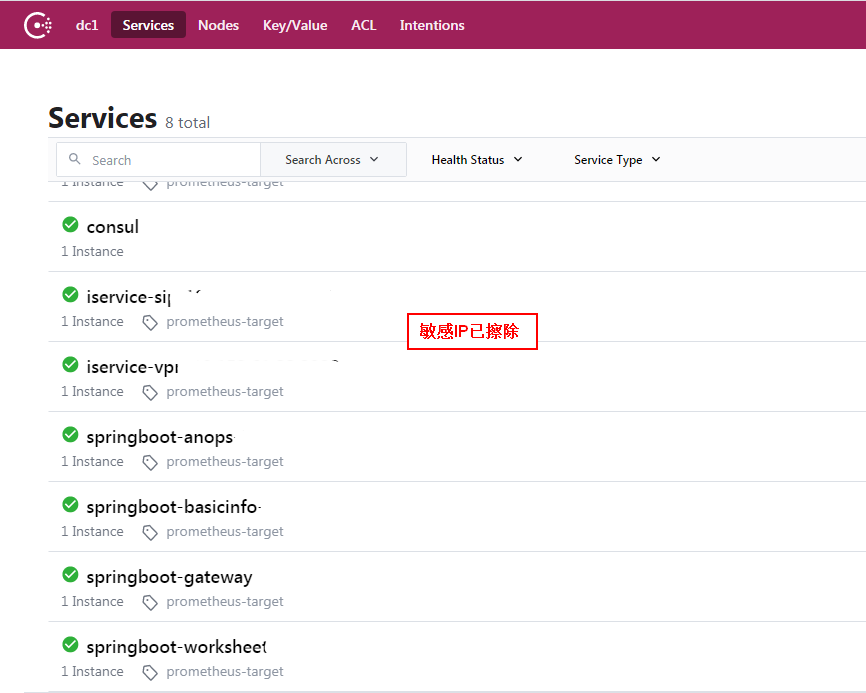
如果要注销掉某个服务,可以通过如下 API 命令操作,例如注销上边添加的 spring boot微服务
curl -X PUT http://10.10.10.2:8500/v1/agent/service/deregister/springboot-anops
5、配置 Prometheus 实现自动服务发现
现在 Consul 服务已经启动完毕,并成功注册了一个服务,接下来,我们需要配置 Prometheus 来使用 Consul 自动服务发现,目的就是能够将上边添加的服务自动发现到 Prometheus 的 Targets 中,增加 prometheus.yml 配置如下:
[root@pro-gra-alt prometheus]# cat prometheus.yml

global:

  scrape_interval:     60s

  evaluation_interval: 60s

scrape_configs:

  - job_name: prometheus

    static_configs:

      - targets: ['10.10.10.2:9090']

        labels:

          instance: prometheus

  - job_name: 'consul-prometheus'

    consul_sd_configs:

    - server: '10.10.10.2:8500'

    relabel_configs:

    - source_labels: [__metrics_path__]

      regex: /metrics

      target_label: __metrics_path__

      replacement: /actuator/prometheus

      action: replace

    - source_labels: [__meta_consul_service]

      separator: ;

      regex: (.*)

      target_label: application

      replacement: $1

      action: replace

    - source_labels: ['__meta_consul_tags']

      regex: '^.*,prometheus-target,.*$'

      action: keep

alerting:

  alertmanagers:

  - static_configs:

    - targets:

       - 10.10.10.2:9093

rule_files:

  - "/usr/local/prometheus/rules/*.rules"

[root@pro-gra-alt prometheus]#
其中 :
consul_sd_configs指定 Consul 的地址relabel_configs指定配置标签覆盖规则__meta_consul_service
    - source_labels: [__meta_consul_service]

      separator: ;

      regex: (.*)

      target_label: application

      replacement: $1

      action: replace
这个配置是将 __meta_consul_service 重新映射为 application字段,方便 Prometheus 查询
__metrics_path__
    - source_labels: [__metrics_path__]

      regex: /metrics

      target_label: __metrics_path__

      replacement: /actuator/prometheus

      action: replace
这个配置是为了将 Prometheus 默认的拉取数据 /metrics改成 /actuator/prometheus,方便从 Spring拉取,如果有多种不同的应用,数据路径不一样,建议设置多个job,以使用不同的规则
__meta_consul_tags
    - source_labels: ['__meta_consul_tags']

      regex: '^.*,prometheus-target,.*$'

      action: keep
这个配置是为了筛选指定tag的应用,只有有这个tag的应用才会拉取监控数据,这里是 prometheus-target,是在 Spring Boot的配置文件中配置的,这样就可以避免拉取不相关的数据的应用(如 Consul自己的数据,替换路径为/actuator/prometheus后无法获取到监控数据)
配置完成后重新创建 Prometheus容器,配置文件挂载到宿主机
docker run -d -p 9090:9090 --name prometheus -v /etc/localtime:/etc/localtime -v /jws/prometheus/prometheus.yml:/etc/prometheus/prometheus.yml -v /jws/prometheus/rules/node-up.rules:/usr/local/prometheus/rules/node-up.rules prom/prometheus --config.file=/etc/prometheus/prometheus.yml --web.enable-lifecycle
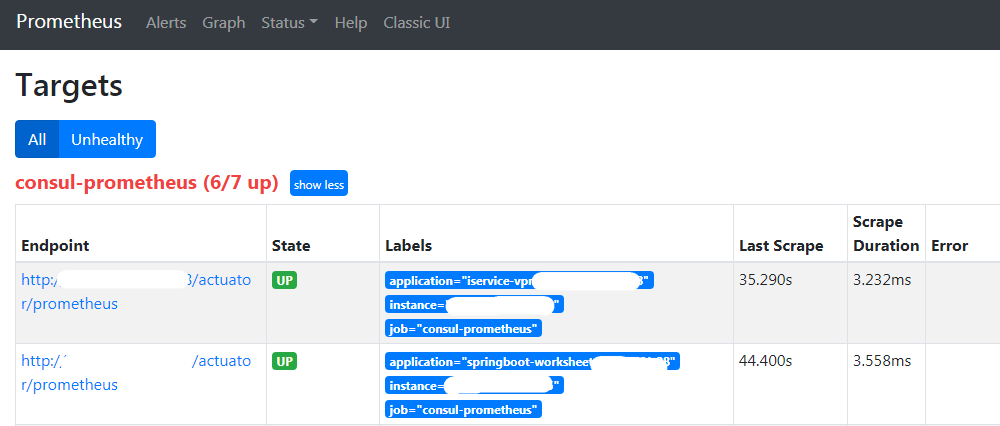
重新创建容器后查看Prometheus UI 页面的 Targets 或者Service Discovery是否配置成功
参考:https://cloud.tencent.com/developer/article/1536967
参考:https://hellowoodes.blog.csdn.net/article/details/106159160
参考:https://www.prometheus.wang/promql/prometheus-promql-functions.html
Prometheus 通过 consul 实现自动服务发现的更多相关文章
- Prometheus Consul实现自动服务发现
Prometheus Consul实现自动服务发现 1.概述 Consul 是一个支持多数据中心分布式高可用的服务发现和配置共享的服务软件. Consul 由 HashiCorp公司用Go语言开发 ...
- Prometheus 通过 consul 分布式集群实现自动服务发现
转载自:https://cloud.tencent.com/developer/article/1611091 1.Consul 介绍 Consul 是基于 GO 语言开发的开源工具,主要面向分布式, ...
- Consul + fabio 实现自动服务发现、负载均衡 - DockOne.io
Consul + fabio 实现自动服务发现.负载均衡 - DockOne.io http://dockone.io/article/1567
- 15、基于consul+consul-template+registrator+nginx实现自动服务发现
一.架构图 二.组件介绍 1.Registrator Registrator:一个由Go语言编写的,针对docker使用的,通过检查本机容器进程在线或者停止运行状态,去注册服务的工具.所以我们要做的实 ...
- Prometheus在Kubernetes下的服务发现机制
Prometheus作为容器监控领域的事实标准,随着以Kubernetes为核心的云原生热潮的兴起,已经得到了广泛的应用部署.灵活的服务发现机制是Prometheus和Kubernetes两者得以连接 ...
- 服务注册发现consul之三:服务发现比较:Consul vs Zookeeper vs Etcd vs Eureka
这里就平时经常用到的服务发现的产品进行下特性的对比,首先看下结论: Feature Consul zookeeper etcd euerka 服务健康检查 服务状态,内存,硬盘等 (弱)长连接,kee ...
- Consul 学习笔记—服务发现
前言: 上一篇文章简单实用Consul试下服务注册,本篇继续学习Consul中的另外特性:服务发现.KV操作 :以及对上篇文章中存在的问题进行解决 问题解决 在上一篇文章中,注册服务提示检查失败. 通 ...
- Ocelot + Consul + Registrator 基于Docker 实现服务发现、服务自动注册
目录 1. Consul集群搭建 1.1 F&Q Consul官方推荐的host网络模式运行 2. Registrator服务注册工具 2.1 F&Q Registrator悬挂服务 ...
- Prometheus与服务发现
这种按需的资源使用方式对于监控系统而言就意味着没有了一个固定的监控目标,所有的监控对象(基础设施.应用.服务)都在动态的变化.对于Prometheus这一类基于Pull模式的监控系统,显然也无法继续使 ...
随机推荐
- 研发效率破局之道 Facebook工作法
如果你问中国和美国互联网公司都有什么差别,很多人会回答:低效加班文化.最近爆出的996大讨论,通过糙快猛打拼和996加班去抢占市场获得机会的成功案例越来越少.至此,只有提高效能才是出路. 由于软件开发 ...
- Selenium 3 常用 API
元素定位 获取页面元素属性 元素判断 元素操作 操作输入框/单击 双击 下拉框操作 键盘操作 鼠标操作 单选框操作 多选框操作 拖动窗口 操作 JS 框 切换 frame 使用 JS 操作页面对象 操 ...
- 【OO课下讨论】bug中的“二八定律”
bug中的"二八定律" 本文主要为讨论2020/3/17下午OO课讨论的第三个思考题设立 有一个经典的经验性原则,叫帕累托原则,也称为二八定律.这个原则在经济.社会和科技等多个领域 ...
- vagrant构建centos虚拟环境
vagrant搭建centos 什么是vagrant 如何使用 1.构建本地的目录 2.官方下载对应的镜像文件,官方下载地址 3.导入刚刚下载的镜像(box文件) 4.初始化 5.修改Vagrantf ...
- 什么时候选择mmap而非read?
mmap 和 read 系统流程 在linux文件系统中,通常使用open(), read()读取文件,但操作系统同样提供了mmap()作为读取文件的方式,而这两者有什么不同呢?什么时候用read() ...
- php常用错误码的意思
总揽 200:服务器响应正常. 304:该资源在上次请求之后没有任何修改(这通常用于浏览器的缓存机制,使用GET请求时尤其需要注意). 400:无法找到请求的资源. 401:访问资源的权限不够. 40 ...
- 路由器逆向分析------MIPS系统网络的配置(QEMU)
本文博客地址:http://blog.csdn.net/qq1084283172/article/details/69378333 MIPS系统网络的配置 使用QEMU 模拟正在运行的MIPS系统并 ...
- 14.PHP_PHP与XML技术
PHP与XML技术 先把概念粘过来: 先来个基本模板: <?xml version="1.0" encoding="gb2312" standalone= ...
- PHP Excel文件导入数据到数据库
1.php部分(本例thinkphp5.1): 下载PHPExcel了扩展http://phpexcel.codeplex.com/ <?phpnamespace app\admin\contr ...
- 全套Project版本安装教程及下载地址
1:Project 2007 安装教程及下载地址 https://mp.weixin.qq.com/s/8iI7x1qjon0yAdo3bStjzw 2:Project 2010 安装教程及下载地址 ...