
Springboot下载Excel的3种方式
Springboot下载Excel的3种方式
汇总一下浏览器下载和代码本地下载实现的3种方式。
(其实一般都是在代码生成excel,然后上传到oss,然后传链接给前台,但是我好像没有实现过直接点击就能在浏览器下载的功能,所以这次一起汇总一下3种实现方式。)





1.EasyExcel--浏览器下载
1.Maven环境
网络上有很多maven的easyexcel版本,还是推荐alibaba的easyexcel,操作简单,代码不冗余
        <!-- https://mvnrepository.com/artifact/com.alibaba/easyexcel -->

        <dependency>

            <groupId>com.alibaba</groupId>

            <artifactId>easyexcel</artifactId>

            <version>2.2.10</version>

        </dependency>
2.完整代码实现
- 控制层:设置response格式然后直接下载即可
package com.empirefree.springboot.controller;

import com.alibaba.excel.EasyExcel;

import com.empirefree.springboot.pojo.User;

import org.springframework.web.bind.annotation.GetMapping;

import org.springframework.web.bind.annotation.RestController;

import javax.servlet.ServletOutputStream;

import javax.servlet.http.HttpServletResponse;

import java.io.FileNotFoundException;

import java.io.FileOutputStream;

import java.io.IOException;

import java.io.OutputStream;

import java.util.ArrayList;

import java.util.List;

/**

 * @program: springboot

 * @description:

 * @author: huyuqiao

 * @create: 2021/07/04 15:01

 */

@RestController

public class UserController {

    /**

     * Author: HuYuQiao

     * Description: 浏览器下载--excel

     */

    @GetMapping("/testRespExcel")

    public void testRespExcel(HttpServletResponse response){

        response.addHeader("Content-Disposition", "attachment;filename=" + "huyuqiao.xlsx");

        response.setContentType("application/vnd.ms-excel;charset=gb2312");

        try {

//            从HttpServletResponse中获取OutputStream输出流

            ServletOutputStream outputStream = response.getOutputStream();

            /*

             * EasyExcel 有多个不同的read方法,适用于多种需求

             * 这里调用EasyExcel中通过OutputStream流方式输出Excel的write方法

             * 它会返回一个ExcelWriterBuilder类型的返回值

             * ExcelWriterBuilde中有一个doWrite方法,会输出数据到设置的Sheet中

             */

            EasyExcel.write(outputStream, User.class).sheet("测试数据").doWrite(getAllUser());

        } catch (IOException e) {

            e.printStackTrace();

        }

    }

    public List<User> getAllUser(){

        List<User> userList = new ArrayList<>();

        for (int i=0;i<100;i++){

            User user = User.builder().name("胡宇乔"+ i).password("huyuqiao").age(i).build();

            userList.add(user);

        }

        return userList;

    }

}
- 实体类:给User设置对应的excel属性即可,value代表excel中名字,index代表第几列
package com.empirefree.springboot.pojo;

import com.alibaba.excel.annotation.ExcelProperty;

import com.alibaba.excel.metadata.BaseRowModel;

import lombok.Builder;

import lombok.Data;

/**

 * @program: springboot

 * @description: user

 * @author: huyuqiao

 * @create: 2021/07/04 14:53

 */

@Data

@Builder

public class User  extends BaseRowModel{

    @ExcelProperty(value = "姓名",index = 0)

    private String name;

    @ExcelProperty(value = "密码",index = 1)

    private String password;

    @ExcelProperty(value = "年龄",index = 2)

    private Integer age;

}
3.实现效果
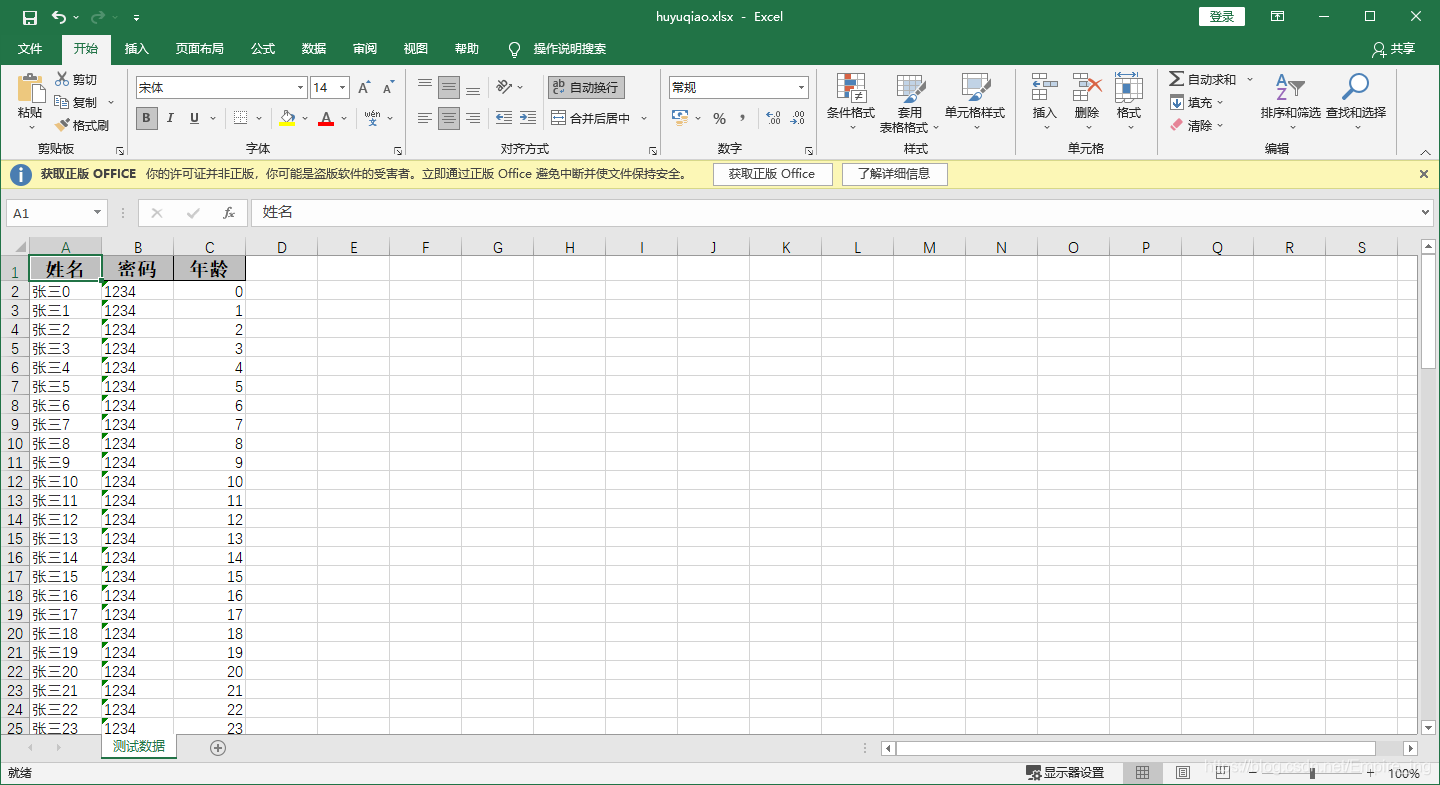
2.EasyExcel--本地下载
1.完整代码实现
maven和上面一样,只是文件输出流设置一下即可
package com.empirefree.springboot.controller;

import com.alibaba.excel.EasyExcel;

import com.empirefree.springboot.pojo.User;

import org.springframework.web.bind.annotation.GetMapping;

import org.springframework.web.bind.annotation.RestController;

import javax.servlet.ServletOutputStream;

import javax.servlet.http.HttpServletResponse;

import java.io.FileNotFoundException;

import java.io.FileOutputStream;

import java.io.IOException;

import java.io.OutputStream;

import java.util.ArrayList;

import java.util.List;

/**

 * @program: springboot

 * @description:

 * @author: huyuqiao

 * @create: 2021/07/04 15:01

 */

@RestController

public class UserController {

    /**

     * Author: HuYuQiao

     * Description:本地生成--excel

     */

    @GetMapping("/testLocalExcel")

    public void testLocalExcel(){

        // 文件输出位置

        OutputStream out = null;

        try {

            out = new FileOutputStream("C:\\Users\\EDY\\Desktop\\empirefree.xlsx");

            EasyExcel.write(out, User.class).sheet("测试数据").doWrite(getAllUser());

        } catch (FileNotFoundException e) {

            e.printStackTrace();

        }finally {

            try {

                // 关闭流

                out.close();

            } catch (IOException e) {

                e.printStackTrace();

            }

        }

    }

    public List<User> getAllUser(){

        List<User> userList = new ArrayList<>();

        for (int i=0;i<100;i++){

            User user = User.builder().name("张三"+ i).password("1234").age(i).build();

            userList.add(user);

        }

        return userList;

    }

}
2.实现效果
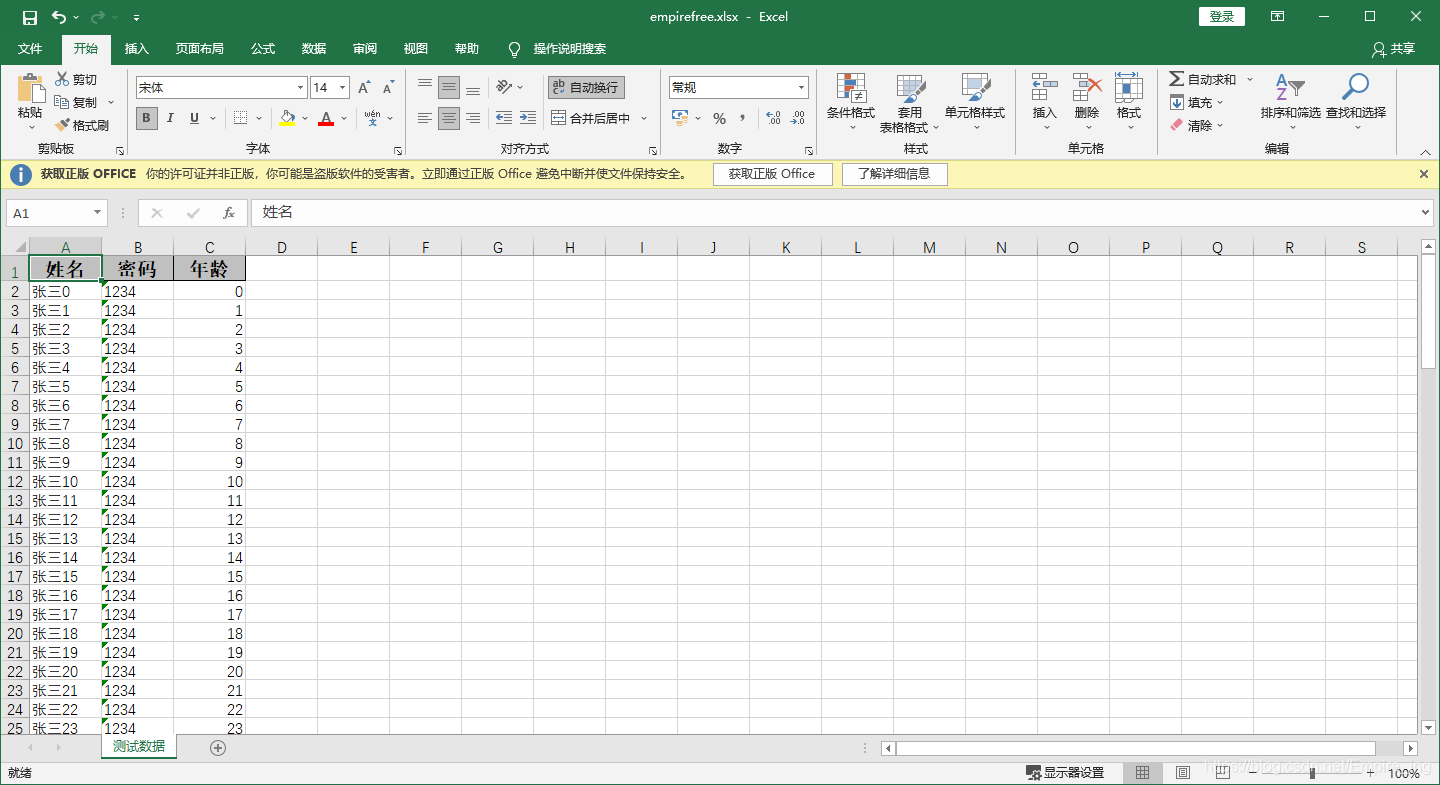
3.Poi--浏览器实现下载
1.Maven环境
		<!-- excel导出工具 -->

		<dependency>

			<groupId>org.apache.poi</groupId>

			<artifactId>poi</artifactId>

			<version>RELEASE</version>

		</dependency>

		<dependency>

			<groupId>org.apache.poi</groupId>

			<artifactId>poi-ooxml</artifactId>

			<version>RELEASE</version>

		</dependency>
2.代码实现
- 控制层
       /**

     * Author: HuYuQiao

     * Description: excle-export

     */

    @GetMapping("/export")

    public String exportExcel(HttpServletResponse response) {

        System.out.println("成功到达到处excel....");

        String fileName = "test.xls";

        if (fileName == null || "".equals(fileName)) {

            return "文件名不能为空!";

        } else {

            if (fileName.endsWith("xls")) {

                Boolean isOk = excelService.exportExcel(response, fileName, 1, 10);

                if (isOk) {

                    return "导出成功!";

                } else {

                    return "导出失败!";

                }

            }

            return "文件格式有误!";

        }

    }
- serviceimpl层
  /**

     * Author: HuYuQiao

     * Description: excel-impl

     */

    @Override

    public Boolean exportExcel(HttpServletResponse response, String fileName, Integer pageNum, Integer pageSize) {

        log.info("导出数据开始。。。。。。");

        //查询数据并赋值给ExcelData

        List<User> userList = userMapper.find();

        System.out.println(userList.size() + "size");

        List<String[]> list = new ArrayList<String[]>();

        for (User user : userList) {

            String[] arrs = new String[4];

            arrs[0] = String.valueOf(user.getId());

            arrs[1] = user.getUsername();

            arrs[2] = user.getPassword();

            arrs[3] = String.valueOf(user.getEnable());

            list.add(arrs);

        }

        //表头赋值

        String[] head = {"序列", "用户名", "密码", "状态"};

        ExcelData data = new ExcelData();

        data.setHead(head);

        data.setData(list);

        data.setFileName(fileName);

        //实现导出

        try {

            ExcelUtil.exportExcel(response, data);

            log.info("导出数据结束。。。。。。");

            return true;

        } catch (Exception e) {

            log.info("导出数据失败。。。。。。");

            return false;

        }

    }
- 工具类
package com.example.demo.utils;

import com.example.demo.entity.ExcelData;

import com.example.demo.entity.User;

import lombok.extern.slf4j.Slf4j;

import org.apache.poi.hssf.usermodel.*;

import org.apache.poi.ss.usermodel.*;

import javax.servlet.http.HttpServletResponse;

import java.io.BufferedOutputStream;

import java.io.FileInputStream;

import java.io.InputStream;

import java.io.OutputStream;

import java.util.ArrayList;

import java.util.List;

import static org.apache.poi.ss.usermodel.CellType.*;

/**

 * Author: HuYuQiao

 * Description: excelUtil

 */

@Slf4j

public class ExcelUtil {

    /**

     * Author: HuYuQiao

     * Description: excelUtil-export

     */

    public static void exportExcel(HttpServletResponse response, ExcelData data) {

        log.info("导出解析开始,fileName:{}",data.getFileName());

        try {

            //实例化HSSFWorkbook

            HSSFWorkbook workbook = new HSSFWorkbook();

            //创建一个Excel表单,参数为sheet的名字

            HSSFSheet sheet = workbook.createSheet("sheet");

            //设置表头

            setTitle(workbook, sheet, data.getHead());

            //设置单元格并赋值

            setData(sheet, data.getData());

            //设置浏览器下载

            setBrowser(response, workbook, data.getFileName());

            log.info("导出解析成功!");

        } catch (Exception e) {

            log.info("导出解析失败!");

            e.printStackTrace();

        }

    }

    /**

     * Author: HuYuQiao

     * Description: excelUtil-settitle

     */

    private static void setTitle(HSSFWorkbook workbook, HSSFSheet sheet, String[] str) {

        try {

            HSSFRow row = sheet.createRow(0);

            //设置列宽,setColumnWidth的第二个参数要乘以256,这个参数的单位是1/256个字符宽度

            for (int i = 0; i <= str.length; i++) {

                sheet.setColumnWidth(i, 15 * 256);

            }

            //设置为居中加粗,格式化时间格式

            HSSFCellStyle style = workbook.createCellStyle();

            HSSFFont font = workbook.createFont();

            font.setBold(true);

            style.setFont(font);

            style.setDataFormat(HSSFDataFormat.getBuiltinFormat("m/d/yy h:mm"));

            //创建表头名称

            HSSFCell cell;

            for (int j = 0; j < str.length; j++) {

                cell = row.createCell(j);

                cell.setCellValue(str[j]);

                cell.setCellStyle(style);

            }

        } catch (Exception e) {

            log.info("导出时设置表头失败!");

            e.printStackTrace();

        }

    }

    /**

     * Author: HuYuQiao

     * Description: excelUtil-setData

     */

    private static void setData(HSSFSheet sheet, List<String[]> data) {

        try{

            int rowNum = 1;

            for (int i = 0; i < data.size(); i++) {

                HSSFRow row = sheet.createRow(rowNum);

                for (int j = 0; j < data.get(i).length; j++) {

                    row.createCell(j).setCellValue(data.get(i)[j]);

                }

                rowNum++;

            }

            log.info("表格赋值成功!");

        }catch (Exception e){

            log.info("表格赋值失败!");

            e.printStackTrace();

        }

    }

    /**

     * Author: HuYuQiao

     * Description: excelUtil-setBrowser

     */

    private static void setBrowser(HttpServletResponse response, HSSFWorkbook workbook, String fileName) {

        try {

            //清空response

            response.reset();

            //设置response的Header

            response.addHeader("Content-Disposition", "attachment;filename=" + fileName);

            OutputStream os = new BufferedOutputStream(response.getOutputStream());

            response.setContentType("application/vnd.ms-excel;charset=gb2312");

            //将excel写入到输出流中

            workbook.write(os);

            os.flush();

            os.close();

            log.info("设置浏览器下载成功!");

        } catch (Exception e) {

            log.info("设置浏览器下载失败!");

            e.printStackTrace();

        }

    }

    /**

     * Author: HuYuQiao

     * Description: excelUtil--importExcel

     */

    public static List<Object[]> importExcel(String fileName) {

        log.info("导入解析开始,fileName:{}",fileName);

        try {

            List<Object[]> list = new ArrayList<>();

            InputStream inputStream = new FileInputStream(fileName);

            Workbook workbook = WorkbookFactory.create(inputStream);

            Sheet sheet = workbook.getSheetAt(0);

            //获取sheet的行数

            int rows = sheet.getPhysicalNumberOfRows();

            for (int i = 0; i < rows; i++) {

                //过滤表头行

                if (i == 0) {

                    continue;

                }

                //获取当前行的数据

                Row row = sheet.getRow(i);

                Object[] objects = new Object[row.getPhysicalNumberOfCells()];

                int index = 0;

                for (Cell cell : row) {

                    if (cell.getCellType().equals(NUMERIC)) {

                        objects[index] = (int) cell.getNumericCellValue();

                    }

                    if (cell.getCellType().equals(STRING)) {

                        objects[index] = cell.getStringCellValue();

                    }

                    if (cell.getCellType().equals(BOOLEAN)) {

                        objects[index] = cell.getBooleanCellValue();

                    }

                    if (cell.getCellType().equals(ERROR)) {

                        objects[index] = cell.getErrorCellValue();

                    }

                    index++;

                }

                list.add(objects);

            }

            log.info("导入文件解析成功!");

            return list;

        }catch (Exception e){

            log.info("导入文件解析失败!");

            e.printStackTrace();

        }

        return null;

    }

    //测试导入

    public static void main(String[] args) {

        try {

            String fileName = "E:/test.xlsx";

            List<Object[]> list = importExcel(fileName);

            for (int i = 0; i < list.size(); i++) {

                User user = new User();

                user.setId((Integer) list.get(i)[0]);

                user.setUsername((String) list.get(i)[1]);

                user.setPassword((String) list.get(i)[2]);

                user.setEnable((Integer) list.get(i)[3]);

                System.out.println(user.toString());

            }

        } catch (Exception e) {

            e.printStackTrace();

        }

    }

}
3.实现效果
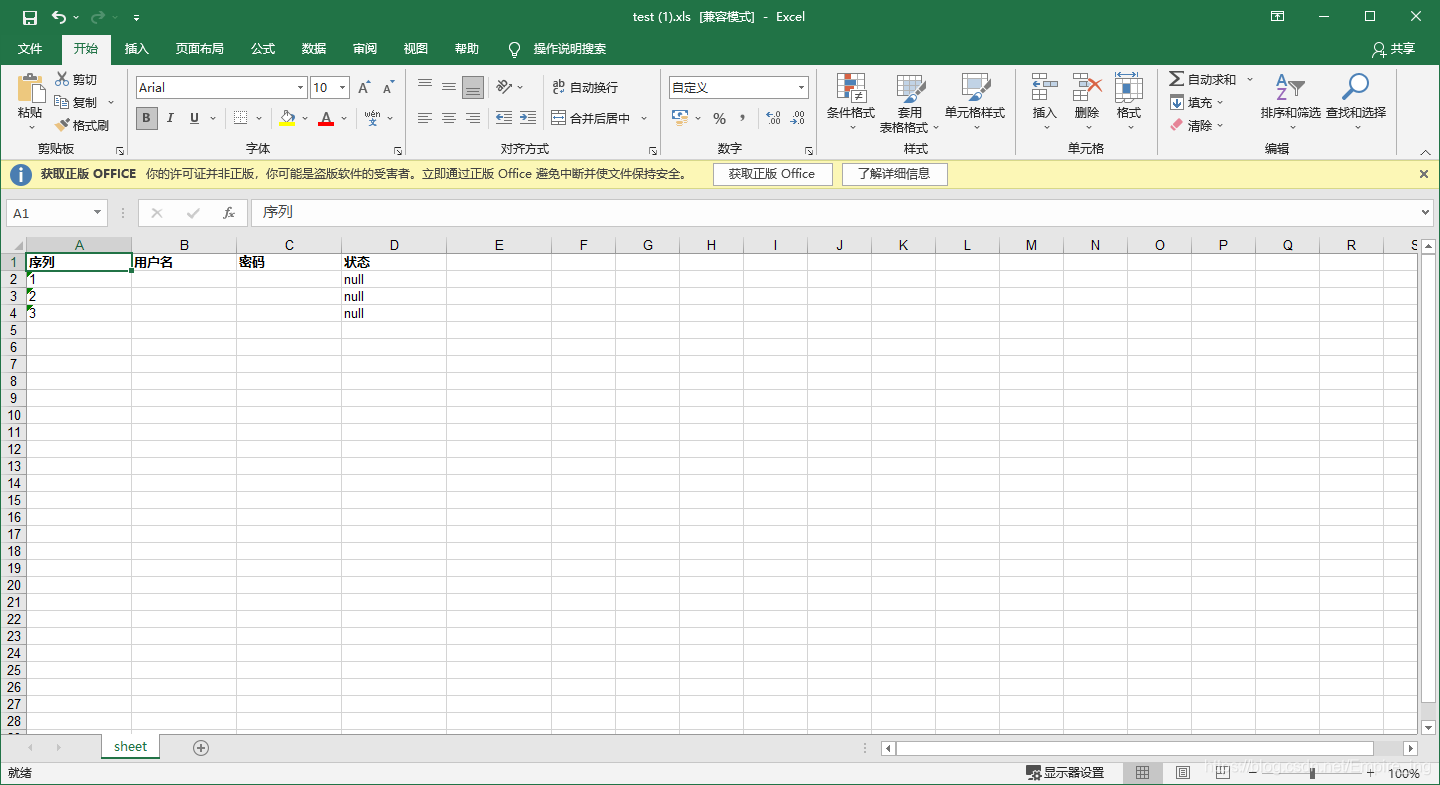
4.总结
总体看来:当excel需要在浏览器下载时,使用alibaba的easyexcel最快最方便,并且注意需要设置response格式
Springboot下载Excel的3种方式的更多相关文章
- SpringBoot整合Servlet的两种方式
SpringBoot整合Servlet有两种方式: 1.通过注解扫描完成Servlet组件的注册: 2.通过方法完成Servlet组件的注册: 现在简单记录一下两种方式的实现 1.通过注解扫描完成Se ...
- 从后端接口下载文件的2种方式:get方式、post方式
从后端接口下载文件的2种方式 一.get方式 直接使用: location.href='http://www.xxx.com/getFile?params1=xxx¶ms2=xxxx' ...
- 【文件下载】Java下载文件的几种方式
[文件下载]Java下载文件的几种方式 摘自:https://www.cnblogs.com/sunny3096/p/8204291.html 1.以流的方式下载. public HttpServl ...
- springboot成神之——mybatis在spring-boot中使用的几种方式
本文介绍mybatis在spring-boot中使用的几种方式 项目结构 依赖 WebConfig DemoApplication 方式一--@Select User DemoApplication ...
- SpringBoot从入门到精通二(SpringBoot整合myBatis的两种方式)
前言 通过上一章的学习,我们已经对SpringBoot有简单的入门,接下来我们深入学习一下SpringBoot,我们知道任何一个网站的数据大多数都是动态的,也就是说数据是从数据库提取出来的,而非静态数 ...
- 【SpringBoot】05.SpringBoot整合Listener的两种方式
SpringBoot整合Listener的两种方式: 1.通过注解扫描完成Listener组件的注册 创建一个类实现ServletContextListener (具体实现哪个Listener根据情况 ...
- 【SpringBoot】03.SpringBoot整合Servlet的两种方式
SpringBoot整合Servlet的两种方式: 1. 通过注解扫描完成Servlet组件注册 新建Servlet类继承HttpServlet 重写超类doGet方法 在该类使用注解@WebServ ...
- SpringBoot工程创建的三种方式
一. 通过IDEA的spring Initializer创建 1. 打开创建项目面板 File->New->Project->Spring Initializr 2. 填写Maven ...
- Asp.Net 下载文件的几种方式
asp.net下载文件几种方式 protected void Button1_Click(object sender, EventArgs e) { /* 微软为Response对象提供了一个新的方法 ...
随机推荐
- C#基础之==(双等于号)与equals()区别
C#中Equals和= =比较 这两种方式也是大家在日常编码工作当中用的比较多的判断方式.之前在使用的时候也没太关注两者在比较不同类型的时候存在哪些区别. 今天就和大家一起深入了解一下其中区别 一.值 ...
- 定义私有属性: *String name; * int age; * String gender; * int salary; Date hiredate;//入职时间
import java.text.SimpleDateFormat; import java.util.Date; /** * 定义私有属性: * String name; * int age; * ...
- Mac 无密码 SSH 登录服务器
Mac 无密码 SSH 登录服务器,只需要简单三步,不再需要记住账号密码,快速进入服务器 第一步,生成密钥对 在当前用户下创建.ssh目录 mkdir ~/.ssh 使用命令ssh-keygen生成密 ...
- mysql登录框注入绕过单引号匹配
0x00 原理 网站使用正则匹配对用户名一栏传到服务器的参数进行了匹配,如果匹配到了单引号则报错 0x01 简单例子 当我们输入admin'时,网站直接报错,很有可能就是用了正则,这样我们也不 ...
- [刷题] 46 Permutations
要求 整型数组,每个元素不相同,返回元素所有排列的可能 示例 [1,2,3] [ [1,2,3], [1,3,2], [2,1,3], [2,3,1], [3,1,2], [3,2,1] ] 思路 树 ...
- Installing SFTP/SSH Server on Windows using OpenSSH
Installing SFTP/SSH Server 1. On Windows 10 version 1803 and newer In Settings app, go to Apps > ...
- Mysql数据库-多实例主从复制-主从故障详解
一.mysql结构 1.实例 1.什么是单实例 一个进程 + 多个线程 + 一个预分配的内存空间 2.多实例 多个进程 + 多个线程 + 多个预分配的内存空间 ](http://shelldon.51 ...
- 无法开机 如果您的手机黑屏无法开机,可以按照以下方式操作尝试: 如果是,使用原装充电器或使用弱电流方式充电(例如使用电脑USB接口充电)充电15-30分钟后尝试重新开机;注意:电量过低引起的无法开机,刚插入充电器时可能不亮屏但呼吸灯闪烁状态。
https://www.mi.com/service/support/startup 无法开机 如果您的手机黑屏无法开机,可以按照以下方式操作尝试: 技术支持 如何刷机 无法开机 手机自动关机.重启 ...
- CentOS 7 设置默认进入字符界面
CentOS 7 设置默认进入字符界面原创阳阳唐 最后发布于2018-10-18 10:12:51 阅读数 3363 收藏展开准备修改之前安装的centos7的默认启动方式,安装时是图形用户界面,想让 ...
- C语言变量和函数命名规范
C 语言变量和函数命名规范: 关于C语言变量和函数命名规范 据考察,没有一种命名规则可以让所有的程序员赞同,程序设计教科书一般都不指定命名规则.命名规则对软件产品而言并不是"成败悠关&quo ...