
(三)Struts2的Action(简单讲解版)
Actions是Struts2框架的核心,因为它们适用于任何MVC(Model View Controller)框架。 每个URL映射到特定的action,其提供处理来自用户的请求所需的处理逻辑。
但action还有另外两个重要的功能。 首先,action在将数据从请求传递到视图(无论是JSP还是其他类型的结果)方面起着重要作用。 第二,action必须协助框架确定哪个结果应该呈现在响应请求的视图中。
创建Action
Struts2中actions的唯一要求是必须有一个无参数方法返回String或Result对象,并且必须是POJO。如果没有指定no-argument方法,则默认是使用execute()方法。
你还可以扩展ActionSupport类,该类可实现六个接口,包括Action接口。Action的接口如下:
public interface Action {

   public static final String SUCCESS = "success";

   public static final String NONE = "none";

   public static final String ERROR = "error";

   public static final String INPUT = "input";

   public static final String LOGIN = "login";

   public String execute() throws Exception;

}
让我们来看看在Hello World示例中的action方法:
package cn.w3cschool.struts2;

public class HelloWorldAction{

   private String name;

   public String execute() throws Exception {

      return "success";

   }

   public String getName() {

      return name;

   }

   public void setName(String name) {

      this.name = name;

   }

}
为了说明action方法控制视图的要点,让我们对execute方法进行以下更改,并扩展ActionSupport类如下:
package cn.w3cschool.struts2;

import com.opensymphony.xwork2.ActionSupport;

public class HelloWorldAction extends ActionSupport{

   private String name;

   public String execute() throws Exception {

      if ("SECRET".equals(name))

      {

         return SUCCESS;

      }else{

         return ERROR;

      }

   }

   public String getName() {

      return name;

   }

   public void setName(String name) {

      this.name = name;

   }

}
在这个例子中,我们在execute方法中使用一些逻辑来查看name属性。如果属性等于字符串“SECRET”,我们返回SUCCESS作为结果,否则我们返回ERROR作为结果。因为我们已经扩展了ActionSupport,所以我们可以使用String常量、SUCCESS和ERROR。 现在,让我们修改struts.xml文件如下:
<?xml version="1.0" encoding="UTF-8"?>

<!DOCTYPE struts PUBLIC

   "-//Apache Software Foundation//DTD Struts Configuration 2.0//EN"

   "http://struts.apache.org/dtds/struts-2.0.dtd">

   <struts>

      <constant name="struts.devMode" value="true" />

      <package name="helloworld" extends="struts-default">

         <action name="hello"

            class="cn.w3cschool.struts2.HelloWorldAction"

            method="execute">

            <result name="success">/HelloWorld.jsp</result>

            <result name="error">/AccessDenied.jsp</result>

         </action>

      </package>

</struts>
创建视图
让我们在你的eclipse项目的WebContent文件夹中创建下面的jsp文件HelloWorld.jsp。右键单击项目资源管理器中的WebContent文件夹,然后选择“New”> “JSP File”。如果返回结果是SUCCESS将调用此文件(这个字符串常量“success”是在Action接口中定义的):
<%@ page contentType="text/html; charset=UTF-8" %>

<%@ taglib prefix="s" uri="/struts-tags" %>

<html>

<head>

<title>Hello World</title>

</head>

<body>

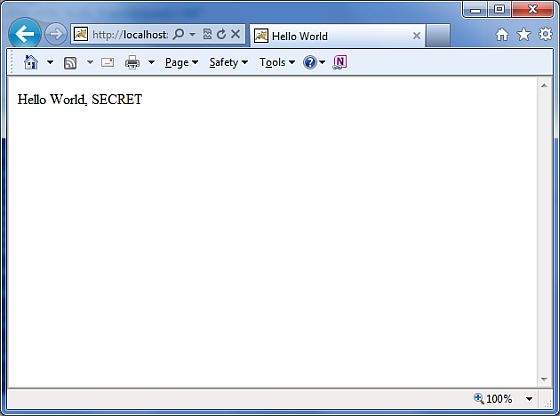
   Hello World, <s:property value="name"/>

</body>

</html>
如果action的结果是ERROR,即字符串常量为“error”,下面的文件将被框架调用。 以下是AccessDenied.jsp的内容:
<%@ page contentType="text/html; charset=UTF-8" %>

<%@ taglib prefix="s" uri="/struts-tags" %>

<html>

<head>

<title>Access Denied</title>

</head>

<body>

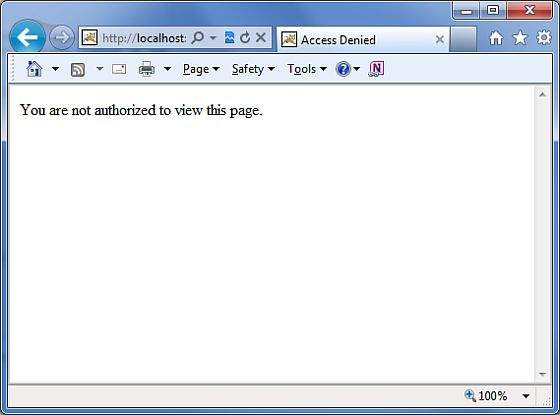
   You are not authorized to view this page.

</body>

</html>
我们还需要在WebContent文件夹中创建index.jsp文件。此文件将用作初始的action URL,用户可以单击它以命令Struts 2框架调用HelloWorldAction类的execute方法并呈现HelloWorld.jsp视图。
<%@ page language="java" contentType="text/html; charset=ISO-8859-1"

   pageEncoding="ISO-8859-1"%>

<%@ taglib prefix="s" uri="/struts-tags"%>

   <!DOCTYPE html PUBLIC "-//W3C//DTD HTML 4.01 Transitional//EN"

"http://www.w3.org/TR/html4/loose.dtd">

<html>

<head>

<title>Hello World</title>

</head>

<body>

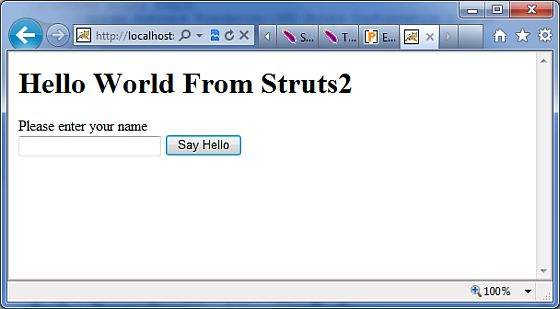
   <h1>Hello World From Struts2</h1>

   <form action="hello">

      <label for="name">Please enter your name</label><br/>

      <input type="text" name="name"/>

      <input type="submit" value="Say Hello"/>

   </form>

</body>

</html>
这样,没有改变web.xml文件的需求,所以我们可以使用前面在Hello World示例章节中创建的的web.xml文件。现在,我们准备好使用Struts 2框架运行我们的Hello World应用程序了。
执行应用程序
右键单击项目名称,然后单击“Export”>“WAR File”创建WAR文件。 然后在Tomcat的webapps目录中部署这个WAR文件。最后,启动Tomcat服务器并尝试访问URL http://localhost:8080/HelloWorldStruts2/index.jsp。显示的图示如下:
让我们输入一个单词为“SECRET”,你会看到如下页面:
现在输入除“SECRET”之外的任何词,你会看到如下页面:
创建多个Actions
你会需要频繁定义多个action来处理不同的请求,并为用户提供不同的URL,因此你将如下定义的不同类:
package cn.w3cschool.struts2;

import com.opensymphony.xwork2.ActionSupport;

   class MyAction extends ActionSupport{

      public static String GOOD = SUCCESS;

      public static String BAD = ERROR;

   }

   public class HelloWorld extends ActionSupport{

      ...

      public String execute()

      {

         if ("SECRET".equals(name)) return MyAction.GOOD;

         return MyAction.BAD;

      }

      ...

   }

   public class SomeOtherClass extends ActionSupport{

      ...

      public String execute()

      {

         return MyAction.GOOD;

      }

      ...

   }
你将如下在struts.xml文件中的配置这些action:
<?xml version="1.0" encoding="UTF-8"?>

<!DOCTYPE struts PUBLIC

    "-//Apache Software Foundation//DTD Struts Configuration 2.0//EN"

    "http://struts.apache.org/dtds/struts-2.0.dtd">

struts>

 <constant name="struts.devMode" value="true" />

   <package name="helloworld" extends="struts-default">

      <action name="hello"

         class="cn.w3cschool.struts2.HelloWorld"

         method="execute">

         <result name="success">/HelloWorld.jsp</result>

         <result name="error">/AccessDenied.jsp</result>

      </action>

      <action name="something"

         class="cn.w3cschool.struts2.SomeOtherClass"

         method="execute">

         <result name="success">/Something.jsp</result>

         <result name="error">/AccessDenied.jsp</result>

      </action>

   </package>

</struts>
正如你在上面的例子中看到的,action的结果SUCCESS和ERROR是重复的。为了解决这个问题,建议您创建一个包含结果的类。
(三)Struts2的Action(简单讲解版)的更多相关文章
- J2EE进阶(三)struts2 <s:action>标签的用法
J2EE进阶(三)struts2 <s:action>标签的用法 前言 使用action标签,可以允许在jsp页面中直接调用Action,(类似AJAX页面调用)在调用Action时候,可 ...
- (四)Struts2的Action(深入讲解版)
Struts2的Action 开发者需要提供大量的Action,并在struts.xml中配置Action.Action类里包含了对用户请求的处理逻辑,因为我们也称Action为业务控制器. 一.编写 ...
- Struts2大约Action系统培训6大约action的接受三个参数的方法
我们知道,action在web它在控制器的发展起到了一定作用,通过接收client来到参数,运行不同的模块只实现运营,因此,接收参数是非常重要的组成部分,有接收到的参数的仅前端.操作权限运行数据库后端 ...
- struts2的action访问servlet API的三种方法
学IT技术,就是要学习... 今天无聊看看struts2,发现struts2的action访问servlet API的三种方法: 1.Struts2提供的ActionContext类 Object g ...
- Struts2中Action接收参数的方法主要有以下三种:
Struts2中Action接收参数的方法主要有以下三种: 1.使用Action的属性接收参数(最原始的方式): a.定义:在Action类中定义属性,创建get和set方法: b.接 ...
- struts2开发action 的三种方法以及通配符、路径匹配原则、常量
struts2开发action 的三种方法 1.继承ActionSupport public class UserAction extends ActionSupport { // Action中业务 ...
- Struts2之Action
Struts2之Action MVC模式中需要有一个控制器来负责浏览器与服务器之间的通信,实现用户与服务器的交互.在Struts2框架中实现这一功能的是Action,它是整个框架最核心的部分.Acti ...
- 简单讲解iOS应用开发中的MD5加密的相关使用
简单讲解iOS应用开发中的MD5加密的相关使用 作者:文顶顶 字体:[增加 减小] 类型:转载 时间:2015-12-19 我要评论 这篇文章主要介绍了iOS应用开发中的MD5加密的相关使用, ...
- [struts2学习笔记] 第五节 编写struts2的action代码
本文地址:http://blog.csdn.net/sushengmiyan/article/details/40479299 官方文档: http://struts.apache.org/relea ...
随机推荐
- 我眼中的价值币——NGK(下)
跨链交互方案并不是区块链世界中的一个新课题.自比特币诞生揭开智能合约的序幕之后,跨链交互的需求便产生了.但是,经过十年的发展,市场中的跨链解决方案进展缓慢,究之原因有以下几个方面. 首先,区块链的去中 ...
- 彻底解决Asp.netCore WebApi 3.1 跨域时的预检查204 options重复请求的问题
Asp.netCore WebApi 3.1 跨域的预检查options问题 1:我们直接使用core跨域的中间件 ,注入跨域服务, services.AddCors(options => { ...
- (数据科学学习手札108)Python+Dash快速web应用开发——静态部件篇(上)
本文示例代码已上传至我的Github仓库https://github.com/CNFeffery/DataScienceStudyNotes 1 简介 这是我的系列教程Python+Dash快速web ...
- C++中tuple类型
tuple是C++11新标准里的类型.它是一个类似pair类型的模板.pair类型是每个成员变量各自可以是任意类型,但是只能有俩个成员,而tuple与pair不同的是它可以有任意数量的成员.但是每个确 ...
- lambda表达式在python和c++中的异同
Lambda表达式是干么的?.lambda表达式首先是一个表达式,是一个函数对象一个匿名函数,但不是函数.现在流行语言例如:JS.PHP都支持一种和面向过程.面向对象并列的函数式编程,lambda就是 ...
- Kubernetes-3.安装
docker version:19.03.14 kubernetes version:1.19.4 本文介绍使用kubeadm安装Kubernetes集群的简单过程. 目录 使用kubeadm安装k8 ...
- 31Si2CrMoB
转: 31Si2CrMoB 31Si2CrMoB是推土机用钢的一种耐磨钢:此钢有很高的强度和韧度,适合于推土机XX.31Si2CrMoB冶炼技术工艺:电弧炉冶炼,初轧开坯.钢板轧制:可√189-170 ...
- HDOJ-1358(字符串压缩+KMP)
Period HDOJ-1358 这题还是属于KMP算法的应用,属于字符串压缩问题.也就是在一个字符串s中寻找一个前缀,使得s可以被一份或者多份前缀子串t拷贝连接,也就是串接. #include< ...
- 解决VM 与 Device/Credential Guard 不兼容(全网有效解决思路)
为什么要写这篇文章先说背景:前段时间因为学习Linux系统需要,自己本机用的是Windows系统,那这里就需要用到虚拟机来创建虚拟环境用来支持Linux系统 1: 于是乎,自己很激动的下载了vm虚拟机 ...
- github个人主页 阿里云域名的绑定
域名解析 我在阿里云上买了一个新域名:gaolu.name,我已经在GitHub Pages上建立了自己的博客:http://gaolu1215.github.io.现在我希望将gaolu.name映 ...