
Mokito 单元测试与 Spring-Boot 集成测试
Mokito 单元测试与 Spring-Boot 集成测试
版本说明
Java:1.8
JUnit:5.x
Mokito:3.x
H2:1.4.200
spring-boot-starter-test:2.3.9.RELEASE
前言:通常任何软件都会划分为不同的模块和组件。单独测试一个组件时,我们叫做单元测试。单元测试用于验证相关的一小段代码是否正常工作。
单元测试不验证应用程序代码是否和外部依赖正常工作。它聚焦与单个组件并且 Mock 所有和它交互的依赖。
集成测试主要用于发现用户端到端请求时不同模块交互产生的问题。
集成测试范围可以是整个应用程序,也可以是一个单独的模块,取决于要测试什么。
典型的 Spring boot CRUD 应用程序,单元测试可以分别用于测试控制器(Controller)层、DAO 层等。它不需要任何嵌入服务,例如:Tomcat、Jetty、Undertow。
在集成测试中,我们应该聚焦于从控制器层到持久层的完整请求。应用程序应该运行嵌入服务(例如:Tomcat)以创建应用程序上下文和所有 bean。这些 bean 有的可能会被 Mock 覆盖。
单元测试
单元测试的动机,单元测试不是用于发现应用程序范围内的 bug,或者回归测试的 bug,而是分别检测每个代码片段。
几个要点
- 快,极致的快,500ms 以内
- 同一个单元测试可重复运行 N 次
- 每次运行应得到相同的结果
- 不依赖任何模块
Gradle 引入
plugins {

    id 'java'

    id "org.springframework.boot" version "2.3.9.RELEASE"

    id 'org.jetbrains.kotlin.jvm' version '1.4.32'

}

apply from: 'config.gradle'

apply from: file('compile.gradle')

group rootProject.ext.projectDes.group

version rootProject.ext.projectDes.version

repositories {

    mavenCentral()

}

dependencies {

    implementation rootProject.ext.dependenciesMap["lombok"]

    annotationProcessor rootProject.ext.dependenciesMap["lombok"]

    implementation rootProject.ext.dependenciesMap["commons-lang3"]

    implementation rootProject.ext.dependenciesMap["mybatis-plus"]

    implementation rootProject.ext.dependenciesMap["spring-boot-starter-web"]

    implementation rootProject.ext.dependenciesMap["mysql-connector"]

    implementation rootProject.ext.dependenciesMap["druid"]

    testImplementation group: 'org.springframework.boot', name: 'spring-boot-starter-test', version: '2.3.9.RELEASE'

    testImplementation rootProject.ext.dependenciesMap["h2"]

    implementation "org.jetbrains.kotlin:kotlin-stdlib-jdk8"

}

test {

    useJUnitPlatform()

}
引入 spring-boot-starter-test 做为测试框架。该框架已经包含了 JUnit5 和 Mokito 。
对 Service 层进行单元测试
工程结构

Domain 中定义 student 对象。
@Data

@AllArgsConstructor

public class Student {

    public Student() {

        this.createTime = LocalDateTime.now();

    }

    /**

    * 学生唯一标识

    */

    @TableId(type = AUTO)

    private Integer id;

    /**

    * 学生名称

    */

    private String name;

    /**

    * 学生地址

    */

    private String address;

    private LocalDateTime createTime;

    private LocalDateTime updateTime;

}
Service 层定义 student 增加和检索的能力。
public interface StudentService extends IService<Student> {

/**

 * 创建学生

 * <p>

 * 验证学生名称不能为空

 * 验证学生地址不能为空

 *

 * @param dto 创建学生传输模型

 * @throws BizException.ArgumentNullException 无效的参数,学生姓名和学生住址不能为空

 */

void create(CreateStudentDto dto) throws BizException.ArgumentNullException;

/**

 * 检索学生信息

 *

 * @param id 学生信息 ID

 * @return 学生信息

 * @throws DbException.InvalidPrimaryKeyException 无效的主键异常

 */

StudentVo retrieve(Integer id) throws DbException.InvalidPrimaryKeyException;

}
Service 实现,单元测试针对该实现进行测试。
@Service

public class StudentServiceImpl extends ServiceImpl<StudentRepository, Student> implements StudentService {

    private final Mapper mapper;

    public StudentServiceImpl(Mapper mapper) {

        this.mapper = mapper;

    }

    @Override

    public void create(CreateStudentDto dto) throws BizException.ArgumentNullException {

        if (stringNotEmptyPredicate.test(dto.getName())) {

            throw new BizException.ArgumentNullException("学生名称不能为空,不能创建学生");

        }

        if (stringNotEmptyPredicate.test(dto.getAddress())) {

            throw new BizException.ArgumentNullException("学生住址不能为空,不能创建学生");

        }

        Student student = mapper.map(dto, Student.class);

        save(student);

    }

    @Override

    public StudentVo retrieve(Integer id) throws DbException.InvalidPrimaryKeyException {

        if (integerLessZeroPredicate.test(id)) {

            throw new DbException.InvalidPrimaryKeyException("无效的主键,主键不能为空");

        }

        Student student = getById(id);

        return mapper.map(student, StudentVo.class);

    }

}
创建单元测试,Mock 一切。
class StudentServiceImplTest {

    @Spy

    @InjectMocks

    private StudentServiceImpl studentService;

    @Mock

    private Mapper mapper;

    @Mock

    private StudentRepository studentRepository;

    @BeforeEach

    public void setUp() {

        MockitoAnnotations.initMocks(this);

    }

    @Test

    public void testCreateStudent_NullName_ShouldThrowException() {

        CreateStudentDto createStudentDto = new CreateStudentDto("", "一些测试地址");

        String msg = Assertions.assertThrows(BizException.ArgumentNullException.class, () -> studentService.create(createStudentDto)).getMessage();

        String expected = "学生名称不能为空,不能创建学生";

        Assertions.assertEquals(expected, msg);

    }

    @Test

    public void testCreateStudent_NullAddress_ShouldThrowException() {

        CreateStudentDto createStudentDto = new CreateStudentDto("小明", "");

        String msg = Assertions.assertThrows(BizException.ArgumentNullException.class, () -> studentService.create(createStudentDto)).getMessage();

        String expected = "学生住址不能为空,不能创建学生";

        Assertions.assertEquals(expected, msg);

    }

    @Test

    public void testCreateStudent_ShouldPass() throws BizException.ArgumentNullException {

        CreateStudentDto createStudentDto = new CreateStudentDto("小明", "住址测试");

        when(studentService.getBaseMapper()).thenReturn(studentRepository);

        when(studentRepository.insert(any(Student.class))).thenReturn(1);

        Student student = new Student();

        when(mapper.map(createStudentDto, Student.class)).thenReturn(student);

        studentService.create(createStudentDto);

    }

    @Test

    public void testRetrieve_NullId_ShouldThrowException() {

        String msg = Assertions.assertThrows(DbException.InvalidPrimaryKeyException.class, () -> studentService.retrieve(null)).getMessage();

        String expected = "无效的主键,主键不能为空";

        Assertions.assertEquals(expected, msg);

    }

    @Test

    public void testRetrieve_ShouldPass() throws DbException.InvalidPrimaryKeyException {

        when(studentService.getBaseMapper()).thenReturn(studentRepository);

        Integer studentId = 1;

        String studentName = "小明";

        String studentAddress = "学生地址";

        LocalDateTime createTime = LocalDateTime.now();

        LocalDateTime updateTime = LocalDateTime.now();

        Student student = new Student(studentId, studentName, studentAddress, createTime, updateTime);

        when(studentRepository.selectById(studentId)).thenReturn(student);

        StudentVo studentVo = new StudentVo(studentId, studentName, studentAddress, createTime, updateTime);

        when(mapper.map(student, StudentVo.class)).thenReturn(studentVo);

        StudentVo studentVoReturn = studentService.retrieve(studentId);

        Assertions.assertEquals(studentId, studentVoReturn.getId());

        Assertions.assertEquals(studentName, studentVoReturn.getName());

        Assertions.assertEquals(studentAddress, studentVoReturn.getAddress());

        Assertions.assertEquals(createTime, studentVoReturn.getCreateTime());

        Assertions.assertEquals(updateTime, studentVoReturn.getUpdateTime());

    }

}
- @RunWith(MockitoJUnitRunner.class):添加该 Class 注解,可以自动初始化 @Mock 和 @InjectMocks 注解的对象。
- MockitoAnnotations.initMocks():该方法为 @RunWith(MockitoJUnitRunner.class) 注解的替代品,正常情况下二选一即可。但是我在写单元测试的过程中发现添加 @RunWith(MockitoJUnitRunner.class) 注解不生效。我怀疑和 Junit5 废弃 @Before 注解有关,各位可作为参考。查看源码找到问题是更佳的解决方式。
- @Spy:调用真实方法。
- @Mock:创建一个标注类的 mock 实现。
- @InjectMocks:创建一个标注类的 mock 实现。此外依赖注入 Mock 对象。在上面的实例中
StudentServiceImpl被标注为 @InjectMocks 对象,所以 Mokito 将为StudentServiceImpl创建 Mock 对象,并依赖注入Mapper和StudentRepository对象。
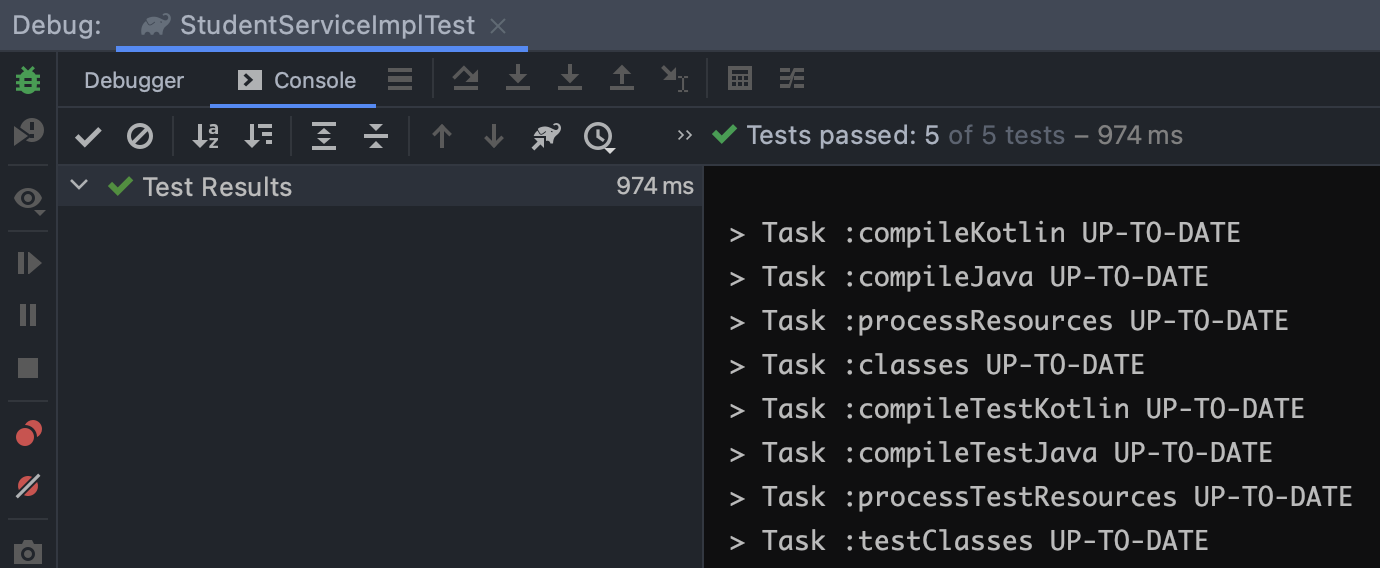
结果
集成测试
- 集成测试的目的是测试不同的模块一共工作能否达到预期。
- 集成测试不应该有实际依赖(例如:数据库),而是模拟它们的行为。
- 应用程序应该在 ApplicationContext 中运行。
- Spring boot 提供 @SpringBootTest 注解创建运行上下文。
- 使用 @TestConfiguration 配置测试环境。例如 DataSource。
我们把集成测试集中在 Controller 层。
创建 Controller ,语法使用了 Kotlin
Mokito 单元测试与 Spring-Boot 集成测试的更多相关文章
- Springboot 系列(一)Spring Boot 入门篇
注意:本 Spring Boot 系列文章基于 Spring Boot 版本 v2.1.1.RELEASE 进行学习分析,版本不同可能会有细微差别. 前言 由于 J2EE 的开发变得笨重,繁多的配置, ...
- 笔记:Spring Boot 项目构建与解析
构建 Maven 项目 通过官方的 Spring Initializr 工具来产生基础项目,访问 http://start.spring.io/ ,如下图所示,该页面提供了以Maven构建Spring ...
- Spring Boot 系列总目录
一.Spring Boot 系列诞生原因 上学那会主要学的是 Java 和 .Net 两种语言,当时对于语言分类这事儿没什么概念,恰好在2009年毕业那会阴差阳错的先找到了 .Net 的工作,此后就开 ...
- Spring Boot - 项目构建与解析
构建 Maven 项目 通过官方的 Spring Initializr 工具来产生基础项目,访问 http://start.spring.io/ ,如下图所示,该页面提供了以Maven构建Spring ...
- (2)Spring Boot配置
文章目录 配置文件 YAML 语法 单元测试 配置文件值自动注入 @Value 获取配置文件属性的值 加载指定配置文件 优先级问题 加载Spring 的配置文件 为容器中添加组件 随机数 & ...
- Spring Boot 第一弹,问候一下世界!!!
持续原创输出,点击上方蓝字关注我吧 目录 前言 什么是Spring Boot? 如何搭建一个Spring Boot项目? 第一个程序 Hello World 依赖解读 什么是配置文件? 什么是启动类? ...
- Spring Boot 的单元测试和集成测试
学习如何使用本教程中提供的工具,并在 Spring Boot 环境中编写单元测试和集成测试. 1. 概览 本文中,我们将了解如何编写单元测试并将其集成在 Spring Boot 环境中.你可在网上找到 ...
- 学习 Spring Boot:(二十九)Spring Boot Junit 单元测试
前言 JUnit 是一个回归测试框架,被开发者用于实施对应用程序的单元测试,加快程序编制速度,同时提高编码的质量. JUnit 测试框架具有以下重要特性: 测试工具 测试套件 测试运行器 测试分类 了 ...
- Spring Boot实战之单元测试
Spring Boot实战之单元测试 本文介绍使用Spring测试框架提供的MockMvc对象,对Restful API进行单元测试 Spring测试框架提供MockMvc对象,可以在不需要客户端-服 ...
随机推荐
- yapi & mock JSON
yapi & mock JSON json, body https://hellosean1025.github.io/yapi/documents/mock.html response bo ...
- [转]ROS订阅激光数据
https://github.com/robopeak/rplidar_ros/blob/master/src/client.cpp /* * Copyright (c) 2014, RoboPe ...
- Javascript中的事件冒泡与捕获
事件冒泡和事件捕获 起因:今天在封装一个bind函数的时候,发现el.addEventListener函数支持第三个参数,useCapture:是否使用事件捕获,觉得有点模糊 Js事件流 页面的哪一部 ...
- 手把手教你Spring Boot整合Mybatis Plus和Swagger2
前言:如果你是初学者,请完全按照我的教程以及代码来搭建(文末会附上完整的项目代码包,你可以直接下载我提供的完整项目代码包然后自行体验!),为了照顾初学者所以贴图比较多,请耐心跟着教程来,希望这个项目D ...
- 微信小程序(五)-常见组件(标签)
常见组件(标签) https://developers.weixin.qq.com/miniprogram/dev/component/ 1.view 代替以前的div标签 2.text 1.文本标签 ...
- vue子组件的样式没有加scoped属性会影响父组件的样式
scoped是一个vue的指令,用来控制组件的样式生效区域,加上scoped,样式只在当前组件内生效,不加scoped,这个节点下的样式会全局生效. 需要注意的是:一个组件的样式肯定是用来美化自己组件 ...
- .NET并发编程-数据并行
本系列学习在.NET中的并发并行编程模式,实战技巧 内容目录 数据并行Fork/Join模式PLINQ 本小节开始学习数据并行的概念模式,以及在.NET中数据并行的实现方式.本系列保证最少代码呈现量, ...
- CentOS6.4 Install oh-my-zsh
先安装zsh yum -y install zsh # 查看是否安装完成 cat /etc/shells /bin/sh /bin/bash /sbin/nologin /bin/dash /bin/ ...
- 记录mysql查询数据遇到的一个小问题
今天在测试的时候,需要使用mysql对插入的数据进行检验,但是写完查询语句的时候执行会报错.原因很简单,这个表名是order(订单),在MySQL语言中order是用来排序的关键字,原则上讲是不能作为 ...
- 178. 分数排名 + MySql + RANK() OVER
178. 分数排名 LeetCode_MySql_178 题目描述 题解分析 排名函数 DENSE_RANK().如果使用 DENSE_RANK() 进行排名会得到:1,1,2,3,4. RANK() ...
- Springboot 系列(一)Spring Boot 入门篇