
ASP.NET CORE 1.0 MVC API 文档用 SWASHBUCKLE SWAGGER实现
from:https://damienbod.com/2015/12/13/asp-net-5-mvc-6-api-documentation-using-swagger/
代码生成工具: https://github.com/NSwag/NSwag
This article shows how to document your ASP.NET Core 1.0 MVC API using Swagger with Swashbuckle. Per default, it does not use your xml comments in the code and this needs to be configured if required.
Code: https://github.com/damienbod/AspNet5GeoElasticsearch
2016.07.03 Updated to ASP.NET Core RTM
2016.06.04 Updated to ASP.NET Core RC2 dotnet
Step 1: Add the required NuGet packages to the dependencies in the project.json file.
|
1
2
3
4
5
6
|
"dependencies": { "Swashbuckle.SwaggerGen": "6.0.0-beta901", "Swashbuckle.SwaggerUi": "6.0.0-beta901"}, |
Step 2: Produce the .xml file which contains the xml comments when building. Click the produce outputs on build checkbox in your project file.
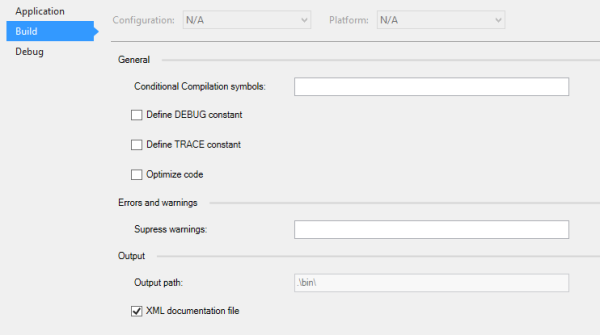
Or set the ProduceOutputsOnBuild property in the project xproj file.
|
1
|
<ProduceOutputsOnBuild>True</ProduceOutputsOnBuild> |
Step 3: Configure Swashbuckle.SwaggerGen in the Startup class ConfigureServices method.
You need to define your path to the comments xml file, which can be found in the artifacts folder. This should be saved in a config file.
The ConfigureSwaggerDocument with OperationFilter method is required so that the xml comments are added to the documentation, and also ConfigureSwaggerSchema with ModelFilter
|
1
2
3
4
5
6
7
8
9
10
11
12
13
14
15
16
17
18
19
20
21
22
|
public void ConfigureServices(IServiceCollection services){ var pathToDoc = Configuration["Swagger:Path"]; services.AddMvc(); services.AddSwaggerGen(); services.ConfigureSwaggerGen(options => { options.SingleApiVersion(new Info { Version = "v1", Title = "Geo Search API", Description = "A simple api to search using geo location in Elasticsearch", TermsOfService = "None" }); options.IncludeXmlComments(pathToDoc); options.DescribeAllEnumsAsStrings(); }); services.AddScoped<ISearchProvider, SearchProvider>();} |
Step 4: Use swagger in the Startup class Configure method.
UseSwaggerGen and UseSwaggerUi
|
1
2
3
4
5
6
7
8
9
10
11
12
13
14
15
16
17
18
19
20
21
22
23
24
25
26
27
|
public void Configure(IApplicationBuilder app, IHostingEnvironment env, ILoggerFactory loggerFactory){ loggerFactory.AddConsole(Configuration.GetSection("Logging")); loggerFactory.AddDebug(); if (env.IsDevelopment()) { app.UseDeveloperExceptionPage(); app.UseBrowserLink(); } else { app.UseExceptionHandler("/Home/Error"); } app.UseStaticFiles(); app.UseMvc(routes => { routes.MapRoute( name: "default", template: "{controller=Home}/{action=Index}/{id?}"); }); app.UseSwagger(); app.UseSwaggerUi();} |
Step 5: Create a Controller API with your documentation:
|
1
2
3
4
5
6
7
8
9
10
11
12
13
14
15
16
17
18
19
20
21
22
23
24
25
26
27
28
29
30
31
32
33
34
35
36
37
38
39
40
41
42
43
44
45
46
47
48
49
50
51
52
53
54
55
56
57
58
59
60
61
62
63
64
65
66
67
68
69
|
using Microsoft.AspNet.Mvc;using AspNet5GeoElasticsearch.ElasticsearchApi;using AspNet5GeoElasticsearch.Models;using Newtonsoft.Json;using Swashbuckle.SwaggerGen.Annotations;namespace AspNet5GeoElasticsearch.Controllers{ /// <summary> /// This class is used as an api for the search requests. /// </summary> [Route("api/[controller]")] [Produces("application/json")] public class SearchController : Controller { private readonly ISearchProvider _searchProvider; public SearchController(ISearchProvider searchProvider) { _searchProvider = searchProvider; } /// <summary> /// This method returns the found documents from Elasticsearch /// </summary> /// <param name="maxDistanceInMeter">Distance in meters from your location</param> /// <param name="centerLongitude">center Longitude </param> /// <param name="centerLatitude">center Latitude </param> /// <returns>All the documents which were found</returns> [HttpGet] [Produces(typeof(MapModel))] [SwaggerResponse(System.Net.HttpStatusCode.OK, Type = typeof(MapModel))] [Route("GeoSearch")] public ActionResult Search(uint maxDistanceInMeter, double centerLongitude, double centerLatitude) { var searchResult = _searchProvider.SearchForClosest(maxDistanceInMeter, centerLongitude, centerLatitude); var mapModel = new MapModel { MapData = JsonConvert.SerializeObject(searchResult), CenterLongitude = centerLongitude, CenterLatitude = centerLatitude, MaxDistanceInMeter = maxDistanceInMeter }; return Ok(mapModel); } /// <summary> /// Inits the Elasticsearch documents /// </summary> [HttpPost] [Route("InitData")] public ActionResult InitData() { initSearchEngine(); return Ok(); } private void initSearchEngine() { if (!_searchProvider.MapDetailsIndexExists()) { _searchProvider.InitMapDetailMapping(); _searchProvider.AddMapDetailData(); } } }} |
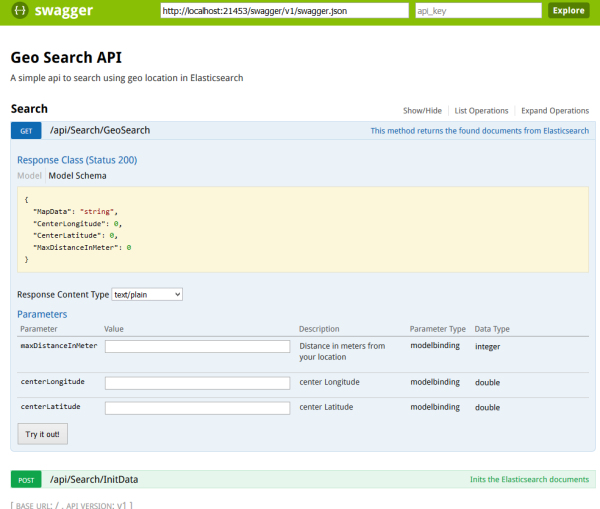
This can then be viewed using ./swagger/ui
http://localhost:21453/swagger/ui/index.html
Links:
https://github.com/domaindrivendev/Swashbuckle
https://github.com/domaindrivendev/Ahoy
http://blog.sluijsveld.com/28/01/2016/CustomSwaggerUIField/
修改文档名称及路径:
using System;

using System.Collections.Generic;

using System.IO;

using System.Linq;

using System.Threading.Tasks;

using Microsoft.AspNetCore.Builder;

using Microsoft.AspNetCore.Hosting;

using Microsoft.Extensions.Configuration;

using Microsoft.Extensions.DependencyInjection;

using Microsoft.Extensions.Logging;

using Swashbuckle.Swagger.Model;

using Swashbuckle.SwaggerGen.Application;

namespace CoreApi

{

    /// <summary>

    ///

    /// </summary>

    public class Startup

    {

        /// <summary>

        /// 必须,不允许为空字符串

        /// </summary>

        string version = "v1";

        /// <summary>

        /// API文档路径

        /// </summary>

        string pathToDoc = Path.Combine(AppContext.BaseDirectory, "CoreApi.xml");

        /// <summary>

        /// API项目名称

        /// </summary>

        string appName = "CoreApi";

        /// <summary>

        ///

        /// </summary>

        /// <param name="env"></param>

        public Startup(IHostingEnvironment env)

        {

            appName = env.ApplicationName;

            pathToDoc = Path.Combine(AppContext.BaseDirectory, string.Format("{0}.xml", env.ApplicationName));

            var builder = new ConfigurationBuilder()

                .SetBasePath(env.ContentRootPath)

                .AddJsonFile("appsettings.json", optional: true, reloadOnChange: true)

                .AddJsonFile($"appsettings.{env.EnvironmentName}.json", optional: true)

                .AddEnvironmentVariables();

            Configuration = builder.Build();

        }

        /// <summary>

        ///

        /// </summary>

        public IConfigurationRoot Configuration

        {

            get;

        }

        // This method gets called by the runtime. Use this method to add services to the container.

        /// <summary>

        ///

        /// </summary>

        /// <param name="services"></param>

        public void ConfigureServices(IServiceCollection services)

        {

            // Add framework services.

            services.AddMvc();

            services.AddSwaggerGen();

            services.ConfigureSwaggerGen(options =>

            {

                options.SingleApiVersion(new Info

                {

                    Version = version,

                    Title = appName,

                    Description = appName,

                    TermsOfService = "None",

                });

                options.IncludeXmlComments(pathToDoc);

                options.DescribeAllEnumsAsStrings();

            });

            //services.AddScoped<ISearchProvider, SearchProvider>();

        }

        // This method gets called by the runtime. Use this method to configure the HTTP request pipeline.

        /// <summary>

        ///

        /// </summary>

        /// <param name="app"></param>

        /// <param name="env"></param>

        /// <param name="loggerFactory"></param>

        public void Configure(IApplicationBuilder app, IHostingEnvironment env, ILoggerFactory loggerFactory)

        {

            loggerFactory.AddConsole(Configuration.GetSection("Logging"));

            loggerFactory.AddDebug();

            app.UseSwagger("help/{apiVersion}/api.json");

            app.UseSwaggerUi("help", string.Format("/help/{0}/api.json", version));

            app.UseMvc();

        }

    }
}
搜索
复制
ASP.NET CORE 1.0 MVC API 文档用 SWASHBUCKLE SWAGGER实现的更多相关文章
- 用VSCode开发一个asp.net core2.0+angular5项目(5): Angular5+asp.net core 2.0 web api文件上传
第一部分: http://www.cnblogs.com/cgzl/p/8478993.html 第二部分: http://www.cnblogs.com/cgzl/p/8481825.html 第三 ...
- 从头编写 asp.net core 2.0 web api 基础框架 (1)
工具: 1.Visual Studio 2017 V15.3.5+ 2.Postman (Chrome的App) 3.Chrome (最好是) 关于.net core或者.net core 2.0的相 ...
- 【转载】从头编写 asp.net core 2.0 web api 基础框架 (1)
工具: 1.Visual Studio 2017 V15.3.5+ 2.Postman (Chrome的App) 3.Chrome (最好是) 关于.net core或者.net core 2.0的相 ...
- ASP.NET Core 2.0 MVC项目实战
一.前言 毕业后入职现在的公司快有一个月了,公司主要的产品用的是C/S架构,再加上自己现在还在学习维护很老的delphi项目,还是有很多不情愿的.之前实习时主要是做.NET的B/S架构的项目,主要还是 ...
- asp.net core 3.0 MVC JSON 全局配置
asp.net core 3.0 MVC JSON 全局配置 System.Text.Json(default) startup配置代码如下: using System.Text.Encodings. ...
- 从头编写 asp.net core 2.0 web api 基础框架 (3)
第一部分:http://www.cnblogs.com/cgzl/p/7637250.html 第二部分:http://www.cnblogs.com/cgzl/p/7640077.html 之前我介 ...
- 【转载】从头编写 asp.net core 2.0 web api 基础框架 (3)
Github源码地址:https://github.com/solenovex/Building-asp.net-core-2-web-api-starter-template-from-scratc ...
- 从头编写asp.net core 2.0 web api 基础框架 (5) + 使用Identity Server 4建立Authorization Server (7) 可运行前后台源码
前台使用angular 5, 后台是asp.net core 2.0 web api + identity server 4. 从头编写asp.net core 2.0 web api 基础框架: 第 ...
- asp.net core 2.0 web api + Identity Server 4 + angular 5 可运行前后台源码
前台使用angular 5, 后台是asp.net core 2.0 web api + identity server 4. 从头编写asp.net core 2.0 web api 基础框架: 第 ...
随机推荐
- git 新建服务器的版本以及项目的用户
一, git客户端账号生成 1. git的客户端的公钥生成 ssh-keygen -t rsa -C "test@gmail.com" mac机器会在 /Users/用户/.ssh ...
- Android - 模块添加与编译
Android5.1 Ubuntu14.04 Android系统编译依靠.mk文件 添加google服务 我们自己的ROM里没有google服务 完整的google包里包含google框架和各种服务, ...
- Android 手机卫士--自定义组合控件构件布局结构
由于设置中心条目中的布局都很类似,所以可以考虑使用自定义组合控件来简化实现 本文地址:http://www.cnblogs.com/wuyudong/p/5909043.html,转载请注明源地址. ...
- iOS关于CAShapeLayer与UIBezierPath的知识内容
使用CAShapeLayer与UIBezierPath可以实现不在view的drawRect方法中就画出一些想要的图形 . 1:UIBezierPath: UIBezierPath是在 UIKit 中 ...
- php设计模式 适配器模式
适配器模式,可以将截然不同的函数接口封装成统一的API: 应用举例,PHP的数据库操作有Mysql.Mysqli.pdo三种,可以用适配器模式统一成一致,类似的场景还有cache适配器,将memcac ...
- 布局 position
position : 设置定位方式 跟『定位』相关的有一些属性,最重要的一个是『position』,它主要是设置『定位方式』. 而定位方式最重要的是设置『参照物』. 配合 position 使用的有这 ...
- 在IDEA 上使用Git查看主干和分支等
使用IDEA 查看提交历史时,IDEA默认显示的页面是你当前页面的提交历史: 然后,你点击左侧的 log 键,则可以显示整个团队每个人的提交记录: 在选中每一次的记录以后,会弹出每次提交的所有文件(对 ...
- 讲讲js中的逻辑与(&&)以及逻辑或(||)
前几天看到一个函数,百思不得其解,今天早上醒来看了本js的书,正好讲到操作符的用法,给大家分享下js中的&&,||,和我们用的其他的编程语言还是有点区别的. 直接上那个函数的代码: f ...
- CentOS系统启动流程你懂否
一.Linux内核的组成 相关概念: Linux系统的组成部分:内核+根文件系统 内核:进程管理.内存管理.网络协议栈.文件系统.驱动程序. IPC(Inter-Process Communicati ...
- python class对象转换成json/字典
# -*- encoding: UTF-8 -*- class Student: name = '' age = 0 def __init__(self, name, age): self.name ...