
Android 手机卫士--自定义组合控件构件布局结构
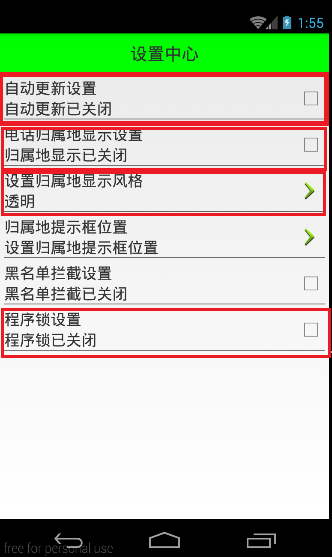
由于设置中心条目中的布局都很类似,所以可以考虑使用自定义组合控件来简化实现
本文地址:http://www.cnblogs.com/wuyudong/p/5909043.html,转载请注明源地址。
自定义组合控件
1.将已经编写好的布局文件,抽取到一个类中去做管理,下次还需要使用此布局结构的时候,直接使用组合控件对应的对象.
2.将组合控件的布局,抽取到单独的一个xml中
新建布局文件:setting_item_view.xml,将上篇文章中布局文件中的代码放进去
<?xml version="1.0" encoding="utf-8"?>

<RelativeLayout xmlns:android="http://schemas.android.com/apk/res/android"

    android:layout_width="match_parent"

    android:layout_height="wrap_content" >

    <RelativeLayout

        android:layout_width="match_parent"

        android:layout_height="wrap_content"

        android:padding="5dp" >

        <TextView

            android:id="@+id/tv_title"

            android:layout_width="wrap_content"

            android:layout_height="wrap_content"

            android:text="自动更新设置"

            android:textColor="#000"

            android:textSize="18sp" />

        <TextView

            android:id="@+id/tv_des"

            android:layout_width="wrap_content"

            android:layout_height="wrap_content"

            android:layout_below="@id/tv_title"

            android:text="自动更新已关闭"

            android:textColor="#000"

            android:textSize="18sp" />

        <CheckBox

            android:id="@+id/cb_box"

            android:layout_width="wrap_content"

            android:layout_height="wrap_content"

            android:layout_alignParentRight="true"

            android:layout_centerVertical="true" />

        <View

            android:layout_width="match_parent"

            android:layout_height="1dp"

            android:layout_below="@id/tv_des"

            android:background="#000" />

    </RelativeLayout>

</RelativeLayout>
3.通过一个单独的类SettingItemView.java,去加载此段布局文件.
package com.wuyudong.mobilesafe.view;

import com.wuyudong.mobilesafe.R;

import android.content.Context;

import android.util.AttributeSet;

import android.view.View;

import android.widget.CheckBox;

import android.widget.RelativeLayout;

import android.widget.TextView;

public class SettingItemView extends RelativeLayout {

    private TextView tv_des;

    private CheckBox cb_box;

    public SettingItemView(Context context) {

        this(context, null);

    }

    public SettingItemView(Context context, AttributeSet attrs) {

        this(context, attrs, 0);

    }

    public SettingItemView(Context context, AttributeSet attrs, int defStyle) {

        super(context, attrs, defStyle);

        // xml-->view 将设置界面的条目转换成view对象

        View.inflate(context, R.layout.setting_item_view, this);

        // 等同于以下两行代码

        /*

         * View view = View.inflate(context, R.layout.setting_item_view, null);

         * this.addView(view);

         */

        //自定义组合控件中的标题描述

        TextView tv_title = (TextView) findViewById(R.id.tv_title);

        tv_des = (TextView) findViewById(R.id.tv_des);

        cb_box = (CheckBox) findViewById(R.id.cb_box);

    }

}
这样只需要简单的几行代码就可以完成布局文件的调用
<?xml version="1.0" encoding="utf-8"?>

<LinearLayout xmlns:android="http://schemas.android.com/apk/res/android"

    android:layout_width="match_parent"

    android:layout_height="match_parent"

    android:orientation="vertical" >

    <TextView

        style="@style/TitleStyle"

        android:text="设置中心" />

    <!--

    <RelativeLayout

        android:layout_width="match_parent"

        android:layout_height="wrap_content"

        android:padding="5dp" >

        <TextView

            android:id="@+id/tv_title"

            android:layout_width="wrap_content"

            android:layout_height="wrap_content"

            android:text="自动更新设置"

            android:textColor="#000"

            android:textSize="18sp" />

        <TextView

            android:id="@+id/tv_des"

            android:layout_width="wrap_content"

            android:layout_height="wrap_content"

            android:layout_below="@id/tv_title"

            android:text="自动更新已关闭"

            android:textColor="#000"

            android:textSize="18sp" />

        <CheckBox

            android:id="@+id/cb_box"

            android:layout_alignParentRight="true"

            android:layout_centerVertical="true"

            android:layout_width="wrap_content"

            android:layout_height="wrap_content" />

        <View

            android:layout_below="@id/tv_des"

            android:background="#000"

            android:layout_width="match_parent"

            android:layout_height="1dp"

            />

    </RelativeLayout>

    -->

    <com.wuyudong.mobilesafe.view.SettingItemView

        android:layout_width="match_parent"

        android:layout_height="wrap_content" >

    </com.wuyudong.mobilesafe.view.SettingItemView>

</LinearLayout>
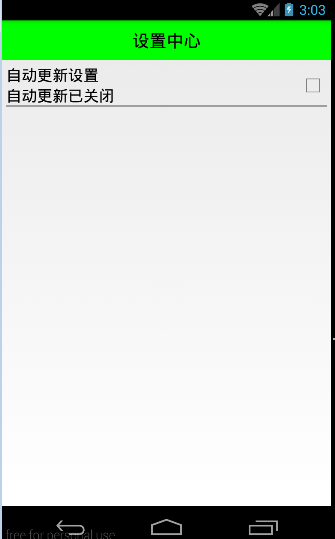
运行项目后,有如下效果:
Android 手机卫士--自定义组合控件构件布局结构的更多相关文章
- [android] 手机卫士自定义组合控件
设置中心 新建SettingActivity 设置GridView条目的点击事件 调用GridView对象的setOnItemClickListenner()方法,参数:OnItemClickList ...
- [android] 手机卫士自定义滚动控件
TextView控件设置单行显示 android:singleLine=”true” 设置TextView开始的位置显示省略号,android:ellipsize=”start” 设置滚动属性,and ...
- Android自定义控件之自定义组合控件
前言: 前两篇介绍了自定义控件的基础原理Android自定义控件之基本原理(一).自定义属性Android自定义控件之自定义属性(二).今天重点介绍一下如何通过自定义组合控件来提高布局的复用,降低开发 ...
- Android开发之自定义组合控件
自定义组合控件的步骤1.自定义一个View,继承ViewGroup,比如RelativeLayout2.编写组合控件的布局文件,在自定义的view中加载(使用View.inflate())3.自定义属 ...
- Android自定义控件之自定义组合控件(三)
前言: 前两篇介绍了自定义控件的基础原理Android自定义控件之基本原理(一).自定义属性Android自定义控件之自定义属性(二).今天重点介绍一下如何通过自定义组合控件来提高布局的复用,降低开发 ...
- android自定义控件(五) 自定义组合控件
转自http://www.cnblogs.com/hdjjun/archive/2011/10/12/2209467.html 代码为自己编写 目标:实现textview和ImageButton组合, ...
- Android Studio自定义组合控件
在Android的开发中,为了能够服用代码,会把有一定共有特点的控件组合在一起定义成一个自定义组合控件. 本文就详细讲述这一过程.虽然这样的View的组合有一个粒度的问题.粒度太大了无法复用,粒度太小 ...
- Android自定义组合控件详细示例 (附完整源码)
在我们平时的Android开发中,有时候原生的控件无法满足我们的需求,或者经常用到几个控件组合在一起来使用.这个时候,我们就可以根据自己的需求创建自定义的控件了,一般通过继承View或其子类来实现. ...
- Android开发学习笔记-自定义组合控件的过程
自定义组合控件的过程 1.自定义一个View 一般来说,继承相对布局,或者线性布局 ViewGroup:2.实现父类的构造方法.一般来说,需要在构造方法里初始化自定义的布局文件:3.根据一些需要或者需 ...
随机推荐
- Elasticsearch嵌套聚合
Elasticserch在新版本中支持聚合操作,而聚合操作也可以嵌套使用,方法如下: curl -XGET 10.4.44.19:9200/test/test/_search?pretty -d ' ...
- 矢量化的HTML5拓扑图形组件设计
HT一直被客户称道的就是其全矢量化的设计特色,矢量相比传统图片好处太多了: www.hightopo.com/guide/guide/core/vector/ht-vector-guide.html ...
- Ionic2学习笔记(4):*号
作者:Grey 原文地址: http://www.cnblogs.com/greyzeng/p/5544479.html 大家常常会在ionic2页面中见到*号 ...
- ADO.NET基础03
数据库和VS的连接,实现数据的同步,让用户的一切信息都可以在数据库中留下记录. ADO.NET基础 它是连接所有数据库的一种特殊的技术,提供对不同的数据库统一操作接口. 在VS中也可以添加数 ...
- C# HTTP上传文件
代码: /// <summary> /// Http上传文件 /// </summary> public static string HttpUploadFile(string ...
- 代码生成工具Database2Sharp中增加视图的代码生成以及主从表界面生成功能
在代码生成工具的各种功能规划中,我们一向以客户的需求作为驱动,因此也会根据需要增加一些特殊的功能或者处理.在实际的开发中,虽然我们一般以具体的表进行具体业务开发,但是有些客户提出有时候视图开发也是很常 ...
- Redis系列二之事务及消息通知
一.事务 Redis中的事务是一组命令的集合.一个事务中的命令要么都执行,要么都不执行. 1.事务简介 事务的原理是先将一个事务的命令发送给Redis,然后再让Redis依次执行这些命令.下面看一个示 ...
- Mysql 大小写问题
今天发布程序的时候,日志报错找不到表,但是系统中已经存在表,最后发现是sql大小写的问题,mysql默认设置导致这些执行失败. 1.用ROOT登录,修改/etc/my.cnf 2.在[mysqld]下 ...
- cros解决跨域
- 孙鑫MFC学习笔记8:对话框编程(下)
1.在按钮上没有字体设置,但是在对话框上有字体设置 2.让按钮进行消息响应 *1.创建按钮 *2.创建从按钮继承的类 *3.关联对象 3.属性页编程 *1.在对话框资源中新建属性页 *2.为属性页创建 ...