
Python 利用pytesser模块识别图像文字
使用的是python的pytesser模块,原先想做的是图片中文识别,搞了一段时间了,在中文的识别上还是有很多问题,这里做记录分享。
pytesser,OCR in Python using the Tesseract engine from Google。是谷歌OCR开源项目的一个模块,可将图片中的文字转换成文本(主要是英文)。
1.pytesser安装
使用设备:win8 64位
PyTesser使用Tesseract OCR引擎,将图像转换到可接受的格式,然后执行tesseract提取出文本信息。使用PyTesser ,你无须安装Tesseract OCR引擎,但必须要先安装PIL模块(Python Image Library,python的图形库)
pytesser下载:http://code.google.com/p/pytesser/ 若打不开,可通过百度网盘下载:http://pan.baidu.com/s/1o69LL8Y
PIL官方下载:http://www.pythonware.com/products/pil/
其中PIL可直接点击exe安装,pytesser无需安装,解压后可以放在python安装文件夹的\Lib\site-packages\ 下直接使用(需要添加pytesser.pth)
Ubuntu安装
sudo pip install pytesseract

sudo apt-get install tesseract-ocr
2.pytesser源码
通过查看pytesser.py的源码,可以看到几个主要函数:
(1)call_tesseract(input_filename, output_filename)
该函数调用tesseract外部执行程序,提取图片中的文本信息
(2)image_to_string(im, cleanup = cleanup_scratch_flag)
该函数处理的是image对象,所以需用使用im = open(filename)打开文件,返回一个image对象。其中调用util.image_to_scratch(im, scratch_image_name)将内存中的图像文件保存为bmp,以便tesserac程序能正常处理。
(3)image_file_to_string(filename, cleanup = cleanup_scratch_flag, graceful_errors=True)
该函数直接使用Tesseract读取图像文件,如果图像是不相容的,会先转换成兼容的格式,然后再提取图片中的文本信息。
"""OCR in Python using the Tesseract engine from Google

http://code.google.com/p/pytesser/

by Michael J.T. O'Kelly

V 0.0.1, 3/10/07"""

import Image

import subprocess

import util

import errors

tesseract_exe_name = 'tesseract' # Name of executable to be called at command line

scratch_image_name = "temp.bmp" # This file must be .bmp or other Tesseract-compatible format

scratch_text_name_root = "temp" # Leave out the .txt extension

cleanup_scratch_flag = False  # Temporary files cleaned up after OCR operation

def call_tesseract(input_filename, output_filename):

    """Calls external tesseract.exe on input file (restrictions on types),

    outputting output_filename+'txt'"""

    args = [tesseract_exe_name, input_filename, output_filename]

    proc = subprocess.Popen(args)

    retcode = proc.wait()

    if retcode!=0:

        errors.check_for_errors()

def image_to_string(im, cleanup = cleanup_scratch_flag):

    """Converts im to file, applies tesseract, and fetches resulting text.

    If cleanup=True, delete scratch files after operation."""

    try:

        util.image_to_scratch(im, scratch_image_name)

        call_tesseract(scratch_image_name, scratch_text_name_root)

        text = util.retrieve_text(scratch_text_name_root)

    finally:

        if cleanup:

            util.perform_cleanup(scratch_image_name, scratch_text_name_root)

    return text

def image_file_to_string(filename, cleanup = cleanup_scratch_flag, graceful_errors=True):

    """Applies tesseract to filename; or, if image is incompatible and graceful_errors=True,

    converts to compatible format and then applies tesseract.  Fetches resulting text.

    If cleanup=True, delete scratch files after operation."""

    try:

        try:

            call_tesseract(filename, scratch_text_name_root)

            text = util.retrieve_text(scratch_text_name_root)

        except errors.Tesser_General_Exception:

            if graceful_errors:

                im = Image.open(filename)

                text = image_to_string(im, cleanup)

            else:

                raise

    finally:

        if cleanup:

            util.perform_cleanup(scratch_image_name, scratch_text_name_root)

    return text

if __name__=='__main__':

    im = Image.open('phototest.tif')

    text = image_to_string(im)

    print text

    try:

        text = image_file_to_string('fnord.tif', graceful_errors=False)

    except errors.Tesser_General_Exception, value:

        print "fnord.tif is incompatible filetype.  Try graceful_errors=True"

        print value

    text = image_file_to_string('fnord.tif', graceful_errors=True)

    print "fnord.tif contents:", text

    text = image_file_to_string('fonts_test.png', graceful_errors=True)

    print text
  3.pytesser使用
  在代码中加载pytesser模块,简单的测试代码如下:
from pytesser import *

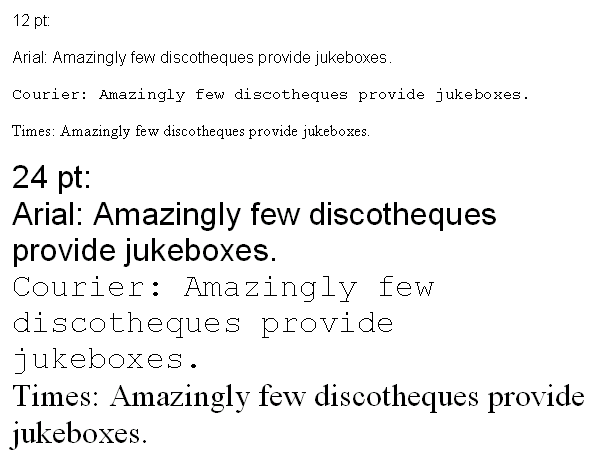
im = Image.open('fonts_test.png')

text = image_to_string(im)

print "Using image_to_string(): "

print text

text = image_file_to_string('fonts_test.png', graceful_errors=True)

print "Using image_file_to_string():"

print text
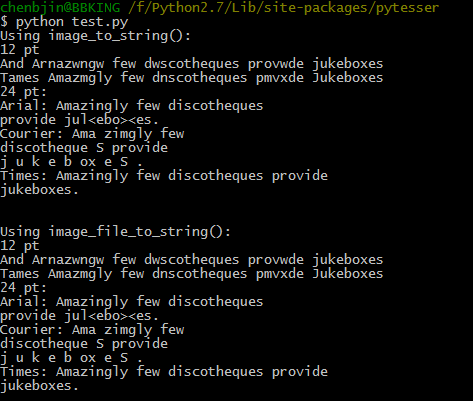
识别结果如下:基本能将英文字符提取出来,但对一些复杂点的图片,比如说我尝试对一些英文论文图片进行识别,但结果实在不理想。
由于在中文识别方面还有很多问题,以后再进一步研究分享。
参考:HK_JH的专栏 http://blog.csdn.net/hk_jh/article/details/8961449
Python 利用pytesser模块识别图像文字的更多相关文章
- python利用selenium库识别点触验证码
利用selenium库和超级鹰识别点触验证码(学习于静谧大大的书,想自己整理一下思路) 一.超级鹰注册:超级鹰入口 1.首先注册一个超级鹰账号,然后在超级鹰免费测试地方可以关注公众号,领取1000积分 ...
- 利用Hough变换识别图像中的直线
引入 近期看到2015年数学建模A题太阳影子定位中的第四问,需要根据附件中视频里的直杆的太阳影子的变化确定拍摄地点.其实确定拍摄地点这个问题并不是十分困难,因为有前三问的铺垫,我们已经得出了太阳影子长 ...
- Python利用os模块批量修改文件名
初学Python.随笔记录自己的小练习. 通过查阅资料os模块中rename和renames都可以做到 他们的区别为.rename:只能修改文件名 renames:可以修改文件名,还可以修改文件上 ...
- python 利用tkinter模块设计出window窗口(搞笑版)
代码如下 from tkinter import * import tkinter from tkinter import messagebox #定义了一个函数,当关闭window窗口时将会弹出一个 ...
- python利用twilio模块给自己发短信
1.访问http://twilio.com/并填写注册表单.注册了新账户后,你需要验证一个手机号码,短信将发给该号码. 2.Twilio 提供的试用账户包括一个电话号码,它将作为短信的发送者.你将需要 ...
- [Python] 利用commands模块执行Linux shell命令
http://blog.csdn.net/dbanote/article/details/9414133 http://zhou123.blog.51cto.com/4355617/1312791
- python利用scapy模块写一个TCP路由追踪和扫描存活IP的脚本
前言: 没有前言 0x01 from scapy.all import * import sys from socket import * import os from threading impor ...
- python 利用csv模块导入数据
- 利用pytesser识别图形验证码
简单识别 1.一般思路 验证码识别的一般思路为: 图片降噪 图片切割 图像文本输出 1.1 图片降噪 所谓降噪就是把不需要的信息通通去除,比如背景,干扰线,干扰像素等等,只剩下需要识别的文字,让图片变 ...
随机推荐
- IPV6
(一) iOS 9.0.OS X 10.11 以上的系统 在IPv6的环境下 是支持IP地址访问网络的.所以大家测试机如果是 iOS9.0以上的系统,可以直接通过IP访问.这是因为iOS 9.0之后 ...
- AJAX的问题
1.什么是AJAX AJAX即"Asynchronous Javascript And XML"(异步JavaScript和XML),是指一种创建交互式网页应用的网页开发技术. A ...
- 对css中clear元素的理解
clear:left;表示左侧不能有浮动元素. clear:right;表示右侧不能有浮动元素. clear:both;表示左右两侧都不能有浮动元素. 但在使用时,还得考虑css优先级问题.相同类型选 ...
- 深入浅出设计模式——组合模式(Composite Pattern)
模式动机 对于树形结构,当容器对象(如文件夹)的某一个方法被调用时,将遍历整个树形结构,寻找也包含这个方法的成员对象(可以是容器对象,也可以是叶子对象,如子文件夹和文件)并调用执行.(递归调用)由于容 ...
- 程序设计入门——C语言 第2周编程练习 信号报告(5分)
2 题目内容: 无线电台的RS制信号报告是由三两个部分组成的: R(Readability) 信号可辨度即清晰度. S(Strength) 信号强度即大小. 其中R位于报告第一位,共分5 ...
- [SoapUI] Post请求Body里面限制特殊字符(&、%),Groovy脚本里特殊字符需要添加“\”转义($)。
SoapUI的Post请求,在body里面不能包含(&.%),如果含有这些特殊字符,请求会报错:在添加的Groovy脚本里有些特殊字符需要使用“\”转义($),不然也会报错.
- HTML5 十大新特性(一)——语义标签
说语义标签前先来理解下什么叫语义化,当下html是靠div+css来铸造页面的整体框架和结构的,通篇大量的div可读性极低,因此诞生了这些特殊的标签,简单地说就是见名知义,使页面更清晰,方便维护和开发 ...
- 【Python】下拉框元素的找法
首先,从selenium.webdriver.support.ui里调用Select类,如下: 其次,找到下拉框元素,再找下拉框里要最终选择的元素,如下: 注意:调用Select类后,不必再加clic ...
- Android基础:Activity
Activity基本概念 Activity代表活动窗口,通过Context加载页面显示内容,每一个Activity都必须在manifest.xml中注册. 一个应用程序由多个界面构成,回退栈,活动窗口 ...
- C++ template的一些高级用法(元编码,可变参数,仿函数,using使用方法,. C++ 智能指针)
1 . 通用函数可变参数模板 对于有些时候,我们无法确切的知道,函数的参数个数时,而又不想过多的使用所谓的函数重载,那么就可以效仿下面的例子: #include<iostream> #i ...