
DependencyProperties or INotifyPropertyChanged ?
When you want to make an object binding-aware you have two choices : implements INotifyPropertyChanged or creates DependencyProperties. Which one is the best ? Let's try to answer this question !How to implement INotifyPropertyChangedDeclaring that your class is implementing INotifyPropertyChang
 Is your email address OK? You are signed up for our newsletters but your email address is either unconfirmed, or has not been reconfirmed in a long time. Please clickhere to have a confirmation email sent so we can confirm your email address and start sending you newsletters again. Alternatively, you can update your subscriptions.
When you want to make an object binding-aware you have two choices : implementINotifyPropertyChanged or create DependencyProperties. Which one is the best? Let's try to answer this question!
How to Implement INotifyPropertyChanged
Declaring that your class is implementing INotifyPropertyChanged adds anPropertyChangedEventHandler that you raise for every changes of the properties. We also add a little tricky method checkIfPropertyNameExists(String propertyName) which checks by reflection when debugging if the property name really exists! You usually ends up with code like this :
/// <summary>

/// Base class for all my viewModel.

/// </summary>

public class ViewModelBase : INotifyPropertyChanged

{

#region INotifyPropertyChanged Members

public event PropertyChangedEventHandler PropertyChanged;

public void FirePropertyChanged(String propertyName)

{

  checkIfPropertyNameExists(propertyName);

  PropertyChangedEventHandler handler = PropertyChanged;

  if (handler != null)

    handler.Invoke(this, new PropertyChangedEventArgs(propertyName));

}

#endregion

[Conditional("DEBUG")]

private void checkIfPropertyNameExists(String propertyName)

{

  Type type = this.GetType();

  Debug.Assert(

    type.GetProperty(propertyName) != null,

    propertyName + "property does not exist on object of type : " + type.FullName);

}

}
As you can see, the code is quite easy to write and understand. You have to be very vigilant in checking the name of the property you gives as refactoring do not impacts Strings values but it stays quite simple.
DependencyProperties
MSDN definition of a DependencyProperty (link to) : a property that exists on aDependencyObject, is stored by the DependencyObject property store, and is identified by aDependencyProperty identifier on the owning DependencyObject.
Here is an example of how to create a DependencyProperty:
public class MyDependencyObject : System.Windows.DependencyObject

{

 public static readonly System.Windows.DependencyProperty MyDependencyPropertyProperty =

  System.Windows.DependencyProperty.Register("MyDependencyProperty", typeof(String), typeof(MyDependencyObject));

 public String MyDependencyProperty

 {

   get { return (String)GetValue(MyDependencyObject.MyDependencyPropertyProperty); }

   set { SetValue(MyDependencyObject.MyDependencyPropertyProperty, value); }

 }

}
Which one choose ?
Performances
All the tests are done under the .NET framework 4.0 with VisualStudio 2010 and .NET Memory Profiler 3.5. The tests were already done on this page MVVM – Lambda vs INotifyPropertyChanged vs DependencyObject but I do not get the same results...
Execution Times
To tests this I created a simple application and two textblocks binded to two String on my ViewModel. The tests were performed one by one and I took care to remove the inheritance of my ViewModel from DependencyObject when testing the INotifyPropertyChanged.
The code used to tests DependencyProperty is this one :
public static readonly DependencyProperty StringWithDependencyPropertyProperty =

DependencyProperty.Register("StringWithDependencyProperty", typeof(String), typeof(MainViewModel));

public String StringWithDependencyProperty

{

  get { return (String)GetValue(MainViewModel.StringWithDependencyPropertyProperty); }

  set { SetValue(MainViewModel.StringWithDependencyPropertyProperty, value); }

}

...

DateTime start = DateTime.Now;

for (int i = 0; i < 100000; i++)

  _mainViewModel.StringWithDependencyProperty = i.ToString();

DateTime end = DateTime.Now;

Console.WriteLine("Total time for DependencyProperty : " + (end - start).TotalMilliseconds +" ms.");
The code used to tests INotifyPropertyChangedis this one :
public String StringWithINotifyPropertyChanged

{

 get { return _stringWithINotifyPropertyChanged; }

 set

  {

    _stringWithINotifyPropertyChanged = value;

    firePropertyChanged("StringWithINotifyPropertyChanged");

  }

}

...

DateTime start = DateTime.Now;

for (int i = 0; i < 100000; i++)

  _mainViewModel.StringWithINotifyPropertyChanged = i.ToString();

DateTime end = DateTime.Now;

Console.WriteLine("Total time for INotifyPropertyChanged : " + (end - start).TotalMilliseconds+" ms.");
The results, for NO binding of the properties, were these :
Total time for DependencyProperty : 45 ms.
Total time for INotifyPropertyChanged : 171 ms.
The results, for one binding of the properties, were these :
Total time for DependencyProperty : 489 ms.
Total time for INotifyPropertyChanged : 1125 ms.
The results, for twelve binding of the properties, were these :
Total time for DependencyProperty : 3600ms.
Total time for INotifyPropertyChanged : 8375 ms.
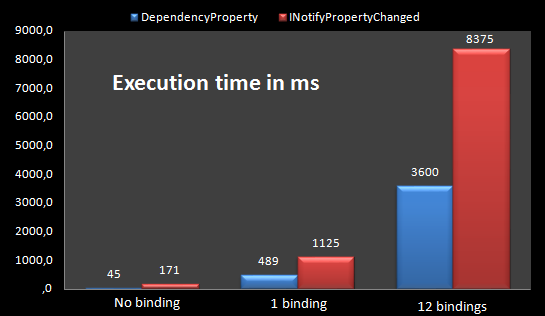
DependencyProperty is 2,30 times faster than INotifyPropertyChanged for one binding and this number does not increase with the number of binded controls!
Edit : As argued in the comments and even if it is not the most common way to useINotifyPropertyChanged, I have made the tests with a static event args, and the results are :
Total time for no binding: 154ms.
Total time for one binding: 770ms.
Total time for twelve bindings: 5605ms.
DependencyProperies are still better, even if it's less...
Memory usage
I executed the same code and profiled the memory usages :
DependencyPropertycreated 600 new instances and add 44,583 bytesINotifyPropertyChangedcreated 876 new instances and add 63,536 bytes
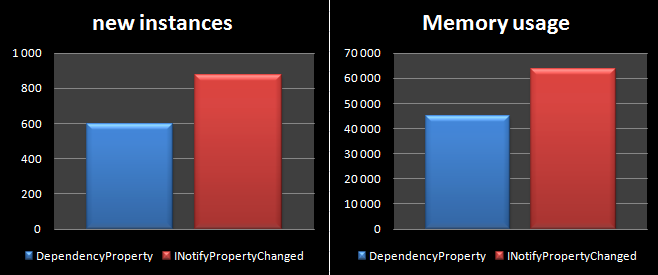
DependencyProperty seems (in my tests) to create less instance and to use less memory than theINotifyPropertyChanged system...
Inheritance Issues
To create a DependencyProperty your objects needs to inherit from DependencyObject. This is not always possible and then using INotifyPropertyChanged is the only way to make it Bindable-aware.
Also, by being a DependencyObject, your object will carry with it all the dependency engine stuff and these limitations:
- only the thread that the
DependencyObjectwas created on may access the DependencyObject directly. DependencyObjectseals Equals and GetHashCode(),- They are not marked as Serializable : (but you can use the XAMLWriter and XAMLReader to do so...
Inheritance from a base class you do not have a grip on ?=> No DependencyProperty !
Animations
Using DependencyProperty make the poperties animatable. If you want to animate a property, there is no simple work-around because, as the MSDN says : In order to be animated, the animation's target property must be a dependency property.
If you can't use DependencyProperty (when you do not create the objects for example), there is still work-arounds techniques.
Flexibility
Using INotifyPropertyChanged is sometimes more flexible than using DependencyProperty. Let me explain that. When you build a screen on which a lot of controls visibility dependsof some rules, you may declare a boolean which value is computed from other boolean.
For example, IsEditionPosible must be set to true only if IsAlreadyInEditionMode = falseand if UserHasEditionRights = true. So when changing the value ofIsAlreadyInEditionMode or UserHasEditionRights you must tells the binding engine thatIsEditionPosible has been updated too. It's easier to do this with INotifyPropertyChangedthan with the DependencyProperty with which you should have to create a method, which recalculate and reassign the new value to IsEditionPosible. Here you just have to use this little snippet :
public Boolean IsAlreadyInEditionMode

{

 get { return _isAlreadyInEditionMode ; }

 set

  {

    _isAlreadyInEditionMode = value;

    firePropertyChanged("IsAlreadyInEditionMode ");

    firePropertyChanged("IsEditionPosible");

  }

}

public Boolean UserHasEditionRights

{

 get { return _userHasEditionRights ; }

 set

  {

    _userHasEditionRights = value;

    firePropertyChanged("UserHasEditionRights");

    firePropertyChanged("IsEditionPosible");

  }

}

public Boolean IsEditionPosible

{

 get { return UserHasEditionRights && !IsAlreadyInEditionMode  ; }

}
Note that this is the way that I create computed value for easier binding in my viewModel but this is a subject where improvments may be done...
Flexibility (easier code writing) needed ?=> Choose INotifyPropertyChanged !
Testing
When you performs testing on your object, you will be in trouble if you use DependencyObject: the test are not done on the same thread that created the object and then throws you a "System.InvalidOperationException: The calling thread cannot access this object because a different thread owns it".
Testing => No DependencyProperty !
Code Readability/Writing
Some people argues that the use of DependencyProperties the code extremely ugly. I myself think that this is exaclty the same. To make easier the creation of dependencyProperty you can use this snippet : link to the snippet
DependencyProperties or INotifyPropertyChanged ?的更多相关文章
- 传智播客--数据绑定--INotifyPropertyChanged(小白内容)
INotifyPropertyChanged一般在数据绑定的时候使用. InotifyPropertyChanged是.net内置的接口,数据绑定时会检测DataContext是否实现了Inotify ...
- INotifyPropertyChanged, Interface
Data Object(class) impliment INotifyPropertyChanged; then the Object can update BindingSource. Impli ...
- Data Binding和INotifyPropertyChanged是如何协调工作的?
前言 WPF的一大基础就是Data Binding.在基于MVVM架构的基础上,只有通过实现INotifyPropertyChanged接口的ViewModel才能够用于Data Binding. 要 ...
- 如何优雅的实现INotifyPropertyChanged接口
INotifyPropertyChanged接口在WPF或WinFrom程序中使用还是经常用到,常用于通知界面属性变更.标准写法如下: class NotifyObject : INotifyProp ...
- INotifyPropertyChanged接口的PropertyChanged 事件
INotifyPropertyChanged 接口用于向客户端(通常是执行绑定的客户端)发出某一属性值已更改的通知. 例如,考虑一个带有名为 FirstName 属性的 Person 对象. 若要提供 ...
- 为Page添加INotifyPropertyChanged功能
在Page页面里面, DataContext 更新后,前台数据要求会自动更新. 但前台的绑定如果用x:bind 语法. 它要求强类型.直接关联到DataContext上就不行了. 需要为Page 添加 ...
- 【.NET深呼吸】INotifyPropertyChanged接口的真故事
无论是在流氓腾的问问社区,还是在黑度贴吧,或是“厕所等你”论坛上,曾经看到过不少朋友讨论INotifyPropertyChanged接口.不少朋友认为该接口是为双向绑定而使用的,那么,真实的情况是这样 ...
- 使用CallerMemberName简化InotifyPropertyChanged的实现
在WPF中,当我们要使用MVVM的方式绑定一个普通对象的属性时,界面上往往需要获取到属性变更的通知, class NotifyObject : INotifyPropertyChanged ...
- C#-INotifyPropertyChanged(解决数据绑定的界面刷新问题)
最近做项目用到DataGridView,用它绑定数据源后,如果数据源中的数据修改无法及时刷新到控件上,必须切换单元格的焦点才能导致刷新显示新数值,通过查官方文档,用INotifyPropertyCha ...
随机推荐
- AFNetworking(AFN)总结
AFNetworking(AFN) ----主要做下载上传之用 //他是干啥的?发送请求,主要做下载上传之用 (苹果自带有获取服务器数据的方法NSURLConnection send,AFNetwor ...
- JDBC之SqlHelper
SqlHelper工具类如下: import java.sql.Connection; import java.sql.PreparedStatement; import java.sql.Resul ...
- Volley学习总结
本文主要包括以下内容 volly基本操作(String与Json类型) volly图片操作 自定义volly volly源码分析 Volley简单易用,在性能方面也进行了大幅度的调整,它的设计目标就是 ...
- php常用判断的函数
empty($var) //用来检查变量是否为空(没有值或零值) isset($var) //这个//测试一个变量看它是否已被定义. gettype($var) ...
- mysql中select五种子句和统计函数
select 五种子句顺序 where 条件 group by 分组 having 把结果进行再次筛选 order by 排序 limit 取出条目 统计函数 max(列名) 求最大 min( ...
- 13.代理模式(Proxy Pattern)
using System; namespace Test { //抽象角色:声明真实对象和代理对象的共同接口. //代理角色:代理对象角色内部含有对真实对象的引用,从而可以操作真实对象, //同时代理 ...
- Android性能优化系列 + Android官方培训课程中文版
Android性能优化典范 - 第6季 http://hukai.me/android-performance-patterns-season-6/ Android性能优化典范 - 第5季 htt ...
- [LeetCode] Letter Combinations of a Phone Number
Given a digit string, return all possible letter combinations that the number could represent. A map ...
- 二、activity与Intent
(一) 多个activity之间的跳转(无值传递) 第一步:创建activity(其实就是jave文件),并进行注册 在AndroidManifest.xml中 <activity androi ...
- 一些常用的C++标准函数
一些常用的C++标准函数 double atof(const char* p); int atoi(const char* p); long atol(const char* p); cstdlib ...