
自然语言13_Stop words with NLTK
python机器学习-乳腺癌细胞挖掘(博主亲自录制视频)https://study.163.com/course/introduction.htm?courseId=1005269003&utm_campaign=commission&utm_source=cp-400000000398149&utm_medium=share
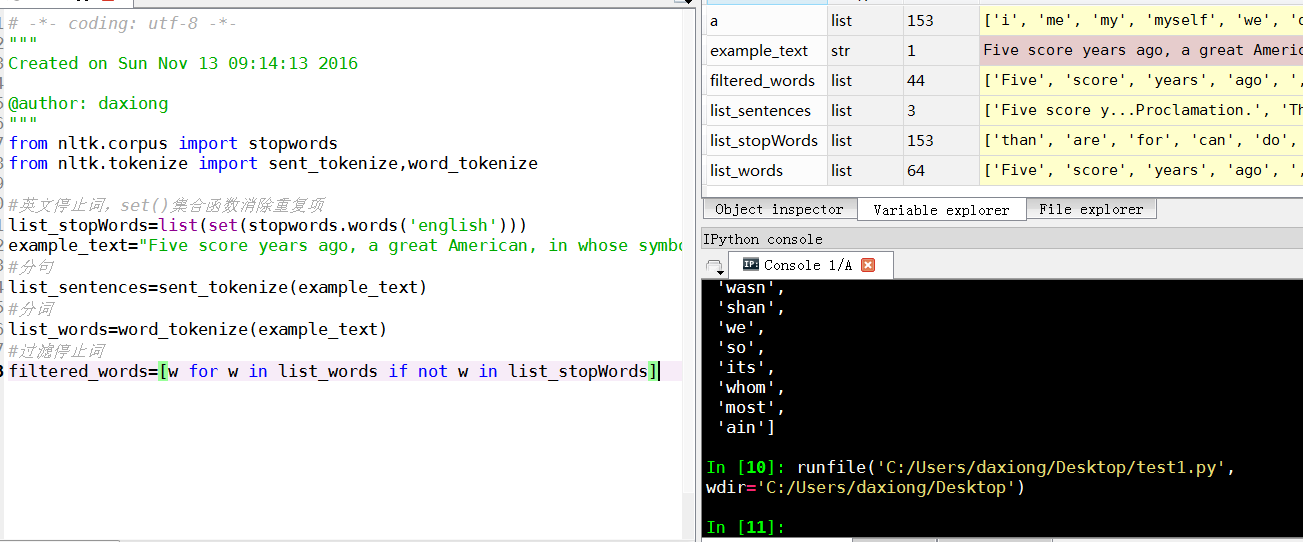
# -*- coding: utf-8 -*-

"""

Created on Sun Nov 13 09:14:13 2016

@author: daxiong

"""

from nltk.corpus import stopwords

from nltk.tokenize import sent_tokenize,word_tokenize

#英文停止词,set()集合函数消除重复项

list_stopWords=list(set(stopwords.words('english')))

example_text="Five score years ago, a great American, in whose symbolic shadow we stand today, signed the Emancipation Proclamation. This momentous decree came as a great beacon light of hope to millions of Negro slaves who had been seared in the flames of withering injustice. It came as a joyous daybreak to end the long night of bad captivity."

#分句

list_sentences=sent_tokenize(example_text)

#分词

list_words=word_tokenize(example_text)

#过滤停止词

filtered_words=[w for w in list_words if not w in list_stopWords]
Stop words with NLTK
The idea of Natural Language Processing is to do some form of
analysis, or processing, where the machine can understand, at least to
some level, what the text means, says, or implies.
This is an obviously massive challenge, but there are steps to
doing it that anyone can follow. The main idea, however, is that
computers simply do not, and will not, ever understand words directly.
Humans don't either *shocker*. In humans, memory is broken down into
electrical signals in the brain, in the form of neural groups that fire
in patterns. There is a lot about the brain that remains unknown, but,
the more we break down the human brain to the basic elements, we find
out basic the elements really are. Well, it turns out computers store
information in a very similar way! We need a way to get as close to that
as possible if we're going to mimic how humans read and understand
text. Generally, computers use numbers for everything, but we often see
directly in programming where we use binary signals (True or False,
which directly translate to 1 or 0, which originates directly from
either the presence of an electrical signal (True, 1), or not (False,
0)). To do this, we need a way to convert words to values, in numbers,
or signal patterns. The process of converting data to something a
computer can understand is referred to as "pre-processing." One of the
major forms of pre-processing is going to be filtering out useless data.
In natural language processing, useless words (data), are referred to
as stop words.
Immediately, we can recognize ourselves that some words carry more
meaning than other words. We can also see that some words are just
plain useless, and are filler words. We use them in the English
language, for example, to sort of "fluff" up the sentence so it is not
so strange sounding. An example of one of the most common, unofficial,
useless words is the phrase "umm." People stuff in "umm" frequently,
some more than others. This word means nothing, unless of course we're
searching for someone who is maybe lacking confidence, is confused, or
hasn't practiced much speaking. We all do it, you can hear me saying
"umm" or "uhh" in the videos plenty of ...uh ... times. For most
analysis, these words are useless.
We would not want these words taking up space in our database, or
taking up valuable processing time. As such, we call these words "stop
words" because they are useless, and we wish to do nothing with them.
Another version of the term "stop words" can be more literal: Words we
stop on.
For example, you may wish to completely cease analysis if you
detect words that are commonly used sarcastically, and stop immediately.
Sarcastic words, or phrases are going to vary by lexicon and corpus.
For now, we'll be considering stop words as words that just contain no
meaning, and we want to remove them.
You can do this easily, by storing a list of words that you
consider to be stop words. NLTK starts you off with a bunch of words
that they consider to be stop words, you can access it via the NLTK
corpus with:
from nltk.corpus import stopwords
Here is the list:
{'ourselves', 'hers', 'between', 'yourself', 'but', 'again', 'there',
'about', 'once', 'during', 'out', 'very', 'having', 'with', 'they',
'own', 'an', 'be', 'some', 'for', 'do', 'its', 'yours', 'such', 'into',
'of', 'most', 'itself', 'other', 'off', 'is', 's', 'am', 'or', 'who',
'as', 'from', 'him', 'each', 'the', 'themselves', 'until', 'below',
'are', 'we', 'these', 'your', 'his', 'through', 'don', 'nor', 'me',
'were', 'her', 'more', 'himself', 'this', 'down', 'should', 'our',
'their', 'while', 'above', 'both', 'up', 'to', 'ours', 'had', 'she',
'all', 'no', 'when', 'at', 'any', 'before', 'them', 'same', 'and',
'been', 'have', 'in', 'will', 'on', 'does', 'yourselves', 'then',
'that', 'because', 'what', 'over', 'why', 'so', 'can', 'did', 'not',
'now', 'under', 'he', 'you', 'herself', 'has', 'just', 'where', 'too',
'only', 'myself', 'which', 'those', 'i', 'after', 'few', 'whom', 't',
'being', 'if', 'theirs', 'my', 'against', 'a', 'by', 'doing', 'it',
'how', 'further', 'was', 'here', 'than'}
Here is how you might incorporate using the stop_words set to remove the stop words from your text:
from nltk.corpus import stopwords

from nltk.tokenize import word_tokenize

example_sent = "This is a sample sentence, showing off the stop words filtration."

stop_words = set(stopwords.words('english'))

word_tokens = word_tokenize(example_sent)

filtered_sentence = [w for w in word_tokens if not w in stop_words]

filtered_sentence = []

for w in word_tokens:

    if w not in stop_words:

        filtered_sentence.append(w)

print(word_tokens)

print(filtered_sentence)
Our output here:['This', 'is', 'a', 'sample', 'sentence', ',', 'showing', 'off', 'the', 'stop', 'words', 'filtration', '.']
['This', 'sample', 'sentence', ',', 'showing', 'stop', 'words', 'filtration', '.']
Our database thanks us. Another form of data pre-processing is 'stemming,' which is what we're going to be talking about next.

自然语言13_Stop words with NLTK的更多相关文章
- 自然语言处理(1)之NLTK与PYTHON
自然语言处理(1)之NLTK与PYTHON 题记: 由于现在的项目是搜索引擎,所以不由的对自然语言处理产生了好奇,再加上一直以来都想学Python,只是没有机会与时间.碰巧这几天在亚马逊上找书时发现了 ...
- 自然语言23_Text Classification with NLTK
QQ:231469242 欢迎喜欢nltk朋友交流 https://www.pythonprogramming.net/text-classification-nltk-tutorial/?compl ...
- 自然语言20_The corpora with NLTK
QQ:231469242 欢迎喜欢nltk朋友交流 https://www.pythonprogramming.net/nltk-corpus-corpora-tutorial/?completed= ...
- 自然语言19.1_Lemmatizing with NLTK(单词变体还原)
QQ:231469242 欢迎喜欢nltk朋友交流 https://www.pythonprogramming.net/lemmatizing-nltk-tutorial/?completed=/na ...
- 自然语言14_Stemming words with NLTK
https://www.pythonprogramming.net/stemming-nltk-tutorial/?completed=/stop-words-nltk-tutorial/ # -*- ...
- 自然语言处理2.1——NLTK文本语料库
1.获取文本语料库 NLTK库中包含了大量的语料库,下面一一介绍几个: (1)古腾堡语料库:NLTK包含古腾堡项目电子文本档案的一小部分文本.该项目目前大约有36000本免费的电子图书. >&g ...
- python自然语言处理函数库nltk从入门到精通
1. 关于Python安装的补充 若在ubuntu系统中同时安装了Python2和python3,则输入python或python2命令打开python2.x版本的控制台:输入python3命令打开p ...
- Python自然语言处理实践: 在NLTK中使用斯坦福中文分词器
http://www.52nlp.cn/python%E8%87%AA%E7%84%B6%E8%AF%AD%E8%A8%80%E5%A4%84%E7%90%86%E5%AE%9E%E8%B7%B5-% ...
- 推荐《用Python进行自然语言处理》中文翻译-NLTK配套书
NLTK配套书<用Python进行自然语言处理>(Natural Language Processing with Python)已经出版好几年了,但是国内一直没有翻译的中文版,虽然读英文 ...
随机推荐
- Easyui表单,文本框,下拉菜单三级联动练习代码
<%@ page language="java" contentType="text/html; charset=UTF-8" pageEncoding= ...
- [转] ServletContext 与application的异同
相同:其实servletContext和application 是一样的,就相当于一个类创建了两个不同名称的变量.在 servlet中ServletContext就是application对象.大家只 ...
- iOS开发,系统自带的分享简单实现
由于simulator设置里面没有新浪微博的选项,所以选择了真机调试,成功了.代码不多,包含头文件 没有配置登录信息的话,是没有作用的 ...
- react.js table组件【可以直接使用】
最近在做一个CMS,使用的技术是刚刚学习的react.js,准备制作一个查询的页面以及一个新增的页面. 这是table的公共组件: 我们在使用的过程中,只会用到: 制作出来的查询页面: 新增页面: 上 ...
- 02python算法-二分法简介
老规矩: 什么是二分法: 其实是一个数学领域的词,但是在计算机领域也有广泛的使用. 为什么需要二分法? 当穷举算法性能让你崩溃时. 二分法怎么用呢? 让我们先玩一个游戏先,我心里想一个100以内的整数 ...
- 谈谈MVC项目中的缓存功能设计的相关问题
本文收集一些关于项目中为什么需要使用缓存功能,以及怎么使用等,在实际开发中对缓存的设计的考虑 为什么需要讨论缓存呢? 缓存是一个中大型系统所必须考虑的问题.为了避免每次请求都去访问后台的资源(例如数据 ...
- jsp 中的js 与 jstl 运行的先后顺序
在jsp 中运行下面的代码,结论是:js 中可以使用 标签,js 的注释 对标签无效-- 有知道原理的吗<c:set var="flag" value="false ...
- cygwin-安装断点续传
本文转载http://blog.chinaunix.net/uid-20178959-id-1731456.html 本文主要介绍正常下载安装(http://www.cnblogs.com/hwagg ...
- git初体验(三)git分支
分支的理念就是分身,就像孙悟空拔出猴毛变出很多跟自己一模一样的猴子,然后每个猴子做自己的事情互不干涉,等到所有猴子做完之后,猴子集合来合并劳动成果,然后悟空就把那些猴子猴孙门统统收回了. 你创建了一个 ...
- selenium+eclispse里代码备注
1.火狐.谷歌和IE浏览器引擎都要重新下载selenium官网引擎,并设置路径才可以支持selenium3 而狐火用自己的引擎不用设置路径既可以支持selenium2也支持selenium3,谷歌和I ...