
自然语言23_Text Classification with NLTK
sklearn实战-乳腺癌细胞数据挖掘(博主亲自录制视频教程)
QQ:231469242
欢迎喜欢nltk朋友交流
https://www.pythonprogramming.net/text-classification-nltk-tutorial/?completed=/wordnet-nltk-tutorial/
Text Classification with NLTK
Now that we're comfortable with NLTK, let's try to tackle text
classification. The goal with text classification can be pretty broad.
Maybe we're trying to classify text as about politics or the military.
Maybe we're trying to classify it by the gender of the author who wrote
it. A fairly popular text classification task is to identify a body of
text as either spam or not spam, for things like email filters. In our
case, we're going to try to create a sentiment analysis algorithm.
To do this, we're going to start by trying to use the movie
reviews database that is part of the NLTK corpus. From there we'll try
to use words as "features" which are a part of either a positive or
negative movie review. The NLTK corpus movie_reviews data set has the
reviews, and they are labeled already as positive or negative. This
means we can train and test with this data. First, let's wrangle our
data.
import nltk

import random

from nltk.corpus import movie_reviews

documents = [(list(movie_reviews.words(fileid)), category)

             for category in movie_reviews.categories()

             for fileid in movie_reviews.fileids(category)]

random.shuffle(documents)

print(documents[1])

all_words = []

for w in movie_reviews.words():

    all_words.append(w.lower())

all_words = nltk.FreqDist(all_words)

print(all_words.most_common(15))

print(all_words["stupid"])
It may take a moment to run this script, as the movie reviews dataset is somewhat large. Let's cover what is happening here.
After importing the data set we want, you see:
documents = [(list(movie_reviews.words(fileid)), category)

             for category in movie_reviews.categories()

             for fileid in movie_reviews.fileids(category)]
Basically, in plain English, the above code is translated to: In each category (we have pos or neg), take all of the file IDs (each review has its own ID), then store the word_tokenized version (a list of words) for the file ID, followed by the positive or negative label in one big list.
Next, we use random to shuffle our documents. This is because we're going to be training and testing. If we left them in order, chances are we'd train on all of the negatives, some positives, and then test only against positives. We don't want that, so we shuffle the data.
Then, just so you can see the data you are working with, we print out documents[1], which is a big list, where the first element is a list the words, and the 2nd element is the "pos" or "neg" label.
Next, we want to collect all words that we find, so we can have a massive list of typical words. From here, we can perform a frequency distribution, to then find out the most common words. As you will see, the most popular "words" are actually things like punctuation, "the," "a" and so on, but quickly we get to legitimate words. We intend to store a few thousand of the most popular words, so this shouldn't be a problem.
print(all_words.most_common(15))
The above gives you the 15 most common words. You can also find out how many occurences a word has by doing:
print(all_words["stupid"])
Next up, we'll begin storing our words as features of either positive or negative movie reviews.
导入corpus语料库的movie_reviews 影评
all_words 是所有电影影评的所有文字,一共有150多万字
#all_words 是所有电影影评的所有文字,一共有150多万字
all_words=movie_reviews.words()
'''
all_words

Out[37]: ['plot', ':', 'two', 'teen', 'couples', 'go', 'to', ...]

len(all_words)

Out[38]: 1583820
'''
影评的分类category只有两种,neg负面,pos正面
import nltk

import random

from nltk.corpus import movie_reviews

for category in movie_reviews.categories():

    print(category)

'''

neg

pos

'''
列出关于neg负面的文件ID
movie_reviews.fileids("neg")

'''

 'neg/cv502_10970.txt',

 'neg/cv503_11196.txt',

 'neg/cv504_29120.txt',

 'neg/cv505_12926.txt',

 'neg/cv506_17521.txt',

 'neg/cv507_9509.txt',

 'neg/cv508_17742.txt',

 'neg/cv509_17354.txt',

 'neg/cv510_24758.txt',

 'neg/cv511_10360.txt',

 'neg/cv512_17618.txt'

 .......

'''
列出关于pos正面的文件ID
movie_reviews.fileids("pos")

'pos/cv989_15824.txt',

 'pos/cv990_11591.txt',

 'pos/cv991_18645.txt',

 'pos/cv992_11962.txt',

 'pos/cv993_29737.txt',

 'pos/cv994_12270.txt',

 'pos/cv995_21821.txt',

 'pos/cv996_11592.txt',

 'pos/cv997_5046.txt',

 'pos/cv998_14111.txt',

 'pos/cv999_13106.txt'
输出neg/cv987_7394.txt 的文字,一共有872个
list_words=movie_reviews.words("neg/cv987_7394.txt")

'''

['please', 'don', "'", 't', 'mind', 'this', 'windbag', ...]

'''

len(list_words)

'''

Out[30]: 872

'''
tuple1=(list(movie_reviews.words("neg/cv987_7394.txt")), 'neg')

'''
Out[32]: (['please', 'don', "'", 't', 'mind', 'this', 'windbag', ...], 'neg')
'''
#用列表解析最终比较方便

#展示形式多条(['please', 'don', "'", 't', 'mind', 'this', 'windbag', ...], 'neg')

documents = [(list(movie_reviews.words(fileid)), category)

             for category in movie_reviews.categories()

             for fileid in movie_reviews.fileids(category)]
一共有2000个文件
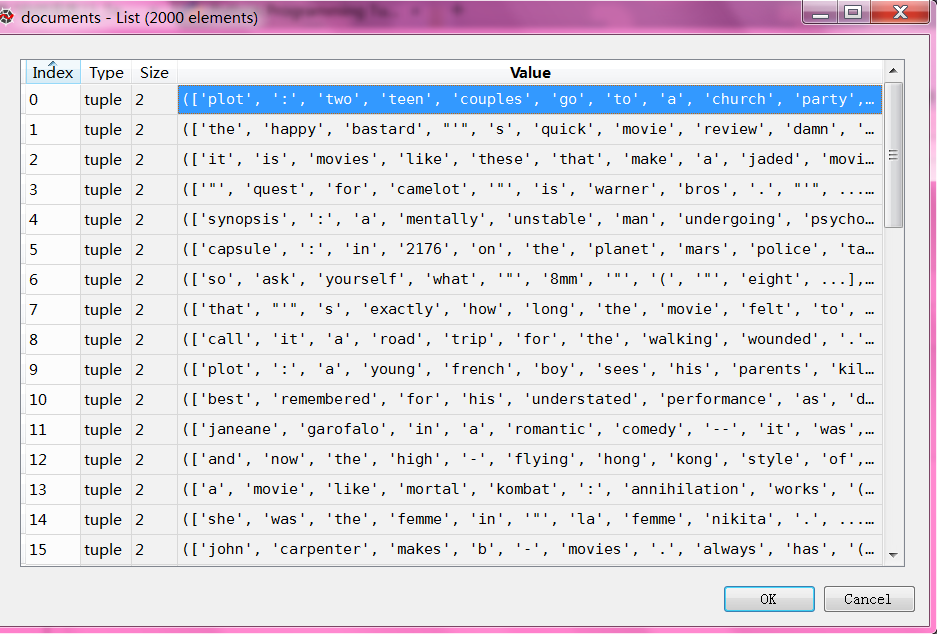
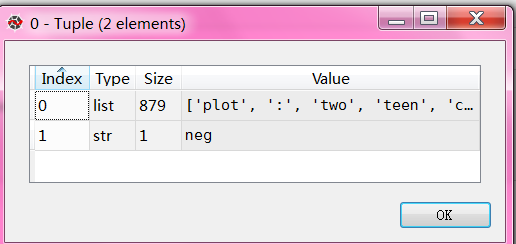
每个文件由一窜单词和评论neg/pos组成
完整测试代码
# -*- coding: utf-8 -*-

"""

Created on Sun Dec  4 09:27:48 2016

@author: daxiong

"""

import nltk

import random

from nltk.corpus import movie_reviews

documents = [(list(movie_reviews.words(fileid)), category)

             for category in movie_reviews.categories()

             for fileid in movie_reviews.fileids(category)]

random.shuffle(documents)

#print(documents[1])

all_words = []

for w in movie_reviews.words():

    all_words.append(w.lower())

all_words = nltk.FreqDist(all_words)

#print(all_words.most_common(15))

print(all_words["stupid"])
自然语言23_Text Classification with NLTK的更多相关文章
- 自然语言处理(1)之NLTK与PYTHON
自然语言处理(1)之NLTK与PYTHON 题记: 由于现在的项目是搜索引擎,所以不由的对自然语言处理产生了好奇,再加上一直以来都想学Python,只是没有机会与时间.碰巧这几天在亚马逊上找书时发现了 ...
- 自然语言20_The corpora with NLTK
QQ:231469242 欢迎喜欢nltk朋友交流 https://www.pythonprogramming.net/nltk-corpus-corpora-tutorial/?completed= ...
- 自然语言19.1_Lemmatizing with NLTK(单词变体还原)
QQ:231469242 欢迎喜欢nltk朋友交流 https://www.pythonprogramming.net/lemmatizing-nltk-tutorial/?completed=/na ...
- 自然语言14_Stemming words with NLTK
https://www.pythonprogramming.net/stemming-nltk-tutorial/?completed=/stop-words-nltk-tutorial/ # -*- ...
- 自然语言13_Stop words with NLTK
https://www.pythonprogramming.net/stop-words-nltk-tutorial/?completed=/tokenizing-words-sentences-nl ...
- 自然语言处理2.1——NLTK文本语料库
1.获取文本语料库 NLTK库中包含了大量的语料库,下面一一介绍几个: (1)古腾堡语料库:NLTK包含古腾堡项目电子文本档案的一小部分文本.该项目目前大约有36000本免费的电子图书. >&g ...
- python自然语言处理函数库nltk从入门到精通
1. 关于Python安装的补充 若在ubuntu系统中同时安装了Python2和python3,则输入python或python2命令打开python2.x版本的控制台:输入python3命令打开p ...
- Python自然语言处理实践: 在NLTK中使用斯坦福中文分词器
http://www.52nlp.cn/python%E8%87%AA%E7%84%B6%E8%AF%AD%E8%A8%80%E5%A4%84%E7%90%86%E5%AE%9E%E8%B7%B5-% ...
- 推荐《用Python进行自然语言处理》中文翻译-NLTK配套书
NLTK配套书<用Python进行自然语言处理>(Natural Language Processing with Python)已经出版好几年了,但是国内一直没有翻译的中文版,虽然读英文 ...
随机推荐
- 9-cat 简明笔记
连接或显示文件 cat [options] [file-list] 参数 file-list 是cat要处理的单个文件路径名或多个文件路径名列表,如果不指定任何参数或指定一个连字符(-)代替文件名,c ...
- redis+Keepalived主从热备秒级切换
一 简介 安装使用centos 5.10 Master 192.168.235.135 Slave 192.168.235.152 Vip 192.168.235.200 编译环境 yum -y in ...
- yii2权限控制rbac之菜单menu最详细教程
前面我们在博文 yii2搭建完美后台并实现rbac权限控制实例教程中完美实现了yii2的后台搭建和rbac权限控制,如果你还没有实现,请先看上文再回来参考本文,因为本文是在上文的基础上进行完善和补充. ...
- Using LINQ to SharePoint
LINQ and LINQ Providers LINQ is a feature of the programming languages C# and Microsoft Visual Bas ...
- VS2013 无法在Web服务器上启动调试。IIS未列出与打开的URL匹配的网站。
出现这个问题的原因是:没有用管理员权限运行VS2013. 本来遇到这个问题的时候,不知道什么原因.后来附加到进程调试的时候,提示要以管理员身份运行.才知道啥原因.
- 将Extjs文件拷入eclipse工程下卡死问题
主要是由于eclipse默认对js文件进行校验,ExtJS中js文件多且庞大造成电脑资源耗尽. 解决方法: 找到工作空间中项目文件夹下的.project文件,将 <buildCommand> ...
- URL详解与URL编码
作为前端,每日与 URL 打交道是必不可少的.但是也许每天只是单纯的用,对其只是一知半解,随着工作的展开,我发现在日常抓包调试,接口调用,浏览器兼容等许多方面,不深入去理解URL与URL编码则会踩到很 ...
- 用CSS和jQuery制作简单的下拉框
请选择 百度 谷歌 雅虎 新浪 dowebok 代码 素材 模板 教程 示例下载 // li', function() { var parent = $(this).closest('.select' ...
- 解决npm install缓慢
http://npm.taobao.org/ 使用淘宝提供的cnpm替代npm
- dede去掉当前位置position后面的箭头
理论是,dede的当前位置标签{dedefield name='position'},结构是 "首页 > 主栏目 > 子栏目 > ",箭头符号字段数据都是在后台设 ...