
jsp之大文件分段上传、断点续传
1,项目调研
因为需要研究下断点上传的问题。找了很久终于找到一个比较好的项目。
在GoogleCode上面,代码弄下来超级不方便,还是配置hosts才好,把代码重新上传到了github上面。
https://github.com/freewebsys/java-large-file-uploader-demo
效果:
上传中,显示进度,时间,百分比。
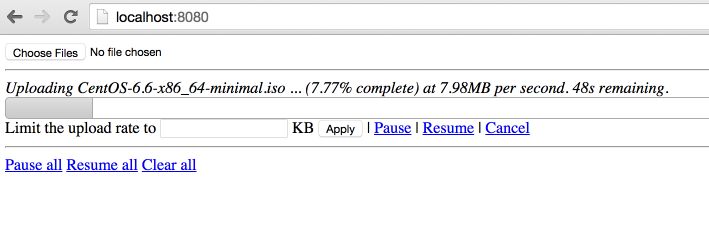
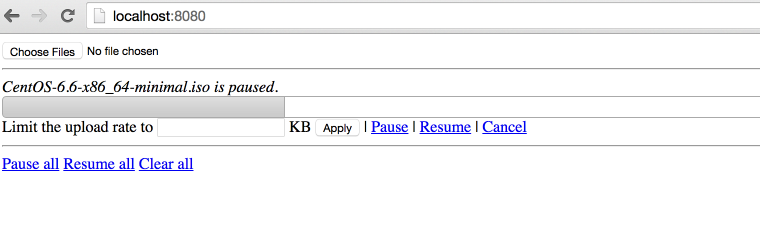
点击【Pause】暂停,点击【Resume】继续。
2,代码分析
原始项目:
https://code.google.com/p/java-large-file-uploader/
这个项目最后更新的时间是 2012 年,项目进行了封装使用最简单的方法实现了http的断点上传。
因为html5 里面有读取文件分割文件的类库,所以才可以支持断点上传,所以这个只能在html5 支持的浏览器上面展示。
同时,在js 和 java 同时使用 cr32 进行文件块的校验,保证数据上传正确。
代码在使用了最新的servlet 3.0 的api,使用了异步执行,监听等方法。
上传类UploadServlet
@Component("javaLargeFileUploaderServlet")
@WebServlet(name = "javaLargeFileUploaderServlet", urlPatterns = { "/javaLargeFileUploaderServlet" })
public class UploadServlet extends HttpRequestHandlerServlet
implements HttpRequestHandler {
private static final Logger log = LoggerFactory.getLogger(UploadServlet.class);
@Autowired
UploadProcessor uploadProcessor;
@Autowired
FileUploaderHelper fileUploaderHelper;
@Autowired
ExceptionCodeMappingHelper exceptionCodeMappingHelper;
@Autowired
Authorizer authorizer;
@Autowired
StaticStateIdentifierManager staticStateIdentifierManager;
@Override
public void handleRequest(HttpServletRequest request, HttpServletResponse response)
throws IOException {
log.trace("Handling request");
Serializable jsonObject = null;
try {
// extract the action from the request
UploadServletAction actionByParameterName =
UploadServletAction.valueOf(fileUploaderHelper.getParameterValue(request, UploadServletParameter.action));
// check authorization
checkAuthorization(request, actionByParameterName);
// then process the asked action
jsonObject = processAction(actionByParameterName, request);
// if something has to be written to the response
if (jsonObject != null) {
fileUploaderHelper.writeToResponse(jsonObject, response);
}
}
// If exception, write it
catch (Exception e) {
exceptionCodeMappingHelper.processException(e, response);
}
}
private void checkAuthorization(HttpServletRequest request, UploadServletAction actionByParameterName)
throws MissingParameterException, AuthorizationException {
// check authorization
// if its not get progress (because we do not really care about authorization for get
// progress and it uses an array of file ids)
if (!actionByParameterName.equals(UploadServletAction.getProgress)) {
// extract uuid
final String fileIdFieldValue = fileUploaderHelper.getParameterValue(request, UploadServletParameter.fileId, false);
// if this is init, the identifier is the one in parameter
UUID clientOrJobId;
String parameter = fileUploaderHelper.getParameterValue(request, UploadServletParameter.clientId, false);
if (actionByParameterName.equals(UploadServletAction.getConfig) && parameter != null) {
clientOrJobId = UUID.fromString(parameter);
}
// if not, get it from manager
else {
clientOrJobId = staticStateIdentifierManager.getIdentifier();
}
// call authorizer
authorizer.getAuthorization(
request,
actionByParameterName,
clientOrJobId,
fileIdFieldValue != null ? getFileIdsFromString(fileIdFieldValue).toArray(new UUID[] {}) : null);
}
}
private Serializable processAction(UploadServletAction actionByParameterName, HttpServletRequest request)
throws Exception {
log.debug("Processing action " + actionByParameterName.name());
Serializable returnObject = null;
switch (actionByParameterName) {
case getConfig:
String parameterValue = fileUploaderHelper.getParameterValue(request, UploadServletParameter.clientId, false);
returnObject =
uploadProcessor.getConfig(
parameterValue != null ? UUID.fromString(parameterValue) : null);
break;
case verifyCrcOfUncheckedPart:
returnObject = verifyCrcOfUncheckedPart(request);
break;
case prepareUpload:
returnObject = prepareUpload(request);
break;
case clearFile:
uploadProcessor.clearFile(UUID.fromString(fileUploaderHelper.getParameterValue(request, UploadServletParameter.fileId)));
break;
case clearAll:
uploadProcessor.clearAll();
break;
case pauseFile:
List<UUID> uuids = getFileIdsFromString(fileUploaderHelper.getParameterValue(request, UploadServletParameter.fileId));
uploadProcessor.pauseFile(uuids);
break;
case resumeFile:
returnObject =
uploadProcessor.resumeFile(UUID.fromString(fileUploaderHelper.getParameterValue(request, UploadServletParameter.fileId)));
break;
case setRate:
uploadProcessor.setUploadRate(UUID.fromString(fileUploaderHelper.getParameterValue(request, UploadServletParameter.fileId)),
Long.valueOf(fileUploaderHelper.getParameterValue(request, UploadServletParameter.rate)));
break;
case getProgress:
returnObject = getProgress(request);
break;
}
return returnObject;
}
List<UUID> getFileIdsFromString(String fileIds) {
String[] splittedFileIds = fileIds.split(",");
List<UUID> uuids = Lists.newArrayList();
for (int i = 0; i < splittedFileIds.length; i++) {
uuids.add(UUID.fromString(splittedFileIds[i]));
}
return uuids;
}
private Serializable getProgress(HttpServletRequest request)
throws MissingParameterException {
Serializable returnObject;
String[] ids =
new Gson()
.fromJson(fileUploaderHelper.getParameterValue(request, UploadServletParameter.fileId), String[].class);
Collection<UUID> uuids = Collections2.transform(Arrays.asList(ids), new Function<String, UUID>() {
@Override
public UUID apply(String input) {
return UUID.fromString(input);
}
});
returnObject = Maps.newHashMap();
for (UUID fileId : uuids) {
try {
ProgressJson progress = uploadProcessor.getProgress(fileId);
((HashMap<String, ProgressJson>) returnObject).put(fileId.toString(), progress);
}
catch (FileNotFoundException e) {
log.debug("No progress will be retrieved for " + fileId + " because " + e.getMessage());
}
}
return returnObject;
}
private Serializable prepareUpload(HttpServletRequest request)
throws MissingParameterException, IOException {
// extract file information
PrepareUploadJson[] fromJson =
new Gson()
.fromJson(fileUploaderHelper.getParameterValue(request, UploadServletParameter.newFiles), PrepareUploadJson[].class);
// prepare them
final HashMap<String, UUID> prepareUpload = uploadProcessor.prepareUpload(fromJson);
// return them
return Maps.newHashMap(Maps.transformValues(prepareUpload, new Function<UUID, String>() {
public String apply(UUID input) {
return input.toString();
};
}));
}
private Boolean verifyCrcOfUncheckedPart(HttpServletRequest request)
throws IOException, MissingParameterException, FileCorruptedException, FileStillProcessingException {
UUID fileId = UUID.fromString(fileUploaderHelper.getParameterValue(request, UploadServletParameter.fileId));
try {
uploadProcessor.verifyCrcOfUncheckedPart(fileId,
fileUploaderHelper.getParameterValue(request, UploadServletParameter.crc));
}
catch (InvalidCrcException e) {
// no need to log this exception, a fallback behaviour is defined in the
// throwing method.
// but we need to return something!
return Boolean.FALSE;
}
return Boolean.TRUE;
}
}
异步上传UploadServletAsync
@Component("javaLargeFileUploaderAsyncServlet")
@WebServlet(name = "javaLargeFileUploaderAsyncServlet", urlPatterns = { "/javaLargeFileUploaderAsyncServlet" }, asyncSupported = true)
public class UploadServletAsync extends HttpRequestHandlerServlet
implements HttpRequestHandler {
private static final Logger log = LoggerFactory.getLogger(UploadServletAsync.class);
@Autowired
ExceptionCodeMappingHelper exceptionCodeMappingHelper;
@Autowired
UploadServletAsyncProcessor uploadServletAsyncProcessor;
@Autowired
StaticStateIdentifierManager staticStateIdentifierManager;
@Autowired
StaticStateManager<StaticStatePersistedOnFileSystemEntity> staticStateManager;
@Autowired
FileUploaderHelper fileUploaderHelper;
@Autowired
Authorizer authorizer;
/**
* Maximum time that a streaming request can take.<br>
*/
private long taskTimeOut = DateUtils.MILLIS_PER_HOUR;
@Override
public void handleRequest(final HttpServletRequest request, final HttpServletResponse response)
throws ServletException, IOException {
// process the request
try {
//check if uploads are allowed
if (!uploadServletAsyncProcessor.isEnabled()) {
throw new UploadIsCurrentlyDisabled();
}
// extract stuff from request
final FileUploadConfiguration process = fileUploaderHelper.extractFileUploadConfiguration(request);
log.debug("received upload request with config: "+process);
// verify authorization
final UUID clientId = staticStateIdentifierManager.getIdentifier();
authorizer.getAuthorization(request, UploadServletAction.upload, clientId, process.getFileId());
//check if that file is not paused
if (uploadServletAsyncProcessor.isFilePaused(process.getFileId())) {
log.debug("file "+process.getFileId()+" is paused, ignoring async request.");
return;
}
// get the model
StaticFileState fileState = staticStateManager.getEntityIfPresent().getFileStates().get(process.getFileId());
if (fileState == null) {
throw new FileNotFoundException("File with id " + process.getFileId() + " not found");
}
// process the request asynchronously
final AsyncContext asyncContext = request.startAsync();
asyncContext.setTimeout(taskTimeOut);
// add a listener to clear bucket and close inputstream when process is complete or
// with
// error
asyncContext.addListener(new UploadServletAsyncListenerAdapter(process.getFileId()) {
@Override
void clean() {
log.debug("request " + request + " completed.");
// we do not need to clear the inputstream here.
// and tell processor to clean its shit!
uploadServletAsyncProcessor.clean(clientId, process.getFileId());
}
});
// then process
uploadServletAsyncProcessor.process(fileState, process.getFileId(), process.getCrc(), process.getInputStream(),
new WriteChunkCompletionListener() {
@Override
public void success() {
asyncContext.complete();
}
@Override
public void error(Exception exception) {
// handles a stream ended unexpectedly , it just means the user has
// stopped the
// stream
if (exception.getMessage() != null) {
if (exception.getMessage().equals("Stream ended unexpectedly")) {
log.warn("User has stopped streaming for file " + process.getFileId());
}
else if (exception.getMessage().equals("User cancellation")) {
log.warn("User has cancelled streaming for file id " + process.getFileId());
// do nothing
}
else {
exceptionCodeMappingHelper.processException(exception, response);
}
}
else {
exceptionCodeMappingHelper.processException(exception, response);
}
asyncContext.complete();
}
});
}
catch (Exception e) {
exceptionCodeMappingHelper.processException(e, response);
}
}
}
3,请求流程图:
主要思路就是将文件切分,然后分块上传。
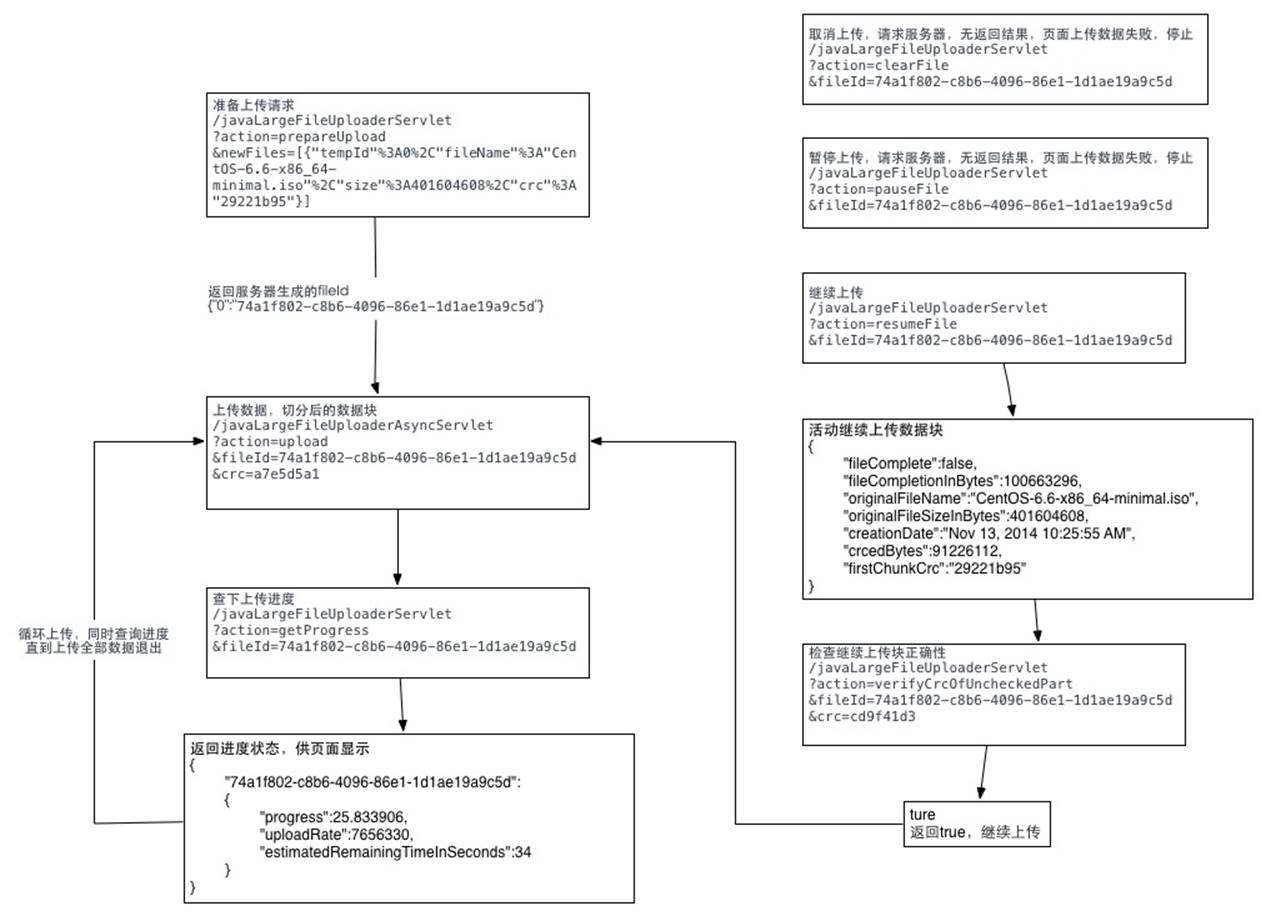
详细代码可以参照我写的这篇文章:http://t.cn/AiHwnJaB
jsp之大文件分段上传、断点续传的更多相关文章
- Asp.net mvc 大文件上传 断点续传
Asp.net mvc 大文件上传 断点续传 进度条 概述 项目中需要一个上传200M-500M的文件大小的功能,需要断点续传.上传性能稳定.突破asp.net上传限制.一开始看到51CTO上的这 ...
- vue之大文件分段上传、断点续传
需求: 支持大文件批量上传(20G)和下载,同时需要保证上传期间用户电脑不出现卡死等体验: 内网百兆网络上传速度为12MB/S 服务器内存占用低 支持文件夹上传,文件夹中的文件数量达到1万个以上,且包 ...
- javascript之大文件分段上传、断点续传(一)
需求: 支持大文件批量上传(20G)和下载,同时需要保证上传期间用户电脑不出现卡死等体验: 内网百兆网络上传速度为12MB/S 服务器内存占用低 支持文件夹上传,文件夹中的文件数量达到1万个以上,且包 ...
- B/S之大文件分段上传、断点续传
4GB以上超大文件上传和断点续传服务器的实现 随着视频网站和大数据应用的普及,特别是高清视频和4K视频应用的到来,超大文件上传已经成为了日常的基础应用需求. 但是在很多情况下,平台运营方并没有大文件上 ...
- js之大文件分段上传、断点续传
文件夹上传:从前端到后端 文件上传是 Web 开发肯定会碰到的问题,而文件夹上传则更加难缠.网上关于文件夹上传的资料多集中在前端,缺少对于后端的关注,然后讲某个后端框架文件上传的文章又不会涉及文件夹. ...
- php之大文件分段上传、断点续传
前段时间做视频上传业务,通过网页上传视频到服务器. 视频大小 小则几十M,大则 1G+,以一般的HTTP请求发送数据的方式的话,会遇到的问题:1,文件过大,超出服务端的请求大小限制:2,请求时间过长, ...
- java之大文件分段上传、断点续传
文件上传是最古老的互联网操作之一,20多年来几乎没有怎么变化,还是操作麻烦.缺乏交互.用户体验差. 一.前端代码 英国程序员Remy Sharp总结了这些新的接口 ,本文在他的基础之上,讨论在前端采用 ...
- java+大文件分段上传
一. 功能性需求与非功能性需求 要求操作便利,一次选择多个文件和文件夹进行上传:支持PC端全平台操作系统,Windows,Linux,Mac 支持文件和文件夹的批量下载,断点续传.刷新页面后继续传输. ...
- java 大文件上传 断点续传 完整版实例 (Socket、IO流)
ava两台服务器之间,大文件上传(续传),采用了Socket通信机制以及JavaIO流两个技术点,具体思路如下: 实现思路: 1.服:利用ServerSocket搭建服务器,开启相应端口,进行长连接操 ...
随机推荐
- pytest_skip跳过用例
前言 pytest.mark.skip可以标记无法在某些平台上运行的测试功能,或者您希望失败的测试功能 skip意味着只有在满足某些条件时才希望测试通过,否则pytest应该跳过运行测试. 常见示例是 ...
- Django之创建超级用户
本文链接来自:https://blog.csdn.net/HuaCode/article/details/79721673 首选创建一个新用户,用来登录Django管理网站,进入manage.py目录 ...
- Java调用Http/Https接口(5)--HttpAsyncClient调用Http/Https接口
HttpAsyncClient是HttpClient的异步版本,提供异步调用的api.文中所使用到的软件版本:Java 1.8.0_191.HttpClient 4.1.4. 1.服务端 参见Java ...
- Linux的巡检命令
# uname -a # 查看内核/操作系统/CPU信息# head -n 1 /etc/issue # 查看操作系统版本# cat /proc/cpuinfo # 查看CPU信息# hostname ...
- SpringMVC+SpringBoot+MyBatis
一.在框架中有时候会发现dao层和service层是相同的代码,为什么会同时存在呢?(以下https://blog.csdn.net/fanjieshanghai/article/details/88 ...
- koa2--nodemailer实现邮箱验证
依赖包安装: /** * koa-bodyparser用于把formData数据解析到ctx.request.body * 通过ctx.request.body访问请求的参数 * koa-redis用 ...
- Mysql中类似于oracle中nvl()函数的ifnull()函数
IFNULL(expr1,expr2) 如果expr1不是NULL,IFNULL()返回expr1,否则它返回expr2.IFNULL()返回一个数字或字符串值,取决于它被使用的上下文环境. my ...
- React-Native中使用到的一些JS特性
React Native - 调试技巧及调试菜单说明(模拟器调试.真机调试) https://www.hangge.com/blog/cache/detail_1480.html 1,解构赋值——de ...
- SpringBoot + sqlserver+mybatis
一.maven引入 <dependency> <groupId>com.microsoft.sqlserver</groupId> <artifactId&g ...
- LFS7.10——构建LFS系统
参考:LFS7.10——准备Host系统 LFS7.10——构造临时Linux系统 本文正式开始构建LFS系统,后面所有命令的执行都是在root用户下完成的. 这时开始构建LFS前准备工作 更改$LF ...