
15、VUEX-Store
1、什么是VUEX
Vuex是管理vue的组件状态的工具。
个人理解:vuex是管理组件之间通信的一个插件。
2、为什么要用VUEX
我们知道组件之间是独立的,组件之间想要实现通信,我目前知道的就只有props选项,但这也仅限于父组件和子组件之间的通信。如果兄弟组件之间想要实现通信呢?嗯..,方法应该有。抛开怎么实现的问题,试想一下,当做中大型项目时,面对一大堆组件之间的通信,还有一大堆的逻辑代码,会不会很抓狂??那为何不把组件之间共享的数据给“拎”出来,在一定的规则下管理这些数据呢? 这就是Vuex的基本思想了。
3、VUEX核心
他有4个核心选项:state mutations getters actions

3.1. State
用来存放组件之间共享的数据。他跟组件的data选项类似,只不过data选项是用来存放组件的私有数据。
<!DOCTYPE html>

<html lang="en">

<head>

    <meta charset="UTF-8">

    <meta name="viewport" content="width=device-width, initial-scale=1.0">

    <meta http-equiv="X-UA-Compatible" content="ie=edge">

    <title>Document</title>

</head>

<script src="./js/vuex.js"></script>

<script src="./js/vue2.0.js"></script>

<body>

    <div id="app">

        <hello></hello>

    </div>

</body>

<script>

    Vue.use(Vuex);

   var myStore =  new Vuex.Store({

        state:{

            //存放组件之间共享的数据

            name:"jjk"

        },

         mutations:{

             //显式的更改state里的数据

         },

         getters:{

             //过滤state数据

         },

         actions:{

             //

         }

    });

    Vue.component('hello',{

        template:"<p>{{name}}</p>",

        computed: {

            name:function(){

                return this.$store.state.name

            }

        },

         mounted:function(){

            console.log(this)

        }

    })

    new Vue({

        el:"#app",

        data:{

            name:"dk"

        },

        store:myStore,

        mounted:function(){

            console.log(this)

        }

    })

</script>

</html>

3.2. mutations
前面讲到的都是如何获取state的数据,那如何把数据存储到state中呢?在 Vuex store 中,实际改变 状态(state) 的唯一方式是通过 提交(commit) 一个 mutation。 mutations下的函数接收state作为参数,接收一个叫做payload(载荷)的东东作为第二个参数,这个东东是用来记录开发者使用该函数的一些信息,比如说提交了什么,提交的东西是用来干什么的,包含多个字段,所以载荷一般是对象(其实这个东西跟git的commit很类似)还有一点需要注意:mutations方法必须是同步方法!
具体看实例:
<!DOCTYPE html>

<html lang="en">

<head>

    <meta charset="UTF-8">

    <meta name="viewport" content="width=device-width, initial-scale=1.0">

    <meta http-equiv="X-UA-Compatible" content="ie=edge">

    <title>Document</title>

</head>

<script src="./js/vuex.js"></script>

<script src="./js/vue2.0.js"></script>

<body>

    <div id="app">

        <hello></hello>

    </div>

</body>

<script>

    Vue.use(Vuex);

   var myStore =  new Vuex.Store({

        state:{

            //存放组件之间共享的数据

            name:"jjk",

            age:18,

            num:1

        },

         mutations:{

             //显式的更改state里的数据

             change:function(state,a){

                //  state.num++;

               console.log(state.num += a);

             }

         },

         getters:{

             getAge:function(state){

                 return state.age;

             }

         },

         actions:{

             //

         }

    });

    Vue.component('hello',{

        template:"<p @click='changeNum'>姓名:{{name}} 年龄:{{age}} 次数:{{num}}</p>",

        computed: {

            name:function(){

                return this.$store.state.name

            },

            age:function(){

                return this.$store.getters.getAge

            },

            num:function(){

                return this.$store.state.num

            }

        },

         mounted:function(){

            console.log(this)

        },

        methods: {

            changeNum: function(){

                //在组件里提交

                // this.num++;

                this.$store.commit('change',10)

            }

        },

        data:function(){

            return {

                // num:5

            }

        }

    })

    new Vue({

        el:"#app",

        data:{

            name:"dk"

        },

        store:myStore,

        mounted:function(){

            console.log(this)

        }

    })

</script>

</html>
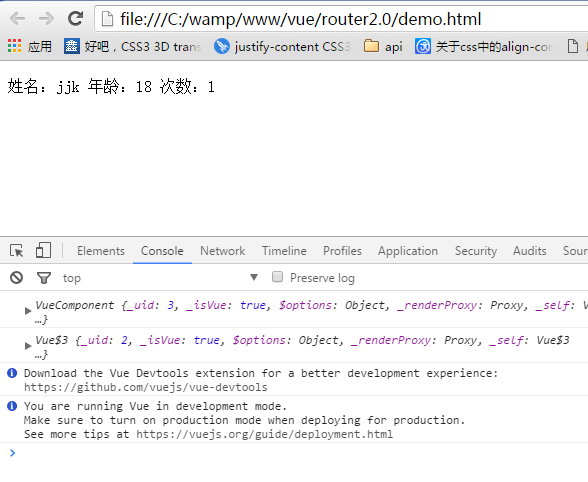
当点击p标签前,chrome中显示:
点击p标签后:
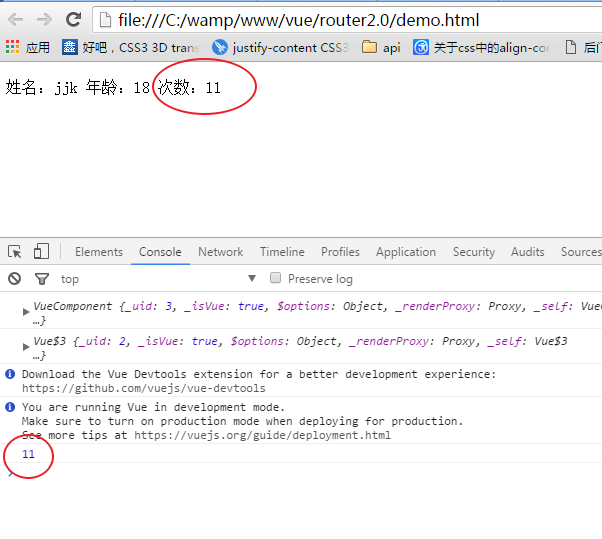
可以看出:更改state的数据并显示在组件中,有几个步骤:1. 在mutations选项里,注册函数 函数里面装逻辑代码。2.在组件里,this.$store.commit('change',payload) 注意:提交的函数名要一一对应 3.触发函数,state就会相应更改 4.在组件的计算属性里 this.$store.state 获取你想要得到的数据
3.3. getters
有时候,我们需要对state的数据进行筛选,过滤。这些操作都是在组件的计算属性进行的。如果多个组件需要用到筛选后的数据,那我们就必须到处重复写该计算属性函数;或者将其提取到一个公共的工具函数中,并将公共函数多处导入 - 两者都不太理想。如果把数据筛选完在传到计算属性里就不用那么麻烦了,getters就是干这个的,你可以把getters看成是store的计算属性。getters下的函数接收接收state作为第一个参数。那么,组件是如何获取经过getters过滤的数据呢? 过滤的数据会存放到$store.getters对象中。具体看一个例子:
<!DOCTYPE html>

<html lang="en">

<head>

    <meta charset="UTF-8">

    <meta name="viewport" content="width=device-width, initial-scale=1.0">

    <meta http-equiv="X-UA-Compatible" content="ie=edge">

    <title>Document</title>

</head>

<script src="./js/vuex.js"></script>

<script src="./js/vue2.0.js"></script>

<body>

    <div id="app">

        <hello></hello>

    </div>

</body>

<script>

    Vue.use(Vuex);

   var myStore =  new Vuex.Store({

        state:{

            //存放组件之间共享的数据

            name:"jjk",

            age:18

        },

         mutations:{

             //显式的更改state里的数据

         },

         getters:{

             getAge:function(state){

                 return state.age;

             }

         },

         actions:{

             //

         }

    });

    Vue.component('hello',{

        template:"<p>姓名:{{name}} 年龄:{{age}}</p>",

        computed: {

            name:function(){

                return this.$store.state.name

            },

            age:function(){

                return this.$store.getters.getAge

            }

        },

         mounted:function(){

            console.log(this)

        }

    })

    new Vue({

        el:"#app",

        data:{

            name:"dk"

        },

        store:myStore,

        mounted:function(){

            console.log(this)

        }

    })

</script>

</html>

3.4. actions
既然mutations只能处理同步函数,我大js全靠‘异步回调’吃饭,怎么能没有异步,于是actions出现了...
actions和mutations的区别
1.Actions 提交的是 mutations,而不是直接变更状态。也就是说,actions会通过mutations,让mutations帮他提交数据的变更。
2.Action 可以包含任意异步操作。ajax、setTimeout、setInterval不在话下
再来看一下实例:
<!DOCTYPE html>

<html lang="en">

<head>

    <meta charset="UTF-8">

    <meta name="viewport" content="width=device-width, initial-scale=1.0">

    <meta http-equiv="X-UA-Compatible" content="ie=edge">

    <title>Document</title>

</head>

<script src="./js/vuex.js"></script>

<script src="./js/vue2.0.js"></script>

<body>

    <div id="app">

        <hello></hello>

    </div>

</body>

<script>

    Vue.use(Vuex);

   var myStore =  new Vuex.Store({

        state:{

            //存放组件之间共享的数据

            name:"jjk",

            age:18,

            num:1

        },

         mutations:{

             //显式的更改state里的数据

             change:function(state,a){

                //  state.num++;

               console.log(state.num += a);

             },

             changeAsync:function(state,a){

                 console.log(state.num +=a);

             }

         },

         getters:{

             getAge:function(state){

                 return state.age;

             }

         },

         actions:{

        //设置延时

             add:function(context,value){

                 setTimeout(function(){

           //提交事件

                    context.commit('changeAsync',value);

                 },1000)

             }

         }

    });

    Vue.component('hello',{

        template:`

                <div>

                    <p @click='changeNum'>姓名:{{name}} 年龄:{{age}} 次数:{{num}}</p>

                    <button @click='changeNumAnsyc'>change</button>

                </div>`,

        computed: {

            name:function(){

                return this.$store.state.name

            },

            age:function(){

                return this.$store.getters.getAge

            },

            num:function(){

                return this.$store.state.num

            }

        },

         mounted:function(){

            console.log(this)

        },

        methods: {

            changeNum: function(){

                //在组件里提交

                // this.num++;

                this.$store.commit('change',10)

            },

        //在组件里派发事件 当点击按钮时,changeNumAnsyc触发-->actions里的add函数被触发-->mutations里的changeAsync函数触发

            changeNumAnsyc:function(){

                this.$store.dispatch('add', 5);

            }

        },

        data:function(){

            return {

                // num:5

            }

        }

    })

    new Vue({

        el:"#app",

        data:{

            name:"dk"

        },

        store:myStore,

        mounted:function(){

            console.log(this)

        }

    })

</script>

</html>
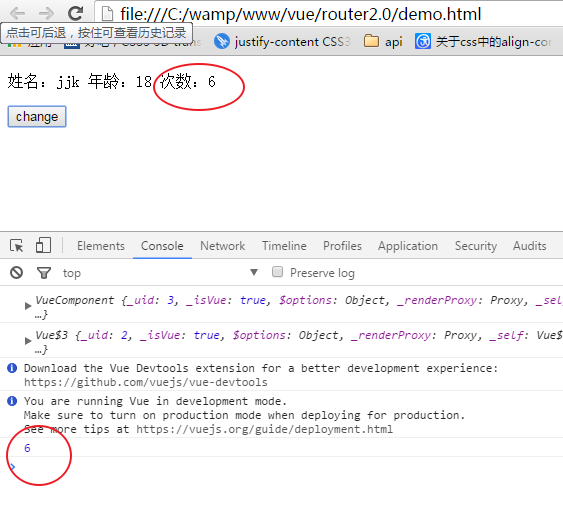
点击按钮一秒后,chrome中显示:
先整明白 context dispatch是什么东西:
context:context是与 store 实例具有相同方法和属性的对象。可以通过context.state和context.getters来获取 state 和 getters。
dispatch:翻译为‘派发、派遣’的意思,触发事件时,dispatch就会通知actions(跟commit一样一样的)参数跟commit也是一样的。
action的大体流程:
- 在actions选项里添加函数(异步)并提交到对应的函数(在mutation选项里)中 context.commit('changeAsync',value);
actions:{
add:function(context,value){
setTimeout(function(){
context.commit('changeAsync',value);
},1000)
}
}
2. 在组件里: changeNumAnsyc:function(){this.$store.dispatch('add', 5);} 将dispatch“指向”actions选项里的函数
3、在mutations选项里,要有对应的函数 changeAsync:function(state,a){console.log(state.num +=a);}
3.5. 总结
各个类型的 API各司其职,mutation 只管存,你给我(dispatch)我就存;action只管中间处理,处理完我就给你,你怎么存我不管;Getter 我只管取,我不改的。 action放在了 methods 里面,说明我们应该把它当成函数来用(讲道理,钩子函数也应该可以的) mutation是写在store里面的,这说明,它就是个半成品,中间量,我们不应该在外面去操作它。getter写在了 computed 里面,这说明虽然 getter我们写的是函数,但是我们应该把它当成计算属性来用。
4、如何使用VUEX
3.1. 安装vuex
Npm install vuex -- save
3.2. 创建store
1、创建文件夹store,用来管理文件,具体路径无所谓,建议放到src目录下
2、文件夹store文件夹内创建index.js文件,这个文件我们用来组装模块并导出 store 的文件
import Vue from 'vue'

import Vuex from 'vuex'

// 告诉 vue “使用” vuex

Vue.use(Vuex)

// 创建一个对象来保存应用启动时的初始状态

// 需要维护的状态

const store = new Vuex.Store({

  state: {

    // 放置初始状态 app启动的时候的全局的初始值

    bankInf: {"name":"我是vuex的第一个数据","id":100,"bankName":"中国银行"}

  }

})

// 整合初始状态和变更函数,我们就得到了我们所需的 store

// 至此,这个 store 就可以连接到我们的应用中

export default store

3.3. Main.js文件中注册store
import Vue from 'vue'

import App from './App'

import router from './router'

import store from './../store/index'

/* eslint-disable no-new */

new Vue({

  el: '#app',

  router,

  store,

  template: '<App/>',

  components: { App }

})
3.4. 使用store之获取
任意组件中使用store中的数据,就是使用计算属性返回store中的数据到一个新属性上
<div class="bank">

    <list-header :headerData="bankName"></list-header>

    04银行详情页面

    <input  name="" v-model="textValue">

    <button type="button" name="获取数据" @click="newBankName"></button>

</div>
3.5. 使用store之修改
使用命令:this.$store.commit
export default {

  ...

  computed: {

    bankName() {

      return this.$store.state.bankInf.bankName;

    }

  },

  methods: {

    newBankName: function() {

      this.$store.commit('newBankName', this.textValue)

    }

  }

 ...

}
在store中的index.js中添加mutations:
const store = new Vuex.Store({

  state: {

    // 放置初始状态 app启动的时候的全局的初始值

    bankInf: {"name":"我是vuex的第一个数据","id":100,"bankName":"中国银行"},

    count:0

  },

  mutations: {

    newBankName(state,msg) {

      state.bankInf.bankName = msg;

    }

  }

})
5、常见错误
如果在使用中发现报错this.$store.commit is not a function ,请打开你项目的配置文件package.json,查看你正在使用的vuex的版本,我正在使用的是vuex2.0,
如果想删除旧版本的vuex并安装新版本的vuex请使用
npm rm vuex --save
然后安装最新的vuex
npm install vuex --save
即可解决这个错误,或者是查看vuex官网api修改提交mutation的语句
15、VUEX-Store的更多相关文章
- 25、vuex改变store中数据
以登录为例: 1.安装vuex:npm install vuex --save 2.在main.js文件中引入: import store from '@/store/index.js'new Vue ...
- Vue全家桶(Vue-cli、Vue-route、vuex)
摘要 学习本篇之前要具备一定的vue基础知识,可以先看一下Vue基础(环境配置.内部指令.全局API.选项.内置组件) 1.Vue-cli Vue-cli是vue官方出品的快速构建单页应用的脚手架,这 ...
- requirejs、vue、vuex、vue-route的结合使用,您认为可行吗?
在五一节之前和一网友讨论前端技术时,对方提到vue.vue-route如果配合requirejs应用.当时的我没有想得很明白,也没能这位网友一个准确的回复,但我许诺于他五一研究后给他一个回复.本是一天 ...
- 9、vuex快速上手
vue脚手架 npm install -g vue-cli usage: vue init example: vue init webpack myvue 安装vuex: npm i -S vuex ...
- 2、vuex页面刷新数据不保留,解决方法(转)
今天这个问题又跟页面的刷新有一定的关系,虽然说跟页面刷新的关系不大,但确实页面刷新引起的这一个问题. 场景: VueX里存储了 this.$store.state.PV这样一个变量,这个变量是在app ...
- Vue、Vuex+Cookie 实现自动登陆 。
概述 1.自动登陆实现思路. 2.vuex + cookie 多标签页状态保持. 自动登陆的需求: 1.登陆时勾选自动登陆,退出登陆或登陆到期后再次登陆后自动填写表单(记住密码)或访问登陆页自动登陆. ...
- vue2.0读书笔记3 - router、vuex
1.vue的应用场景.优势.劣势 优势 通常情况下,运行时效率更高:一个事件循环仅一次视图更新,无频繁的DOM操作: 数据与视图分离,通过管理数据流,控制页面的展现,便于维护.且高效: 数据双向绑定, ...
- day 87 Vue学习六之axios、vuex、脚手架中组件传值
本节目录 一 axios的使用 二 vuex的使用 三 组件传值 四 xxx 五 xxx 六 xxx 七 xxx 八 xxx 一 axios的使用 Axios 是一个基于 promise 的 HT ...
- Vue(5)- axios、vuex
一.内容回顾 1.webpack(前端中工作,项目上线之前对整个前端项目优化) - entry:整个项目的程序入口(main.js或index.js): - output:输出的出口: - loade ...
- Do not mutate vuex store state outside mutation handlers.
组件代码: selectItem(item,index) { this.selectPlay({ list: this.songs, index }) }, ...mapActions([ 'sele ...
随机推荐
- Tomcat部署项目时,发布的项目页面部分乱码,且页面渲染文件也是乱码。
catalina.bat中必须设置为UTF-8,如果我不设置为UTF-8,页面接收到的就是乱码了,尝试过各种UTF-8的调试,都无解,最后还是只能在catalina.bat的set "JAV ...
- Docker镜像服务(二)
一.Docker镜像介绍 镜像是Docker的三大核心概念之一. Docker运行容器前需要本地存在对应的镜像,如果镜像不存在本地,Docker会尝试先从默认的镜像仓库下载(默认使用Docker Hu ...
- Mysqldump一次备份多个指定数据库
今天碰到了,就作个记录. mysqldump -u user -p --databases DB1 DB2 --single-transaction --master-data=2 --default ...
- 继承c3,网络编程,相互通信
继承: 面向对象多继承,a先找左,再找右 py2中有经典类,新式类,py3中只有新式类 py2中用ascii 编译 py3中用unicode 编译 py2: 经典类 新式类:如果自己或自己的前辈继承o ...
- SGD的动量(Momentum)算法
引入动量(Momentum)方法一方面是为了解决“峡谷”和“鞍点”问题:一方面也可以用于SGD 加速,特别是针对高曲率.小幅但是方向一致的梯度. 如果把原始的 SGD 想象成一个纸团在重力作用向下滚动 ...
- [Algorithm] 617. Merge Two Binary Trees
Given two binary trees and imagine that when you put one of them to cover the other, some nodes of t ...
- streamsets 源码构建
依赖构建工具 git 1.9+ oracle jdk 8 docker 1.10+ maven 3.3.9+ nodejs npm grunt-cli md5sum 预备构建任务 data col ...
- appium--uiautomatorviewer的使用
uiautomatorviewer的使用 uiautomatorviewer也是获取页面元素属性的工具,相比之前介绍的appium desktop来说,方便了很多,appium desktop需要从启 ...
- Linux引导过程与服务控制
一:系统引导流程: 开机自检(BIOS)-->MBR引导-->GRUB菜单-->加载内核(kernel)-->init进程初始化 二:系统引导级别: 0 poweroff.t ...
- Codechef August Challenge 2019 Division 2
Preface 老年菜鸡终于开始打CC了,由于他太弱了所以只能打Div2 因为台风的原因challenge并没有写,所以水了个Rank7 A Football SB模拟题不解释 #include< ...