
android自定义日期组件之双DatePicker
1、效果图(两个DatePicker放在一起,同时选择起始与结束时间):
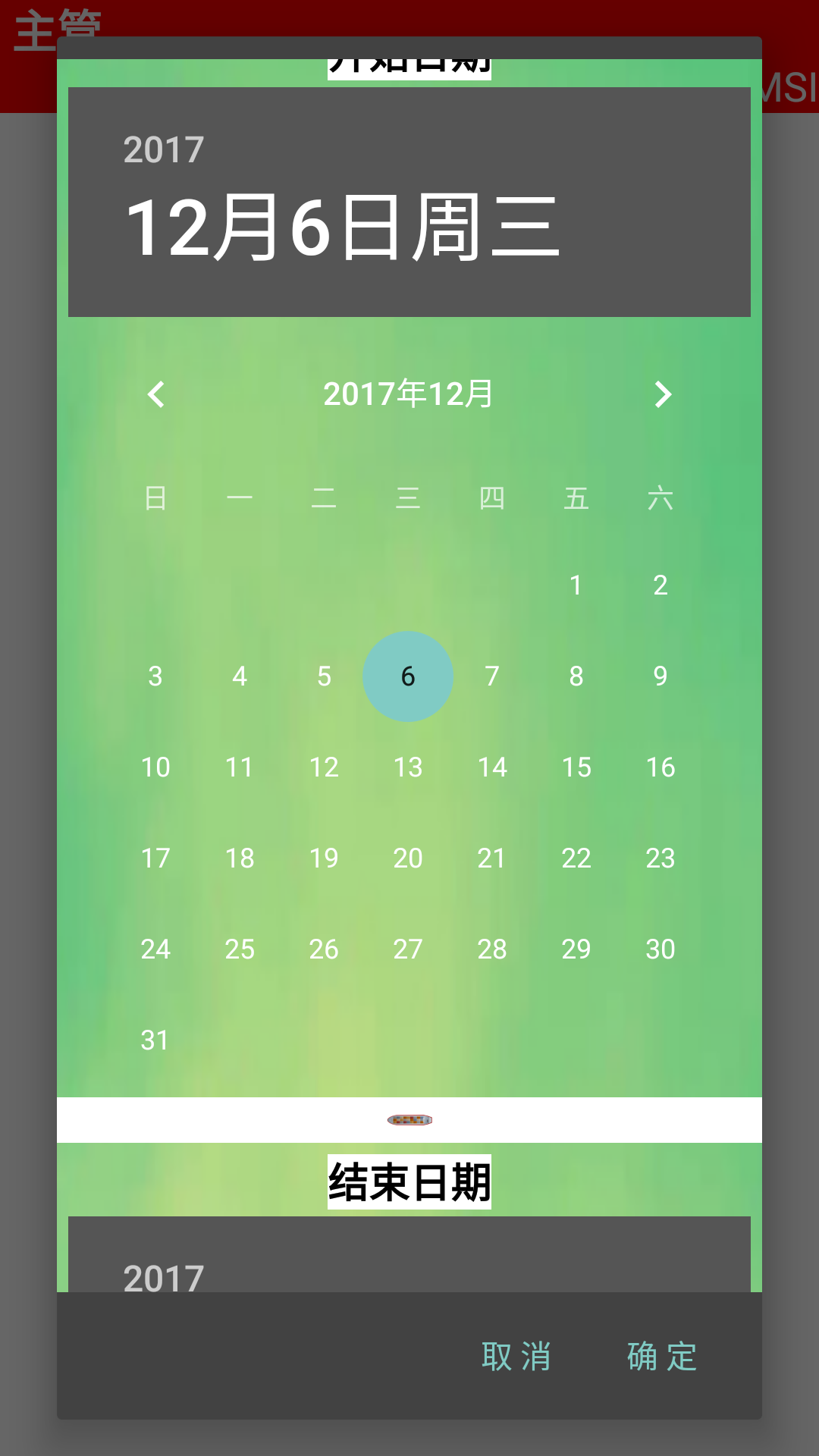
2、实现
2.1布局文件:
 <?xml version="1.0" encoding="utf-8"?>

 <LinearLayout xmlns:android="http://schemas.android.com/apk/res/android"

     xmlns:app="http://schemas.android.com/apk/res-auto"

     android:layout_width="wrap_content"

     android:layout_height="wrap_content"

     android:gravity="center_horizontal"

     android:orientation="vertical"

     android:paddingTop="10dp">

     <ScrollView

         android:layout_width="match_parent"

         android:layout_height="match_parent">

         <LinearLayout

             android:layout_width="match_parent"

             android:layout_height="wrap_content"

             android:background="@drawable/time"

             android:orientation="vertical" >

             <LinearLayout

                 android:layout_width="match_parent"

                 android:layout_height="match_parent"

                 android:gravity="center_horizontal"

                 android:orientation="vertical"

                 android:padding="5dip">

                 <TextView

                     android:layout_width="wrap_content"

                     android:layout_height="wrap_content"

                     android:layout_marginBottom="3dp"

                     android:background="@color/white"

                     android:textSize="18dp"

                     android:textStyle="bold"

                     android:textColor="@color/black"

                     android:text="开始日期" />

                 <DatePicker

                     android:id="@+id/datePickerStart"

                     android:layout_width="wrap_content"

                     android:layout_height="wrap_content"

                     android:calendarViewShown="false" />

             </LinearLayout>

             <ImageView

                 android:id="@+id/imageView2"

                 android:background="@color/white"

                 android:layout_width="match_parent"

                 android:layout_height="20dp"

                 app:srcCompat="@drawable/redbound" />

             <LinearLayout

                 android:layout_width="match_parent"

                 android:layout_height="match_parent"

                 android:gravity="center_horizontal"

                 android:orientation="vertical"

                 android:padding="5dip">

                 <TextView

                     android:layout_width="wrap_content"

                     android:layout_height="wrap_content"

                     android:layout_marginBottom="3dp"

                     android:background="@color/white"

                     android:textSize="18dp"

                     android:textColor="@color/black"

                     android:textStyle="bold"

                     android:text="结束日期" />

                 <DatePicker

                     android:id="@+id/datePickerEnd"

                     android:layout_width="wrap_content"

                     android:layout_height="wrap_content"

                     android:calendarViewShown="false" />

             </LinearLayout>

         </LinearLayout>

     </ScrollView>

 </LinearLayout>
2.2 自定义类
 package com.easson.mx.pieceworkqc;

 import android.app.AlertDialog;

 import android.content.Context;

 import android.content.DialogInterface;

 import android.content.DialogInterface.OnClickListener;

 import android.os.Bundle;

 import android.view.LayoutInflater;

 import android.view.View;

 import android.widget.DatePicker;

 import android.widget.DatePicker.OnDateChangedListener;

 import java.lang.reflect.Field;

 /**

  * Created by zhangtao on 2017/11/21.

  */

 public class DoubleDatePickerDialog extends AlertDialog implements OnClickListener, OnDateChangedListener {

     private static final String START_YEAR = "start_year";

     private static final String END_YEAR = "end_year";

     private static final String START_MONTH = "start_month";

     private static final String END_MONTH = "end_month";

     private static final String START_DAY = "start_day";

     private static final String END_DAY = "end_day";

     private final DatePicker mDatePicker_start;

     private final DatePicker mDatePicker_end;

     private final OnDateSetListener mCallBack;

     /**

      * The callback used to indicate the user is done filling in the date.

      */

     public interface OnDateSetListener {

         void onDateSet(DatePicker startDatePicker, int startYear, int startMonthOfYear, int startDayOfMonth,

                        DatePicker endDatePicker, int endYear, int endMonthOfYear, int endDayOfMonth);

         void onConfirmed(DatePicker startDatePicker, int startYear, int startMonthOfYear, int startDayOfMonth,

                          DatePicker endDatePicker, int endYear, int endMonthOfYear, int endDayOfMonth) ;

     }

     /**

      * @param context

      *            The context the dialog is to run in.

      * @param callBack

      *            How the parent is notified that the date is set.

      * @param year

      *            The initial year of the dialog.

      * @param monthOfYear

      *            The initial month of the dialog.

      * @param dayOfMonth

      *            The initial day of the dialog.

      */

     public DoubleDatePickerDialog(Context context, OnDateSetListener callBack, int year, int monthOfYear, int dayOfMonth) {

         this(context, 0, callBack, year, monthOfYear, dayOfMonth);

     }

     public DoubleDatePickerDialog(Context context, int theme, OnDateSetListener callBack, int year, int monthOfYear,

                                   int dayOfMonth) {

         this(context, 0, callBack, year, monthOfYear, dayOfMonth, true);

     }

     /**

      * @param context

      *            The context the dialog is to run in.

      * @param theme

      *            the theme to apply to this dialog

      * @param callBack

      *            How the parent is notified that the date is set.

      * @param year

      *            The initial year of the dialog.

      * @param monthOfYear

      *            The initial month of the dialog.

      * @param dayOfMonth

      *            The initial day of the dialog.

      */

     public DoubleDatePickerDialog(Context context, int theme, OnDateSetListener callBack, int year, int monthOfYear,

                                   int dayOfMonth, boolean isDayVisible) {

         super(context, theme);

         mCallBack = callBack;

         Context themeContext = getContext();

         setButton(BUTTON_POSITIVE, "确 定", this);

         setButton(BUTTON_NEGATIVE, "取 消", this);

         setIcon(0);

         LayoutInflater inflater = (LayoutInflater) themeContext.getSystemService(Context.LAYOUT_INFLATER_SERVICE);

         View view = inflater.inflate(R.layout.doubledatepicker, null);

         setView(view);

         mDatePicker_start = (DatePicker) view.findViewById(R.id.datePickerStart);

         mDatePicker_end = (DatePicker) view.findViewById(R.id.datePickerEnd);

         mDatePicker_start.init(year, monthOfYear, dayOfMonth, this);

         mDatePicker_end.init(year, monthOfYear, dayOfMonth, this);

         // 如果要隐藏当前日期(day),则使用下面方法。

         if (!isDayVisible) {

             hidDay(mDatePicker_start);

             hidDay(mDatePicker_end);

         }

     }

     /**

      * 隐藏DatePicker中的日期显示

      * @param mDatePicker

      */

     private void hidDay(DatePicker mDatePicker) {

         Field[] datePickerfFields = mDatePicker.getClass().getDeclaredFields();

         for (Field datePickerField : datePickerfFields) {

             if ("mDaySpinner".equals(datePickerField.getName())) {

                 datePickerField.setAccessible(true);

                 Object dayPicker = new Object();

                 try {

                     dayPicker = datePickerField.get(mDatePicker);

                 } catch (IllegalAccessException e) {

                     e.printStackTrace();

                 } catch (IllegalArgumentException e) {

                     e.printStackTrace();

                 }

                 ((View) dayPicker).setVisibility(View.GONE);

             }

         }

     }

     public void onClick(DialogInterface dialog, int which) {

         if (which == BUTTON_NEGATIVE){

             tryNotifyDateSet();

         }

         //如果是“确 定”按钮,则往下执行

         else if(which==BUTTON_POSITIVE)

         {

             tryConfirmBtnEvent();

         }

     }

     @Override

     public void onDateChanged(DatePicker view, int year, int month, int day) {

         if (view.getId() == R.id.datePickerStart) {

             mDatePicker_start.init(year, month, day, this);

         }

         if (view.getId() == R.id.datePickerEnd) {

             mDatePicker_end.init(year, month, day, this);

         }

     }

     /**

      * 获得开始日期的DatePicker

      * @return The calendar view.

      */

     public DatePicker getDatePickerStart() {

         return mDatePicker_start;

     }

     /**

      * 获得结束日期的DatePicker

      * @return The calendar view.

      */

     public DatePicker getDatePickerEnd() {

         return mDatePicker_end;

     }

     /**

      * Sets the start date.

      *

      * @param year

      *            The date year.

      * @param monthOfYear

      *            The date month.

      * @param dayOfMonth

      *            The date day of month.

      */

     public void updateStartDate(int year, int monthOfYear, int dayOfMonth) {

         mDatePicker_start.updateDate(year, monthOfYear, dayOfMonth);

     }

     /**

      * Sets the end date.

      *

      * @param year

      *            The date year.

      * @param monthOfYear

      *            The date month.

      * @param dayOfMonth

      *            The date day of month.

      */

     public void updateEndDate(int year, int monthOfYear, int dayOfMonth) {

         mDatePicker_end.updateDate(year, monthOfYear, dayOfMonth);

     }

     private void tryNotifyDateSet() {

         if (mCallBack != null) {

             mDatePicker_start.clearFocus();

             mDatePicker_end.clearFocus();

             mCallBack.onDateSet(mDatePicker_start, mDatePicker_start.getYear(), mDatePicker_start.getMonth(),

                     mDatePicker_start.getDayOfMonth(), mDatePicker_end, mDatePicker_end.getYear(),

                     mDatePicker_end.getMonth(), mDatePicker_end.getDayOfMonth());

         }

     }

     private void tryConfirmBtnEvent()

     {

         if (mCallBack != null) {

             mCallBack.onConfirmed(mDatePicker_start, mDatePicker_start.getYear(), mDatePicker_start.getMonth(),

                     mDatePicker_start.getDayOfMonth(), mDatePicker_end, mDatePicker_end.getYear(),

                     mDatePicker_end.getMonth(), mDatePicker_end.getDayOfMonth());

         }

     }

     @Override

     protected void onStop() {

         super.onStop();

     }

     @Override

     public Bundle onSaveInstanceState() {

         Bundle state = super.onSaveInstanceState();

         state.putInt(START_YEAR, mDatePicker_start.getYear());

         state.putInt(START_MONTH, mDatePicker_start.getMonth());

         state.putInt(START_DAY, mDatePicker_start.getDayOfMonth());

         state.putInt(END_YEAR, mDatePicker_end.getYear());

         state.putInt(END_MONTH, mDatePicker_end.getMonth());

         state.putInt(END_DAY, mDatePicker_end.getDayOfMonth());

         return state;

     }

     @Override

     public void onRestoreInstanceState(Bundle savedInstanceState) {

         super.onRestoreInstanceState(savedInstanceState);

         int start_year = savedInstanceState.getInt(START_YEAR);

         int start_month = savedInstanceState.getInt(START_MONTH);

         int start_day = savedInstanceState.getInt(START_DAY);

         mDatePicker_start.init(start_year, start_month, start_day, this);

         int end_year = savedInstanceState.getInt(END_YEAR);

         int end_month = savedInstanceState.getInt(END_MONTH);

         int end_day = savedInstanceState.getInt(END_DAY);

         mDatePicker_end.init(end_year, end_month, end_day, this);

     }

 }
2.3调用
在其他类中:
实现DoubleDatePickerDialog 中接口OnDateSetListener中的方法,以完成相应操作
  //取时间区间

     private void confirmTimeSpace() {         Calendar c=Calendar.getInstance();

         new DoubleDatePickerDialog(ScrapedListActivity.this, 0, new DoubleDatePickerDialog.OnDateSetListener() {

             @Override

             public void onDateSet(DatePicker startDatePicker, int startYear, int startMonthOfYear, int startDayOfMonth,

                                   DatePicker endDatePicker, int endYear, int endMonthOfYear, int endDayOfMonth) {
                   //取起始结束时间

                 startTimeStr = startYear + SPACE_STR + (startMonthOfYear+1) + SPACE_STR + startDayOfMonth;

                 endTimeStr = endYear + SPACE_STR + (endMonthOfYear+1) + SPACE_STR + endDayOfMonth;

                 tstartTimeStr=startYear + TSPACE_STR + (startMonthOfYear+1)  + TSPACE_STR + startDayOfMonth;

                 tendTimeStr=endYear + TSPACE_STR + (endMonthOfYear+1) + TSPACE_STR + endDayOfMonth;
                   //要做的事

                 ScrapedListActivity.this.finish();

             }

             @Override

             public void onConfirmed(DatePicker startDatePicker, int startYear, int startMonthOfYear, int startDayOfMonth,

                                     DatePicker endDatePicker, int endYear, int endMonthOfYear, int endDayOfMonth) {
                   //取起始结束时间

                 startTimeStr = startYear + SPACE_STR + (startMonthOfYear+1) + SPACE_STR + startDayOfMonth;

                 endTimeStr = endYear + SPACE_STR + (endMonthOfYear+1) + SPACE_STR + endDayOfMonth;

                 tstartTimeStr=startYear + TSPACE_STR + (startMonthOfYear+1)  + TSPACE_STR + startDayOfMonth;

                 tendTimeStr=endYear + TSPACE_STR + (endMonthOfYear+1) + TSPACE_STR + endDayOfMonth;

                 //要做的事

                 initInfoEvent();

             }

         }, c.get(Calendar.YEAR), c.get(Calendar.MONTH), c.get(Calendar.DATE), true).show();

     }
android自定义日期组件之双DatePicker的更多相关文章
- vue自定义日期组件
vue-datepicker 基于 vuejs 2.x 可自定义主题的日期组件 github Usage 只需要在项目中加入 calendar.vue,就可以使用了. 向组件传入 prop 即可改变 ...
- Android图片管理组件(双缓存+异步加载)
转自:http://www.oschina.net/code/snippet_219356_18887?p=3#comments ImageManager2这个类具有异步从网络下载图片,从sd读取本地 ...
- Ionic4.x 中的 UI 组件(UI Components) 日期组件
1.日期组件的基本使用 官方文档:https://ionicframework.com/docs/api/datetime 模板中: <ion-datetime display-format=& ...
- Android自定义组件系列【4】——自定义ViewGroup实现双侧滑动
在上一篇文章<Android自定义组件系列[3]--自定义ViewGroup实现侧滑>中实现了仿Facebook和人人网的侧滑效果,这一篇我们将接着上一篇来实现双面滑动的效果. 1.布局示 ...
- 【Android 应用开发】Android - 时间 日期相关组件
源码下载地址 : -- CSDN : http://download.csdn.net/detail/han1202012/6856737 -- GitHub : https://github.co ...
- Android - 时间 日期相关组件
源码下载地址 : -- CSDN : http://download.csdn.net/detail/han1202012/6856737 -- GitHub : https://github.co ...
- Android自定义组件
[参考的原文地址] http://blog.csdn.net/l1028386804/article/details/47101387效果图: 实现方式: 一:自定义一个含有EditText和Butt ...
- Android Studio开发基础之自定义View组件
一般情况下,不直接使用View和ViewGroup类,而是使用使用其子类.例如要显示一张图片可以用View类的子类ImageView,开发自定义View组件可分为两个主要步骤: 一.创建一个继承自an ...
- 9.Android之日期对话框DatePicker控件学习
设置日期对话框在手机经常用到,今天来学习下. 首先设置好布局文件:如图 xml对应代码 <?xml version="1.0" encoding="utf-8&qu ...
随机推荐
- 前端基础 & 初识CSS
CSS介绍 CSS(Cascading Style Sheet,层叠样式表)定义如何显示HTML元素.l 当浏览器读到一个样式表,它就会按照这个样式表来对文档进行格式化(渲染). CSS语法 每个CS ...
- python面向对象(二)
属性查找 类有两种属性:数据属性和函数属性 1. 类的数据属性是所有对象共享的 2. 类的函数属性是绑定给对象用的 class BeijingStudent: school='Beijing' ...
- C++学习之旅get、getline的使用方法
C++学习之旅get.getline的使用方法 面向行的输入:cin.getline(). 该函数读取整行.它使用通过回车键输入的换行符来确定输入结尾.要调用这样的方法,能够使用cin.getline ...
- android自定义View (五)view.requestLayout() 与 invalidate()
一.要点 If in the course of processing the event, the view's bounds may need to be changed, the view wi ...
- Spring Boot在aop中获取request对象
doBefore(){ ServetRequestAttrbtes attributes = (ServetRequestAttrbtes)RequestContextHolder.getHttpat ...
- IDEA创建Tomcat8源码工程流程
上一篇文章的产出,其实离不开网上各位大神们的辅助,正是通过他们的讲解,我才对Tomcat的结构有了更进一步的认识. 但在描述前后端交互的过程中,还有很多细节并没有描述到位,所以就有了研究Tomcat源 ...
- Python学习进程(2)Python环境的搭建
本节主要介绍在windows和Linux平台上如何搭建Python编程环境. (1)查看Python版本: windows: C:\Users\JMSun>python 'pyt ...
- Spring session共享(使用redis)
SpringBoot+Redis实现HttpSession共享 前提:需要使用redis做session存储 一.效果演练(这里使用SpringBoot工程,Spring同理) 1.一个工程使用两个端 ...
- Ajax跨域请求action方法,无法传递及接收cookie信息(应用于系统登录认证及退出)解决方案
最近的项目中涉及到了应用ajax请求后台系统登录,身份认证失败,经过不断的调试终于找到解决方案. 应用场景: 项目测试环境:前端应用HTML,js,jQuery ajax请求,部署在Apache服务器 ...
- nodejs数据接收body-parser中间件
给大家翻译一下npm上body-parser的资料 nodejs 的body数据解析中间件 插件作用:对于req.body属性,在操作数据前分析进来的请求体的插件 首先学习解析一个http处理 这篇文 ...