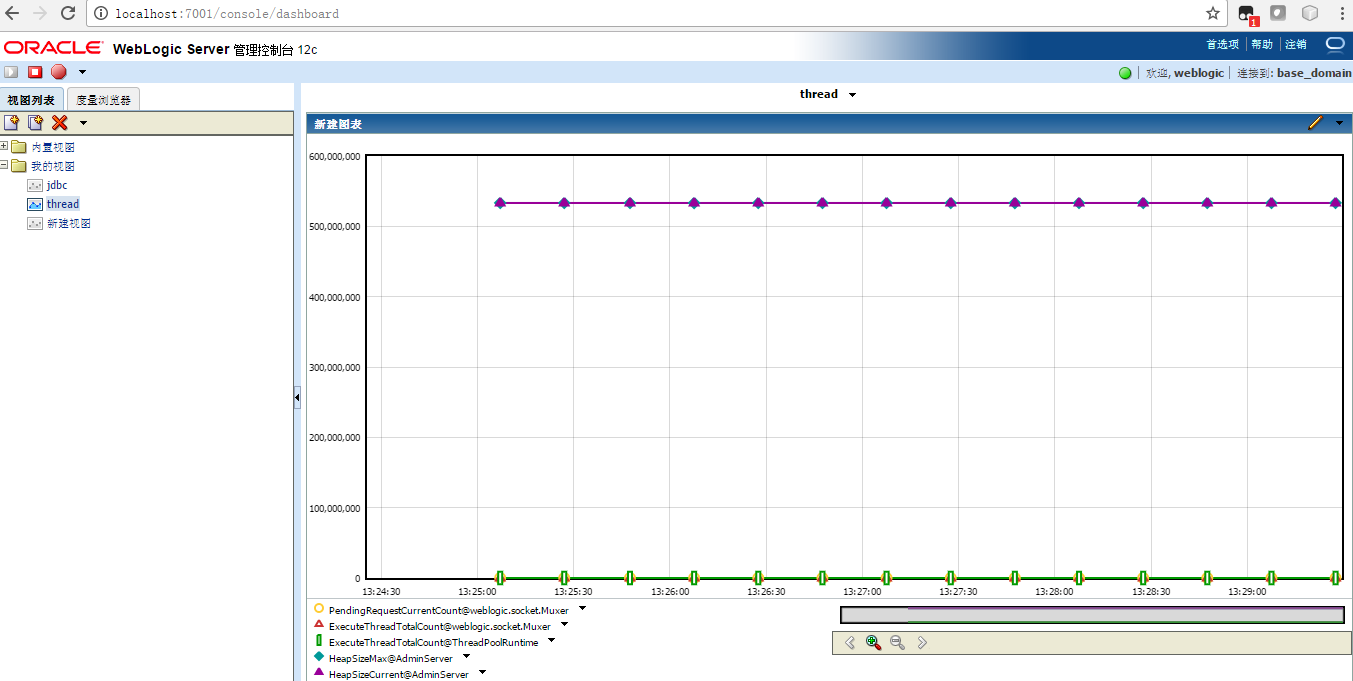
weblogic server提供了一个dashboard让我们对mbean进行图形化的展现和分析,地址是

http://localhost:7001/console/dashboard
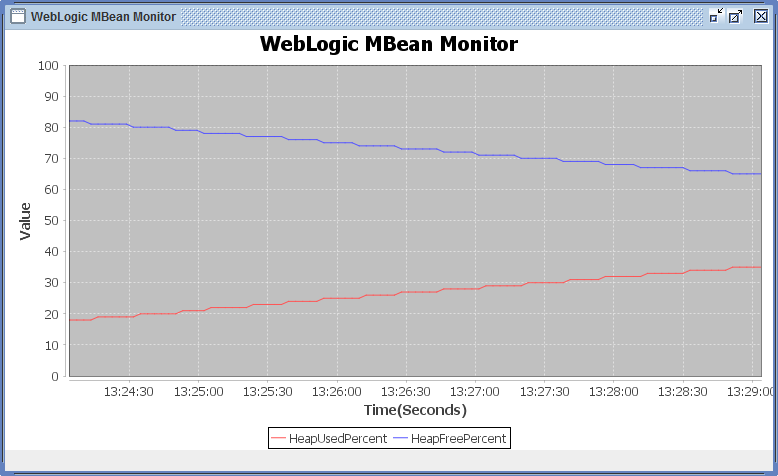
但有时候总是觉得weblogic的监控做出来效果不好,所以找时间自己基于JfreeChart做了一个,代码如下:

图表类

RealTimeChart.java

package mbeanmonitor;

import java.io.IOException;

import java.net.MalformedURLException;

import org.jfree.chart.ChartFactory;
import org.jfree.chart.ChartPanel;
import org.jfree.chart.JFreeChart;
import org.jfree.chart.axis.ValueAxis;
import org.jfree.chart.plot.XYPlot;
import org.jfree.data.time.Millisecond;
import org.jfree.data.time.TimeSeries;
import org.jfree.data.time.TimeSeriesCollection;

public class RealTimeChart extends ChartPanel implements Runnable
{
private static TimeSeries timeSeries;
private static TimeSeries timeSeries1;
private long value=0;

public RealTimeChart(String chartContent,String title,String yaxisName)
{
super(createChart(chartContent,title,yaxisName));
}

private static JFreeChart createChart(String chartContent,String title,String yaxisName){
//创建时序图对象
timeSeries = new TimeSeries("HeapUsedPercent",Millisecond.class);
timeSeries1 = new TimeSeries("HeapFreePercent",Millisecond.class);

TimeSeriesCollection timeseriescollection = new TimeSeriesCollection(timeSeries);
timeseriescollection.addSeries(timeSeries1);
JFreeChart jfreechart = ChartFactory.createTimeSeriesChart(title,"Time(Seconds)",yaxisName,timeseriescollection,true,true,false);
XYPlot xyplot = jfreechart.getXYPlot();
//纵坐标设定
ValueAxis valueaxis = xyplot.getDomainAxis();
//自动设置数据轴数据范围
valueaxis.setAutoRange(true);
//数据轴固定数据范围 30s
valueaxis.setFixedAutoRange(300000D);

valueaxis = xyplot.getRangeAxis();
valueaxis.setRange(0.0D,100D);

return jfreechart;
}

public void run()
{
while(true)
{
try
{
timeSeries.add(new Millisecond(), getWebLogicUsedHeap());
timeSeries1.add(new Millisecond(), getJvmTotalHeap());

Thread.sleep(3000);
}
catch (InterruptedException e) { }
}
}

private long randomNum()
{
System.out.println((Math.random()*20+80));
return (long)(Math.random()*20+80);
}

private int getWebLogicTotalThread() {
String hostname = "localhost";
String portString = "7001";
String username = "weblogic";
String password = "weblogic12";

int totalthread =0;
WebLogicServerRuntime s = new WebLogicServerRuntime();
try {
s.initConnection(hostname, portString, username, password);
totalthread=s.printTotalThread();
//connector.close();
} catch (Exception e) {
}

return totalthread;
}

private int getWebLogicUsedHeap() {
String hostname = "localhost";
String portString = "7001";
String username = "weblogic";
String password = "weblogic12";

int heapused =0;
WebLogicServerRuntime s = new WebLogicServerRuntime();
try {
s.initConnection(hostname, portString, username, password);
heapused=s.getJvmRuntime();
//connector.close();
} catch (Exception e) {
}

return heapused;
}

private int getJvmTotalHeap() {
String hostname = "localhost";
String portString = "7001";
String username = "weblogic";
String password = "weblogic12";

int heapused =0;
WebLogicServerRuntime s = new WebLogicServerRuntime();
try {
s.initConnection(hostname, portString, username, password);
heapused=s.getJvmTotalHeap();
//connector.close();
} catch (Exception e) {
}

return heapused;
}

}

//Test.java

WebLogic Mbean类

WebLogicServerRuntime.java

package mbeanmonitor;

import java.io.IOException;
import java.net.MalformedURLException;
import java.util.Hashtable;
import javax.management.MBeanServerConnection;
import javax.management.MalformedObjectNameException;
import javax.management.ObjectName;
import javax.management.remote.JMXConnector;
import javax.management.remote.JMXConnectorFactory;
import javax.management.remote.JMXServiceURL;
import javax.naming.Context;

public class WebLogicServerRuntime {

private static MBeanServerConnection connection;
private static JMXConnector connector;
private static final ObjectName service,ThreadPoolRuntimeservice;

// Initializing the object name for DomainRuntimeServiceMBean
// so it can be used throughout the class.
static {
try {
service = new ObjectName("com.bea:Name=DomainRuntimeService,Type=weblogic.management.mbeanservers.domainruntime.DomainRuntimeServiceMBean");
ThreadPoolRuntimeservice = new ObjectName("com.bea:Name=ThreadPoolRuntime,ServerRunTime=AdminServer,Type=weblogic.management.mbeanservers.runtime.ThreadPoolRuntimeMBean");

}catch (MalformedObjectNameException e) {
throw new AssertionError(e.getMessage());
}
}

/*
* Initialize connection to the Domain Runtime MBean Server
*/
public static void initConnection(String hostname, String portString,
String username, String password) throws IOException,
MalformedURLException {
String protocol = "t3";
Integer portInteger = Integer.valueOf(portString);
int port = portInteger.intValue();
String jndiroot = "/jndi/";
String mserver = "weblogic.management.mbeanservers.domainruntime";
JMXServiceURL serviceURL = new JMXServiceURL(protocol, hostname,
port, jndiroot + mserver);
Hashtable h = new Hashtable();
h.put(Context.SECURITY_PRINCIPAL, username);
h.put(Context.SECURITY_CREDENTIALS, password);
h.put(JMXConnectorFactory.PROTOCOL_PROVIDER_PACKAGES,
"weblogic.management.remote");
connector = JMXConnectorFactory.connect(serviceURL, h);
connection = connector.getMBeanServerConnection();
}

/*
* Print an array of ServerRuntimeMBeans.
* This MBean is the root of the runtime MBean hierarchy, and
* each server in the domain hosts its own instance.
*/
public static ObjectName[] getServerRuntimes() throws Exception {
return (ObjectName[]) connection.getAttribute(service,
"ServerRuntimes");
}

public static ObjectName[] getTotalThread() throws Exception {
return (ObjectName[]) connection.getAttribute(ThreadPoolRuntimeservice,
"ExecuteThreadTotalCount");
}

public int printTotalThread() throws Exception {

ObjectName[] runtimeService = getServerRuntimes();
//new ObjectName("com.bea:Name=DomainRuntimeService,Type=weblogic.management.mbeanservers.domainruntime.DomainRuntimeServiceMBean");
// String managedServerName = (String) connection.getAttribute(runtimeService, "Name");
// ObjectName serverRT = new ObjectName("com.bea:Name=" + managedServerName + ",Type=ServerRuntime");
// System.out.println("serverRT=" + managedServerName);
// ObjectName serverTP = (ObjectName)connection.getAttribute(serverRT, "ThreadPoolRuntime");
// String totalthread = (String) connection.getAttribute(serverTP, "ExecuteThreadTotalCount");
// System.out.println(totalthread);

// return Integer.parseInt(totalthread);
int ExecuteThreadTotalCount = 0;

int length = (int) runtimeService.length;
for (int i = 0; i < length; i++) {
String name = (String) connection.getAttribute(runtimeService[i],"Name");
ObjectName threadRT = (ObjectName) connection.getAttribute(runtimeService[i],"ThreadPoolRuntime");
ExecuteThreadTotalCount = (Integer)connection.getAttribute(threadRT, "ExecuteThreadTotalCount");
System.out.println("n……………….<"+name+" :.. ThreadPoolRuntime>…………….");
System.out.println("CompletedRequestCount : " + connection.getAttribute(threadRT, "CompletedRequestCount"));
System.out.println("ExecuteThreadTotalCount : " + connection.getAttribute(threadRT, "ExecuteThreadTotalCount"));
/* System.out.println("ExecuteThreadIdleCount : ” + connection.getAttribute(threadRT, “ExecuteThreadIdleCount”));
System.out.println("HealthState : ” + connection.getAttribute(threadRT, “HealthState”));
System.out.println("HoggingThreadCount : ” + connection.getAttribute(threadRT, “HoggingThreadCount”));
System.out.println("PendingUserRequestCount : ” + connection.getAttribute(threadRT, “PendingUserRequestCount”));
System.out.println("QueueLength : ” + connection.getAttribute(threadRT, “QueueLength”));
System.out.println("SharedCapacityForWorkManagers: ” + connection.getAttribute(threadRT, “SharedCapacityForWorkManagers”));
System.out.println("StandbyThreadCount : ” + connection.getAttribute(threadRT, “StandbyThreadCount”));
System.out.println("Suspended : ” + connection.getAttribute(threadRT, “Suspended”));
System.out.println("Throughput : ” + connection.getAttribute(threadRT, “Throughput”));
*/
System.out.println("………………………………………………………………n");
}
return (ExecuteThreadTotalCount);

}

public int getJvmRuntime() throws Exception {
ObjectName[] serverRT = getServerRuntimes();
int length = (int) serverRT.length;

int heapused = 0;
for (int i = 0; i < length; i++) {
String name = (String) connection.getAttribute(serverRT[i],"Name");
ObjectName jvmRT = (ObjectName) connection.getAttribute(serverRT[i],"JVMRuntime");
heapused = 100-(Integer)connection.getAttribute(jvmRT, "HeapFreePercent");

System.out.println("n……………..<"+name+" : .JVMRuntime>…………….");
System.out.println("HeapFreeCurrent :" + connection.getAttribute(jvmRT, "HeapFreeCurrent"));
System.out.println("HeapFreePercent :" + connection.getAttribute(jvmRT, "HeapFreePercent"));
System.out.println("HeapSizeCurrent :" + connection.getAttribute(jvmRT, "HeapSizeCurrent"));
System.out.println("HeapSizeMax :" + connection.getAttribute(jvmRT, "HeapSizeMax"));
System.out.println("JavaVendor :" + connection.getAttribute(jvmRT, "JavaVendor"));
System.out.println("JavaVersion :" + connection.getAttribute(jvmRT, "JavaVersion"));
System.out.println("Uptime :" + connection.getAttribute(jvmRT, "Uptime"));
System.out.println("………………………………………………………………n");
}
return heapused;
}

public int getJvmTotalHeap() throws Exception {
ObjectName[] serverRT = getServerRuntimes();
int length = (int) serverRT.length;

int HeapFreePercent = 0;
for (int i = 0; i < length; i++) {
String name = (String) connection.getAttribute(serverRT[i],"Name");
ObjectName jvmRT = (ObjectName) connection.getAttribute(serverRT[i],"JVMRuntime");
HeapFreePercent = (Integer)connection.getAttribute(jvmRT, "HeapFreePercent");

System.out.println("n……………..<"+name+" : .JVMRuntime>…………….");
System.out.println("HeapFreeCurrent :" + connection.getAttribute(jvmRT, "HeapFreeCurrent"));
System.out.println("HeapFreePercent :" + connection.getAttribute(jvmRT, "HeapFreePercent"));
System.out.println("HeapSizeCurrent :" + connection.getAttribute(jvmRT, "HeapSizeCurrent"));
System.out.println("HeapSizeMax :" + connection.getAttribute(jvmRT, "HeapSizeMax"));
System.out.println("JavaVendor :" + connection.getAttribute(jvmRT, "JavaVendor"));
System.out.println("JavaVersion :" + connection.getAttribute(jvmRT, "JavaVersion"));
System.out.println("Uptime :" + connection.getAttribute(jvmRT, "Uptime"));
System.out.println("………………………………………………………………n");
}
return HeapFreePercent;
}
/*
*
* Iterate through ServerRuntimeMBeans and get the name and state
*/
public void printNameAndState() throws Exception {
ObjectName[] serverRT = getServerRuntimes();
System.out.println("got server runtimes");
int length = (int) serverRT.length;
for (int i = 0; i < length; i++) {
String name = (String) connection.getAttribute(serverRT[i],
"Name");
String state = (String) connection.getAttribute(serverRT[i],
"State");
System.out.println("Server name: " + name + ". Server state: "
+ state);
}
}

public static void main(String[] args) throws Exception {
/*String hostname = args[0];
String portString = args[1];
String username = args[2];
String password = args[3];
*/
String hostname = "localhost";
String portString = "7001";
String username = "weblogic";
String password = "weblogic12";

WebLogicServerRuntime s = new WebLogicServerRuntime();
initConnection(hostname, portString, username, password);
//s.printNameAndState();
s.printTotalThread();
s.getJvmRuntime();
connector.close();
}
}

运行主类

Test.java

package mbeanmonitor;

import java.awt.BorderLayout;
import java.awt.event.WindowAdapter;
import java.awt.event.WindowEvent;
import javax.swing.JFrame;
import javax.swing.UIManager;

public class Test
{

/**
* @param args
*/
public static void main(String[] args)
{
try
{
UIManager.setLookAndFeel(
UIManager.getCrossPlatformLookAndFeelClassName());
}
catch (Exception e) { }

JFrame.setDefaultLookAndFeelDecorated(true);

JFrame frame=new JFrame("WebLogic MBean Monitor");
RealTimeChart rtcp=new RealTimeChart("Random Data","WebLogic MBean Monitor","Value");
frame.getContentPane().add(rtcp,new BorderLayout().NORTH);

frame.pack();
frame.setVisible(true);
(new Thread(rtcp)).start();

frame.addWindowListener(new WindowAdapter()
{
public void windowClosing(WindowEvent windowevent)
{
System.exit(0);
}

});
}
}

运行效果

WebLogic MBean Monitor的更多相关文章

  1. monitor weblogic server ,Very simple to use, weblogic监控、巡检、故障简单小工具

        1. 开发了一个简单的监视weblogic执行情况的小程序.各位朋友下载下来试试,不用登陆console就能够知道server的执行状况,包含了jvm.线程.jdbc.状态jms等:另一个更简 ...

  2. JMX monitor weblogic 总结

    https://blog.csdn.net/joy_91/article/details/42774839

  3. WebLogic: The Definitive Guide examined WebLogic's security mechanisms--reference

    reference from: http://www.onjava.com/pub/a/onjava/excerpt/weblogic_chap17/index1.html?page=1 ...... ...

  4. weblogic 的应用 常见问题处理 db2 链接不上(转载)

    xingkaistart weblogic10之Failed to initialize the application 'wss-1-1' due to error weblogic. Weblog ...

  5. weblogic JDBC Connection Pools--转官方文档

    http://docs.oracle.com/cd/E13222_01/wls/docs81/ConsoleHelp/jdbc_connection_pools.html#1106016 JDBC C ...

  6. weblogic的集群与配置

    目录(?)[-] 1.Weblogic的集群 2.创建Weblogic集群前的规划 3.开始创建我们的Weblogic集群 1.1 创建集群的总控制端aminserver 2.2 创建集群中的节点my ...

  7. 【转】Weblogic的集群

    原文链接:http://www.cnblogs.com/HondaHsu/p/4267972.html 一.Weblogic的集群 还记得我们在第五天教程中讲到的关于Tomcat的集群吗? 两个tom ...

  8. tomcat,Jboss,weblogic区别与比较

    一.tomcat Tomcat 服务器是一个免费的开放源代码的Web 应用服务器,它是Apache 软件基金会(Apache Software Foundation)的Jakarta 项目中的一个核心 ...

  9. WebLogic Exception

    访问Weblogic发生以下异常: 2013-08-20 10:15:11 ERROR [ExceptionConvertOnlyFilter] doFilter (line:70) Could no ...

随机推荐

  1. 【BZOJ】1782: [Usaco2010 Feb]slowdown 慢慢游

    [算法]DFS序+树状数组 [题解]题意相当于统计前i-1个点在第i个点的祖先的个数,显然可以用dfs维护,用树状数组差分维护前缀和. 出栈不新加节点就要注意左闭右开,即in[a[i]]处+1,ou[ ...

  2. bzoj 1083 最小生成树

    裸的最小生成树. /************************************************************** Problem: User: BLADEVIL Lan ...

  3. redis配置错误导致服务器不能启动

    redis-server忘了把配置里面的daemonize的no改成yes所以把redis-server加入到了/etc/rc.local里面,在服务器启动的时候就会阻塞在这里,导致服务器不能启动.[ ...

  4. IEEE 802.15介绍

    1. 无线通信 无线通信主要是利用无线电(Radio)射频(RF)技术的通信方式,无线网络是采用无线通信技术实现的网络无线网络可为两种: 近距离无线网络和远距离无线网络 近距离无线网络主要可分为如下两 ...

  5. Multi-Paxos协议日志同步应用

    使用Multi-Paxos协议的日志同步与恢复 基于Basic-Paxos协议的日志同步方案, 所有成员的身份都是平等的, 任何成员都可以提出日志持久化的提案, 并且尝试在成员组中进行持久化. 而在实 ...

  6. Linux下f命令配置

    一.工具 f 的配置 使用 ========== ========== ========== ========== ========== ==========  ==== 一.配置方法: 首先在lin ...

  7. 在另一个文本框显示input file选择的文件名字

    javascript 获取文件域 (type=file) 的完整路径一直是很麻烦的问题,问题主要出在一些浏览器基于安全性考虑而不能正常获取到文件域中选中图片的决对路径,尤其一些基于webkit的浏览器 ...

  8. 《Java编程思想》笔记 第九章 接口

    1.抽象类和抽象方法 抽象方法,仅有方法声明没有方法体 abstract class AbstractClass{ abstract void f(); //没有 {} } 只要有一个或者多个抽象方法 ...

  9. 区块链开发(五)git、truffle安装

    truffle是以太坊最受欢迎的一个开发框架,本篇博客介绍truffle的下载安装过程. git安装 在安装truffle之前需要核实一下本机是否安装git程序.后面的程序安装需要依赖git. 输入以 ...

  10. hdu 5747(数学,贪心)

    Aaronson Time Limit: 4000/2000 MS (Java/Others)    Memory Limit: 131072/131072 K (Java/Others)Total ...