
WebServic dynamic url
How to make your Web Reference proxy URL dynamic
开发环境和部署环境,Webservice 的URL不同
需将url 配置到 web.config文件中。
Introduction
I have been asked before, how to make the URL property for a web reference to a web service in a project, configurable in a config file instead of compiled in the web reference proxy. This is most useful when you want to deploy a project with a web reference between different business environments (like between Test/QA and Production) without recompiling the project. There is a simple way to do this that requires no coding at all on the developer's part (provided you are using Visual Studio for .NET).
Getting Started
To follow this article, first you need to have a compiled web service to reference, and a project in which you wish to add a web reference. After you have added your web reference (which creates the proxy class with references to the web service for you automatically using VS .NET), you need to set your solution view to 'Show All':
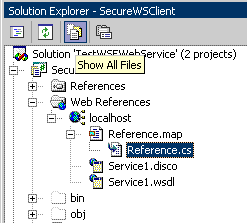
This shows the Reference.cs file for the Reference.map. This is the proxy class file that VS.NET generates automatically for you when you add a web reference.
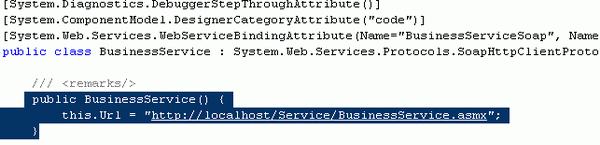
Open up this file and notice under the constructor for the proxy class that the URL is hard coded for you inside the constructor:
Changing the URL from Static to Dynamic
We are going to change the hard coded URL in the proxy class Reference.cs to a key in the web.config of the web service client project. An appSettings section will be added automatically with the current URL, and code will be placed in theReference.cs proxy class constructor to look for the URL there. All this will be done by changing one property setting on the proxy reference.
If you look at the web reference properties (below):
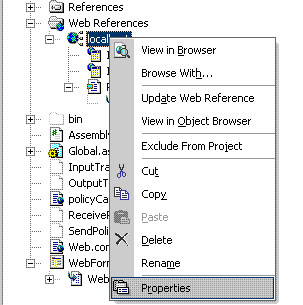
you can see that there is a configuration setting called 'URL Behavior'. This setting is by default set to Static.
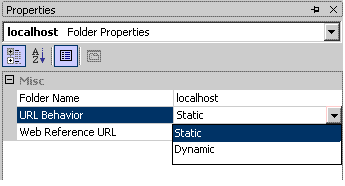
To make the URL in the Reference.cs map class code behind look for the web service URL in your web.config file, we need to change this setting to Dynamic:
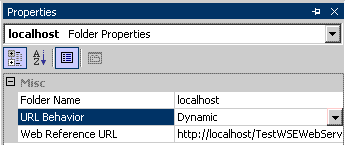
Doing this in VS.NET does two things for you. It changes the Reference.cs file to have the code to look for the WSDL URL in the project's web.config file:
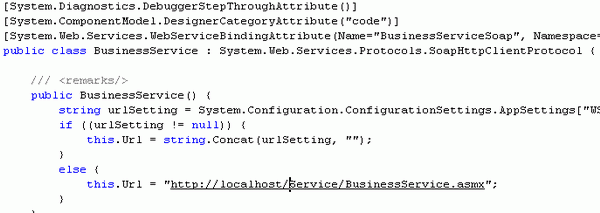
And it adds the URL as a key value to the projects web.config file under appSettings:

Now you can set the URL to different servers for deployment in different environments, without having to change the code. You just change the URL in your config file for your project.
WebServic dynamic url的更多相关文章
- Feign Dynamic URL
原创转载请注明出处:https://www.cnblogs.com/agilestyle/p/11811932.html Project Directory Maven Dependency < ...
- Ionic 动态配置url路由的设置
随着Ionic App功能的不断增加,需要路由的url设置就越来越多,不喜欢在config函数中写一堆硬代码,一则不美,二则维护起来也麻烦,能不能把这些数据独立出来呢? 经过查找资料与各种实验,最终找 ...
- OkHttp,Retrofit 1.x - 2.x 基本使用
Square 为广大开发者奉献了OkHttp,Retrofit1.x,Retrofit2.x,运用比较广泛,这三个工具有很多相似之处,初学者可能会有一些使用迷惑.这里来总结一下它们的一些基本使用和一些 ...
- 项目二(业务GO)——跨域上传图片(请求接口)
之前,就听过“跨域上传”图片的问题,只是疏于研究,也就一再搁置,直至今天再次遇见这个不能避免的“坑”,才不得不思考一下,怎么“跨域上传”图片或者文件? 问题来源: 何为“跨域”? ——就是给你一个接口 ...
- dubbo框架揭秘之服务发布
通常情况下是通过Spring配置的方式去实现服务的发布,为了方便调试,我就不采用Spring配置的方式. DemoService demo = new DemoServiceImpl(); Appli ...
- Dubbo源码学习--服务发布(ServiceBean、ServiceConfig)
前面讲过Dubbo SPI拓展机制,通过ExtensionLoader实现可插拔加载拓展,本节将接着分析Dubbo的服务发布过程. 以源码中dubbo-demo模块作为切入口一步步走进Dubbo源码. ...
- Dubbo学习-源码学习
Dubbo概述 dubbo框架提供多协议远程调用,服务提供方可以是分布式部署.dubbo框架可以很简单的帮我们实现微服务. 此处援引官网上图片 dubbo分为客户端和服务提供方 服务方将服务注册到注册 ...
- RPC -dubbo 服务导出实现
在阅读此文章之前,我希望阅读者对Spring 扩展机制的有一定的了解,比如:自定义标签与Spring整合, InitializingBean 接口,ApplicationContextAware,Be ...
- dubbo源码分析14——DubboProtocol的export方法分析
走到了这一步也挺不容易的,把之前的暴露入口代码再列出来回顾一下: //配置为none不暴露 if (! Constants.SCOPE_NONE.toString().equalsIgnoreCase ...
随机推荐
- 9张图让你明白什么叫做"一坨屎"一样的iOS垃圾代码
前言:这是一个两万余行的商业项目,但代码质量却不敢恭维! //本文永久链接,转载请注明出处:http://www.cnblogs.com/ChenYilong/p/3489939.html ...
- JSP的简便写法
aaarticlea/png;base64,iVBORw0KGgoAAAANSUhEUgAAAMIAAAFmCAIAAACwedIqAAAWfklEQVR4nO2d7XPV1p3H77+x+3JfpJ ...
- python函数对象和闭包
关于函数对象和闭包 闭包(closure)是函数式编程的重要的语法结构.不同的语言实现闭包的方式不同.Python以函数对象为基础,为闭包这一语法结构提供支持的 (我们在特殊方法与多范式中,已经多次看 ...
- Ubuntu破解开机密码
使用Ubuntu和使用windows系列产品一样,会忘记开机密码.难道我们在忘记开机密码的时候就必须重装系统吗?当然不是了!既然在windows下面我们可以破解开机密码,那么在Ubuntu里面一样可行 ...
- 入园的第一篇--where、where
这篇是入园的第一篇随便,后面我会将自己几年前写的博文都转到这里.哎,其实说到博文的事情,我就很郁闷,甚至有些恼火,后面我会详细说说这中间的过程,也许能帮助某些人避免遇到类似的事情.突然想起<西游 ...
- 关于EINTR错误的理解【转】
转自:http://www.xuebuyuan.com/1470645.html 最近在工作中遇到了EINTR错误,感到比较困惑,几番研究之后,颇有心得和收获,特记录如下,便于以后查询,也给有同样困惑 ...
- [ Python - 2 ] 常见内置函数
1. abs(): 绝对值 In [1]: abs(-10) Out[1]: 10 2. all(): 当参数中任何一个值为False时,all() 都为False all(iterable) ...
- 关于C++编译的程序无法在新一台电脑上运行总结
最近在调用一个SDK调试一个主板的DPIO. 可是编译好的程序在开发电脑上运行没问题,到了新主板建立的电脑系统上就出问题. 总结了下要注意一下几方面. 1:程序本身要没有问题.至少在开发电脑系统环境下 ...
- 区块链开发(四)Nodejs下载&安装
以太坊框架truffle的安装需要依赖nodejs中的npm命令,本篇博客我们就简单介绍一下node的安装过程.操作系统基于ubuntu 16.04版本. 下载地址 nodejs官网:http://w ...
- 网关协议:CGI、FastCGI、WSGI
CGI就像是一座桥,把网页和WEB服务器中的执行程序连接起来,它把HTML接收的指令传递给服务器的执行程序,再把服务器执行程序的结果返还给HTML页. CGI CGI即通用网关接口(Common Ga ...