
转:Transform Web.Config when Deploying a Web Application Project
Introduction
One of the really cool features that are integrated with Visual Studio 2010 is Web.Config (XDT) transformations. ASP.NET Web.Config transformations are a great way to manage configurations in several environments. We can easily change a database connection string or other settings within our Web.config file when deploying a Web Application Project. When we deploy a Web site, we often want some settings in the deployed application's Web.configfile to be different from the development Web.config file. For example, we might want to change the connection strings, security settings, active directory and network addresses, proxy settings, service endpoints and so on. Not only change the connection string or other settings but also insert new settings, remove existing settings and so on during deployment. Here is the Web.Config(XDT) transformations syntax documentation on MSDN.
Background
A Web.config transformation file contains XML markup that specifies how to change the Web.config file when it is deployed.
- It only works for web applications. So firstly we have to create a Web Application Project .
- After creating the project Right click on web.config and select Add Config Transforms.
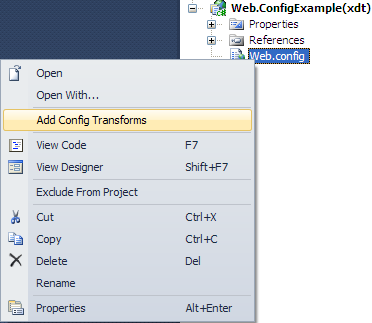
- When you click Add Config Transforms - this will create the default web.debug.config and web.Release.configfiles.
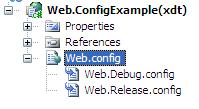
The root element of a transform file must specify the XML-Document-Transform namespace in its opening tag. I used some features form ML-Document-Transform that I needed.
Web.Release.Config
 Collapse | Copy Code
<configuration xmlns:xdt="http://schemas.microsoft.com/XML-Document-Transform">
<appsettings>
<add key="Email" value="mmoin56@yahoo.com"
xdt:locator="Match(key)" xdt:transform="RemoveAll">
<add key="EMailFrom" value="mmoin56@hotmail.com"/>
<add key="EMailCC" value="mmoin56@yahoo.com"/>
<add key="EMailBCC" value="mmoin56@gmail.com"
xdt:locator="Match(key)" xdt:transform="Insert"/>
</appsettings> <connectionstrings xdt:transform="Replace">
<add name="Release-Mode" connectionstring="data source=MOIN-PC;initial catalog=MasterCareEMR;
user id=sa;password=123" providername="System.Data.SqlClient"/>
</connectionstrings> <system.web>
<compilation xdt:transform="RemoveAttributes(debug)"/>
<compilation batch="false" xdt:transform="SetAttributes(batch)"/>
<authentication mode="Windows" xdt:transform="SetAttributes(mode)"/>
</system.web>
</configuration>
Web.Debug.Config
Collapse | Copy Code<configuration xmlns:xdt="http://schemas.microsoft.com/XML-Document-Transform">
<appsettings>
<add key="Email" value="mmoin56@yahoo.com"
xdt:locator="Match(key)" xdt:transform="RemoveAll"/>
<add key="EMailFrom" value="mmoin56@hotmail.com"/>
<add key="EMailCC" value="mmoin56@yahoo.com"/>
<add key="EMailBCC" value="mmoin56@gmail.com"
xdt:locator="Match(key)" xdt:transform="Insert"/>
</appsettings> <connectionstrings xdt:transform="Replace">
<add name="Debug-mode" connectionstring="data source=MOIN-PC;initial
catalog=MasterCareEMR; user id=sa;password=123" providername="System.Data.SqlClient"/>
</connectionstrings>
<system.web>
<compilation batch="false" xdt:transform="SetAttributes(batch)"/>
<authentication mode="Windows" xdt:transform="SetAttributes(mode)"/>
<customerrors mode="RemoteOnly" defaultredirect="GenericErrorPage.htm"
xdt:locator="Match(mode)" xdt:transform="Insert">
<error statuscode="403" redirect="NoAccess.htm"/>
<error statuscode="404" redirect="FileNotFound.htm"/>
</customerrors>
</system.web>
</configuration>
Remove all existing values by using xdt:Locator="Match(key)" xdt:Transform="RemoveAll", and thenxdt:Transform="Insert", this will ensure any existing values are removed and inserted with the new ones. Alsoxdt:Transform="Replace" will replace any existing elements. In addition we can use SetAttributes andRemoveAttributes to add new attributes or remove existing attributes.
Default Web.Config file
Collapse | Copy Code<configuration>
<appsettings>
<add value="mmoin56@yahoo.com" key="Email"/>
<add value="mmoin56@hotmail.com" key="EMailFrom"/>
<add value="mmoin56@yahoo.com" key="EMailCC"/>
</appsettings> <connectionstrings>
<add providername="System.Data.SqlClient"
connectionstring="data source=MOIN-PC;initial catalog=MasterCareEMR;
user id=sa;password=123" name="MCEMRBPPConnectionString"/>
</connectionstrings> <system.web>
<compilation targetframework="4.0" batch="true" debug="true"/>
<authentication mode="Windows"/>
</system.web>
</configuration>
Now we will publish the Project with Release mode.

After publishing the Project we notice that the Web.config file has changed with new settings and a new connection string.
Web.config file.
Collapse | Copy Code<configuration>
<appsettings>
<add value="mmoin56@hotmail.com" key="EMailFrom"/>
<add value="mmoin56@yahoo.com" key="EMailCC"/>
<add value="mmoin56@gmail.com" key="EMailBCC"/>
</appsettings> <connectionstrings>
<add providername="System.Data.SqlClient" connectionstring="data source=MOIN-PC;initial
catalog=MasterCareEMR; user id=sa;password=123" name="Release-Mode"/>
</connectionstrings> <system.web>
<compilation targetframework="4.0" batch="false"/>
<authentication mode="Forms"/>
</system.web>
</configuration>
If we again publish with Debug mode we will notice that the Web.config has changed the correspondingWeb.Debug.config file configuration. Really it is a very interesting feature of VS2010.
Conclusion
There are many flexible options to transform Web.config files using the xdt:Transform and xdt:Locator elements and it is very easy. I hope this will make your life a little easier.
转:Transform Web.Config when Deploying a Web Application Project的更多相关文章
- Web.config Transformation Syntax for Web Application Project Deployment
Web.config Transformation Syntax for Web Application Project Deployment Other Versions Updated: Ma ...
- 10 Things ASP.NET Developers Should Know About Web.config Inheritance and Overrides(转)
10 Things ASP.NET Developers Should Know About Web.config Inheritance and Overrides Wednesday, Janua ...
- 关于Web.config的debug和release.config文件
使用Web.Config Transformation配置灵活的配置文件 发布Asp.net程序的时候,开发环境和发布环境的Web.Config往往不同,比如connectionstring等.如果常 ...
- 一步步开发自己的博客 .NET版(11、Web.config文件的读取和修改)
Web.config的读取 对于Web.config的读取大家都很属性了.平时我们用得比较多的就是appSettings节点下配置.如: 我们对应的代码是: = ConfigurationManage ...
- 配置子目录Web.config使其消除继承,用虚拟目录创建多个网站的方法
来源:http://www.wtnzone.com/post/2011/02/20/Set-Web-Config-to-Turn-Inheritance-Off.aspx ASP.NET提供了强大的W ...
- Web.config配置详解
一.认识Web.config文件 Web.config 文件是一个XML文本文件,它用来储存 ASP.NET Web 应用程序的配置信息(如最常用的设置ASP.NET Web ...
- web.config 配置
一.认识Web.config文件 Web.config 文件是一个xml文本文件,它用来储存 asp.NET Web 应用程序的配置信息(如最常用的设置asp.NET Web 应用程序的身份验证方 ...
- web.config中配置页面出错后跳转指定错误页面
每当用户访问错误页面时,会出现不友好的404错误,所以为了防止这种不友好,我们在web.config中的<system.web>节点下配置 <customErrors>,在出现 ...
- 我没发现Mvc里的 web.config 有什么用。
实验过程 由于 Mvc2+ 引入 Area ,导致文件夹结构发生变化. Mvc下的 web.config 所在的位置是: ~/Areas/MySystem/Views/Web.config 对应的请求 ...
随机推荐
- atitit.提升开发效率---MDA 软件开发方式的革命(5)----列表查询建模
)----列表查询建模 1. 配置条件字段@Conditional 1 2. 配置条件字段显示类型为range----@Conditional(displayType = displayType.ra ...
- Leetcode 102 Binary Tree Level Order Traversal 二叉树+BFS
二叉树的层次遍历 /** * Definition for a binary tree node. * struct TreeNode { * int val; * TreeNode *left; * ...
- Liferay7 BPM门户开发之36: 使用Portlet filters过滤器做切面AOP
使用Portlet filters过滤器做切面AOP Portlet Filters定义于JSR286 Java Portlet Specification 2.0 Portlet Filters是为 ...
- Python面试题(一)
**晚上在公司的论坛上看到一道面试题,题目如下:随机给定一字符串和字符,要求重排,比如:'abde','c'.重排之后变成'abcde' **看到他们给的答案很多都是二分法重排,既然是字符类的处理,当 ...
- 详解Bootstrap面板组件
面板组件主要作用是用来处理一些其他组件无法完成的功能,在不同的版本中具有不同的源码: LESS:panels.less SASS:_panels.scss 基础面板非常简单,就是一个div容器中运用了 ...
- Nginx在安装过程经常出现的问题
在Linux操作系统下搭建Nginx服务器,很多时候会出现不同的错误,在此我们在搭建过程中出现的错误进行一些总结: 主要问题有: 1.防火墙问题 2.缺少gc++ 3.缺少pcre.zlib库 解决办 ...
- 如何通过linux ssh远程linux不用输入密码登入
如何通过一台linux ssh远程其他linux服务器时,不要输入密码,可以自动登入.提高远程效率,不用记忆各台服务器的密码. 工具/原料 ssh,ssh-keygen,scp 方法/步骤 首 ...
- Parallel的陷阱
,).ToArray(); ; Parallel.For<int>( fromInclusive: , toExclusive: nums.Length, /* 陷阱 */ localIn ...
- phpmyadmin导入sql数据的纠结
今天准备往phpstudy的mysql导入数据,超过2M,提示" 没有接收到要导入的数据.可能是文件名没有提交,也可能是文件大小超出 PHP 限制.参见 FAQ 1.16. " 折 ...
- 学习rabbitmq
http://www.cnblogs.com/dubing/p/4017613.html elk+redis 搭建nginx日志分析平台 http://www.cnblogs.com/yjf512/p ...