
10 Things ASP.NET Developers Should Know About Web.config Inheritance and Overrides(转)
10 Things ASP.NET Developers Should Know About Web.config Inheritance and Overrides
The ASP.NET configuration system is build around the idea of inheritance:
Each Web.config file applies configuration settings to the directory that it is in and to all of the child directories below it. Settings in child directories can optionally override or modify settings that are specified in parent directories. Configuration settings in a Web.config file can optionally be applied to individual files or subdirectories by specifying a path in a locationelement.
The root of the ASP.NET configuration hierarchy is the systemroot\Microsoft.NET\Framework\versionNumber\CONFIG\Web.config file, which includes settings that apply to all ASP.NET applications that run a specific version of the .NET Framework. Because each ASP.NET application inherits default configuration settings from the root Web.config file, you need to create Web.config files only for settings that override the default settings.
For a lot of sites, you don't really need to know about that - you can get by with one Web.config file for the site. But, knowing how the inheritance works - and how to control it - can really help out.
I've noticed that a lot of the questions I answer questions on forums, StackOverflow, and internal e-mail lists can be solved by better understanding how ASP.NET configuration inheritance and overrides work. And so, a bunch of tips about how ASP.NET configuration inheritance and overrides work! I'll start with some basics, but there are some towards the end I'll bet most ASP.NET developers don't know.
Tip 1: Using Web.config files in site subfolders
And ASP.NET website's Web.config is part of an inheritance chain. Your website's subfolders can have Web.config - an example is the Web.config file in an ASP.NET MVC application's View folder which does things like preventing directly viewing the View templates:
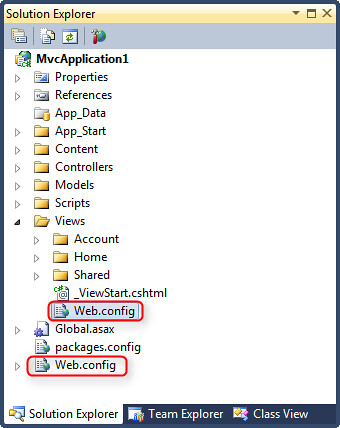
This allows for setting general settings at the site level and overriding them when necessary. Any settings in the base Web.config that aren't overridden in the subfolder stay in effect, so the "child" Web.config can be pretty small. You can continue to nest them, so sub-sub-subfolders can get their own Web.config if needed. Some of the most common uses of subfolders are to restrict permission (e.g. requiring authentication or restricting access to resources), but you can also use them to do things like include default namespaces in Views, toggle handlers, etc.
Tip 2: Understand how your site Web.config inherits its settings
But there's an inheritance chain above the site, too. Here's a simplified version from the MSDN docs:
|
Configuration level |
File name |
File description |
|---|---|---|
|
Server |
Machine.config |
The Machine.config file contains the ASP.NET schema for all of the Web applications on the server. This file is at the top of the configuration merge hierarchy. |
|
IIS |
ApplicationHost.config |
ApplicationHost.config is the root file of the IIS 7.0 configuration system. It includes definitions of all sites, applications, virtual directories, and application pools, as well as global defaults for the Web server settings. It is in the following location: %windir%\system32\inetsrv\config |
|
Root Web |
Web.config |
The Web.config file for the server is stored in the same directory as the Machine.config file and contains default values for most of the system.web configuration sections. At run time, this file is merged second from the top in the configuration hierarchy. |
|
Web site |
Web.config |
The Web.config file for a specific Web site contains settings that apply to the Web site and inherit downward through all of the ASP.NET applications and subdirectories of the site. |
|
ASP.NET application root directory |
Web.config |
The Web.config file for a specific ASP.NET application is located in the root directory of the application and contains settings that apply to the Web application and inherit downward through all of the subdirectories in its branch. |
|
ASP.NET application subdirectory |
Web.config |
The Web.config file for an application subdirectory contains settings that apply to this subdirectory and inherit downward through all of the subdirectories in its branch. |
So your website's configuration's actually inherited a bunch of settings that were set at the server level. That's nice for a few reasons:
- It allows the ASP.NET / IIS teams to migrate settings that aren't commonly modified from the project template Web.config files to server defaults, keeping your Web.config files smaller and more readable. For example, ASP.NET 4 migrated a bunch of handler registrations to Machine.config, so the Empty ASP.NET Application Web.config is slimmed down to about 8 lines.
- You can override things at the server level as needed, and they'll take effect for all applications. For example, you can set <deployment retail="true"> on production servers to disable trace output and debug capabilities.
- You can find a lot of useful information in the Machine.config default settings since they're stored in plain text. For example, the ASP.NET Membership Provider has some defaults set for password requirements and the membership database, and you can look them up by looking in the appropriate .NET framework version's Machine.config. For a default installation of ASP.NET 4, that's found in C:\Windows\Microsoft.NET\Framework64\v4.0.30319\Config\machine.config with a quick search for <membership>.
Tip 3: Understand how your Web.config inherits IIS configuration settings
This overlaps a bit of Tip 2, but it bears repeating. Long-time ASP.NET developers (myself included) are prone to thinking of ASP.NET and IIS configuration separately, but that all changed with IIS 7. This is all pretty old news, as IIS 7 has been out for a while, but it hasn't been completely absorbed by ASP.NET developers.
CarlosAg summed this up well in a post from 2006(!) which explained The New Configuration System in IIS 7. I'm not going to rehash his post here - go read it. Some important takeaways are that both the ApplicationHost.config and Machine.config feed into the configuration settings in your site's Web.config, as shown in Carlos' diagram:
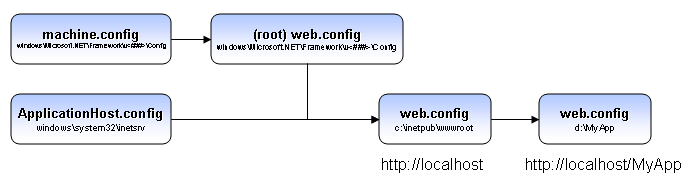
In addition to the understanding how things work part of it, this is also good to know because - based on the info in Tip 2 - you can see what the base settings are, and how you can override them in your application's Web.config. This is why you can do pretty advanced things like configure rules on for the URL Rewrite Module in your application's web.config.
Of course, server administrators don't necessarily want to allow any application on the server to modify settings via Web.config, so there are configurable policies in the ApplicationHost.config which state whether individual applications can override settings. There's also anAdministration.config file which controls things like Module registration.
There's one kind of new update to this list - using aspnet.config for Application Pool tuning. It's found in the same directory as Machine.config, and it's been around since .NET 2.0. However, as of ASP.NET 4 it's been expanded to handle things like concurrency and threading, as explained in Scott Forsyth's post, Setting an aspnet.config File per Application Pool. While not something most ASP.NET developers will need to use, it's good to know that you can control things like maxConcurrentRequestsPerCPU, maxConcurrentThreadsPerCPU and requestQueueLimit at the application pool level.
Tip 4: Location, location
While it's nice to be able to override settings in a subfolder using nested Web.config files, that can become hard to manage. In a large application, it can be difficult to manage settings because you can't see the effective permissions in one place. Another option is to use the <location> element to target settings to a specific location. For example, I previously showed how to use this to allow large file uploads to a specific directory in an ASP.NET application using the location element:
<location path="Upload">

    <system.web>

        <httpRuntime executionTimeout="110"

                     maxRequestLength="20000" />

    </system.web>

</location>
Tip 5: Clearing parent settings when adding to a collection
Sometimes you want to remove all inherited settings and start fresh. A common place you'll see this is in handler, module, connection string and provider registration - places where configuration is used to populate a collection. Scott Guthrie blogged about an example in which just adding a new Membership Provider causes problems, because you end up with two providers - the default, and the one you just added. It's important to clear the collection before adding your new provider using the <clear/> element, like this:
<membership>

      <providers>

          <clear/>

          <add name="AspNetSqlMembershipProvider"

              type="System.Web.Security.SqlMembershipProvider,

                    System.Web, Version=2.0.0.0,

                    Culture=neutral,

                    PublicKeyToken=b03f5f7f11d50a3a"

              connectionStringName="MyDatabase"

              enablePasswordRetrieval="false"

              (additional elements removed for brevity)

          />

      </providers>

</membership>
As Scott explains, failure to <clear/> the collection first results in both providers attempting to handle membership, which probably isn't what you intended.
Tip 6: Locking settings with with allowOverride and inheritInChildApplications
You may need to prevent sub-applications from overriding or extending settings. You can do that with the allowOverride attribute, which does exactly what the name suggests - the same way a sealed class prevents changes via a derived class. The MSDN documentation summarizes this well:
You can lock configuration settings in ASP.NET configuration files (Web.config files) by adding an allowOverride attribute to a location element and setting the allowOverride attribute to false. Then within the location element, you can define the configuration section that you want to lock. ASP.NET will throw an exception if another configuration file attempts to override any configuration section that is defined within this locked location element.
Using a location element with an allowOverride=false attribute locks the entire configuration section. You can also lock individual configuration elements and attributes using lockItem, lockElements, lockAttributes, lockAllAttributesExcept, and lockAllElementsExcept.
That last part there - using attributes on sections - works because those lock attributes are among the general attributes inherited by section elements.
Tip 7: Disinheriting your child applications with inheritInChildApplications="false"
If you've got settings that should only apply to the parent application and shouldn't be inherited, you can use the inheritInChildApplications attribute on any section or location element. That makes the settings at the current level, but inheriting applications and subfolders don't have to bother with clearing and rebuilding configuration just to remove those settings.
This came up in a recent question on StackOverflow: Unloading parts of a web.config file from a child application
Since Web.config is so heavily built on the concept of inheritance, it's not surprising that turning it off for a section can have some side effects. The aptly self-named "Run Things Proper Harry," a.k.a. rtpHarry, has written up two good posts covering usage and important things to be aware of.
- SOLVED: Breaking parent web.config dependencies in sub applications
- SOLVED: IIS7, validateIntegratedModeConfiguration and inheritInChildApplications clash
Tip 8: Use configSource to separate configuration into separate files
While I've been discussing modification of Web.config settngs through inheritance, it only makes sense to mentions some useful ways to handle overriding Web.config settings.
Any Web.config section can be moved to a separate file by setting the configSource attribute to a file reference. I've mostly used this for handling connection strings, since it allows you a lot more flexibility over versioning and and deployment. Instead of having different Web.config files for each environment ("Oops! Just deployed the staging Web.config to production!!!"). It looks like this:
<configuration>

  <connectionStrings configSource="connectionStrings.config" />

  ...
Then your connectionStrings.config file only needs to change between environments, and can contain specific settings. It holds the contents of the element you're referring to, so it looks like this:
<connectionStrings>

  <add name="subtextData"

    connectionString="Server=.;Database=staging;Trusted_Connection=True;" />

</connectionStrings>
Another way I've seen this done is to have differently named connection strings config files for each environment (e.g. dev.config, staging.config, production.config). That allows you to check them all in to source control and not worry about getting files with the same name but different contents mixed up, but the tradeoff is that your Web.config in each environment needs to be updated to point to the right config source.
So, this is a handy trick, but isn't quite perfect. A better option is to use Web.config File Transformations.
Tip 9: Use Web.config Transforms to handle environmental differences
I don't hear as much about Web.config Transforms as I'd expect. Maybe they just work and everyone just quietly uses them and doesn't talk about it. But from the questions I see coming up over and over again, I'm not sure that's the case.
I love Web.config Transforms. At my first ASP.NET MVP summit, I was part of a feedback group discussing frustrations with deploying ASP.NET applications. Two themes that came up over and over were difficulties with packaging and managing configuration. That team later produced Web Deployment Packages (a nice format that packages files and settings for a site in a way that can be inspected and modified during installation) and Web.config Transforms.
All the new ASP.NET projects have Web.config transforms already set up - if you expand the Web.config node, you'll see that it's configured to create different settings for Debug and Release mode.
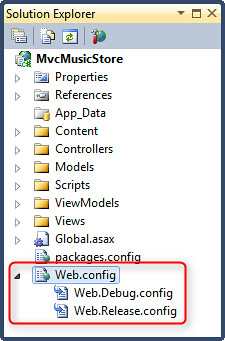
It's really easy to use - your main Web.config has the base settings for your site, and whenever you build, the transforms for the appropriate build configuration (e.g. Debug or Release) are automatically applied. If you had a Test database that you wanted to use by default, but wanted your Release builds to run against the Production database, you could set it up so that your base Web.config connection string points to the Test Database connection string, like this:
<connectionStrings>

  <add name="ApplicationServices"

      connectionString="[TestDatabase]" />

</connectionStrings>
Then your Web.Release.config overwrites that to point at the Production database, like this:
<?xml version="1.0"?>

<configuration xmlns:xdt="http://schemas.microsoft.com/XML-Document-Transform">

  <connectionStrings>

    <add name="ApplicationServices"

        connectionString="[ProductionDatabase]"

        xdt:Transform="Replace" xdt:Locator="Match(name)"/>

  </connectionStrings>

</configuration>
The syntax is pretty straightforward, but you don't need to worry about that because the comments in the Web.Release.config file already show how to do that.
To be clear: unlike the other examples, this is something that happens at build time, not runtime.
I recently ran into an issue where I wanted to deploy something to AppHarbor and wanted to switch between a local SQL Compact database and the hosted database server, and Web.config Transforms worked just great there.
There's a lot more to talk about with Web.config Transforms that's beyond the scope here, such as:
- You can create as many build configurations as you want, with different transforms for each configuration. This makes it simple to switch between different settings in your development environment - say, switching between several development databases or other application settings.
- You can use the configuration transformation system with any XML file using the SlowCheetah Visual Studio extension. Scott Hanselman's written a post with more information on that here: SlowCheetah - Web.config Transformation Syntax now generalized for any XML configuration file
- Sayed (the Microsoft developer who's worked on both Web.config Transforms and the SlowCheetah extension) has also built aPackage Once Publish Anywhere NuGet package which allows you to defer running the transforms until later, using a PowerShell command. That means you can build one Web Deployment Package with all the transforms included, and run them when you're going to deploy to a specific environment.
There's some good information on MSDN about Web.config Transforms:
- Web.config File Transformation section in the Web Application Project Deployment Overview
- Web.config Transformation Syntax for Web Application Project Deployment
- Scott Hanselman: Web Deployment Made Awesome: If You're Using XCopy, You're Doing It Wrong
Tip 10: Managing Application Restarts on Configuration Changes
There are a lot of moving parts in figuring out the configuration for a website, as illustrated above. For that reason, ASP.NET computes the effective settings for the site and caches them. It only recomputes them (and restarts the application) when a file in the sites configuration hierarchy is modified. You can control that on a section by section level using the restartOnExternalChanges property.
One place where configuration changes don't automatically get recomputed is for external config files set using configSource (as shown in Tip 8). You can control that by setting restartOExternalChanges="true" for that section. There's an example on MSDN that shows this in more detail by creating an external configuration file which is loaded via the configuration API (not referenced via configSource), then toggling the restartOnExternalChanges property and showing the differences in operation.
10 Things ASP.NET Developers Should Know About Web.config Inheritance and Overrides(转)的更多相关文章
- WCF项目问题2-无法激活服务,因为它需要 ASP.NET 兼容性。没有未此应用程序启用 ASP.NET 兼容性。请在 web.config 中启用 ASP.NET 兼容性,或将 AspNetCompatibilityRequirementsAttribute.AspNetCompatibilityRequirementsMode 属性设置为 Required 以外的值。
无法激活服务,因为它需要 ASP.NET 兼容性.没有未此应用程序启用 ASP.NET 兼容性.请在 web.config 中启用 ASP.NET 兼容性,或将 AspNetCompatibility ...
- ASP.NET杂谈-一切都从web.config说起(2)(ConfigSections详解-上 )
ConfigSections的结构 首先我们先回顾一下ConfigSections的结构和它子节点的说明,如下: 1: <configSections> 2: <sectionGro ...
- ASP.NET杂谈-一切都从web.config说起(2)(ConfigSections详解-下)
还是接着上一篇说起,在上两篇中主要和大家探讨了ConfigSection的几种常用形式,并举例几个例子说明了一下.其实它们主要都是继承System.Configuration.Configuratio ...
- ASP.NET杂谈-一切都从web.config说起(2)(ConfigSections详解-中)
我们就接着上一篇继续说,上一篇中介绍了ConfigSection的结构和两个简单的DEMO,本篇就说一下SectionGroup.ConfigurationElementCollection和key/ ...
- asp.net夜话之十一:web.config详解
转:http://blog.csdn.net/zhoufoxcn/article/details/3265141 在开发中经常会遇到这样的情况,在部署程序时为了保密起见并不将源代码随项目一同发布,而我 ...
- ASP.NET 多环境下配置文件web.config的灵活配置
调试,发布Asp.net程序的时候,开发环境和发布环境的Web.Config往往不同,比如connectionstring等.如果常常有调试,发布的需求,就需要常常修改web.config文件,这往往 ...
- ASP.NET 多环境下配置文件web.config的灵活配置---转
注意:本功能在.Net Core中已经不可用,暂时需手动修改web.config中的信息,或者将其设置在appsettings.XXX.json中,然后再使用web.config中的环境变量来制定使用 ...
- ASP.NET程序中动态修改web.config中的设置项目(后台CS代码)
using System;using System.Collections;using System.ComponentModel;using System.Data;using System.Dra ...
- asp.net允许跨域配置web.config
<configuration> <system.webServer> <modules> <add name="CultureAwareHttpMo ...
随机推荐
- Synchronize原理
1 普通方法上 2 静态方法上 修饰静态方法内置锁是当前的Class字节码对象 修饰普通方法内置锁是当前类的实例 原理与使用: 从字节码层面解释: 执行同步代码块 monitorenter synch ...
- windchill系统——eclipse与服务器同步数据操作
步骤如下
- Android 必须知道2018年流行的框架库及开发语言,看这一篇就够了!
导语 2017 已经悄悄的走了,2018 也已经匆匆的来了,我们在总结过去的同时,也要展望一下未来,来规划一下今年要学哪些新技术.这几年优秀Android的开源库不断推出,新技术层出不穷,需要我们不断 ...
- 更改当前启动项,开关Hyper-V
switch-HyperV.bat @echo off "%SYSTEMROOT%\system32\cacls.exe" "%SYSTEMROOT%\system32\ ...
- Kestrel 服务器部署多站点问题 (nginx 反向代理)
Kestrel 作为微软的跨平台 web 服务器,有些地方用的好不是很熟. 作为一款嵌套到 dll 中的进程级 web 服务器,在同一台服务器上部署多站点确实还存在一点问题. 今天采用 nginx 做 ...
- ThinkPHP之MVC简析
MVC是一种设计模式.它强制性的使用程序的输入.处理和输出分开.使用MVC应用程序被分成三个核心部件:模型(Model).视图(View).控制器(Controller),它们各自处理自己的任务. 模 ...
- eclipse启动Tomcat服务输入http://localhost:8080/报404解决方法
其实如果Tomcat能够正常启动,而就算输入http://localhost:8080时出现404错误,也不会影响Tomcat作为服务器运行.通过eclipse来启动tomcat会碰到“访问http: ...
- 【Python】内置函数清单
Python内置(built-in)函数随着python解释器的运行而创建.在Python的程序中,你可以随时调用这些函数,不需要定义.最常见的内置函数是: print("Hello Wor ...
- .html() .text() .val() 的区别
.html()用为读取和修改元素的HTML标签(包括其Html标签) .text()用来读取或修改元素的纯文本内容 (包括其后代元素) .val()用来读取或修改表单元素的value值.(只能用于表单 ...
- 【牛客练习赛12-B】迷宫(BFS)
链接:https://www.nowcoder.net/acm/contest/68/B 题目描述 这是一个关于二维迷宫的题目.我们要从迷宫的起点 'S' 走到终点 'E',每一步我们只能选择上下左右 ...