
[转]jQuery Popup Login and Contact Form
本文转自:http://www.formget.com/jquery-popup-form/
Pop up forms are the smart way to present your site. These forms are similar to other forms except, these forms appears abruptly on exact center of screen and requests user to take immediate action over them.
Here, In this example, we explained how to create popup form like Login and Contact form to fulfill below requirements:
- Login Popup form should appears at the center of screen after specific time interval by jQuery on load event .
- Contact form may appear on click event of a button or any link.
Here, we have covered above requirements in this example as given below:
- To popup login form after specific time interval on page load, we used following jQuery code.
setTimeout(popup, 3000); // Setting time 3s to popup login form

function popup() {

$("#logindiv").css("display", "block");

}- To popup login form on click event of a button, we used following jQuery code.
$("#onclick").click(function() {

$("#contactdiv").css("display", "block");

});
Just watch our live demo or download zip file to use it.
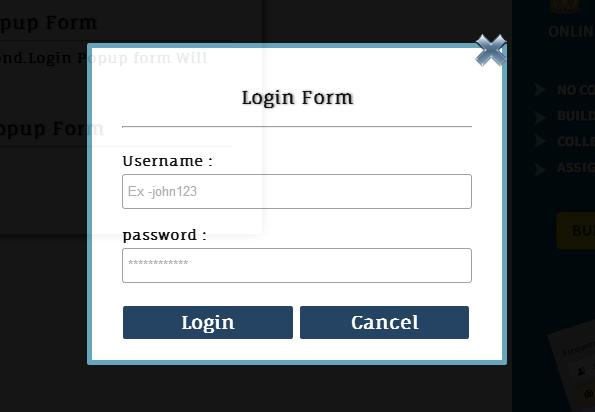
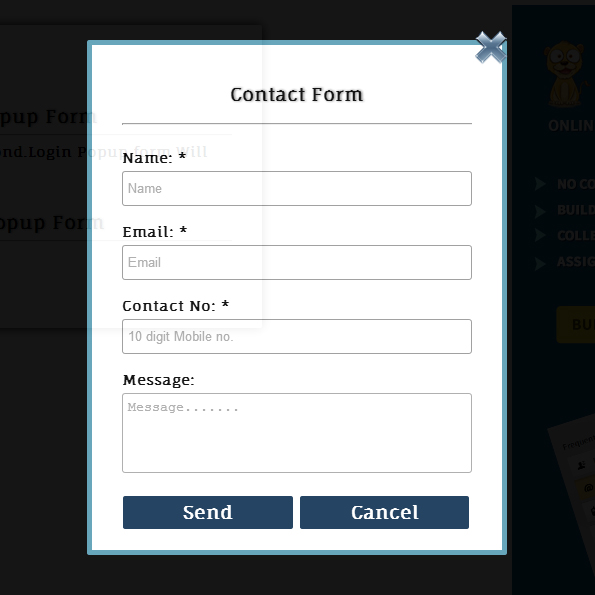
To learn more about it, go through our complete jQuery and HTML codes given below.
HTML File – jquery_popup.html
Given below our complete HTML code to create Login and Contact form.
<html>

<head>

<title>jQuery Popup Login and Contact Form</title>

<script src="js/jquery.min.js"></script>

<link rel="stylesheet" href="css/jquery_popup.css" />

<script src="js/jquery_popup.js"></script>

</head>

<body>

<div id="mainform">

<h2>jQuery Popup Form Example</h2>

<!-- Required div starts here -->

<div class="form" id="popup">

<b>1.Onload Popup Login Form</b><br/><hr/>

<span>Wait for 3 second.Login Popup form Will appears.</span><br/><br/><br/>

<b>2.Onclick Popup Contact Form</b><hr/>

<p id="onclick">Popup</p>

<br/>

</div>

<!-- Right side div -->

<div id="formget"><a href=http://www.formget.com/app><img src="data:images/formget.jpg" alt="Online Form Builder"/></a>

</div>

</div>

<!--Contact Form -->

<div id="contactdiv">

<form class="form" action="#" id="contact">

<img src="data:images/button_cancel.png" class="img" id="cancel"/>

<h3>Contact Form</h3>

<hr/><br/>

<label>Name: <span>*</span></label>

<br/>

<input type="text" id="name" placeholder="Name"/><br/>

<br/>

<label>Email: <span>*</span></label>

<br/>

<input type="text" id="email" placeholder="Email"/><br/>

<br/>

<label>Contact No: <span>*</span></label>

<br/>

<input type="text" id="contactno" placeholder="10 digit Mobile no."/><br/>

<br/>

<label>Message:</label>

<br/>

<textarea id="message" placeholder="Message......."></textarea><br/>

<br/>

<input type="button" id="send" value="Send"/>

<input type="button" id="cancel" value="Cancel"/>

<br/>

</form>

</div>

<!--Login Form -->

<div id="logindiv">

<form class="form" action="#" id="login">

<img src="data:images/button_cancel.png" class="img" id="cancel"/>

<h3>Login Form</h3>

<hr/><br/>

<label>Username : </label>

<br/>

<input type="text" id="username" placeholder="Ex -john123"/><br/>

<br/>

<label>password : </label>

<br/>

<input type="text" id="password" placeholder="************"/><br/>

<br/>

<input type="button" id="loginbtn" value="Login"/>

<input type="button" id="cancel" value="Cancel"/>

<br/>

</form>

</div>

</body>

</html>
JavaScript File – jquery_popup.js
- Wait for 3 seconds and jQuery on load event of page allows Login form to popup on exact center of screen.
- To popup Conact Formuser have to click on “Popup” button.
$(document).ready(function() {

setTimeout(popup, 3000);

function popup() {

$("#logindiv").css("display", "block");

}

$("#login #cancel").click(function() {

$(this).parent().parent().hide();

});

$("#onclick").click(function() {

$("#contactdiv").css("display", "block");

});

$("#contact #cancel").click(function() {

$(this).parent().parent().hide();

});

// Contact form popup send-button click event.

$("#send").click(function() {

var name = $("#name").val();

var email = $("#email").val();

var contact = $("#contactno").val();

var message = $("#message").val();

if (name == "" || email == "" || contactno == "" || message == ""){

alert("Please Fill All Fields");

}else{

if (validateEmail(email)) {

$("#contactdiv").css("display", "none");

}else {

alert('Invalid Email Address');

}

function validateEmail(email) {

var filter = /^[\w\-\.\+]+\@[a-zA-Z0-9\.\-]+\.[a-zA-z0-9]{2,4}$/;

if (filter.test(email)) {

return true;

}else {

return false;

}

}

}

});

// Login form popup login-button click event.

$("#loginbtn").click(function() {

var name = $("#username").val();

var password = $("#password").val();

if (username == "" || password == ""){

alert("Username or Password was Wrong");

}else{

$("#logindiv").css("display", "none");

}

});

});
CSS File – jquery_popup.css
- Design login and contact forms.
- Sets popup form to appear at exact center of screen.
@import url(http://fonts.googleapis.com/css?family=Fauna+One|Muli);

#mainform{

width:960px;

margin:20px auto;

padding-top:20px;

font-family: 'Fauna One', serif;

display:block;

}

h2{

margin-left: 65px;

text-shadow:1px 0px 3px gray;

}

h3{

font-size:18px;

text-align:center;

text-shadow:1px 0px 3px gray;

}

#onclick{

padding:3px;

color:green;

cursor:pointer;

padding:5px 5px 5px 15px;

width:70px;

color:white;

background-color:#123456;

box-shadow:1px 1px 5px grey;

border-radius:3px;

}

b{

font-size:18px;

text-shadow:1px 0px 3px gray;

}

#popup{

padding-top:80px;

}

.form{

border-radius:2px;

padding:20px 30px;

box-shadow:0 0 15px;

font-size:14px;

font-weight:bold;

width:350px;

margin:20px 250px 0 35px;

float:left;

}

input{

width:100%;

height:35px;

margin-top:5px;

border:1px solid #999;

border-radius:3px;

padding:5px;

}

input[type=button]{

background-color:#123456;

border:1px solid white;

font-family: 'Fauna One', serif;

font-Weight:bold;

font-size:18px;

color:white;

width:49%;

}

textarea{

width:100%;

height:80px;

margin-top:5px;

border-radius:3px;

padding:5px;

resize:none;

}

#contactdiv{

opacity:0.92;

position: absolute;

top: 0px;

left: 0px;

height: 100%;

width: 100%;

background: #000;

display: none;

}

#logindiv{

opacity:0.92;

position: absolute;

top: 0px;

left: 0px;

height: 100%;

width: 100%;

background: #000;

display: none;

}

#login,#contact{

width:350px;

margin:0px;

background-color:white;

font-family: 'Fauna One', serif;

position: relative;

border: 5px solid rgb(90, 158, 181);

}

.img{

float: right;

margin-top: -35px;

margin-right: -37px;

}

#contact{

left: 50%;

top: 50%;

margin-left:-210px;

margin-top:-255px;

}

#login{

left: 50%;

top: 50%;

margin-left:-210px;

margin-top:-158px;

}
Conclusion:
Popup forms are event triggered forms. here, we used jQuery’s onload and click events to popup login and contact forms respectively, it will appear on the screen. Keep following our other blogs.
[转]jQuery Popup Login and Contact Form的更多相关文章
- WordPress Contact Form 7插件任意文件上传漏洞
漏洞名称: WordPress Contact Form 7插件任意文件上传漏洞 CNNVD编号: CNNVD-201311-415 发布时间: 2013-11-28 更新时间: 2013-11-28 ...
- Contact Form 7邮件发送失败的解决办法
一.contact form 7无法发送邮件的原因 对mail()函数的不支持. Contact Form 7表单提交失败在使用过程中会出现,归根结底原因在于wordpress主机问题,由于国 内很多 ...
- WordPress Plugin Contact Form Builder [CSRF → LFI]
# Exploit Title: Contact Form Builder [CSRF → LFI]# Date: 2019-03-17# Exploit Author: Panagiotis Vag ...
- WordPress plugin Contact Form [CSRF → LFI] vulnerable 2019-03-17
# Exploit Title: Contact Form by WD [CSRF → LFI]# Date: 2019-03-17# Exploit Author: Panagiotis Vagen ...
- WP Mail SMTP插件解决Contact Form 7表单提交失败问题
WP Mail SMTP插件解决Contact Form 7表单提交失败问题 WP Mail SMTP是一款非常优秀的解决WordPress主机因为不支持或者是禁用了mail()函数,导致无法实现在线 ...
- contact form 7如何搭配Akismet过滤垃圾邮件
contact form 7有很多站长在用,但是经常会有一些垃圾邮件进来,如何过滤呢?两个方法:1.表单提交启用验证码功能,很多垃圾邮件是用软件扫相应的端口,然后批量群发,如果用验证码了可以过滤很大一 ...
- 修改 jquery.validate.js 支持非form标签
尝试使用markdown来写一篇blog,啦啦啦 源代码传送门:github 在特殊情况下我们使用jquery.validate.js对用户输入的内容做验证的时候,表单并不是一定包含在form之中,有 ...
- jquery的validate.js 和 form.js 的使用方法
在使用 Jquery 的方法的验证并且修改 原Form 表单的提交方式的时候,需要引用的文件有 <script type="text/javascript" src=&quo ...
- jQuery ajax()使用serialize()提交form数据
jQuery的serialize()方法通过序列化表单值,创建URL编码文本字符串,我们就可以选择一个或多个表单元素,也可以直接选择form将其序列化 <form action="&q ...
随机推荐
- 常用库nuget包集合
ColorConsole htmlagilitypack.1.4.9.5 经测试效率比 CsQueryLaster 高 csvhelper Extend Devlib系列一套 itextsharp l ...
- 树状数组--K.Bro Sorting
题目网址: http://acm.hust.edu.cn/vjudge/contest/view.action?cid=110064#problem/D Description Matt’s frie ...
- Linux里如何查找文件内容
Linux查找文件内容的常用命令方法. 从文件内容查找匹配指定字符串的行: $ grep "被查找的字符串" 文件名例子:在当前目录里第一级文件夹中寻找包含指定字符串的.in文件g ...
- ASP.NET Web API获取Model元数据
using System; using System.Web.Http; using Common; namespace ConsoleApp { internal class Program { p ...
- eclipse easyexplorer openexplorer
电脑重装了.. eclipse换成了4.4.2,发现原来的easyexplorer不生效了(原来是4.2),搜了下,换成了open explorer即可. 方式一样,都是丢到eclipse/plugi ...
- 用jq编码解码一个url地址
介绍一下编码解码函数对 1. escape /unescape 主要用于汉字编码,返回字符的unicode编码值, 对“+”不能编码 2. encodeURI / decodeURI ...
- oracle pfile spfile
1.参数文件的定义.作用 oracle数据库通过一系列参数来对数据库进行配置.这些参数是以键-值对的形式来表 示的,如:MAXLOGFILES=50BACKGROUND_DUMP_DEST=C:DUM ...
- 关于制作报奖PPT的小结
从9月26日接到制作报奖材料的任务开始,6个人(不包括审查领导和美工人员)忙活了半个多月终于交稿了,翻一下时间日志,10月1日前大概投入了13个小时,10月13日交稿又讨论修改了67个小时,总共算起来 ...
- block中出现此种报错: Incompatible block pointer types initializing 'float (^__strong)(float, float)' with an expression of type 'int (^)(float, float)'
当block(代码块)的返回值是float时,应注意的地方:定义的返回值类型一定要与return的返回值类型一样 我们以两个数的四则运算来举例 在main.m文件中的四则运算中,我采用两种返回值类型( ...
- iOS开发工程师面试知识点汇总
1.KVO实现原理 2.内存管理 3.Runtime 4.GCD 5.Block 6.响应者链 7.@peoperty属性特性 8.单元格cell加载图片处理