
Python爬虫基础之lxml
一、Python lxml的基本应用
 <html>

  <head>

   <title>

    The Dormouse's story

   </title>

  </head>

  <body>

   <p class="title">

    <b>

     The Dormouse's story

    </b>

   </p>

   <p class="story">

    Once upon a time there were three little sisters; and their names were

    <a class="sister" href="http://example.com/elsie" id="link1">

     Elsie

    </a>

    ,

    <a class="sister" href="http://example.com/lacie" id="link2">

     Lacie

    </a>

    and

    <a class="sister" href="http://example.com/tillie" id="link3">

     Tillie

    </a>

    ; and they lived at the bottom of a well.

   </p>

   <p class="story">

    ...

   </p>

  </body>

 </html>
1.使用lxml.etree和lxml.cssselect解析html源码
 from lxml import etree, cssselect

 from cssselect import GenericTranslator, SelectorError

 parser = etree.HTMLParser(remove_blank_text=True)

 document = etree.fromstring(html_doc, parser)

 # 使用CSS选择器

 sel = cssselect.CSSSelector('p a')

 results_sel_href = [e.get('href') for e in sel(document)]  # 打印a标签的href属性

 results_sel_text = [e.text for e in sel(document)]  # 打印<a></a>之间的文本

 print(results_sel_href)

 print(results_sel_text)

 # 使用CSS样式

 results_css = [e.get('href') for e in document.cssselect('p a')]

 print(results_css)

 # 使用xpath

 try:

     expression = GenericTranslator().css_to_xpath('p a')

     print(expression)

 except SelectorError:

     print('Invalid selector.')

 results_xpath = [e.get('href') for e in document.xpath(expression)]  # document.xpath('//a')

 print(results_xpath)
2.cleaning up html
使用html清理器,可以移除一些嵌入的脚本、标签、CSS样式等html元素,这样可以提高搜索效率。
 # cleaning up html

 # 1.不使用Cleaner

 from lxml.html.clean import Cleaner

 html_after_clean = clean_html(html_doc)

 print(html_after_clean)

 # <div>

 #    The Dormouse's story

 #  <body>

 #   <p class="title">

 #    <b>

 #     The Dormouse's story

 #    </b>

 #   </p>

 #   <p class="story">

 #    Once upon a time there were three little sisters; and their names were

 #    <a class="sister" href="http://example.com/elsie" id="link1">

 #     Elsie

 #    </a>

 #    ,

 #    <a class="sister" href="http://example.com/lacie" id="link2">

 #     Lacie

 #    </a>

 #    and

 #    <a class="sister" href="http://example.com/tillie" id="link3">

 #     Tillie

 #    </a>

 #    ; and they lived at the bottom of a well.

 #   </p>

 #   <p class="story">

 #    ...

 #   </p>

 #  </body>

 # </div>

 # 2.使用Cleaner

 cleaner = Cleaner(style=True, links=True, add_nofollow=True, page_structure=False, safe_attrs_only=False)

 html_with_cleaner = cleaner.clean_html(html_doc)

 print(html_with_cleaner)

 # <html>

 #  <head>

 #   <title>

 #    The Dormouse's story

 #   </title>

 #  </head>

 #  <body>

 #   <p class="title">

 #    <b>

 #     The Dormouse's story

 #    </b>

 #   </p>

 #   <p class="story">

 #    Once upon a time there were three little sisters; and their names were

 #    <a class="sister" href="http://example.com/elsie" id="link1">

 #     Elsie

 #    </a>

 #    ,

 #    <a class="sister" href="http://example.com/lacie" id="link2">

 #     Lacie

 #    </a>

 #    and

 #    <a class="sister" href="http://example.com/tillie" id="link3">

 #     Tillie

 #    </a>

 #    ; and they lived at the bottom of a well.

 #   </p>

 #   <p class="story">

 #    ...

 #   </p>

 #  </body>

 # </html>
二、Python lxml的实际应用
1.解析网易云音乐html源码
这是网易云音乐华语歌曲的分类链接http://music.163.com/#/discover/playlist/?order=hot&cat=华语&limit=35&offset=0,打开Chrome F12的Elements查看到页面源码,我们发现每页的歌单都在一个iframe浮窗上面,每首单曲的信息构成一个li标签,包含歌单图片、
歌单链接、歌单名称等。
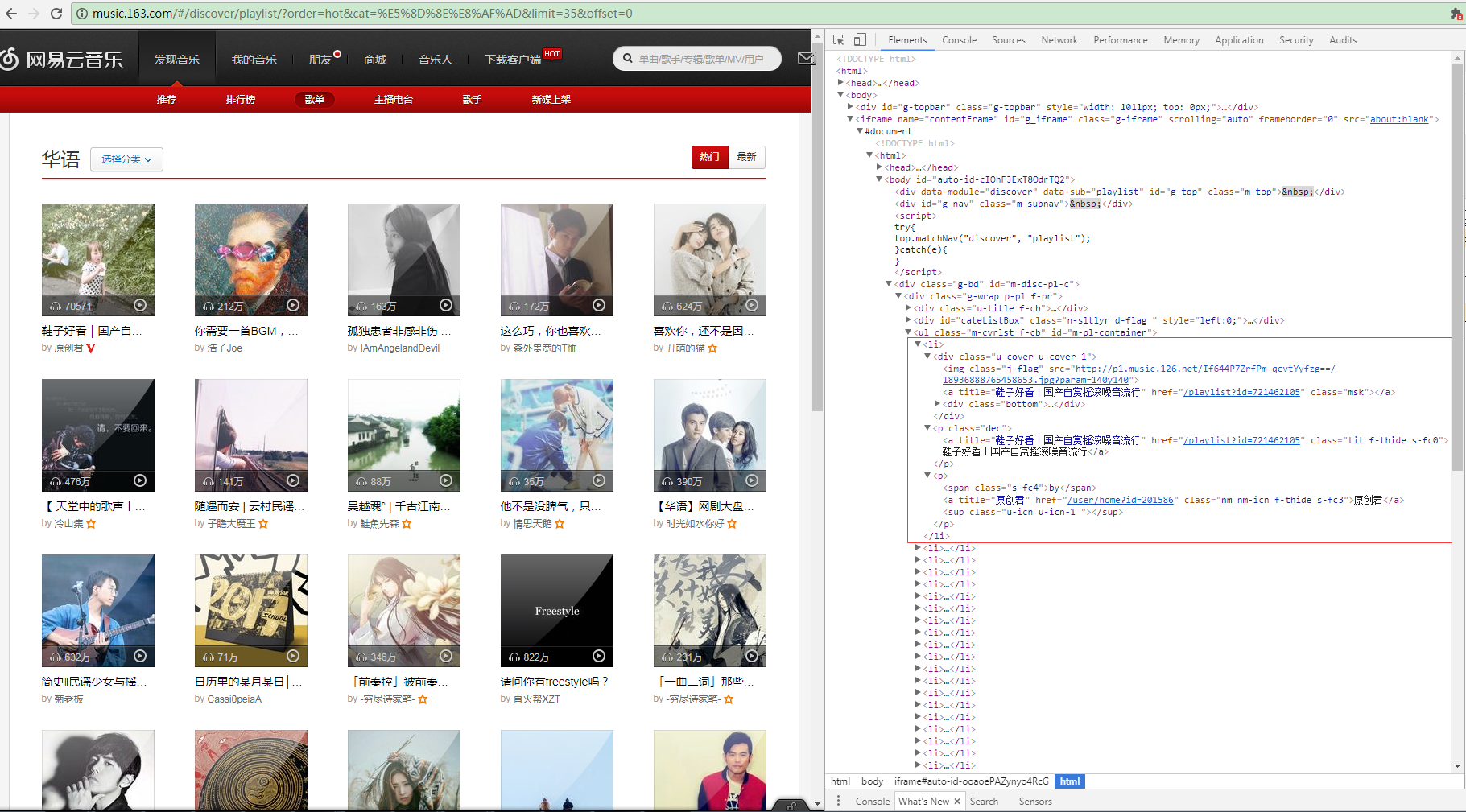
 <ul class="m-cvrlst f-cb" id="m-pl-container">

    <li>

     <div class="u-cover u-cover-1">

      <img class="j-flag" src="http://p1.music.126.net/FGe-rVrHlBTbnOvhMR99PQ==/109951162989189558.jpg?param=140y140" />

      <a title="【说唱】留住你一面,画在我心间" href="/playlist?id=832790627" class="msk"></a>

      <div class="bottom">

       <a class="icon-play f-fr" title="播放" href="javascript:;" data-res-type="13" data-res-id="832790627" data-res-action="play"></a>

       <span class="icon-headset"></span>

       <span class="nb">1615</span>

      </div>

     </div> <p class="dec"> <a title="【说唱】留住你一面,画在我心间" href="/playlist?id=832790627" class="tit f-thide s-fc0">【说唱】留住你一面,画在我心间</a> </p> <p><span class="s-fc4">by</span> <a title="JediMindTricks" href="/user/home?id=17647877" class="nm nm-icn f-thide s-fc3">JediMindTricks</a> <sup class="u-icn u-icn-84 "></sup> </p> </li>

    <li>

     <div class="u-cover u-cover-1">

      <img class="j-flag" src="http://p1.music.126.net/If644P7ZrfPm_qcvtYyfzg==/18936888765458653.jpg?param=140y140" />

      <a title="鞋子好看|国产自赏摇滚噪音流行" href="/playlist?id=721462105" class="msk"></a>

      <div class="bottom">

       <a class="icon-play f-fr" title="播放" href="javascript:;" data-res-type="13" data-res-id="721462105" data-res-action="play"></a>

       <span class="icon-headset"></span>

       <span class="nb">77652</span>

      </div>

     </div> <p class="dec"> <a title="鞋子好看|国产自赏摇滚噪音流行" href="/playlist?id=721462105" class="tit f-thide s-fc0">鞋子好看|国产自赏摇滚噪音流行</a> </p> <p><span class="s-fc4">by</span> <a title="原创君" href="/user/home?id=201586" class="nm nm-icn f-thide s-fc3">原创君</a> <sup class="u-icn u-icn-1 "></sup> </p> </li>

   </ul>
开始解析html源码
首先实例化一个etree.HTMLParser对象,对html源码简单做下处理,创建cssselect.CSSSelector CSS选择器对象,搜索出无序列表ul下的所有li元素(_Element元素对象),再通过sel(document)遍历所有的_Element对象,使用find方法
find(self, path, namespaces=None) Finds the first matching subelement, by tag name or path. (lxml.ettr/lxml.cssselect 详细API请转义官网http://lxml.de/api/index.html)
通过xpath找到li的子元素img和a,通过_Element的属性attrib获取到属性字典,成功获取到歌单的图片链接,歌单列表链接和歌单名称。
 from lxml import etree, cssselect

 html = '''上面提取的html源码'''

 parser = etree.HTMLParser(remove_blank_text=True)

 document = etree.fromstring(html_doc, parser)

 sel = cssselect.CSSSelector('#m-pl-container > li')

 for e in sel(document):

     img = e.find('.//div/img')

     img_url = img.attrib['src']

     a_msk = e.find(".//div/a[@class='msk']")

     musicList_url = 'http:/%s' % a_msk.attrib['href']

     musicList_name = a_msk.attrib['title']

     print(img_url,musicList_url,musicList_name)
Python爬虫基础之lxml的更多相关文章
- Python爬虫基础
前言 Python非常适合用来开发网页爬虫,理由如下: 1.抓取网页本身的接口 相比与其他静态编程语言,如java,c#,c++,python抓取网页文档的接口更简洁:相比其他动态脚本语言,如perl ...
- python爬虫-基础入门-python爬虫突破封锁
python爬虫-基础入门-python爬虫突破封锁 >> 相关概念 >> request概念:是从客户端向服务器发出请求,包括用户提交的信息及客户端的一些信息.客户端可通过H ...
- python爬虫-基础入门-爬取整个网站《3》
python爬虫-基础入门-爬取整个网站<3> 描述: 前两章粗略的讲述了python2.python3爬取整个网站,这章节简单的记录一下python2.python3的区别 python ...
- python爬虫-基础入门-爬取整个网站《2》
python爬虫-基础入门-爬取整个网站<2> 描述: 开场白已在<python爬虫-基础入门-爬取整个网站<1>>中描述过了,这里不在描述,只附上 python3 ...
- python爬虫-基础入门-爬取整个网站《1》
python爬虫-基础入门-爬取整个网站<1> 描述: 使用环境:python2.7.15 ,开发工具:pycharm,现爬取一个网站页面(http://www.baidu.com)所有数 ...
- Python爬虫基础之认识爬虫
一.前言 爬虫Spider什么的,老早就听别人说过,感觉挺高大上的东西,爬网页,爬链接~~~dos黑屏的数据刷刷刷不断地往上冒,看着就爽,漂亮的校花照片,音乐网站的歌曲,笑话.段子应有尽有,全部都过来 ...
- python 爬虫基础知识一
网络爬虫(又被称为网页蜘蛛,网络机器人,在FOAF社区中间,更经常的称为网页追逐者),是一种按照一定的规则,自动的抓取万维网信息的程序或者脚本. 网络爬虫必备知识点 1. Python基础知识2. P ...
- Python爬虫基础(一)——HTTP
前言 因特网联系的是世界各地的计算机(通过电缆),万维网联系的是网上的各种各样资源(通过超文本链接),如静态的HTML文件,动态的软件程序······.由于万维网的存在,处于因特网中的每台计算机可以很 ...
- 【学习笔记】第二章 python安全编程基础---python爬虫基础(urllib)
一.爬虫基础 1.爬虫概念 网络爬虫(又称为网页蜘蛛),是一种按照一定的规则,自动地抓取万维网信息的程序或脚本.用爬虫最大的好出是批量且自动化得获取和处理信息.对于宏观或微观的情况都可以多一个侧面去了 ...
随机推荐
- 基于配置文件的方式配置AOP
之前说的都是通过注释的方式配置,接下来说说如何使用配置文件配置AOP 还是原来的代码,去掉所有注释,接下来配置最基本的几个bean. 然后使用<aop:config>标签进行配置,然后配切 ...
- vi设置行号
首先,我们先打开一个文件,用vim 文件名 就可以直接使用vim打开 我们事先写了一些内容在这个txt里面,我们可以看到如下内容 在这里,我们可以直接敲命令, :set number 或者 ...
- XML fragments parsed from previous mappers already contains value for xxxxx
错误信息: Caused by: org.springframework.core.NestedIOException: Failed to parse mapping resource: 'file ...
- iOS-Mac上进行Fluttrt的安装
1.进入网站进行Flutter 的下载,压缩包解放存放当一个目录 2.进行将Flutter添加到路径, vim ~/.bash_profile 点击i进行编辑,添加flutter存放的路径 expor ...
- POJ 1821 Fence (算竞进阶习题)
单调队列优化dp 我们把状态定位F[i][j]表示前i个工人涂了前j块木板的最大报酬(中间可以有不涂的木板). 第i个工人不涂的话有两种情况: 那么F[i - 1][j], F[i][j - 1]就成 ...
- Codeforces Round #534 (Div. 1)
A 构造题 有一个44的方格 每次放入一个横向12或竖向2*1的方格 满了一行或一列就会消掉 求方案 不放最后一行 这样竖行就不会消 然后竖着的放前两行 横着的放第三行 循环放就可以啦 #includ ...
- 【Spring】Spring随笔索引
Spring随笔索引 [Spring]Spring bean的实例化 [Spring]手写Spring MVC [Spring]Spring Data JPA
- Shell中echo改变输出显示样式
普通输出: echo '------------------------------------------------------' 输出的是系统默认的颜色和字体: 加上一些样式,看效果: echo ...
- luogu4365 秘密袭击 (生成函数+线段树合并+拉格朗日插值)
求所有可能联通块的第k大值的和,考虑枚举这个值: $ans=\sum\limits_{i=1}^{W}{i\sum\limits_{S}{[i是第K大]}}$ 设cnt[i]为连通块中值>=i的 ...
- P1177 【模板】快速排序(学完归并和堆排之后的二更)
P1177 [模板]快速排序 不用说,连题目上都标了是一道模板,那今天就来对能用到的许多排序方式进行一个总结: 选择排序 选择排序(Selection sort)是一种简单直观的排序算法.它的工作原理 ...