
【译】第24节---Fluent API - 属性映射
原文:http://www.entityframeworktutorial.net/code-first/configure-property-mappings-using-fluent-api.aspx
本节,我们将学习如何使用Fluent API配置实体类的属性。 我们将使用我们学校app的Student和Standard域类:
public class Student

{

    public Student()

    {

    }

    public int StudentKey { get; set; }

    public string StudentName { get; set; }

    public DateTime DateOfBirth { get; set; }

    public byte[]  Photo { get; set; }

    public decimal Height { get; set; }

    public float Weight { get; set; }

    public Standard Standard { get; set; }

}

public class Standard

{

    public Standard()

    {

    }

    public int StandardKey { get; set; }

    public string StandardName { get; set; }

    public ICollection<Student> Students { get; set; }

}
配置主键和复合主键
上面的域类,没有按照主键的Code-First约定,因为它们没有Id或{Class Name} + Id属性。
因此,你可以使用Fluent API使用EntityTypeConfiguration的HasKey()方法配置key属性,如下所示。 记住modelBuilder.Entity <TEntity>()返回EntityTypeConfiguration对象。
public class SchoolContext: DbContext

{

    public SchoolDBContext(): base()

    {

    }

    public DbSet<Student> Students { get; set; }

    public DbSet<Standard> Standards { get; set; }

    protected override void OnModelCreating(DbModelBuilder modelBuilder)

    {

        //Configure primary key

        modelBuilder.Entity<Student>().HasKey<int>(s => s.StudentKey);

        modelBuilder.Entity<Standard>().HasKey<int>(s => s.StandardKey);

        //Configure composite primary key

        modelBuilder.Entity<Student>().HasKey<int>(s => new { s.StudentKey, s.StudentName });

    }

}
配置列名、列类型和排序
默认Code-First约定为名属性创建一个同名的列名、顺序和数据类型的列。 你可以覆盖此约定,如下所示:
public class SchoolContext: DbContext

{

    public SchoolDBContext(): base()

    {

    }

    public DbSet<Student> Students { get; set; }

    public DbSet<Standard> Standards { get; set; }

    protected override void OnModelCreating(DbModelBuilder modelBuilder)

    {

        //Configure Column

        modelBuilder.Entity<Student>()

                    .Property(p => p.DateOfBirth)

                    .HasColumnName("DoB")

                    .HasColumnOrder()

                    .HasColumnType("datetime2");

    }

}
如上例所示,我们使用Property()方法为实体的属性配置任何东西。
在这里,我们使用HasColumnName来更改DateOfBirth属性的列名。 此外,我们调用HasColumnOrder和HasColumnType来更改列的顺序和数据类型。
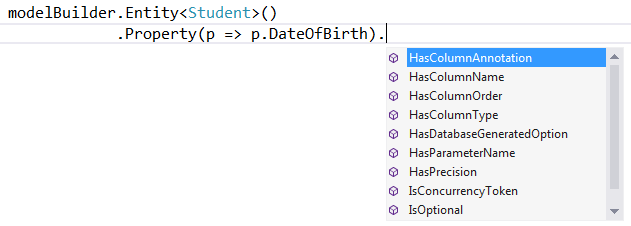
modelBuilder.Entity <TEntity>().Property(expression)允许您使用不同的方法配置特定属性,如下所示:
为属性配置Null或Not Null列
Code-First将为原始数据类型属性创建NotNull列,因为原始数据类型不能为空,除非使用?符号或Nullable <T>。
使用IsOptional方法为属性创建一个可空的列。
以同样的方式,使用IsRequired方法创建一个NotNull列。
namespace CodeFirst_FluentAPI_Tutorials

{

    public class SchoolContext: DbContext

    {

        public SchoolDBContext(): base()

        {

        }

        public DbSet<Student> Students { get; set; }

        public DbSet<Standard> Standards { get; set; }

        protected override void OnModelCreating(DbModelBuilder modelBuilder)

        {

                //Configure Null Column

            modelBuilder.Entity<Student>()

                    .Property(p => p.Heigth)

                    .IsOptional();

                //Configure NotNull Column

                modelBuilder.Entity<Student>()

                    .Property(p => p.Weight)

                    .IsRequired();

        }

    }

}
配置列大小
Code-First将设置列的数据类型的最大大小。 您可以覆盖此约定,如下所示:
namespace CodeFirst_FluentAPI_Tutorials

{

    public class SchoolContext: DbContext

    {

        public SchoolDBContext(): base()

        {

        }

        public DbSet<Student> Students { get; set; }

        public DbSet<Standard> Standards { get; set; }

        protected override void OnModelCreating(DbModelBuilder modelBuilder)

        {

            //Set StudentName column size to 50

            modelBuilder.Entity<Student>()

                    .Property(p => p.StudentName)

                    .HasMaxLength();

            //Set StudentName column size to 50 and change datatype to nchar

            //IsFixedLength() change datatype from nvarchar to nchar

            modelBuilder.Entity<Student>()

                    .Property(p => p.StudentName)

                    .HasMaxLength().IsFixedLength();

            //Set size decimal(2,2)

                modelBuilder.Entity<Student>()

                    .Property(p => p.Height)

                    .HasPrecision(, );

        }

    }

}
如上例所示,我们使用HasMaxLength方法设置列的大小。
IsFixedLength方法将nvarchar转换为nchar类型。
以同样的方式,HasPrecision方法改变了十进制列的精度。
配置并发列
你可以使用ConcurrencyToken方法将属性配置为并发列,如下所示:
namespace CodeFirst_FluentAPI_Tutorials

{

    public class SchoolContext: DbContext

    {

        public SchoolDBContext(): base()

        {

        }

        public DbSet<Student> Students { get; set; }

        public DbSet<Standard> Standards { get; set; }

        protected override void OnModelCreating(DbModelBuilder modelBuilder)

        {

            //Set StudentName as concurrency column

            modelBuilder.Entity<Student>()

                    .Property(p => p.StudentName)

                    .IsConcurrencyToken();

        }

    }

}
如上例所示,我们将StudentName列设置为并发列,以便它被包含在update和delete命令的where子句中。
您也可以使用IsRowVersion()方法来将byte []属性作为并发列。
【译】第24节---Fluent API - 属性映射的更多相关文章
- 【译】第23节---Fluent API - 实体映射
原文:http://www.entityframeworktutorial.net/code-first/configure-entity-mappings-using-fluent-api.aspx ...
- 使用 Fluent API 配置/映射属性和类型(摘自微软Data Access and Storage)
使用 Fluent API 配置/映射属性和类型 使用实体框架 Code First 时,默认行为是使用一组 EF 中内嵌的约定将 POCO 类映射到表.但是,有时您无法或不想遵守这些约定,需要将实体 ...
- 使用Fluent API 配置/映射属性和类型
Code First约定-Fluent API配置 使用Fluent API 配置/映射属性和类型 简介 通常通过重写派生DbContext 上的OnModelCreating 方法来访问Code F ...
- 使用 Fluent API 配置/映射属性和类型
使用 Fluent API 配置/映射属性和类型 使用实体框架 Code First 时,默认行为是使用一组 EF 中内嵌的约定将 POCO 类映射到表.但是,有时您无法或不想遵守这些约定,需要将实体 ...
- 【译】第22节---Fluent API - EntityTypeConfiguration类
原文:http://www.entityframeworktutorial.net/code-first/entitytypeconfiguration-class.aspx 在我们开始使用Fluen ...
- 【译】第21节---Fluent API
原文:http://www.entityframeworktutorial.net/code-first/fluent-api-in-code-first.aspx 在前面的学习中.我们已经看到不同的 ...
- 使用 Fluent API 配置/映射属性和类型2
1.将多个实体类映射到数据库中的一个表 要将多个实体映射到一个数据库表需要满足: a. 两个实体必须是一对一关系 b.两个实体共享一个主键 public class MyContext:DbConte ...
- EF使用Fluent API配置映射关系
定义一个继承自EntityTypeConfiguration<>泛型类的类来定义domain中每个类的数据库配置,在这个自定义类的构造函数中使用我们上次提到的那些方法配置数据库的映射. 映 ...
- 1.【使用EF Code-First方式和Fluent API来探讨EF中的关系】
原文链接:http://www.c-sharpcorner.com/UploadFile/3d39b4/relationship-in-entity-framework-using-code-firs ...
随机推荐
- c# Applicatcontext类
Application类(位于System.Windows.Forms命名空间)公开了Run方法,可以调用该方法来调度应用程序进入消息循环.Run方法有三个重载 1.第一个重载版本不带任何参数,比较少 ...
- Linux基础命令---文本统计wc
wc 统计文件的字节数.单词数.行数. 此命令的适用范围:RedHat.RHEL.Ubuntu.CentOS.SUSE.openSUSE.Fedora. 1.语法 wc [选项] f ...
- 35 个最好用的 Vue 开源库
35 个最好用的 Vue 开源库 Vue.js 是一个非常易用的渐进式 JavaScript 框架,用于构建用户界面. 1.Vue Dark Mode Vue.js 的一个极简主义的深色设计系统.它提 ...
- STO(Security Token Offering)证券型通证、代币发行介绍
STO(Security Token Offering)证券型通证.代币发行介绍:STO(Security Token Offering)是一个新的融资概念.通过证券化的通证进行融资.早在2017年年 ...
- javascript 链式写法
熟悉Jquery的同学都知道,它对dom的操作基本都链式调用的写法,这种给人感觉就是很简洁,易懂,而且最大的好处就是避免多次重复使用一个对象变量. 链式的实现方式:链式操作是在对象的方法中通过最后返回 ...
- Python词云分析
import jieba from matplotlib import pyplot as plt from wordcloud import WordCloud from PIL import Im ...
- Java 高级开发必修知识---内部类
摘自:http://www.cnblogs.com/lsy131479/p/8798912.html Java 内部类分为: 1)成员内部类 2)静态嵌套类 3)方法内部类 4)匿名内部类 内部类的共 ...
- 关于treeMap
https://www.cnblogs.com/skywang12345/p/3310928.html
- Java中使用自定义类封装数组,添加类方法实现数据操作
1.具体见注释 2.后续或有更新 public class MyArray { private long[] array; private int cnt; // 自定义数组类的元素个数 /** 使用 ...
- mysqldump进行复制数据导出导入时的问题
在执行数据导入到从库时,若使用mysqldump命令进行数据导出,应当一次性将需要同步的库导出. mysqldump -uroot -p --single-transaction --database ...