
【译】第23节---Fluent API - 实体映射
原文:http://www.entityframeworktutorial.net/code-first/configure-entity-mappings-using-fluent-api.aspx
本节,我们将学习如何使用Fluent API配置实体。
我们将使用以下学校app的Student和Standard类:
public class Student

{

    public Student()

    {

    }

    public int StudentID { get; set; }

    public string StudentName { get; set; }

    public DateTime? DateOfBirth { get; set; }

    public byte[]  Photo { get; set; }

    public decimal Height { get; set; }

    public float Weight { get; set; }

    public Standard Standard { get; set; }

}

public class Standard

{

    public Standard()

    {

    }

    public int StandardId { get; set; }

    public string StandardName { get; set; }

    public ICollection<Student> Students { get; set; }

}
配置默认模式
首先,我们为数据库中的表配置默认模式。 当然,你可以在创建单个表时更改模式。 以下示例设置默认管理模式:
public class SchoolContext: DbContext

{

    public SchoolDBContext(): base()

    {

    }

    public DbSet<Student> Students { get; set; }

    public DbSet<Standard> Standards { get; set; }

    protected override void OnModelCreating(DbModelBuilder modelBuilder)

    {

        //Configure default schema

        modelBuilder.HasDefaultSchema("Admin");

    }

}
映射实体到表
Code-First将在上下文类中创建名称为DbSet属性的数据库表---本例中为Students和Standards。 你可以覆盖此约定,可以给出与DbSet属性不同的表名称,如下所示:
namespace CodeFirst_FluentAPI_Tutorials

{

    public class SchoolContext: DbContext

    {

        public SchoolDBContext(): base()

        {

        }

        public DbSet<Student> Students { get; set; }

        public DbSet<Standard> Standards { get; set; }

        protected override void OnModelCreating(DbModelBuilder modelBuilder)

        {

                //Configure default schema

            modelBuilder.HasDefaultSchema("Admin");

            //Map entity to table

            modelBuilder.Entity<Student>().ToTable("StudentInfo");

            modelBuilder.Entity<Standard>().ToTable("StandardInfo","dbo");

        }

    }

}
如上例所示,我们从Entity <TEntity>()方法开始。
大多数情况下,你必须从实体<TEntity>()方法开始,使用Fluent API进行配置。
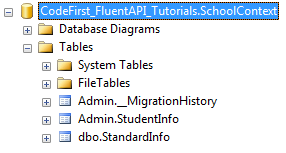
我们使用ToTable()方法将Student实体映射到StudentInfo表,Standard实体到StandardInfo表。注意,StudentInfo位于Admin模式中,并且StandardInfo表位于dbo模式中,因为我们为StandardInfo表指定了dbo模式。
映射实体到多个表
以下示例显示如何将Student实体映射到数据库中的多个表:
namespace CodeFirst_FluentAPI_Tutorials

{

    public class SchoolContext: DbContext

    {

        public SchoolDBContext(): base()

        {

        }

        public DbSet<Student> Students { get; set; }

        public DbSet<Standard> Standards { get; set; }

        protected override void OnModelCreating(DbModelBuilder modelBuilder)

        {

            modelBuilder.Entity<Student>().Map(m =>

            {

                m.Properties(p => new { p.StudentId, p.StudentName});

                m.ToTable("StudentInfo");

            }).Map(m => {

                m.Properties(p => new { p.StudentId, p.Height, p.Weight, p.Photo, p.DateOfBirth});

                m.ToTable("StudentInfoDetail");

            });

            modelBuilder.Entity<Standard>().ToTable("StandardInfo");

        }

    }

}
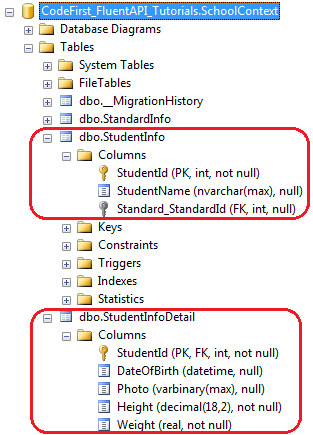
如上例所示,我们使用Map()方法将Student实体的某些属性映射到StudentInfo表,其他属性映射到StudentInfoDetail表。
因此,Student实体将分成两个表,如下所示:
Map方法需要将delegate方法作为参数。 您可以在Map方法中传递Action delegate或lambda表达式,如下所示:
using System.Data.Entity.ModelConfiguration.Configuration;

namespace CodeFirst_FluentAPI_Tutorials

{

    public class SchoolContext: DbContext

    {

        public SchoolDBContext(): base()

        {

        }

        public DbSet<Student> Students { get; set; }

        public DbSet<Standard> Standards { get; set; }

        protected override void OnModelCreating(DbModelBuilder modelBuilder)

        {

            modelBuilder.Entity<Student>().Map(delegate(EntityMappingConfiguration<Student> studentConfig)

            {

                studentConfig.Properties(p => new { p.StudentId, p.StudentName });

                studentConfig.ToTable("StudentInfo");

            });

            Action<EntityMappingConfiguration<Student>> studentMapping = m =>

            {

                m.Properties(p => new { p.StudentId, p.Height, p.Weight, p.Photo, p.DateOfBirth });

                m.ToTable("StudentInfoDetail");

            };

            modelBuilder.Entity<Student>().Map(studentMapping);

            modelBuilder.Entity<Standard>().ToTable("StandardInfo");

        }

    }

}
【译】第23节---Fluent API - 实体映射的更多相关文章
- 【译】第24节---Fluent API - 属性映射
原文:http://www.entityframeworktutorial.net/code-first/configure-property-mappings-using-fluent-api.as ...
- 使用 Fluent API 配置/映射属性和类型(摘自微软Data Access and Storage)
使用 Fluent API 配置/映射属性和类型 使用实体框架 Code First 时,默认行为是使用一组 EF 中内嵌的约定将 POCO 类映射到表.但是,有时您无法或不想遵守这些约定,需要将实体 ...
- 使用Fluent API 配置/映射属性和类型
Code First约定-Fluent API配置 使用Fluent API 配置/映射属性和类型 简介 通常通过重写派生DbContext 上的OnModelCreating 方法来访问Code F ...
- 使用 Fluent API 配置/映射属性和类型
使用 Fluent API 配置/映射属性和类型 使用实体框架 Code First 时,默认行为是使用一组 EF 中内嵌的约定将 POCO 类映射到表.但是,有时您无法或不想遵守这些约定,需要将实体 ...
- 【译】第22节---Fluent API - EntityTypeConfiguration类
原文:http://www.entityframeworktutorial.net/code-first/entitytypeconfiguration-class.aspx 在我们开始使用Fluen ...
- 【译】第21节---Fluent API
原文:http://www.entityframeworktutorial.net/code-first/fluent-api-in-code-first.aspx 在前面的学习中.我们已经看到不同的 ...
- 使用 Fluent API 配置/映射属性和类型2
1.将多个实体类映射到数据库中的一个表 要将多个实体映射到一个数据库表需要满足: a. 两个实体必须是一对一关系 b.两个实体共享一个主键 public class MyContext:DbConte ...
- EF使用Fluent API配置映射关系
定义一个继承自EntityTypeConfiguration<>泛型类的类来定义domain中每个类的数据库配置,在这个自定义类的构造函数中使用我们上次提到的那些方法配置数据库的映射. 映 ...
- 1.【使用EF Code-First方式和Fluent API来探讨EF中的关系】
原文链接:http://www.c-sharpcorner.com/UploadFile/3d39b4/relationship-in-entity-framework-using-code-firs ...
随机推荐
- tensorflow学习5----变量管理
---恢复内容开始--- 前面,读书笔记用加入正则化损失模型效果带来的提升要相对显著. 变量管理: 目的:当神经网络的结构更加复杂,参数更多的时候,就需要一个更好的方式来管理神经网络中的参数. 解决方 ...
- android Observable api请求参数设置注解问题
android Observable api请求参数设置注解问题 2018-10-29 20:05:24.919 11786-11786/xxx E/wxh: getQuote=USD getBase ...
- Qt介绍1---QPA(Qt Platform Abstraction)
Qt是一个夸平台的库(一直宣称“Qt everywhere”),但是Qt底层不是夸平台的.比如:Qt中Gui部件的核心类QWidget,该类除了qwidget.h 和 qwidget.cpp两个原文件 ...
- 自制TFT-Usart通信小项目资料打包
2010-05-08 15:05:00 用orcad画的原理图如下.
- Linux:CPU使用率100%排查方法
Linux作为一个多任务操作系统,将每个CPU的时间划分为很短的时间片,再通过调度器轮流分配给各个任务使用,因此造成多任务同时运行的错觉. CPU使用率 Linux作为一个多任务操作系统,将每个CPU ...
- gulp和webpack的区别
一.概念 gulp 构建工具 我们可以通过给gulp配置不通的task(通过Gulp中的gulp.task()方法配置,比如启动server.sass/less预编译.文件的合并压缩等等)来让gulp ...
- vue打包报内存溢出
vue-cli 构建的项目:package.json 文件里修改: "build": "node build/build.js" 修改为: "buil ...
- PS火焰文字制作
火焰文字制作: 最终效果 第一步: 新建图层,并输入文字(这里不做详细解说)
- 在linux系统中安装redis
使用的工具是 连接上虚拟机,进入安装文件的目录 进入redis压缩包中 将压缩包解压: tar -zxvf redis-2.8.3.tar.gz 进入这个文件中: cd redis-2.8.3 进入 ...
- fjwc2019 D6T1 堆(组合数+打表)
#193. 「2019冬令营提高组」堆 但是每个点都遍历一遍,有些点的子树完全相同却重复算了 忽然记起完全二叉树的性质之一:每个非叶节点的子树中至少有一个是满二叉树 那么我们预处理满二叉树的那一块,剩 ...