
How to use Junit Listener
JUnit Listeners
If you want to do some operations when your tests are started, passed, finished, failed, or skipped/ignored, you can use Listeners. Both JUnit and TestNG provide us Listeners, and in this article, I will explain how to add JUnit Listeners in your automation framework.
Listeners listen and handle events while your automation code is running. We can add a listener by creating a custom Runner. Then, we can use this custom runner in our test class with @RunWith annotation.
First, let’s write our Listener class by extending JUnit’s RunListener class and overriding its methods. I called our listener class as MyExecutionListener.
MyExecutionListener.java
package junitexamples.listener;

/**

 * Created by ONUR BASKIRT on 27.03.2016.

 */

import org.junit.Ignore;

import org.junit.runner.Description;

import org.junit.runner.Result;

import org.junit.runner.notification.Failure;

import org.junit.runner.notification.RunListener;

import java.util.Date;

public class MyExecutionListener extends RunListener {

    //Start and End time of the tests

    long startTime;

    long endTime;

    @Override

    public void testRunStarted(Description description) throws Exception {

        //Start time of the tests

        startTime = new Date().getTime();

        //Print the number of tests before the all tests execution.

        System.out.println("Tests started! Number of Test case: " + description.testCount() + "\n");

    }

    @Override

    public void testRunFinished(Result result) throws Exception {

        //End time of the tests

        endTime = new Date().getTime();

        //Print the below lines when all tests are finished.

        System.out.println("Tests finished! Number of test case: " + result.getRunCount());

        long elapsedSeconds = (endTime-startTime)/1000;

        System.out.println("Elapsed time of tests execution: " + elapsedSeconds +" seconds");

    }

    @Override

    public void testStarted(Description description) throws Exception {

        //Write the test name when it is started.

        System.out.println(description.getMethodName() + " test is starting...");

    }

    @Override

    public void testFinished(Description description) throws Exception {

        //Write the test name when it is finished.

        System.out.println(description.getMethodName() + " test is finished...\n");

    }

    @Override

    public void testFailure(Failure failure) throws Exception {

        //Write the test name when it is failed.

        System.out.println(failure.getDescription().getMethodName() + " test FAILED!!!");

    }

    //O.B: IntelliJ ignored by default. I did not succeed to run this method.

    //If you know any way to accomplish this, please write a comment.

    @Override

    public void testIgnored(Description description) throws Exception {

        super.testIgnored(description);

        Ignore ignore = description.getAnnotation(Ignore.class);

        String ignoreMessage = String.format(

                "@Ignore test method '%s()': '%s'",

                description.getMethodName(), ignore.value());

        System.out.println(ignoreMessage + "\n");

    }

}
Java
Second, we need to add the listener to the test execution. We can add the listener by calling the RunNotifier.addListener() method. This will register our JUnit Listener. I faced with a problem when I tried to use RunListener class’s testRunStarted method. Then, I found a solution that triggers this method after registering the listener in the run method. I wrote a comment about this solution in below code.
MyTestRunner.java
package junitexamples.listener;

/**

 * Created by ONUR BASKIRT on 27.03.2016.

 */

import org.junit.AssumptionViolatedException;

import org.junit.internal.runners.model.EachTestNotifier;

import org.junit.runner.notification.RunNotifier;

import org.junit.runner.notification.StoppedByUserException;

import org.junit.runners.BlockJUnit4ClassRunner;

import org.junit.runners.model.InitializationError;

import org.junit.runners.model.Statement;

public class MyTestRunner extends BlockJUnit4ClassRunner {

    public MyTestRunner(Class<?> klass) throws InitializationError {

        super(klass);

    }

    @Override

    public void run (RunNotifier notifier){

        System.out.println("Executing run()");

        //Add Listener. This will register our JUnit Listener.

        notifier.addListener(new MyExecutionListener());

        //Get each test notifier

        EachTestNotifier testNotifier = new EachTestNotifier(notifier,

                getDescription());

        try {

            //In order capture testRunStarted method

            //at the very beginning of the test run, we will add below code.

            //Invoke here the run testRunStarted() method

            notifier.fireTestRunStarted(getDescription());

            Statement statement = classBlock(notifier);

            statement.evaluate();

        } catch (AssumptionViolatedException e) {

            testNotifier.fireTestIgnored();

        } catch (StoppedByUserException e) {

            throw e;

        } catch (Throwable e) {

            testNotifier.addFailure(e);

        }

    }

}
Java
Third, we need to write a test to verify our listener’s functionality. We register our custom runner with @RunWith(MyTestRunner.class) annotation and for alphabetic test execution, we add @FixMethodOrder(MethodSorters.NAME_ASCENDING) annotation.
Extra: Also, you can combine listeners with custom Retry Rule which described in other JUnit article. Thus, when your test fails, it will rerun the failed test according to given retry count.
ListenerExampleTest.java
package junitexamples.listener;

import jdk.nashorn.internal.ir.annotations.Ignore;

import org.junit.BeforeClass;

import org.junit.FixMethodOrder;

import org.junit.Test;

import org.junit.runner.RunWith;

import org.junit.runners.MethodSorters;

import org.openqa.selenium.WebDriver;

import org.openqa.selenium.htmlunit.HtmlUnitDriver;

import static org.hamcrest.CoreMatchers.is;

import static org.hamcrest.MatcherAssert.assertThat;

import static org.junit.Assert.assertEquals;

/**

 * Created by ONUR on 27.03.2016.

 */

@RunWith(MyTestRunner.class)

@FixMethodOrder(MethodSorters.NAME_ASCENDING)

public class ListenerExampleTest {

    static WebDriver driver;

    final private static String URL = "http://www.swtestacademy.com";

    @BeforeClass

    public static void setupTest(){

        driver = new HtmlUnitDriver();

        driver.get(URL);

    }

    /*

    //If you want, you can add Retry Rule. (I explained it in another post.)

    //Thus, when your test fails, it will rerun by given retry count.

    @Rule

    public RetryRule retryRule = new RetryRule(3);

    */

    @Test

    public void T01_PassTest() {

        //Check title

        assertThat(driver.getTitle(), is("Software Test Academy"));

    }

    @Test

    public void T02_FailTest() {

        //Check title

        assertEquals("Title is wrong!!!", "WRONG TITLE", driver.getTitle());

    }

    //IntelliJ ignored by default

    @Ignore

    public void T03_IgnoreTest() {

        //Check title is correct

        assertThat(driver.getTitle(), is("Software Test Academy"));

    }

    //Throw Exception

    @Test

    public void T04_ExceptionTest() {

        throw new RuntimeException();

    }

}
Java
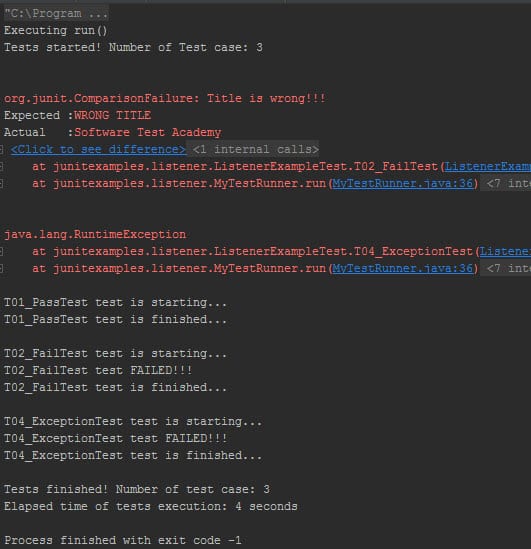
Result:
How to use Junit Listener的更多相关文章
- WebDriver - 添加失败截图
WebDriver失败截图可以通过两种方式实现: 1. Use WebdriverEventListener 第一步:创建自己的WebDriverEventListener 创建自己的WebDrive ...
- 使用RunWith注解改变JUnit的默认执行类,并实现自已的Listener
使用RunWith注解改变JUnit的默认执行类,并实现自已的Listener在平时的单元测试,如果不使用RunWith注解,那么JUnit将会采用默认的执行类Suite执行,如下类: public ...
- Junit : how to add listener, and how to extends RunListener to override behaviors while failed
http://junit.sourceforge.net/javadoc/org/junit/runner/notification/RunListener.html org.junit.runner ...
- [Java] Spring + SpringMVC + Maven + JUnit 搭建
示例项目下载: https://github.com/yangyxd/SpringDemo 利用前面 SpringMVC 项目的配置方式,完成初步的项目创建.下面只讲一些不同之处. 传送门: [Jav ...
- How to Use JUnit With JMeter
Do you need to use JUnit in your testing processes? To answer this question, let's take a look first ...
- 监听器Listener
监听器 6个事件类,均以event结尾 *某些操作,如启动/关闭容器,创建/销毁会话,都将触发一种事件发生,当发生了某种事件,容器将创建对应的事件类对象 8个监听接口,均以Listener结尾 监听器 ...
- maven+springMVC+mybatis+junit详细搭建过程 ***
springMVC+mybatis框架搭建 在上一遍博客中以及讲诉了新建maven项目的流程,现在紧跟上一遍文章,接着搭建spring项目 首先我们先要弄清搭建项目的一般流程,需要注意哪些方面,想要什 ...
- 使用JUnit单元测试入门
一.JUnit是什么? JUnit是一个开发源代码的java测试框架,用于编写和运行可重复的测试.它是用于单元测试框架体系xUnit的一个实例(用于java语言).JUnit最初是由Erich Gam ...
- 获取JUnit的执行结果
junit执行之后会有一个结果展示,下面就来看一下怎么获取这些结果并将其存储为一个对象 junit代码如下: package test; import org.junit.After; import ...
随机推荐
- Python 模型定义 :通过pymysql和数据模型(models.py)创建mysql表及表结构
一.model的配置 1.创建数据库 2.安装pymysql 3.修改配置文件 数据库连接配置 DATABASES = { 'default': { 'ENGINE': 'django.db.back ...
- c#如何解析时区字符串
常见时区缩写可参考: http://time.123cha.com/knowledge/6.html 常见时区缩写如下: IDLE +12:00 国际日期变更线,东边 NZDT +13:00 新西兰 ...
- FSDB Dumper
FSDB:Fast Signal Database 相比较于VCD文件,FSDB文件的大小比VCD波形小5-50倍. 各家的仿真器都支持在simulation的过程中,直接生成FSDB文件 将VCD文 ...
- day1 hbuilder的使用
一.互联网的原理 1.概述 html:用来制作网页. 互联网原理:上网即请求数据. 用户通过在浏览器上输入一个网址,通过HTTP协议向服务器发送请求,服务器做出响应,将相关的网页数据传输到本地计算机, ...
- MVC中修改Table值
记录下: 遇到这样一个问题,表中有一个Char栏位,为1/0 ,只是在视图界面 让其显示为 开始/结束, 目前想到的两种解决办法: ①后台写查询的SQL时,直接写 SELECT a.Status, ( ...
- SLAM学习笔记
ORB_SLAM2源码: 获得旋转矩阵,来自这里:http://www.cnblogs.com/shang-slam/p/6406584.html 关于Covisibility图来自:http://b ...
- python type的用法
目录 描述 语法 用法 type和isinstance Type和Object 描述 python的 type 函数有两个用法,当只有一个参数的时候,返回对象的类型.当有三个参数的时候返回一个类对象. ...
- Linux服务器---流量监控MRTG
MRTG MRTG可以分析网络流量,但是它必须依赖SNMP协议.将收集到的数据生成HTML文件,以图片的形式展示出来 1.安装一些依赖软件 [root@localhost bandwidthd-2.0 ...
- 2017-2018-2 20165316 实验三《敏捷开发与XP实践》实验报告
2017-2018-2 20165316 实验三<敏捷开发与XP实践>实验报告 实验目的 安装 alibaba 插件,解决代码中的规范问题.再研究一下Code菜单,找出一项让自己感觉最好用 ...
- Python数据类型深入学习之数字
一. 数字常量 1. 下面来看看Python的数字常量中都要哪些类型: 数字 常量 129,-89,0 一般整数 9999848499999L,4594646469l 长整型数(无限大小) 1.232 ...