
js插件---bootstrap插件daterangepicker是什么
js插件---bootstrap插件daterangepicker是什么
一、总结
一句话总结:日期段选择插件,也可选择日期
日期段选择插件,也可选择日期
1、daterangepicker 控件如何设置日期格式?
不能直接在选项中format,而是得在选项的locale属性中再format
不能直接在选项中format,而是得在选项的locale属性中再format,因为这个插件的locale属性是设置显示样式的
直接搜索插件如何使用倒是一个不错的方式
代码如下:
<script>

    $(function () {//Date range picker

        $('#reservation').daterangepicker({

            format: 'YYYY-MM-DD',

            locale:{

                format: 'YYYY-MM-DD',

            }

        },function (start, end) {

            //alert('A date range was chosen: ' + start.format('YYYY-MM-DD') + ' to ' + end.format('YYYY-MM-DD'));

        });

    });

</script>
二、bootstrap日期插件daterangepicker的使用
官网文档位置:Date Range Picker — JavaScript Date & Time Picker Library
http://www.daterangepicker.com/
参考:bootstrap日期插件daterangepicker的使用 - u012854400的专栏 - CSDN博客
https://blog.csdn.net/u012854400/article/details/45293037
今天用的了bootstrap日期插件感觉搜索的资料不是很多在此写下一些使用的心得:
插件开源地址:daterangepicker日期控件,
插件使用只要按照开源中的文档信息来就好先包括以下引用:
<script type="text/javascript" src="jquery.js"></script>

<script type="text/javascript" src="moment.js"></script>

<script type="text/javascript" src="daterangepicker.js"></script>

<link rel="stylesheet" type="text/css" href="bootstrap.css" />

<link rel="stylesheet" type="text/css" href="daterangepicker-bs3.css" />
包含对jquery,bootstrap框架的引用,以及日期处理用的moment.js,最后加载上这个插件的js和css文件
然后和大部分jq插件一样,该插件也是对$.fn的扩展所以进行以下的操作来使用这个控件
<script type="text/javascript">

$(document).ready(function() {

  $('input[name="daterange"]').daterangepicker();

});

</script>
用jq获取到你要插入的那个元素然后运行daterangepicker函数就能使用它默认的样式和属性了,
不过光有这个肯定是不行的,daterangepicker函数可以接受一个参数对象和一个回调函数,如下:
$('input[name="daterange"]').daterangepicker(

  {

    format: 'YYYY-MM-DD',

    startDate: '2013-01-01',

    endDate: '2013-12-31'

  },

  function(start, end, label) {

    alert('A date range was chosen: ' + start.format('YYYY-MM-DD') + ' to ' + end.format('YYYY-MM-DD'));

  }

);
回调函数会在日期更改之后触发有三个参数,开始时间,结束时间以及标签名,可以在这里执行你要进行的操作如ajax请求
以上就可以构建一个英文版的日期控件了
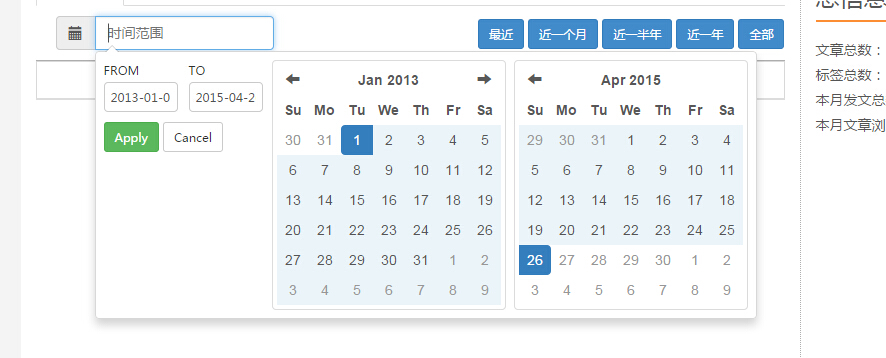
接下来着重介绍一下locale和ranges两个参数
首先是locale这个参数locale是构建本地语言应用的重要参数(github上说locale接受对象参数,不过并没有说明对象的属性)
以下是插件中locale默认属性
{
applyLabel: ‘Apply’,
cancelLabel: ‘Cancel’,
fromLabel: ‘From’,
toLabel: ‘To’,
weekLabel: ‘W’,
customRangeLabel: ‘Custom Range’,
daysOfWeek: moment.weekdaysMin(),
monthNames: moment.monthsShort(),
firstDay: moment.localeData()._week.dow };
我们只有更改这些参数就能够使这个插件变成中文的插件
$('input[name=datetime]').daterangepicker({

        format: 'YYYY-MM-DD',

        startDate: '2013-01-01',

        endDate: new Date(),

        maxDate:new Date(),

        locale:{

            applyLabel: '确认',

            cancelLabel: '取消',

            fromLabel: '从',

            toLabel: '到',

            weekLabel: 'W',

            customRangeLabel: 'Custom Range',

            daysOfWeek:["日","一","二","三","四","五","六"],

            monthNames: ["一月","二月","三月","四月","五月","六月","七月","八月","九月","十月","十一月","十二月"],

        }

    }, function (start, end, label) {

        alert('A date range was chosen: ' + start.format('YYYY-MM-DD') + ' to ' + end.format('YYYY-MM-DD'));

    });
效果如下:
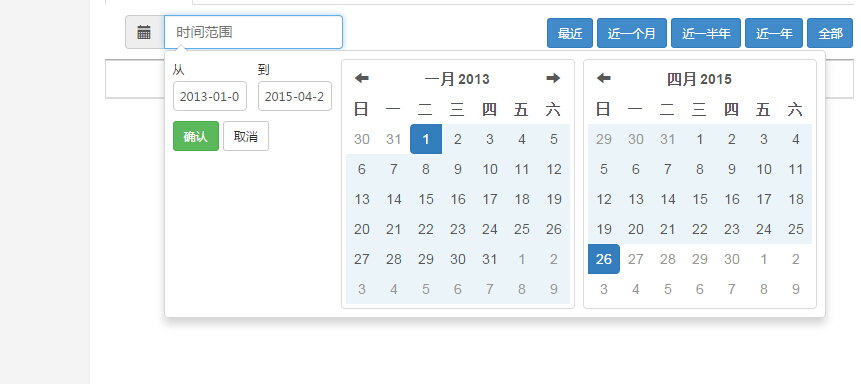
当然你可能也许想实现github中的那个效果,想加个添加时间的快捷键:
Improvely.com
没问题可以使用range参数实现:
range参数也是对象参数{name:[start,end] name是快捷键的名称,接受一个数组分别是时间的开始和结束
 $('input[name=datetime]').daterangepicker({

        format: 'YYYY-MM-DD',

        startDate: '2013-01-01',

        endDate: new Date(),

        maxDate:new Date(),

        locale:{

            applyLabel: '确认',

            cancelLabel: '取消',

            fromLabel: '从',

            toLabel: '到',

            weekLabel: 'W',

            customRangeLabel: '选择时间',

            daysOfWeek:["日","一","二","三","四","五","六"],

            monthNames: ["一月","二月","三月","四月","五月","六月","七月","八月","九月","十月","十一月","十二月"],

        },

        range: {

            "近期": ['2015-04-12',new Date()]

        }

    }, function (start, end, label) {

        alert('A date range was chosen: ' + start.format('YYYY-MM-DD') + ' to ' + end.format('YYYY-MM-DD'));

    });
效果如下:
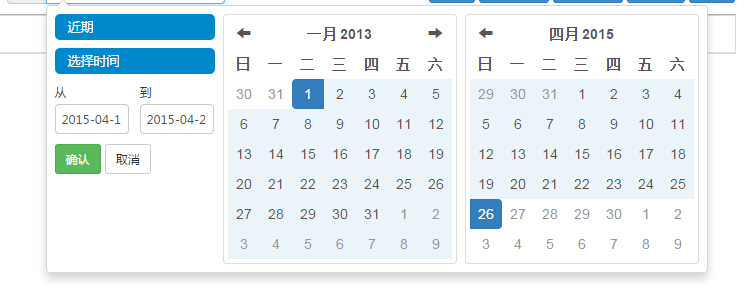
这样就有了一个中文的日期插件了,当然还有其他的参数可以使用包括添加自己的class用来敷写bootstrap的样式来实现自己想要的样式,也可以使用单选时间框函数来实现,具体的大家可以仔细查看官方的文档来构建自己需要的时间选取控件
二、daterangepicker 控件设置日期格式
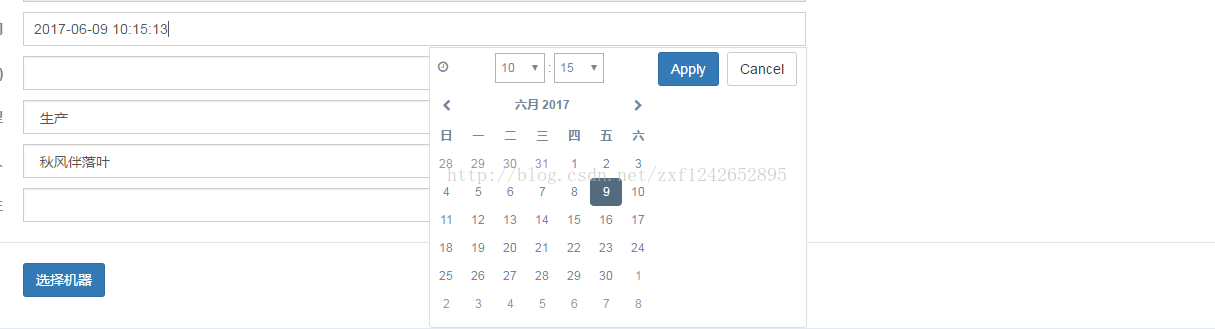
<div class="form-group">

                        <label class="control-label col-md-3 col-sm-3 col-xs-12">计划结束时间  </label>

                         <div class="col-md-6 col-sm-6 col-xs-12">

                          <input id="scheduledEndTime" name="scheduledEndTime" class="date-picker form-control col-md-7 col-xs-12" type="text">

                        </div>

                      </div>
var cb = function(start, end, label) {
$('#scheduledEndTime span').html(start.format('YYYY-MM-DD HH:mm:ss'));
};
var optionSet1 = {
startDate: moment(),
showDropdowns: false,
showWeekNumbers: false,
timePicker: true,
timePickerIncrement: 1,
singleDatePicker: true,
timePicker24Hour: true,
locale: {
format: 'YYYY-MM-DD HH:mm:ss',
daysOfWeek: ['日', '一', '二', '三', '四', '五', '六'],
monthNames: ['一月', '二月', '三月', '四月', '五月', '六月', '七月', '八月', '九月', '十月', '十一月', '十二月'],
},
opens: 'left',
buttonClasses: ['btn btn-default'],
applyClass: 'btn-small btn-primary',
cancelClass: 'btn-small',
format: 'YYYY-MM-DD HH:mm:ss',
};
$('#scheduledEndTime').daterangepicker(optionSet1, cb);四、这个插件是真好用
代码简介,功能强大,直接设置ranges属性,就可以直接在input里面选择时间段,比如前一周等等
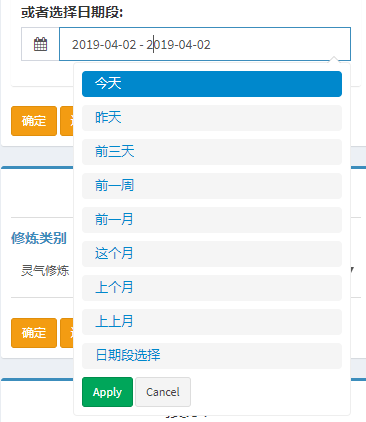
js代码:
 <script>

     $(function () {

         //Date range picker

         $('#reservation').daterangepicker({

             format: 'YYYY-MM-DD',

             locale:{

                 format: 'YYYY-MM-DD',

                 customRangeLabel: '日期段选择',

             },

             ranges   : {

                 '今天'       : [moment(), moment()],

                 '昨天'   : [moment().subtract(1, 'days'), moment().subtract(1, 'days')],

                 '前三天' : [moment().subtract(3, 'days'), moment()],

                 '前一周' : [moment().subtract(6, 'days'), moment()],

                 '前一月': [moment().subtract(30, 'days'), moment()],

                 '这个月'  : [moment().startOf('month'), moment().endOf('month')],

                 '上个月'  : [moment().subtract(1, 'month').startOf('month'), moment().subtract(1, 'month').endOf('month')],

                 '上上月'  : [moment().subtract(2, 'month').startOf('month'), moment().subtract(2, 'month').endOf('month')],

             },

         },function (start, end) {

             //alert('A date range was chosen: ' + start.format('YYYY-MM-DD') + ' to ' + end.format('YYYY-MM-DD'));

         });

     });

 </script>
html代码:
 <div class="form-group">

     <label>或者选择日期段:</label>

     <div class="input-group">

         <div class="input-group-addon">

             <i class="fa fa-calendar"></i>

         </div>

         <input type="text" class="form-control pull-right" id="reservation">

     </div>

     <!-- /.input group -->

 </div>
js插件---bootstrap插件daterangepicker是什么的更多相关文章
- js控制Bootstrap 模态框(Modal)插件
js控制Bootstrap 模态框(Modal)插件 http://www.cnblogs.com/zzjeny/p/5564400.html
- bootstrap插件学习-bootstrap.popover.js
先看bootstrap.popover.js的结构 var Popover = function ( element, options ){} //构造器 Popover.prototype = {} ...
- bootstrap插件学习-bootstrap.dropdown.js
bootstrap插件学习-bootstrap.dropdown.js 先看bootstrap.dropdown.js的结构 var toggle = '[data-toggle="drop ...
- bootstrap插件学习-bootstrap.modal.js
bootstrap插件学习-bootstrap.modal.js 先从bootstrap.modal.js的结构看起. function($){ var Modal = function(){} // ...
- js插件---Bootstrap 树控件
js插件---Bootstrap 树控件 一.总结 一句话总结:可以直接用gojs,或者搜索js,jquery的树控件,或者bootstrap树控件,一大堆 gojs 二.JS组件系列——Bootst ...
- 黄聪: 50 个 Bootstrap 插件
Bootstrap是快速开发Web应用程序的前端工具包.它是一个CSS和HTML的集合,它使用了最新的浏览器技术,给你的Web开发提供了时尚的版式,表单,buttons,表格,网格系统等等. 本文向你 ...
- Bootstrap插件1--tooltip
在引入bootstrap.js之前我们需要引入jquery的js文件 既然是bootstrap的插件,那么自然需要引用bootstrap.js和bootstrap.css这2个核心文件了 这里了主要介 ...
- [前端插件]Bootstrap Table服务器分页与在线编辑应用总结
先看Bootstrap Table应用效果: 表格用来显示数据库中的数据,数据通过AJAX从服务器加载,同时分页功能有服务器实现,避免客户端分页,在加载大量数据时造成的用户体验不好.还可以设置查询数据 ...
- 为你下一个项目准备的 50 个 Bootstrap 插件
Bootstrap是快速开发Web应用程序的前端工具包.它是一个CSS和HTML的集合,它使用了最新的浏览器技术,给你的Web开发提供了时尚的版式,表单,buttons,表格,网格系统等等. 本文向你 ...
随机推荐
- Java Web-----JSP与Servlet(一)
JSP (java服务器页面) JSP全名为Java Server Pages,中文名叫java服务器页面,其根本是一个简化的Servlet设计,它[1] 是由Sun Microsystems公司倡 ...
- Python3 Iterator and Generator
Python3 Iterator and Generator iterator 主要是利用 iter 函数 >>> list=[1,2,3,4] >>> it = ...
- topcoder srm 515 div1
problem1 link 暴力枚举即可. problem2 link 一共有24小时,所以最多有24个顾客.设$f[x][y][z]$表示还剩下$x$把刀,现在时间是$y$,以及来过的顾客集合为$z ...
- MVC 之 初识(一)
创建一个mvc项目,在项目中会startup.cs文件,startup文件主要是将项目寻找一个宿主 过去,项目一般都是寄宿在iis上的,通过owin可以寄宿到不同的宿主. 可以关闭owin:<a ...
- 论文阅读:Videos as Space-Time Region Graphs
Videos as Space-Time Region Graphs ECCV 2018 Xiaolong Wang 2018-08-03 11:16:01 Paper:arXiv 本文利用视频中时空 ...
- 常用linux,DOS命令——持续更新
cd 文件夹名 进入某个文件夹 cd ../ 退出该级目录进入上一级 cd ../../ 退出该级目录进入上上级 cd ../../demo 退出该级目录进入上上级的目录 d: 回车 进入d盘 ls ...
- Validation in jQuery
jquery.validate.js github地址 官方主页 doc demo jquery-validation-unobtrusive github地址 demo doc
- win7 "com surrogate“ 已停止工作的解决办法
1.在文件夹选项里选“始终显示图标,从不显示缩略图”. 2.数据执行保护(DEB),依次打开:计算机——属性——高级系统设置——高级——性能——设置——数据执行保护 选下面的单选按钮“为除下列选定程序 ...
- 【译】第37节---EF6-异步查询和保存
原文:http://www.entityframeworktutorial.net/entityframework6/async-query-and-save.aspx 你可以在.NET4.5下使用 ...
- 增强 用文本增强修改SAP标准屏幕中的字段名称 属于元素的文本增强
如果想要改变标准屏幕中的字段名称,如把物料主数据基本数据元素的名字改为我们想要的名字 . 1.首先,事务MM03进入物料主数据的基本数据2视图中,将鼠标光标放在需要更改的字段“页格式”上,然后按F1键 ...