
初试Python
01 Python简介
Python是一种跨平台的计算机程序设计语言。于1989年开发的语言,创始人范罗苏姆(Guido van Rossum),别称:龟叔(Guido)。
python具有非常多并且强大的第三方库,使得程序开发起来得心应手。
Python“信条”:人生苦短,我用python!(Life is short,you need Python。)
02 Python 版本
python 2.x 版本,官方在 2020 年停止支持,原码不规范,重复较多
python 3.x 版本,功能更加强大且修复了很多bug,原码清晰,简单
Let's not play games with semantics. The way I see the situation for 2.7 is that EOL is January 1st, 2020, and there will be no updates, not even source-only security patches, after that date. Support (from the core devs, the PSF, and python.org) stops completely on that date. If you want support for 2.7 beyond that day you will have to pay a commercial vendor. Of course it's open source so people are also welcome to fork it. But the core devs have toiled long enough, and the 2020 EOL date (an extension from the originally annouced 2015 EOL!) was announced with sufficient lead time and fanfare that I don't feel bad about stopping to support it at all.【原文链接】
03 Python擅长的领域
Web开发:Django、pyramid、Tornado、Bottle、Flask、WebPy
网络编程:Twisted、Requests、Scrapy、Paramiko
科学运算:SciPy、Pandas、lpython
GUI图形开发:wxPython、PyQT、Kivy
运维自动化:OpenStack、SaltStack、Ansible、腾讯蓝鲸
04 Python解释器(部分):
(1)Cpython(官方推荐):把python转化成c语言能识别的二进制码
(2)Jpython:把python转化成java语言能识别的二进制码
(3)其他语言解释器:把python转化成其他语言能识别的二进制码
(4)PyPy:将所有代码一次性编译成二进制码,加快执行效率(模仿编译型语言的一款python解释器)
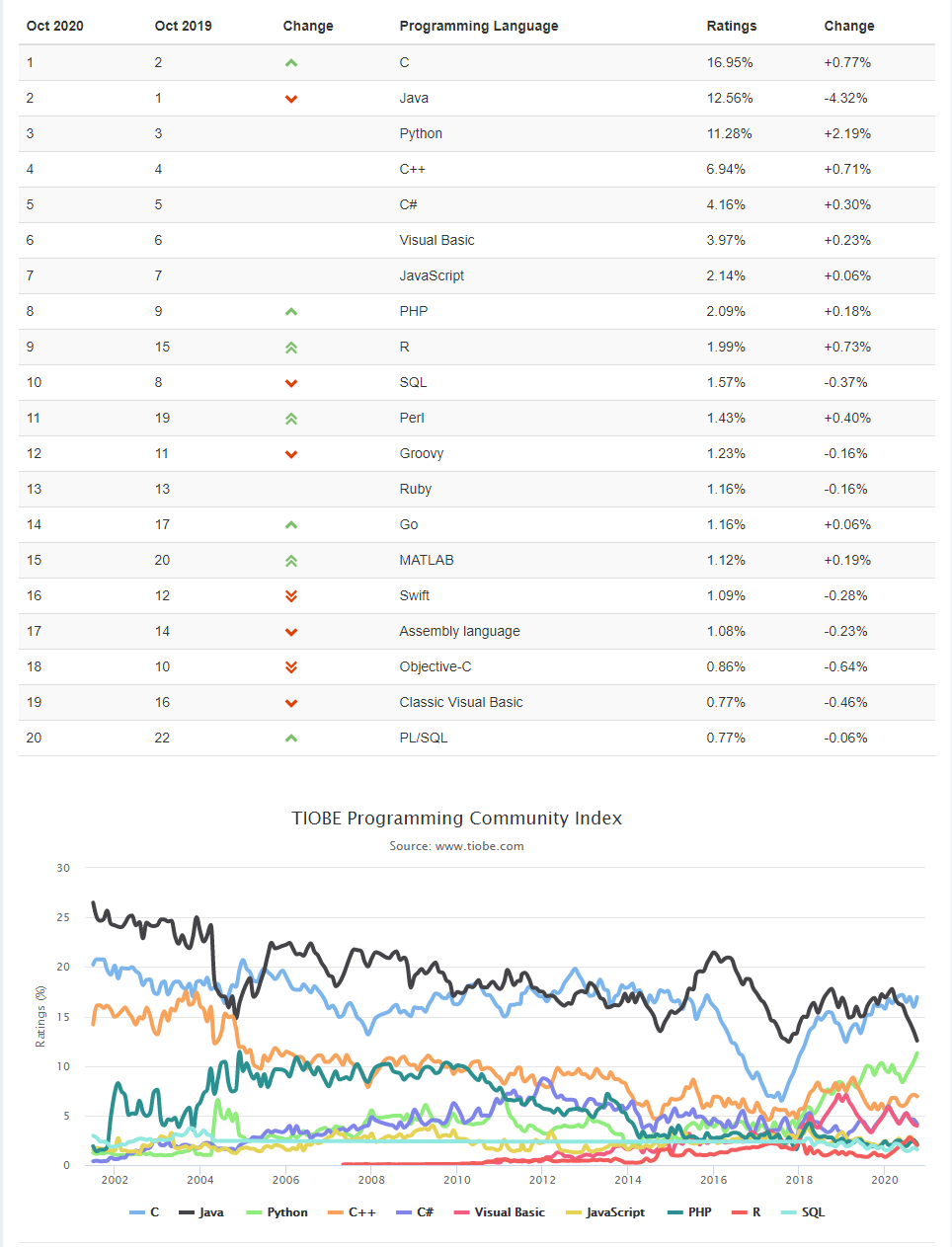
05 2020年10月TIOBE指数
06 Python环境的安装
Windows
下载安装包:https://www.python.org/downloads/
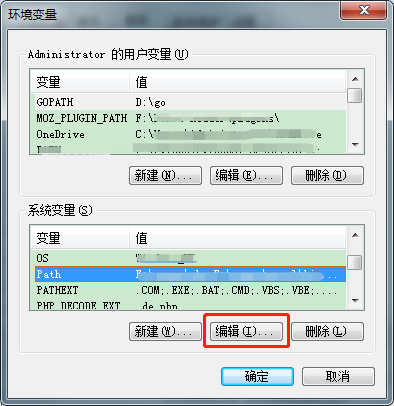
配置环境变量:【右键计算机】-->【属性】-->【高级系统设置】-->【高级】-->【环境变量】-->【在系统变量中找到 Path,双击或编辑】-->【添加Python安装目录,如;C:\python38,切记前面有英文标点分号(win10系统变量与win7大体一致)】
Linux、Mac
无需安装,系统自带Python环境,但是可选择升级版本。
07 编写第一个Python程序
print("Hello World!")
08 编译型与解释型语言区别(补充)
- 编译型:一次性把所有代码编译成机器能识别的二进制码再运行
- 代表语言:c,c++
- 优点:执行速度快
- 缺点:开发速度慢,调试周期长
- 解释型:代码从上到下一行一行解释并运行:
- 代表语言:python,php
- 优点:开发效率快,调试周期短
- 缺点:执行速度相对慢
09 与其它编程语言的对比
C++
#include <iostream>

using namespace std;

int main()

{

   cout << "Hello World";

   return 0;

}
C
#include <stdio.h>

int main()

{

   /* 我的第一个 C 程序 */

   printf("Hello, World! \n");

   return 0;

}
C#
using System;

namespace HelloWorldApplication

{

   class HelloWorld

   {

      static void Main(string[] args)

      {

         /* 我的第一个 C# 程序*/

         Console.WriteLine("Hello World!");

         Console.ReadKey();

      }

   }

}
Java
public class HelloWorld {

    public static void main(String []args) {

       System.out.println("Hello World!");

    }

}
PHP
<?php

echo 'Hello World!';

?>
Ruby
puts "Hello World!";
Go
package main

import "fmt"

func main() {

   fmt.Println("Hello, World!")

}
Python
print("Hello, World!");
10 Python之禅(扩展)
import this
Beautiful is better than ugly.
Explicit is better than implicit.
Simple is better than complex.
Complex is better than complicated.
Flat is better than nested.
Sparse is better than dense.
Readability counts.
Special cases aren't special enough to break the rules.
Although practicality beats purity.
Errors should never pass silently.
Unless explicitly silenced.
In the face of ambiguity, refuse the temptation to guess.
There should be one-- and preferably only one --obvious way to do it.
Although that way may not be obvious at first unless you're Dutch.
Now is better than never.
Although never is often better than right now.
If the implementation is hard to explain, it's a bad idea.
If the implementation is easy to explain, it may be a good idea.
Namespaces are one honking great idea -- let's do more of those!
初试Python的更多相关文章
- 初试Python语法小试牛刀之冒泡排序
Python很火,心里很慌,没吃过猪肉,也要见见猪走路. 看了几天Python的语法,大概初步了解了一点点,https://www.liaoxuefeng.com/wiki/0014316089557 ...
- Python Web-第四周-Programs that Surf the Web(Using Python to Access Web Data)
1.Understanding HTML 1.最简单的爬虫 import urllib fhand=urllib.urlopen('http://www.dr-chuck.com/page1.htm' ...
- 初试PyOpenGL四 (Python+OpenGL)GPU粒子系统与基本碰撞
这篇相当于是对前三篇的总结,基本效果如下: 在初试PyOpenGL一 (Python+OpenGL)讲解Pyopengl环境搭建,网格,球体,第一与第三人称摄像机的实现.在初试PyOpenGL二 (P ...
- python性能监控初试
标 题: python性能监控初试作 者: itdef链 接: http://www.cnblogs.com/itdef/p/3990765.html 欢迎转帖 请保持文本完整并注明出处 之前性能统计 ...
- [python]初试页面抓取——抓取沪深股市交易龙虎榜数据
[python]抓取沪深股市交易龙虎榜数据 python 3.5.0下运行 没做自动建立files文件夹,需要手动在py文件目录下建立files文件夹后运行 #coding=utf-8 import ...
- Python基本语法初试
编程环境: win7旗舰版 Python 3.2.2(default, Sep 4 2011,09:51:08) 代码来源:(Python菜鸟) 代码内容: Python基本的输出语句print(& ...
- python初试牛刀
需求:在L7的一台机器上做nginx配置,然后代码分发到别的所有的机器上.由于目录中有很多配置文件,而且防止误操作,需要修改配置之前先备份原配置.然后需要在运行修改配置的脚本之前,先弹出界面,告知操作 ...
- python爬虫框架scrapy初试(二)
将该导航网站搜索出结果的页面http://www.dmoz.org/Computers/Programming/Languages/Python/Books/里面标题,及标题的超链接和描述爬下来. 使 ...
- 初试PyOpenGL二 (Python+OpenGL)基本地形生成与高度检测
在上文中,讲述了PyOpenGL的基本配置,以及网格,球形的生成,以及基本的漫游.现在利用上一篇的内容,来利用高程图实现一个基本的地形,并且,利用上文中的第三人称漫游,以小球为视角,来在地形上前后左右 ...
随机推荐
- Java实现随机生成由字母、数字组合的N位随机数
通过Math.random函数生成所需的字符所有序列,通过判断当前字符是否属于大小写.数字,符合者加入数组内,直到数组存储N位为止,最后把当前数组转为字符串返回调用处. /** * 随机生成由数字.字 ...
- core的 Linq基本使用,简单模拟数据库多表的左右内连接的测试
1:先看效果: 2:部分代码截图 3:全部代码 1 using System; 2 using System.Collections.Generic; 3 using System.Linq; 4 n ...
- Coneology(POJ 2932)
原题如下: Coneology Time Limit: 5000MS Memory Limit: 65536K Total Submissions: 4937 Accepted: 1086 D ...
- adb安装apk包提示protocol failure问题
截图来自CSDN,待验证
- 学习 | canvas实现图片懒加载 && 下滑底部加载
用canvas实现图片的懒加载并且下滑到据底部60px的时候再次加载数据,模仿UC浏览器的新闻加载. 完整代码:https://github.com/dirkhe1051931999/writeBlo ...
- Vue环境搭建、创建与启动、案例
vue环境搭建 """ 1) 安装node 官网下载安装包,傻瓜式安装:https://nodejs.org/zh-cn/ 2) 安装cnpm npm install - ...
- 7.kafka HA
- Flutter继承环信IM-发送视频时失败:No value for fileLength
首先贴一下代码: 这是发送视频消息的方法 报出一下错误信息: 这是由于在解析的时候JSON里面没有fileLength这个值 往回看发送视频消息api,也并不需要fileLength参数 那顺着错误信 ...
- 安装了高版本OS X 之后无法使用MacPorts的port命令
安装了高版本OS X 之后无法使用MacPorts的port命令 pod update提示: Current platform "darwin 14" does not match ...
- 每日一个知识点:Volatile 和 CAS 的弊端之总线风暴
每日一个知识点系列的目的是针对某一个知识点进行概括性总结,可在一分钟内完成知识点的阅读理解,此处不涉及详细的原理性解读. 一.什么是总线风暴 总线风暴,听着真是一个帅气的词语,但如果发生在你的系统上那 ...