
Spring听课笔记(tg)AOP
好文:https://blog.csdn.net/javazejian/article/details/56267036
通过一个实例来理解
1. 需求:实现算术计算器,可以加减乘除,同时记录日志
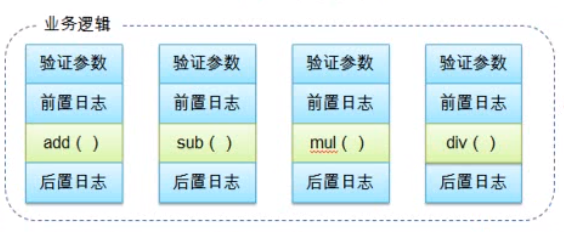
2. 实现方式:
① 高度耦合(直接pass)
② 自己实现动态代理
③ 利用Spring AOP框架
二. 自己实现动态代理
1. 定义接口及实现类:
-- 接口:ArithmeticCalculator
public interface ArithmeticCalculator {

    int add(int i, int j);

    int sub(int i, int j);

    int mul(int i, int j);

    int div(int i, int j);

}
-- 接口的实现类
public class ArithmeticCalculatorImpl implements ArithmeticCalculator{

    public int add(int i, int j) {

        int result = i + j;

        System.out.println("[add] " + i + " + " + j + " = " + result);

        return result;

    }

    public int sub(int i, int j) {

        int result = i - j;

        System.out.println("[sub] " + i + " - " + j + " = " + result);

        return result;

    }

    public int mul(int i, int j) {

        int result = i * j;

        System.out.println("[mul] " + i + " * " + j + " = " + result);

        return result;

    }

    public int div(int i, int j) {

        int result = i / j;

        System.out.println("[div] " + i + " / " + j + " = " + result);

        return result;

    }

}
-- 返回动态代理类
关键代码已经标红,利用JDK的Proxy类,加入参数,返回代理类
try-catch-finally分别对应四种通知
public class ArithmeticCalculatorLoggingProxy {

    private ArithmeticCalculator target;

    public ArithmeticCalculatorLoggingProxy(ArithmeticCalculator target) {

        this.target = target;

    }

    public ArithmeticCalculator getLoggingProxy() {

        ArithmeticCalculator proxy = null;

        //代理对象由哪一个类加载器加载

        ClassLoader loader = target.getClass().getClassLoader();

        //代理对象的类型

        Class[] interfaces = new Class[] {ArithmeticCalculator.class};

        //调用代理对象的目标方法,并执行的代理方法

        InvocationHandler h = new InvocationHandler() {

            //proxy: 一般不用proxy中的方法,容易死循环

            //method: 目标类中的方法

            //args: 目标类方法的参数

            public Object invoke(Object proxy, Method method, Object[] args) {

                Object result = null;

                try {

                    System.out.println("这是前置通知...");

                    result = method.invoke(target, args);

                    System.out.println("这是返回通知,方法正常执行时执行...");

                } catch(Exception e) {

                    System.out.println("这是异常通知,方法异常时执行...");

                    e.printStackTrace();

                } finally {

                    System.out.println("这是后置通知,不论是否异常,都会执行");

                }

                return result;

            }

        };

        proxy = (ArithmeticCalculator) Proxy.newProxyInstance(loader, interfaces, h);

        return proxy;

    }

}
-- 调用
public class App

{

    public static void main( String[] args )

    {

        ArithmeticCalculator target = new ArithmeticCalculatorImpl();

        ArithmeticCalculator proxy = new ArithmeticCalculatorLoggingProxy(target).getLoggingProxy();

        proxy.add(1, 3);

        System.out.println();

        proxy.div(4, 2);

    }

}
-- 结果(后置通知的执行顺序好像和spring aop不太一样)

三 通过Spring AOP + AspectJ注解方式
-- 配置文件(利用context和aop命名空间)
    <!-- 配置bean自动扫描 -->

    <context:component-scan base-package="com.atguigu.spring_1.aop"></context:component-scan>

    <!-- 配置aspectj起作用 -->

    <aop:aspectj-autoproxy></aop:aspectj-autoproxy>
-- 接口,实现类同前,需要注意,实现类要加到spring容器中

-- 日志切面类
需要注意,用@Component 加入到Spring IOC容器中, 用 @Aspect 让AspectJ自动扫描
@Component

@Aspect

public class LogginAspect {

    /**

     * 定义一个方法,用于声明切入点表达式,一般的,方法中不需要其他代码

     */

    @Pointcut("execution(* com.atguigu.spring_1.aop.ArithmeticCalculator.*(..))")

    public void declareJointPointExpression() {};

    /**

     * 前置通知

     */

    @Before("declareJointPointExpression()")

    public void beforeMethod(JoinPoint joinPoint) {

        // JoinPoint:链接点可以访问到方法的具体信息

        String methodName = joinPoint.getSignature().getName();

        List<Object> args = Arrays.asList(joinPoint.getArgs());

        System.out.println("前置通知: method " + methodName + " begin with arguments:" + args +"");

    }

    /**

     * 后置通知: 不论是否有异常,都会如期执行

     * 但是无法访问到方法的返回值

     */

    @After("declareJointPointExpression()")

    public void afterMethod(JoinPoint joinPoint) {

        String methodName = joinPoint.getSignature().getName();

        System.out.println("后置通知: method " + methodName + " end");

    }

    /**

     * 返回通知:只有正常执行时,才可以执行

     * 能够访问到方法的返回值

     */

    @AfterReturning(value="declareJointPointExpression()",

            returning="result")

    public void afterReturningMethod(JoinPoint joinPoint, Object result) {

        String methodName = joinPoint.getSignature().getName();

        System.out.println("返回通知: method " + methodName + " end with result: " + result +"");

    }

    /**

     * 异常通知:抛出异常时执行

     */

    @AfterThrowing(value="declareJointPointExpression()",

            throwing="ex")

    public void afterThrowingMethod(JoinPoint joinPoint, Exception ex) {

        String methodName = joinPoint.getSignature().getName();

        System.out.println("异常通知: method " + methodName + " throw an exception " + ex +"");

    }

}
-- 调用
public class App

{

    public static void main( String[] args )

    {

        ApplicationContext ctx = new ClassPathXmlApplicationContext("aop.xml");

        ArithmeticCalculator target = ctx.getBean(ArithmeticCalculator.class);

        target.add(1, 3);

        System.out.println();

        target.div(4, 2);

    }

}
-- 结果

四)四种通知的执行顺序
没有异常:前置通知->目标方法->后置通知->返回通知
有异常: 前置通知->目标方法->后置通知->异常通知
五)后置通知和返回通知的区别
-- 后置通知(@After)不能访问到目标方法的结果,而返回通知(@AfterReturning)则可以
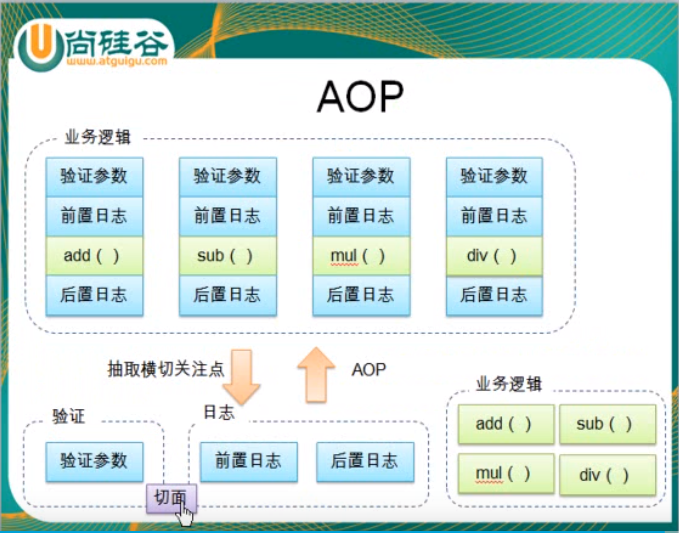
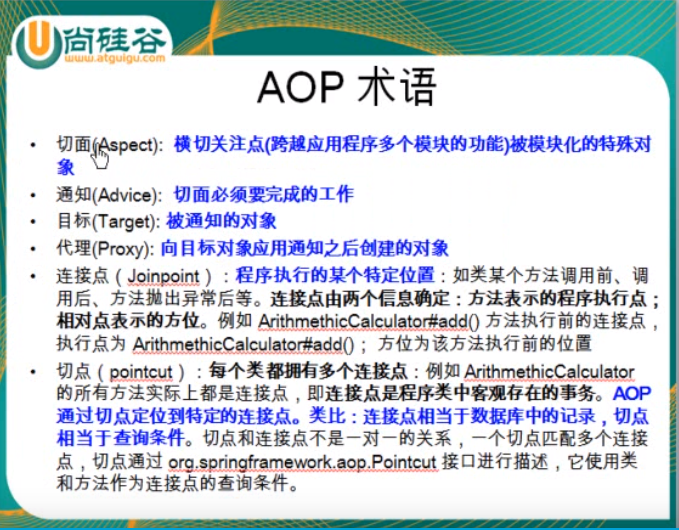
六)切面等基本概念的理解
Spring听课笔记(tg)AOP的更多相关文章
- Spring学习笔记之aop动态代理(3)
Spring学习笔记之aop动态代理(3) 1.0 静态代理模式的缺点: 1.在该系统中有多少的dao就的写多少的proxy,麻烦 2.如果目标接口有方法的改动,则proxy也需要改动. Person ...
- Spring学习笔记4——AOP
AOP 即 Aspect Oriented Program 面向切面编程 首先,在面向切面编程的思想里面,把功能分为核心业务功能,和周边功能. 所谓的核心业务,比如登陆,增加数据,删除数据都叫核心业务 ...
- Spring听课笔记(tg)
0. 地址:https://www.bilibili.com/video/av21335209 1.综述,Spring主要的复习要点集中在以下几点 -- Spring的整体结构,Maven依赖(环境搭 ...
- Spring听课笔记(tg)2
配置Bean -- 配置形式:基于XML 文件的方式, 基于注解的方式 -- Bean的配置方式:通过全类名(反射).通过工厂方法(静态工厂方法&实例工厂方法).FactoryBean -- ...
- [Spring学习笔记 4 ] AOP 概念原理以及java动态代理
一.Spring IoC容器补充(1) Spring IoC容器,DI(依赖注入): 注入的方式:设值方法注入setter(属性注入)/构造子注入(构造函数传入依赖的对象)/字段注入Field(注解) ...
- Spring学习笔记2—AOP
1.AOP概念 AOP(Aspect Oriented Programming):面向切面编程,AOP能够将那些与业务无关,却为业务模块所共同调用的应用(例如事务处理.日志管理.权限控制等)封装起来, ...
- Spring听课笔记(专题一)
Spring入门课程:https://www.imooc.com/learn/196 第0章: Spring是为解决企业应用程序开发复杂性而创建的一个Java开源框架,应用非常广泛.业内非常流行的SS ...
- Spring学习笔记之AOP配置篇(一)
[TOC] 1. 创建并声明一个切面 首先,创建一个类,添加@Component注解使其添加到IoC容器 然后,添加@Aspect注解,使其成为一个切面 最后,在配置文件里面,使用<aop:as ...
- Spring听课笔记(专题二下)
第4章 Spring Bean基于注解的装配 4.1 Bean的定义及作用域的注解实现 1. Bean定义的注解 -- @Component是一个通用注解,可用于任何bean -- @Reposito ...
随机推荐
- Selenium执行JavaScript脚本
JavaScript是运行在客户端(浏览器)和服务器端的脚本语言,允许将静态网页转换为交互式网页.可以通过 Python Selenium WebDriver 执行 JavaScript 语句,在We ...
- 容器编排系统K8s之Dashboard部署
前文我们了解了k8s的访问控制第三关准入控制相关插件的使用,回顾请参考:https://www.cnblogs.com/qiuhom-1874/p/14220402.html:今天我们来了解下k8s的 ...
- JavaCV FFmpeg采集麦克风PCM音频数据
前阵子用一个JavaCV的FFmpeg库实现了YUV视频数据地采集,同样的采集PCM音频数据也可以采用JavaCV的FFmpeg库. 传送门:JavaCV FFmpeg采集摄像头YUV数据 首先引入 ...
- 计算-服务器最大并发量-http协议请求-以webSphere服务器为例-考虑线程池
请求的处理流程 广域网上有大量的并发用户同时访问Web服务器,Web服务器传递请求给应用服务器(Web容器),Web容器传递请求给EJB容器,然后EJB容器发送数据库连接请求给数据库. 请求的处理流程 ...
- 5款极简极美WordPress主题,亲测可用附送源码
2020年深冬,新闻上报道是.从1950年以来最寒冷的冬天. 一个周六的下午,我找遍了全网的简约博客主题,搭建了三年来的第7个独立博客, 多么难得的周末啊,我却在家花了一整天的时间.整理出直接套用5️ ...
- go语言中运算符
Go语言学习笔记(运算符)-day01 go语言中与其他语言一样,存在多种运算符,下表列出了go语言中的运算符类型 算数运算符 关系运算符 逻辑运算符 位运算符 赋值运算符 算数运算符 运算符 描述 ...
- 音视频入门-19-使用giflib处理GIF图片
* 音视频入门文章目录 * GIFLIB The GIFLIB project 上一篇 [手动生成一张GIF图片], 自己生成了一张 GIF 动态图 rainbow.gif. 下面,使用 GIFLIB ...
- MySQL 集群知识点整理
随着项目架构的不断扩大,单台 MySQL 已经不能满足需要了,所以需要搭建集群将前来的请求进行分流处理.博客主要根据丁奇老师的专栏<<MySQL实战45讲>>学习的总结. 架构 ...
- 【JDBC核心】commons-dbutils
commons-dbutils 简介 commons-dbutils 是 Apache 组织提供的一个开源 JDBC 工具类库,它是对 JDBC 的简单封装,学习成本极低,并且使用 commons-d ...
- ReentrantLock-源码解析
ReentrantLock类注释 1.可重入互斥锁,意思是表示该锁能够支持一个线程对资源的重复加锁,该锁还支持获取锁的公平和非公平性选择.synchronized关键字隐式的支持重进入. 2.可以通过 ...