
Spring学习笔记4——AOP
AOP 即 Aspect Oriented Program 面向切面编程
首先,在面向切面编程的思想里面,把功能分为核心业务功能,和周边功能。
所谓的核心业务,比如登陆,增加数据,删除数据都叫核心业务
所谓的周边功能,比如性能统计,日志,事务管理等等
周边功能在Spring的面向切面编程AOP思想里,即被定义为切面
在面向切面编程AOP的思想里面,核心业务功能和切面功能分别独立进行开发
然后把切面功能和核心业务功能 "编织" 在一起,这就叫AOP
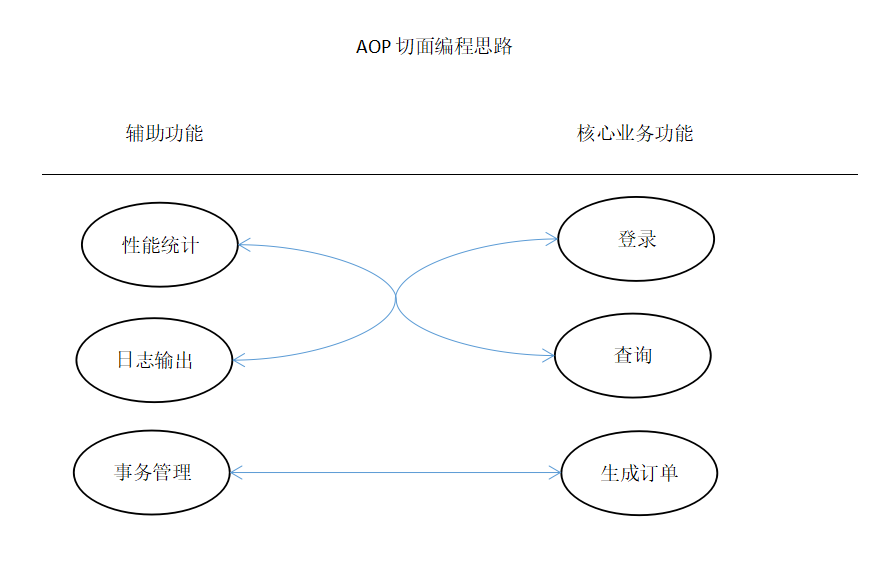
第一步:思路图
1. 功能分两大类,辅助功能和核心业务功能
2. 辅助功能和核心业务功能彼此独立进行开发
3. 比如登陆功能,即便是没有性能统计和日志输出,也可以正常运行
4. 如果有需要,就把"日志输出" 功能和 "登陆" 功能 编织在一起,这样登陆的时候,就可以看到日志输出了
5. 辅助功能,又叫做切面,这种能够选择性的,低耦合的把切面和核心业务功能结合在一起的编程思想,就叫做切面编程
第二步:准备业务类
ProductService.java
 package com.spring.service;

 public class ProductService {

     public void doSomeService() {

         System.out.println("doSomeService");

     }

 }
第三步:测试(TestSpring)
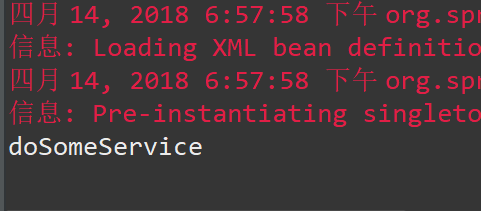
没有引入切面之前,调用该业务类
 package com.spring.test;

 import org.springframework.context.ApplicationContext;

 import org.springframework.context.support.ClassPathXmlApplicationContext;

 import com.spring.service.ProductService;

 public class TestSpring {

     public static void main(String[] args) {

         // TODO Auto-generated method stub

         ApplicationContext context = new ClassPathXmlApplicationContext(new String[] { "applicationContext.xml" });

         ProductService s = (ProductService) context.getBean("Pservice");

         s.doSomeService();

     }

 }
第四步:准备日志切面 LoggerAspect
该日志切面的功能是 在调用核心功能之前和之后分别打印日志,切面就是原理图中讲的那些辅助功能。
Object object = joinPoint.proceed();
这一句代码就是将来与某个核心功能编织之后,用于执行核心功能的代码
LoggerAspect.java
 package com.spring.aspect;

 import org.aspectj.lang.ProceedingJoinPoint;

 public class LoggerAspect {

     public Object log(ProceedingJoinPoint joinPoint) throws Throwable {

         System.out.println("start log:" + joinPoint.getSignature().getName());

         Object object = joinPoint.proceed();

         System.out.println("end log:" + joinPoint.getSignature().getName());

         return object;

     }

 }
第五步:修改applicationContext.xml
1.声明业务对象
 <bean name="Pservice" class="com.spring.service.ProductService">

 </bean>
2.声明日志切面
 <bean name="loggerAspect" class="com.spring.aspect.LoggerAspect">

 </bean>
3.结合
<1>指定右边的核心业务功能
<aop:pointcut expression="execution(* com.spring.service.ProductService.*(..))" id="loggerCutpoint"/>
<2>指定左边的辅助功能
 <aop:aspect id="logAspect" ref="loggerAspect">

     <aop:around pointcut-ref="loggerCutpoint" method="log"/>

 </aop:aspect>
<3>然后通过aop:config把业务对象与辅助功能编织在一起。
 <aop:config>

         <aop:pointcut expression="execution(* com.spring.service.ProductService.*(..))" id="loggerCutpoint"/>

         <aop:aspect id="logAspect" ref="loggerAspect">

             <aop:around pointcut-ref="loggerCutpoint" method="log"/>

         </aop:aspect>

 </aop:config>
注:(注意“*”后面的空格)
execution(* com.spring.service.ProductService.*(..))
这表示对满足如下条件的方法调用,进行切面操作:
* 返回任意类型
com.spring.service.ProductService.*
包名以com.spring.service.ProductService 开头的类的任意方法
(..) 参数是任意数量和类型
applicationContext.xml
 <?xml version="1.0" encoding="UTF-8"?>

 <beans xmlns="http://www.springframework.org/schema/beans"

     xmlns:xsi="http://www.w3.org/2001/XMLSchema-instance"

     xmlns:aop="http://www.springframework.org/schema/aop"

     xmlns:tx="http://www.springframework.org/schema/tx"

     xmlns:context="http://www.springframework.org/schema/context"

     xsi:schemaLocation="

    http://www.springframework.org/schema/beans

    http://www.springframework.org/schema/beans/spring-beans-3.0.xsd

    http://www.springframework.org/schema/aop

    http://www.springframework.org/schema/aop/spring-aop-3.0.xsd

    http://www.springframework.org/schema/tx

    http://www.springframework.org/schema/tx/spring-tx-3.0.xsd

    http://www.springframework.org/schema/context

    http://www.springframework.org/schema/context/spring-context-3.0.xsd">

   <!-- <context:annotation-config/>-->

     <bean name="category" class="com.spring.cate.Category">

         <property name="name" value="category 3333" />

     </bean>

     <bean name="product" class="com.spring.cate.Product">

         <property name="name" value="product 3333" />

           <property name="category" ref="category" />

     </bean>

     <bean name="Pservice" class="com.spring.service.ProductService">

     </bean>

     <bean name="loggerAspect" class="com.spring.aspect.LoggerAspect">

     </bean>

     <aop:config>

         <aop:pointcut expression="execution(* com.spring.service.ProductService.*(..))" id="loggerCutpoint"/>

         <aop:aspect id="logAspect" ref="loggerAspect">

             <aop:around pointcut-ref="loggerCutpoint" method="log"/>

         </aop:aspect>

     </aop:config>

 </beans>
第六步:TestSpring
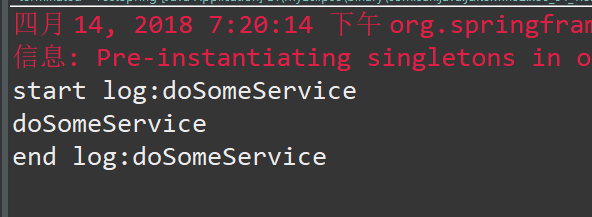
TestSpring 代码没有发生任何变化,通过配置的方式,把切面和核心业务类编制在了一起。
运行测试,可以发现在编织之后,业务方法运行之前和之后分别会打印日志
TestSpring.java
 package com.spring.test;

 import org.springframework.context.ApplicationContext;

 import org.springframework.context.support.ClassPathXmlApplicationContext;

 import com.spring.service.ProductService;

 public class TestSpring {

     public static void main(String[] args) {

         // TODO Auto-generated method stub

         ApplicationContext context = new ClassPathXmlApplicationContext(new String[] { "applicationContext.xml" });

         ProductService s = (ProductService) context.getBean("Pservice");

         s.doSomeService();

     }

 }
Spring学习笔记4——AOP的更多相关文章
- Spring学习笔记之aop动态代理(3)
Spring学习笔记之aop动态代理(3) 1.0 静态代理模式的缺点: 1.在该系统中有多少的dao就的写多少的proxy,麻烦 2.如果目标接口有方法的改动,则proxy也需要改动. Person ...
- [Spring学习笔记 4 ] AOP 概念原理以及java动态代理
一.Spring IoC容器补充(1) Spring IoC容器,DI(依赖注入): 注入的方式:设值方法注入setter(属性注入)/构造子注入(构造函数传入依赖的对象)/字段注入Field(注解) ...
- Spring学习笔记2—AOP
1.AOP概念 AOP(Aspect Oriented Programming):面向切面编程,AOP能够将那些与业务无关,却为业务模块所共同调用的应用(例如事务处理.日志管理.权限控制等)封装起来, ...
- Spring学习笔记之AOP配置篇(一)
[TOC] 1. 创建并声明一个切面 首先,创建一个类,添加@Component注解使其添加到IoC容器 然后,添加@Aspect注解,使其成为一个切面 最后,在配置文件里面,使用<aop:as ...
- spring学习笔记(一) Spring概述
博主Spring学习笔记整理大部分内容来自Spring实战(第四版)这本书. 强烈建议新手购入或者需要电子书的留言. 在学习Spring之前,我们要了解这么几个问题:什么是Spring?Spring ...
- Java框架spring 学习笔记(十八):事务管理(xml配置文件管理)
在Java框架spring 学习笔记(十八):事务操作中,有一个问题: package cn.service; import cn.dao.OrderDao; public class OrderSe ...
- 不错的Spring学习笔记(转)
Spring学习笔记(1)----简单的实例 --------------------------------- 首先需要准备Spring包,可从官方网站上下载. 下载解压后,必须的两个包是s ...
- 【Spring学习笔记-MVC-5】利用spring MVC框架,实现ajax异步请求以及json数据的返回
作者:ssslinppp 时间:2015年5月26日 15:32:51 1. 摘要 本文讲解如何利用spring MVC框架,实现ajax异步请求以及json数据的返回. Spring MV ...
- 【Spring学习笔记-MVC-3】SpringMVC返回Json数据-方式1
<Spring学习笔记-MVC>系列文章,讲解返回json数据的文章共有3篇,分别为: [Spring学习笔记-MVC-3]SpringMVC返回Json数据-方式1:http://www ...
随机推荐
- wireshark抓包分析tcp连接与断开
其实对于网络通信的学习,最好还是能够自己抓到包详细地一下,不然只单单通过文字和图的描述印象不够深刻.本文通过实际的抓包操作来看一下tcp的连接与断开是怎样的. 首先需要去https://www.wir ...
- 织梦dedecms默认网站地图sitemap.html优化
网站地图对于网站优化很重要,搜索引擎就是靠网站地图去收录网站页面,本文主要讲解优化织梦自带的网站地图功能. 织梦自带的网站地图使用方法:织梦后台--生成--HTML更新--更新网站地图,可以在 ...
- JavaScript 实现二叉树
JavaScript 实现二叉树: // JavaScript 实现二叉树 function BinaryTree () { var Node = function (key) { this.key ...
- ELK学习总结(2-6)elk的mapping
1.什么是映射 映射:创建索引的时候,预先定义字段的类型及相关属性 作用:这样会让索引建立的更加细致和完善,如:是否存储.使用何种分析器.重要级别 分类:静态映射和动态映射 2.字段类型:string ...
- Spring Security 入门(1-2)Spring Security - 从 配置例子例子 开始我们的学习历程
1.Spring Security 的配置文件 我们需要为 Spring Security 专门建立一个 Spring 的配置文件,该文件就专门用来作为 Spring Security 的配置. &l ...
- __init__特殊方法
__init__特殊方法不应当返回除了none以外的任何方法.
- jQuery获取浏览器参数
当我们需要获取浏览器参数是,我们可以使用jQuery进行获取,具体方法如下: 例如获取参数的地址:http://www.test.com?a="111"&b="2 ...
- Spring MVC【入门】就这一篇!
MVC 设计概述 在早期 Java Web 的开发中,统一把显示层.控制层.数据层的操作全部交给 JSP 或者 JavaBean 来进行处理,我们称之为 Model1: 出现的弊端: JSP 和 Ja ...
- Linux OpenGL 实践篇-3 绘制三角形
本次实践是绘制两个三角形,重点理解顶点数组对象和OpenGL缓存的使用. 顶点数组对象 顶点数组对象负责管理一组顶点属性,顶点属性包括位置.法线.纹理坐标等. OpenGL缓存 OpenGL缓存实质上 ...
- SpringContextUtil 的配置和调用
首先:在springmvc里面配置 <bean id="springContextUtil" class="com.hna.hka.rmc.common.util. ...