
SqlServer性能优化 Sql语句优化(十四)
一:在较小的结果集上上操作
1.仅返回需要的列
2.分页获取数据
EF实现分页:
  public object  getcp(int skiprows,int currentpagerows)

        {

            HRUser dbcontext = new HRUser();

            var cps = dbcontext.Product.Join(dbcontext.ProductCategory, a => a.ProductSubcategoryKey,

                ar => ar.ProductCategoryKey, (a, ar) => new

                {

                    CName = ar.EnglishProductCategoryName,

                    PName = a.EnglishProductName,

                    Color = a.Color,

                    Size = a.Size

                });

            return cps.OrderBy(p=>p.PName).Skip(skiprows).Take(currentpagerows).ToList();

        }
上一页:
 protected void Button4_Click(object sender, EventArgs e)

        {

            TextBox1.Text = (int.Parse(TextBox1.Text.Trim()) + 1).ToString();

            DataBinding();

        }
下一页:
 protected void Button4_Click(object sender, EventArgs e)

        {

            TextBox1.Text = (int.Parse(TextBox1.Text.Trim()) + 1).ToString();

            DataBinding();

        }
绑定:
 private void DataBinding()

        {

            var cps = p.getcp(int.Parse(TextBox1.Text.Trim())*10,10);

            GridView1.DataSource = cps;

            GridView1.DataBind();

        }
避免出现左侧计算:
select * from EmployeeOp where VacationHours>=10*10

select * from EmployeeOp where VacationHours/10>=10
建立合适的主外键:
select c.EnglishProductCategoryName,p.EnglishProductName from Product as p

inner join ProductCategory as c on c.ProductCategoryKey=p.ProductSubcategoryKey--0.214

alter table ProductCategory

add constraint pk_c_id primary key(ProductCategoryKey)

alter table Product

--不用去检查是否符合主外键的要求

with nocheck

add constraint fk_p_id foreign key(ProductSubcategoryKey) references ProductCategory(ProductCategoryKey)

select c.EnglishProductCategoryName,p.EnglishProductName from Product as p

inner join ProductCategory as c on c.ProductCategoryKey=p.ProductSubcategoryKey--性能好
验证数据存在时使用Exists替换Count():
if ((select count(*) from EmployeeOp where VacationHours=100)>0)

print 'hello'

if exists(select * from EmployeeOp where VacationHours=100)

print 'hello1'
关闭受影响的行数:
set nocount on

select * from Product
添加稀疏列:
create table t1(c1 int identity(1,1),c2 int sparse)

declare @count int

 set @count=0

 while @count<50000

 begin

 --定义稀疏列

 insert t1 values(null)

 set @count=@count+1

 end

 --查看表空间

 sp_spaceused 't1'   --1408

 --删除稀疏列

 alter table t1

 alter column c2 drop sparse

  sp_spaceused 't1'   --1712

  --添加稀疏列

   alter table t1

 alter column c2 add sparse

   sp_spaceused 't1'  --1712

    dbcc shrinkdatabase('HRDB',1)

	--列集

	create table Student(id int,name varchar(500),sex varchar(500),sae int sparse,

	school varchar(500) sparse,optiondata xml   column_set for all_sparse_columns)

	insert Student values (1,'caojian','man','<sae>35</sae><school>cdschool</school>')

	select *from Student

	select id,name,sex,sae,school,optiondata from Student

	update Student set optiondata	='<sae>36</sae>'

	update Student set school='sunliyuan'

	create table Sales(id int identity(1,1),amount int)

	alter table Sales

	add constraint ck_sales_amount check(amount>0)

		create table Sales1(id int identity(1,1),amount int)

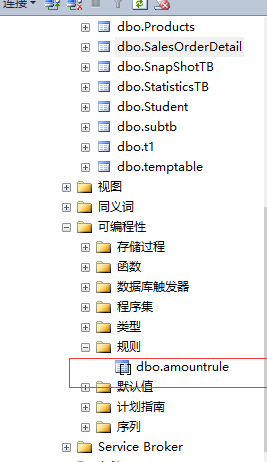
		--创建规则  很多表都可以使用

			create rule amountrule as @amount>0

			--通过系统定义的方式 绑定

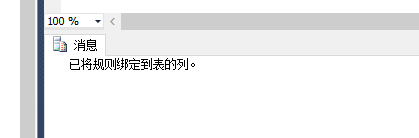
			exec sp_bindrule amountrule, 'Sales1.amount'

			--插入数据的时候就报错

			insert Sales1 values(0)
提高文件访问性能文件流:
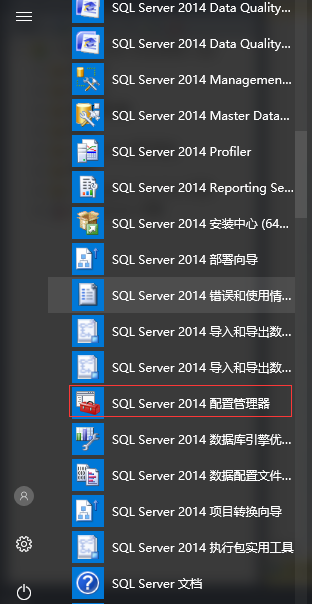
打开SqlServer 配置管理工具:
找到如下的目录打开:
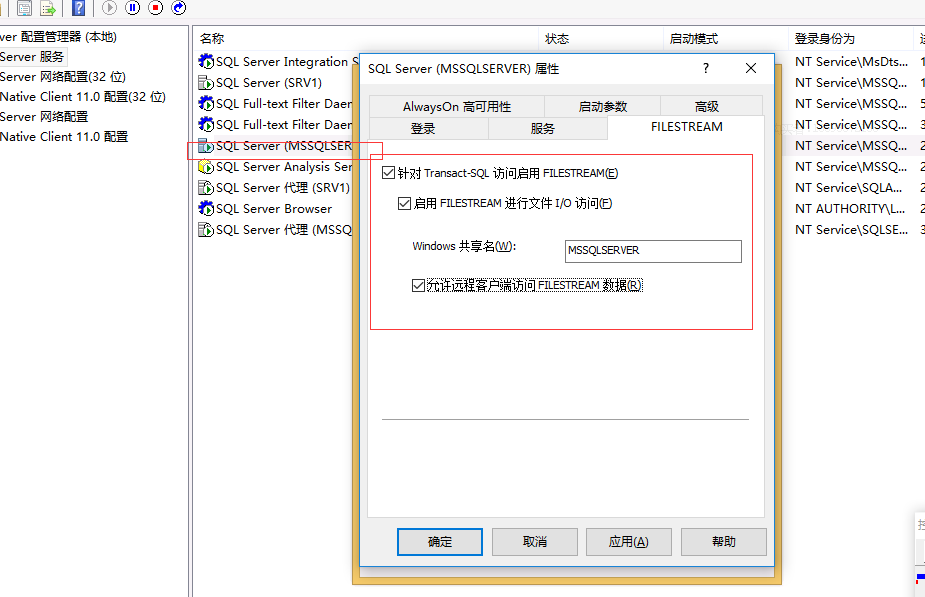
配置访问级别:
--配置访问级别  数据库级别

			sp_configure 'filestream access level',2

			reconfigure

			select * from AdventureWorks2014.Production.Product

			select * from AdventureWorks2014.Production.ProductPhoto

			--链接表

			select * from AdventureWorks2014.Production.ProductProductPhoto

			--存在文件系统中

			--1.创建数据库

			drop database HRSales

			create database HRSales

			on primary

			(

			name='HRSales_data',

			filename='f:\HRSales_Data.mdf'

			),

			--做文件组  --包含filestream

filegroup filestreamfilegroup contains filestream

(

name='HRSaels_Blob',

filename='f:\HRSalesblob'

)

			use HRSales

			go

			create table Product(ID uniqueidentifier RowGUIDCol unique not null,

			name varchar(500),

			image varbinary(max) filestream

			)

			--插入记录

			insert into Product select NEWID(),p.Name,pp.LargePhoto from

		    AdventureWorks2014.Production.Product as p inner join

			AdventureWorks2014.Production.ProductProductPhoto as ppp on p.ProductID=ppp.ProductID inner join

			AdventureWorks2014.Production.ProductPhoto as pp on ppp.ProductPhotoID=pp.ProductPhotoID

			select * from Product
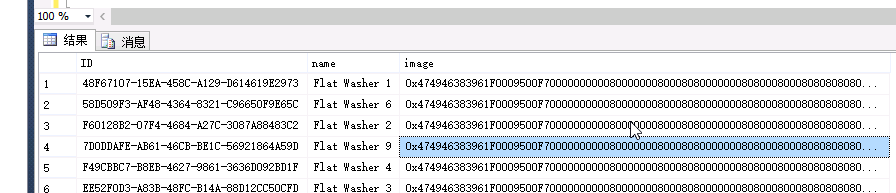
查看IO:
set statistics io on

select * from AdventureWorks2014.Production.ProductPhoto--io 52

set statistics io off

set statistics io on

select * from Product--7

set statistics io off

创建数据库备份设备:
--创建备份设备

sp_addumpdevice 'disk','hrsalesbak','d:\hrsalesbak.bak'

--备份

backup database HRSales to hrsalesbak with name='HRSales Full',format
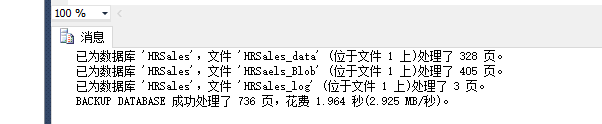
--恢复

restore database HRSales from hrsalesbak with file=1,recovery
文件进行了恢复:
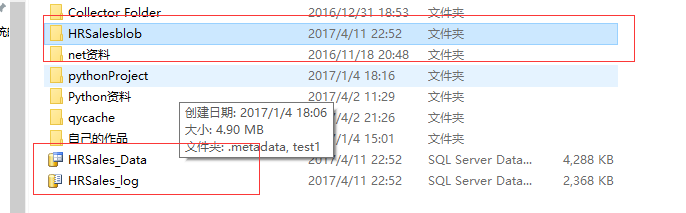

在.Net中的显示:
<asp:Content ID="BodyContent" ContentPlaceHolderID="MainContent" runat="server">

    <asp:Button ID="Button1" runat="server" OnClick="Button1_Click" Text="显示" />

    <asp:GridView ID="GridView1" runat="server" AutoGenerateColumns="False">

        <Columns>

            <asp:BoundField DataField="ID" HeaderText="ID" Visible="False" />

            <asp:BoundField DataField="name" HeaderText="产品名" />

            <asp:TemplateField HeaderText="样图">

                <ItemTemplate>

                    <asp:Image ID="Image1" runat="server" ImageUrl='<%# "ImageHandler.ashx?ID="+Eval("ID") %>' />

                </ItemTemplate>

            </asp:TemplateField>

        </Columns>

    </asp:GridView>

</asp:Content>
Model层:
 SalesDbcontext dbcontext = new SalesDbcontext();

        public object GetAllProduct()

        {

            var allproducts = dbcontext.Product;

            return allproducts.ToList();

        }

        public byte[] GetImageByProductID(Guid id)

        {

            var product = dbcontext.Product.Where(p => p.ID == id).FirstOrDefault();

            return product.image;

        }
后台的调用代码:
    /// <summary>

    /// ImageHandler 的摘要说明

    /// </summary>

    public class ImageHandler : IHttpHandler

    {

        Product p = new Product();

        MemoryStream memorystream = new MemoryStream();

        public void ProcessRequest(HttpContext context)

        {

            var id = Guid.Parse(context.Request.QueryString["ID"]);

            var image = p.GetImageByProductID(id);

            memorystream.Write(image, 0, image.Length);

            context.Response.Buffer = true;

            context.Response.BinaryWrite(image);

            memorystream.Dispose();

        }

        public bool IsReusable

        {

            get

            {

                return false;

            }

        }

    }
SqlServer性能优化 Sql语句优化(十四)的更多相关文章
- 看懂SqlServer查询计划 SQL语句优化分析
转自 http://www.cnblogs.com/fish-li/archive/2011/06/06/2073626.html 阅读目录 开始 SQL Server 查找记录的方法 SQL Ser ...
- 三,mysql优化--sql语句优化之索引一
1,需求:如何在一个项目中,找到慢查询的select,mysql数据库支持把慢查询语句,记录到日志中.供程序员分析.(默认不启用此功能,需要手动启用) 修改my.cnf文件(有些地方是my.ini) ...
- 四,mysql优化——sql语句优化之索引二
1,在什么列适合添加索引 (1)较频繁的作为查询条件字段应该添加索引 select * from emp where empid = 2; (2)唯一性太差的字段不适合添加索引,即时频繁作为查询条件. ...
- 五,mysql优化——sql语句优化小技巧
1,大批量插入数据 (1)对于MyISAM: alter table table_name disable keys; loading data; alter table table_name ena ...
- SQL语句(十四)子查询
--1. 使用IN关键字 --例1 查询系别人数不足5人的系别中学生的学号.姓名和系别 --系别人数不足5人的系别 ==>选择条件 select Sdept from Student Group ...
- 数据库 基于索引的SQL语句优化之降龙十八掌(转)
一篇挺不错的关于SQL语句优化的文章,因不知原始出处,故未作引用说明! 1 前言 客服业务受到SQL语句的影响非常大,在规模比较大的局点,往往因为一个小的SQL语句不够优化,导致数据库性能急 ...
- 转:sql语句优化
性能不理想的系统中除了一部分是因为应用程序的负载确实超过了服务器的实际处理能力外,更多的是因为系统存在大量的SQL语句需要优化. 为了获得稳定的执行性能,SQL语句越简单越好.对复杂的SQL语句,要设 ...
- 关于索引的sql语句优化之降龙十八掌
1 前言 客服业务受到SQL语句的影响非常大,在规模比较大的局点,往往因为一个小的SQL语句不够优化,导致数据库性能急剧下降,小型机idle所剩无几,应用服务器断连.超时,严重影响业务的正 ...
- sql语句优化 (转)
性能不理想的系统中除了一部分是因为应用程序的负载确实超过了服务器的实际处理能力外,更多的是因为系统存在大量的SQL语句需要优化. 为了获得稳定的执行性能,SQL语句越简单越好.对复杂的SQL语句,要设 ...
随机推荐
- codevs 3235 战争
3235 战争 http://codevs.cn/problem/3235/ 时间限制: 2 s 空间限制: 128000 KB 题目描述 Description 2050年,人类与外星人之间 ...
- MySQL数据库远程连接很慢的解决方案
在开发机器上链接mysql数据库很慢,但是在数据库服务器上直接链接数据库很快.猜测应该是远程链接解析的问题,在查询MySQL相关文档和网络搜索后,发现了一个配置似乎可以解决这样的问题,就是在MySQL ...
- Python入门系列教程(四)字典
既能存储多个数据,还能在访问元素的很方便就能够定位到需要的那个元素 增 Dic = {'name':'沐风', 'city':'北京'} Dic['sex']='男' print Dic 删 del ...
- 把JS和CSS合并到1个文件
合并JS文件和CSS文件很多人都知道,也用过,目的是为了减少请求数.但有时候我们觉的把JS合并到1个文件,CSS又合并到另外1个文件也是浪费,我们如何能把CSS和JS一起合并进1个文件了? 这里需要使 ...
- Druid.io通过NiFi摄取流数据
NiFi是一个易于使用,功能强大且可靠的系统来处理和分发数据. 本文讲述如何用NiFi将Http的Json数据传到Druid.国外的一篇文章讲到如何用NiFi将推文传到Druid,https://co ...
- 训练赛第二场C题 zoj 2339 Hyperhuffman
题目链接:http://acm.zju.edu.cn/onlinejudge/showProblem.do?problemCode=2339 解题报告:题目太长了,比赛的时候根本看不懂,完了之后问了什 ...
- exec操作文件描述符
exec命令可以用来替代当前shell:换句话说,并没有启动子shell.使用这一命令时任何环境都将被清除,并重新启动一个shell. 它的一半形式为: exec command 其中,command ...
- 【疑点】<p></p>标签为什么不能包含块级标签?还有哪些特殊的HTML标签?
最近,在码代码的时候,就是下面的这段代码,我犯了一个很不起眼,但犯了就致命的BUG. <body> <p> <ol> <li>Hello</li& ...
- 如何在Maven和Gradle中配置使用Groovy 2.4与Spock 1.0
如何在Maven和Gradle中配置使用Groovy 2.4与Spock 1.0 原文 https://dzone.com/articles/spock-10-groovy-24 翻译 hxfiref ...
- 《区块链100问》第73集:达世币Dash是什么?
达世币诞生于2014年1月18日,匿名程度较比特币更高. 达世币有三种转账方式,一是像比特币一样的普通转账:二是即时交易.不需要矿工打包确认,就可以确认交易,几乎可以实现秒到:三是匿名交易.从区块链上 ...