
mybatis动态sql以及分页
1、mybatis动态sql
2、模糊查询
3、查询返回结果集的处理
4、分页查询
5、特殊字符处理
1.mybatis动态sql
If、trim、foreach
If 标签判断某一字段是否为空
  <select id="list4" resultType="java.util.Map" parameterType="java.util.Map">

    select * from t_mvc_book

    <where>

      <if test="null != bname and bname !=''">

        and bname like #{bname}

      </if>

    </where>

</select>
trim 标签一般用于去除sql语句中多余的and关键字,逗号,或者给sql语句前拼接 “where“、“set“以及“values(“ 等前缀,或者添加“)“等后缀,可用于选择性插入、更新、删除或者条件查询等操作。
    <trim prefix="values (" suffix=")" suffixOverrides="," >

      <if test="bid != null" >

        #{bid,jdbcType=INTEGER},

      </if>

      <if test="bname != null" >

        #{bname,jdbcType=VARCHAR},

      </if>

      <if test="price != null" >

        #{price,jdbcType=DOUBLE},

      </if>

    </trim>
foreach 标签 遍历集合,批量查询、通常用于in关键字
  <select id="selectByIn" resultType="com.liuwenwu.model.Book" parameterType="java.util.List">

    select * from t_mvc_book where bid in

    <foreach collection="bookIds" open="(" close=")" separator="," item="bid">

      #{bid}

    </foreach>

  </select>
List<Book> selectByIn(@Param("bookIds")List bookIds);
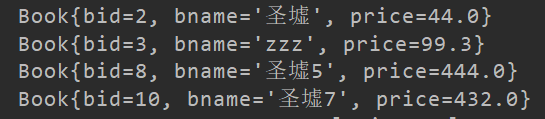
测试
 @Test

    public void selectByIn() {

        List list = new ArrayList();

        list.add(8);

        list.add(2);

        list.add(3);

        list.add(10);

        List<Book> books = this.bookService.selectByIn(list);

        for (Book b : books){

            System.out.println(b);

        }

    }
2.模糊查询(三种方式)
2.1 参数中直接加入%%
2.2 使用${...}代替#{...}(不建议使用该方式,有SQL注入风险)
关键:#{...}与${...}区别?
参数类型为字符串,#会在前后加单引号['],$则直接插入值
注:
1) mybatis中使用OGNL表达式传递参数
2) 优先使用#{...}
3) ${...}方式存在SQL注入风险
2.3 SQL字符串拼接CONCAT
 <!--模糊查询-->

  <select id="selectByLike1" resultType="com.liuwenwu.model.Book" parameterType="java.lang.String">

    select * from t_mvc_book where bname like #{bname}

  </select>

  <select id="selectByLike2" resultType="com.liuwenwu.model.Book" parameterType="java.lang.String">

    select * from t_mvc_book where bname like '${bname}'

  </select>

  <select id="selectByLike3" resultType="com.liuwenwu.model.Book" parameterType="java.lang.String">

    select * from t_mvc_book where bname like concat(concat('%',#{bname}),'%')

  </select>
    List<Book> selectByLike1(@Param("bname")String bname);

    List<Book> selectByLike2(@Param("bname")String bname);

    List<Book> selectByLike3(@Param("bname")String bname);
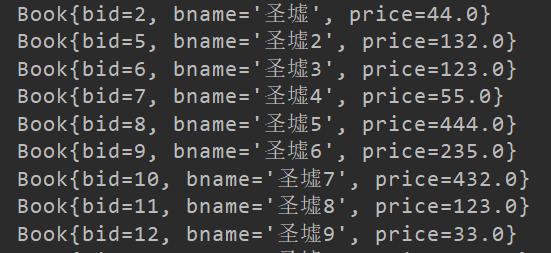
测试
    @Test

    public void selectByLike() {

//        List<Book> books = this.bookService.selectByLike1(StringUtil.toLikeStr("圣墟"));

//        List<Book> books = this.bookService.selectByLike2("%圣墟% or bid !=1");

        List<Book> books = this.bookService.selectByLike3("圣墟");

        for (Book b : books){

            System.out.println(b);

        }

    }
结果:
3.查询返回结果集的处理
resultMap:适合使用返回值是自定义实体类的情况
resultType:适合使用返回值的数据类型是非自定义的,即jdk的提供的类型
3.1 使用resultMap返回自定义类型集合
3.2 使用resultType返回List<T>
3.3 使用resultType返回单个对象
3.4 使用resultType返回List<Map>,适用于多表查询返回结果集
3.5 使用resultType返回Map<String,Object>,适用于多表查询返回单个结果集
 <!--3、查询返回结果集的处理-->

  <select id="list1" resultMap="BaseResultMap">

    select * from t_mvc_book

  </select>

  <select id="list2" resultType="com.liuwenwu.model.Book">

    select * from t_mvc_book

  </select>

  <select id="list3" resultType="com.liuwenwu.model.Book" parameterType="com.liuwenwu.model.BookVo">

    select * from t_mvc_book where bid in

    <foreach collection="bookIds" open="(" close=")" separator="," item="bid">

      #{bid}

    </foreach>

  </select>

  <select id="list4" resultType="java.util.Map" parameterType="java.util.Map">

    select * from t_mvc_book

    <where>

      <if test="null != bname and bname !=''">

        and bname like #{bname}

      </if>

    </where>

</select>

  <select id="list5" resultType="java.util.Map" parameterType="java.util.Map">

    select * from t_mvc_book

    <where>

      <if test="null != bid and bid !=''">

        and bid = #{bid}

      </if>

    </where>

  </select>
//    3.1 使用resultMap返回自定义类型集合

        List<Book> list1();

//    3.2 使用resultType返回List<T>

        List<Book> list2();

//    3.3 使用resultType返回单个对象

        Book list3(BookVo bookVo);

//    3.4 使用resultType返回List<Map>,适用于多表查询返回结果集

        List<Map> list4(Map map);

//    3.5 使用resultType返回Map<String,Object>,适用于多表查询返回单个结果集

        Map list5(Map map);
测试:
    @Test

    public void list() {

//        返回一个resultMap但是使用list<T>接收

//        List<Book> books = this.bookService.list1();

//        返回的是resulttype使用list<T>接收

//        List<Book> books = this.bookService.list2();

//        返回的是resulttype使用list<T>接收

//        for (Book b : books){

//            System.out.println(b);

//        }

//        返回的是resulttype使用T接收

//        BookVo bookVo =new BookVo();

//        List list = new ArrayList();

//        list.add(2);

//        bookVo.setBookIds(list);

//        Book book = this.bookService.list3(bookVo);

//        System.out.println(book);

//        返回的是resulttype使用list<Map>接收

        Map map =new HashMap();

//        map.put("bname",StringUtil.toLikeStr("圣墟"));

//        List<Map> list = this.bookService.list4(map);

//        for (Map m : list) {

//            System.out.println(m);

//        }

//        返回的是resulttype使用Map接收

        map.put("bid",2);

        Map m = this.bookService.list5(map);

        System.out.println(m);

    }
结果:

4.分页查询
为什么要重写mybatis的分页?
Mybatis的分页功能很弱,它是基于内存的分页(查出所有记录再按偏移量offset和边界limit取结果),在大数据量的情况下这样的分页基本上是没有用的
使用分页插件步奏
1、导入pom依赖
2、Mybatis.cfg.xml配置拦截器
3、使用PageHelper进行分页
4、处理分页结果
Pom依赖
<dependency>

    <groupId>com.github.pagehelper</groupId>

    <artifactId>pagehelper</artifactId>

    <version>5.1.2</version>

</dependency>
Mybatis.cfg.xml配置拦截器
<plugins>

    <!-- 配置分页插件PageHelper, 4.0.0以后的版本支持自动识别使用的数据库 -->

    <plugin interceptor="com.github.pagehelper.PageInterceptor">

    </plugin>

</plugins>
  <select id="list4" resultType="java.util.Map" parameterType="java.util.Map">

    select * from t_mvc_book

    <where>

      <if test="null != bname and bname !=''">

        and bname like #{bname}

      </if>

    </where>

</select>
  @Override

    public List<Map> listPager(Map map, PageBean pageBean) {

        if(pageBean!=null && pageBean.isPagination()){

            PageHelper.startPage(pageBean.getPage(),pageBean.getRows());

        }

        List<Map> list = this.bookMapper.list4(map);

        if(pageBean!=null && pageBean.isPagination()){

            PageInfo pageInfo =new PageInfo(list);

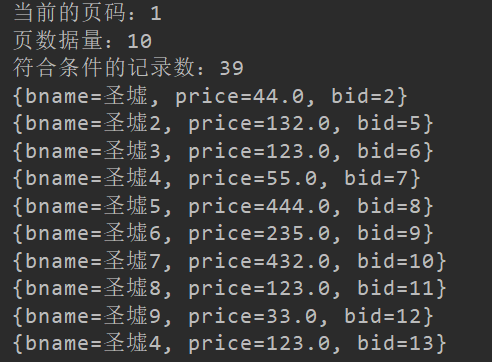
            System.out.println("当前的页码:"+pageInfo.getPageNum());

            System.out.println("页数据量:"+pageInfo.getPageSize());

            System.out.println("符合条件的记录数:"+pageInfo.getTotal());

            pageBean.setTotal(pageInfo.getTotal()+"");

        }

        return list;

    }
测试:
   @Test

    public void listPager() {

        Map map =new HashMap();

        map.put("bname",StringUtil.toLikeStr("圣墟"));

        PageBean pageBean =new PageBean();

        pageBean.setPage(3);

//        pageBean.setPagination(false);

        List<Map> list = this.bookService.listPager(map, pageBean);

        for (Map m : list) {

            System.out.println(m);

        }

    }
结果:
5.特殊字符处理
>(>)
<(<)
&(&)
空格( )
<![CDATA[ <= ]]>
<select id="list6" resultType="java.util.Map" parameterType="com.liuwenwu.model.BookVo">
select * from t_mvc_book
<where>
<if test="null != min and min !=''">
and price > #{min}
</if>
<if test="null != max and max !=''">
and price < #{max}
</if>
</where>
</select>
<select id="list7" resultType="java.util.Map" parameterType="com.liuwenwu.model.BookVo">
select * from t_mvc_book
<where>
<if test="null != min and min !=''">
<![CDATA[ and price > #{min} ]]>
</if>
<if test="null != max and max !=''">
<![CDATA[ and price < #{max} ]]>
</if>
</where>
</select>
//    特殊字符的处理方式

        List<Map> list6(BookVo bookVo);

        List<Map> list7(BookVo bookVo);
测试:
    @Test

    public void listSpecoal() {

        BookVo bookVo =new BookVo();

        bookVo.setMin(100.0);

        bookVo.setMax(500.0);

//        List<Map> list = this.bookService.list6(bookVo);

        List<Map> list = this.bookService.list7(bookVo);

        for (Map map : list) {

            System.out.println(map);

        }

    }
相关代码
PageBean 分页工具类
package com.liuwenwu.util;

import java.io.Serializable;

import java.util.Map;

import javax.servlet.http.HttpServletRequest;

public class PageBean implements Serializable {

    private static final long serialVersionUID = 2422581023658455731L;

    //页码

    private int page=1;

    //每页显示记录数

    private int rows=10;

    //总记录数

    private int total=0;

    //是否分页

    private boolean isPagination=true;

    //上一次的请求路径

    private String url;

    //获取所有的请求参数

    private Map<String,String[]> map;

    public PageBean() {

        super();

    }

    //设置请求参数

    public void setRequest(HttpServletRequest req) {

        String page=req.getParameter("page");

        String rows=req.getParameter("rows");

        String pagination=req.getParameter("pagination");

        this.setPage(page);

        this.setRows(rows);

        this.setPagination(pagination);

        this.url=req.getContextPath()+req.getServletPath();

        this.map=req.getParameterMap();

    }

    public String getUrl() {

        return url;

    }

    public void setUrl(String url) {

        this.url = url;

    }

    public Map<String, String[]> getMap() {

        return map;

    }

    public void setMap(Map<String, String[]> map) {

        this.map = map;

    }

    public int getPage() {

        return page;

    }

    public void setPage(int page) {

        this.page = page;

    }

    public void setPage(String page) {

        if(null!=page&&!"".equals(page.trim()))

            this.page = Integer.parseInt(page);

    }

    public int getRows() {

        return rows;

    }

    public void setRows(int rows) {

        this.rows = rows;

    }

    public void setRows(String rows) {

        if(null!=rows&&!"".equals(rows.trim()))

            this.rows = Integer.parseInt(rows);

    }

    public int getTotal() {

        return total;

    }

    public void setTotal(int total) {

        this.total = total;

    }

    public void setTotal(String total) {

        this.total = Integer.parseInt(total);

    }

    public boolean isPagination() {

        return isPagination;

    }

    public void setPagination(boolean isPagination) {

        this.isPagination = isPagination;

    }

    public void setPagination(String isPagination) {

        if(null!=isPagination&&!"".equals(isPagination.trim()))

            this.isPagination = Boolean.parseBoolean(isPagination);

    }

    /**

     * 获取分页起始标记位置

     * @return

     */

    public int getStartIndex() {

        //(当前页码-1)*显示记录数

        return (this.getPage()-1)*this.rows;

    }

    /**

     * 末页

     * @return

     */

    public int getMaxPage() {

        int totalpage=this.total/this.rows;

        if(this.total%this.rows!=0)

            totalpage++;

        return totalpage;

    }

    /**

     * 下一页

     * @return

     */

    public int getNextPage() {

        int nextPage=this.page+1;

        if(this.page>=this.getMaxPage())

            nextPage=this.getMaxPage();

        return nextPage;

    }

    /**

     * 上一页

     * @return

     */

    public int getPreivousPage() {

        int previousPage=this.page-1;

        if(previousPage<1)

            previousPage=1;

        return previousPage;

    }

    @Override

    public String toString() {

        return "PageBean [page=" + page + ", rows=" + rows + ", total=" + total + ", isPagination=" + isPagination

                + "]";

    }

}
Bookvo
vo用来存放包括数据库表映射的字段以及多余的查询条件所需属性列,保证实体类纯粹,降低耦合度
package com.liuwenwu.model;

import java.util.List;

/**

 * @author LWW

 * @site www.lww.com

 * @company

 * @create 2019-09-20 19:05

 * vo用来存放包括数据库表映射的字段以及多余的查询条件所需属性列

 */

public class BookVo extends Book{

    private List<String> bookIds;

    private Double min;

    private Double max;

    public Double getMax() {

        return max;

    }

    public void setMax(Double max) {

        this.max = max;

    }

    public Double getMin() {

        return min;

    }

    public void setMin(Double min) {

        this.min = min;

    }

    public List<String> getBookIds() {

        return bookIds;

    }

    public void setBookIds(List<String> bookIds) {

        this.bookIds = bookIds;

    }

}
BookService
package com.liuwenwu.service;

import com.liuwenwu.model.Book;

import com.liuwenwu.model.BookVo;

import com.liuwenwu.util.PageBean;

import org.apache.ibatis.annotations.Param;

import java.util.List;

import java.util.Map;

/**

 * @author LWW

 * @site www.lww.com

 * @company

 * @create 2019-09-19 22:23

 */

public interface BookService {

    int deleteByPrimaryKey(Integer bid);

    int insert(Book record);

    int insertSelective(Book record);

    Book selectByPrimaryKey(Integer bid);

    int updateByPrimaryKeySelective(Book record);

    int updateByPrimaryKey(Book record);

    List<Book> selectByIn(List bookIds);

    List<Book> selectByLike1(String bname);

    List<Book> selectByLike2(String bname);

    List<Book> selectByLike3(String bname);

    List<Book> list1();

    List<Book> list2();

    Book list3(BookVo bookVo);

    List<Map> list4(Map map);

    Map list5(Map map);

    List<Map> listPager(Map map, PageBean pageBean);

    List<Map> list6(BookVo bookVo);

    List<Map> list7(BookVo bookVo);

}
BookServiceImpl
package com.liuwenwu.service.impl;

import com.github.pagehelper.PageHelper;

import com.github.pagehelper.PageInfo;

import com.liuwenwu.mapper.BookMapper;

import com.liuwenwu.model.Book;

import com.liuwenwu.model.BookVo;

import com.liuwenwu.service.BookService;

import com.liuwenwu.util.PageBean;

import java.util.List;

import java.util.Map;

/**

 * @author LWW

 * @site www.lww.com

 * @company

 * @create 2019-09-19 22:58

 */

public class BookServiceImpl implements BookService {

    private BookMapper bookMapper;

    public BookMapper getBookMapper() {

        return bookMapper;

    }

    public void setBookMapper(BookMapper bookMapper) {

        this.bookMapper = bookMapper;

    }

    @Override

    public int deleteByPrimaryKey(Integer bid) {

        return bookMapper.deleteByPrimaryKey(bid);

    }

    @Override

    public int insert(Book record) {

        return bookMapper.insert(record);

    }

    @Override

    public int insertSelective(Book record) {

        return bookMapper.insertSelective(record);

    }

    @Override

    public Book selectByPrimaryKey(Integer bid) {

        return bookMapper.selectByPrimaryKey(bid);

    }

    @Override

    public int updateByPrimaryKeySelective(Book record) {

        return bookMapper.updateByPrimaryKeySelective(record);

    }

    @Override

    public int updateByPrimaryKey(Book record) {

        return bookMapper.updateByPrimaryKey(record);

    }

    @Override

    public List<Book> selectByIn(List bookIds) {

        return bookMapper.selectByIn(bookIds);

    }

    @Override

    public List<Book> selectByLike1(String bname) {

        return bookMapper.selectByLike1(bname);

    }

    @Override

    public List<Book> selectByLike2(String bname) {

        return bookMapper.selectByLike2(bname);

    }

    @Override

    public List<Book> selectByLike3(String bname) {

        return bookMapper.selectByLike3(bname);

    }

    @Override

    public List<Book> list1() {

        return bookMapper.list1();

    }

    @Override

    public List<Book> list2() {

        return bookMapper.list2();

    }

    @Override

    public Book list3(BookVo bookVo) {

        return bookMapper.list3(bookVo);

    }

    @Override

    public List<Map> list4(Map map) {

        return bookMapper.list4(map);

    }

    @Override

    public Map list5(Map map) {

        return bookMapper.list5(map);

    }

    @Override

    public List<Map> listPager(Map map, PageBean pageBean) {

        if(pageBean!=null && pageBean.isPagination()){

            PageHelper.startPage(pageBean.getPage(),pageBean.getRows());

        }

        List<Map> list = this.bookMapper.list4(map);

        if(pageBean!=null && pageBean.isPagination()){

            PageInfo pageInfo =new PageInfo(list);

            System.out.println("当前的页码:"+pageInfo.getPageNum());

            System.out.println("页数据量:"+pageInfo.getPageSize());

            System.out.println("符合条件的记录数:"+pageInfo.getTotal());

            pageBean.setTotal(pageInfo.getTotal()+"");

        }

        return list;

    }

    @Override

    public List<Map> list6(BookVo bookVo) {

        return bookMapper.list6(bookVo);

    }

    @Override

    public List<Map> list7(BookVo bookVo) {

        return bookMapper.list7(bookVo);

    }

}
mybatis动态sql以及分页的更多相关文章
- mybatis动态sql和分页
mybatis动态sql foreach BookMapper.xml <select id="selectBooksIn" resultType="com.lin ...
- Mybatis动态sql及分页、特殊符号
目的: mybatis动态sql(案例:万能查询) 查询返回结果集的处理 mybatis的分页运用 mybatis的特殊符号 mybatis动态sql(案例:万能查询) 根据id查询 模糊查询 (参数 ...
- Mybatis的动态sql以及分页
mybatis动态sql If.trim.foreach <select id="selectBooksIn" resultType="com.jt.model.B ...
- 动态sql和分页
Mybatis动态SQL If.trim.foreach BookMapper /** * 如果形参要在mapper.xml中使用需要加上面注解 * map.name: zs age: 12 * @p ...
- MyBatis动态Sql 的使用
Mapper.xml提示: 1:mapper包中新建一个文件:mybatis-3-mapper.dtd 2:在web app libraries/mybatis.jar/org.apache.ibat ...
- mybatis实战教程(mybatis in action)之八:mybatis 动态sql语句
mybatis 的动态sql语句是基于OGNL表达式的.可以方便的在 sql 语句中实现某些逻辑. 总体说来mybatis 动态SQL 语句主要有以下几类:1. if 语句 (简单的条件判断)2. c ...
- 9.mybatis动态SQL标签的用法
mybatis动态SQL标签的用法 动态 SQL MyBatis 的强大特性之一便是它的动态 SQL.如果你有使用 JDBC 或其他类似框架的经验,你就能体会到根据不同条件拼接 SQL 语句有多么 ...
- 自己动手实现mybatis动态sql
发现要坚持写博客真的是一件很困难的事情,各种原因都会导致顾不上博客.本来打算写自己动手实现orm,看看时间,还是先实现一个动态sql,下次有时间再补上orm完整的实现吧. 用过mybatis的人,估计 ...
- Mybatis动态SQL单一基础类型参数用if标签
Mybatis动态SQL单一基础类型参数用if标签时,test中应该用 _parameter,如: 1 2 3 4 5 6 <select id="selectByName" ...
随机推荐
- 浏览器中hook对象属性
先获取window对象属性 来源: 夜幕爬虫安全论坛 原文链接: http://bbs.nightteam.cn/thread-485.htm?orderby=desc&user=7
- 三层交换机和VLAN
目录 一.VLAN的概述及优势 二.VLAN的种类 三.静态VLAN的配置 四.Trunk介绍与配置 五.三层交换机转发原理 一.VLAN的概述及优势 分割广播域 物理分割 逻辑分割 VLAN的优势: ...
- 手动实现instanceof函数
instanceof 功能 a instanceof b 官方解释为检查构造函数b的prototype 有没有出现在a的原型链上.比如: function A() { } function B() { ...
- 月薪20k+的Android面试都问些什么?(含答案)
金九银十跳槽季接近尾声了,可是今年由于疫情的影响仍然不太好找工作,相信大家肯定急需一套Android面试宝典,下面就分享给大家我珍藏已久的Android高阶面试宝典,供大家学习 ! 1.自定义Hand ...
- AMD CMD commonJS es6
看到很多人傻傻的分不清楚 AMD.CMD . commonJS . es6的区别,实际上这跟这几年前段技术的发展有很大的关系. 实际上这是JavaScript的模块化思想演进的一个过程. 最开始的时候 ...
- Linux UDP服务器编程
UDP主要使用sendto()和recvfrom() recvfrom() 函数原型如下: #include <sys/types.h> #include <sys/socket.h ...
- stm32 串口接收一次后再也无法接受,接受都为0
经检测为串口接受后进入别的程序,开辟了2048的临时数组,因为堆栈溢出.stm32总共堆栈为
- 公司新来了一个质量工程师,说团队要保证 0 error,0 warning
摘要:静态代码检查又称为静态程序分析,是指在不运行计算机程序的条件下,进行程序分析的方法. 本文分享自华为云社区<公司新来了一个质量工程师,说团队要保证 0 error,0 warning> ...
- Angular Module 共享模块使用 父模块使用多个子模块
Component.module.ts import {BrowserModule} from '@angular/platform-browser'; import {LocationStrat ...
- C#序列化和反序列化 之 dynamic 动态Json的反序列化
序列化和反序列化的常识不再赘述,如果不清楚这个,可以 参考一下其他人写的文章https://www.cnblogs.com/maitian-lf/p/3670570.html 总结的说, 序列化 是把 ...