
Mybatis的动态sql以及分页
mybatis动态sql
If、trim、foreach
<select id="selectBooksIn" resultType="com.jt.model.Book" parameterType="java.util.List">

  select * from t_mvc_book where bid in

  <foreach collection="bookIds" open="(" close=")" separator="," item="bid">

    #{bid}

  </foreach>

</select>
List<Book> selectBooksIn(@Param("bookIds") List bookIds);
再来看下工具类
Pagebean.java
    private static final long serialVersionUID = 2422581023658455731L;

    //页码

    private int page=;

    //每页显示记录数

    private int rows=;

    //总记录数

    private int total=;

    //是否分页

    private boolean isPagination=true;

    //上一次的请求路径

    private String url;

    //获取所有的请求参数

    private Map<String,String[]> map;

    public PageBean() {

        super();

    }

    //设置请求参数

    public void setRequest(HttpServletRequest req) {

        String page=req.getParameter("page");

        String rows=req.getParameter("rows");

        String pagination=req.getParameter("pagination");

        this.setPage(page);

        this.setRows(rows);

        this.setPagination(pagination);

        this.url=req.getContextPath()+req.getServletPath();

        this.map=req.getParameterMap();

    }

    public String getUrl() {

        return url;

    }

    public void setUrl(String url) {

        this.url = url;

    }

    public Map<String, String[]> getMap() {

        return map;

    }

    public void setMap(Map<String, String[]> map) {

        this.map = map;

    }

    public int getPage() {

        return page;

    }

    public void setPage(int page) {

        this.page = page;

    }

    public void setPage(String page) {

        if(null!=page&&!"".equals(page.trim()))

            this.page = Integer.parseInt(page);

    }

    public int getRows() {

        return rows;

    }

    public void setRows(int rows) {

        this.rows = rows;

    }

    public void setRows(String rows) {

        if(null!=rows&&!"".equals(rows.trim()))

            this.rows = Integer.parseInt(rows);

    }

    public int getTotal() {

        return total;

    }

    public void setTotal(int total) {

        this.total = total;

    }

    public void setTotal(String total) {

        this.total = Integer.parseInt(total);

    }

    public boolean isPagination() {

        return isPagination;

    }

    public void setPagination(boolean isPagination) {

        this.isPagination = isPagination;

    }

    public void setPagination(String isPagination) {

        if(null!=isPagination&&!"".equals(isPagination.trim()))

            this.isPagination = Boolean.parseBoolean(isPagination);

    }

    /**

     * 获取分页起始标记位置

     * @return

     */

    public int getStartIndex() {

        //(当前页码-1)*显示记录数

        return (this.getPage()-)*this.rows;

    }

    /**

     * 末页

     * @return

     */

    public int getMaxPage() {

        int totalpage=this.total/this.rows;

        if(this.total%this.rows!=)

            totalpage++;

        return totalpage;

    }

    /**

     * 下一页

     * @return

     */

    public int getNextPage() {

        int nextPage=this.page+;

        if(this.page>=this.getMaxPage())

            nextPage=this.getMaxPage();

        return nextPage;

    }

    /**

     * 上一页

     * @return

     */

    public int getPreivousPage() {

        int previousPage=this.page-;

        if(previousPage<)

            previousPage=;

        return previousPage;

    }

    @Override

    public String toString() {

        return "PageBean [page=" + page + ", rows=" + rows + ", total=" + total + ", isPagination=" + isPagination

                + "]";

    }
StringUtils
public class StringUtils {

    public static String toLikeStr(String str) {

        return "%"+str+"%";

    }

}
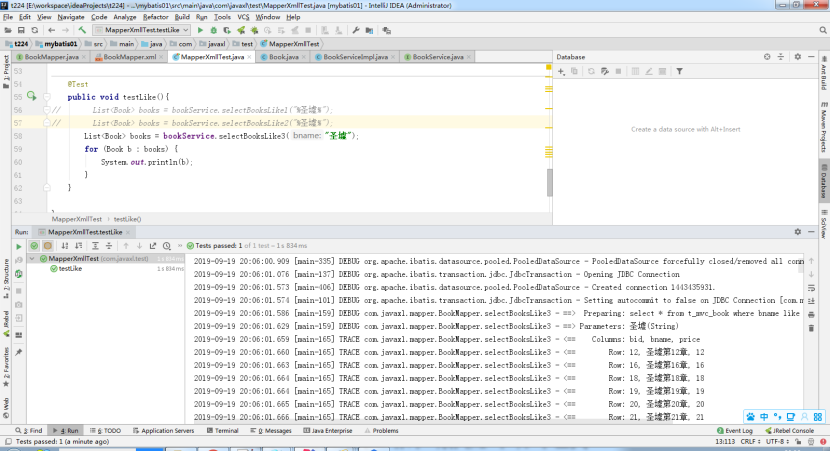
2、模糊查询
#{…}
${…}
Concat
注意:#{...}自带引号,${...}有sql注入的风险
<select id="selectBooksLike1" resultType="com.jt.model.Book" parameterType="java.lang.String">

  select * from t_mvc_book where bname like #{bname}

</select>

<select id="selectBooksLike2" resultType="com.jt.model.Book" parameterType="java.lang.String">

  select * from t_mvc_book where bname like '${bname}'

</select>

<select id="selectBooksLike3" resultType="com.jt.model.Book" parameterType="java.lang.String">

  select * from t_mvc_book where bname like concat(concat('%',#{bname}),'%')

</select>
List<Book> selectBooksLike1(@Param("bname")String bname);

    List<Book> selectBooksLike2(@Param("bname")String bname);

    List<Book> selectBooksLike3(@Param("bname")String bname);
查询返回结果集的处理
resultMap:适合使用返回值是自定义实体类的情况
resultType:适合使用返回值的数据类型是非自定义的,即jdk的提供的类型
3.1 使用resultMap返回自定义类型集合
3.2 使用resultType返回List<T>
3.3 使用resultType返回单个对象
3.4 使用resultType返回List<Map>,适用于多表查询返回结果集
3.5 使用resultType返回Map<String,Object>,适用于多表查询返回单个结果集
<select id="list1" resultMap="BaseResultMap">

    select * from t_mvc_book

  </select>

  <select id="list2" resultType="com.jt.model.Book">

    select * from t_mvc_book

  </select>

  <select id="list3" resultType="com.jt.model.Book" parameterType="com.jt.model.vo.BookVo">

    select * from t_mvc_book where bid in

    <foreach collection="bookIds" item="bid" open="(" close=")" separator=",">

      #{bid}

    </foreach>

  </select>

  <select id="list4" resultType="java.util.Map" parameterType="java.util.Map">

    select * from t_mvc_book where bid in

    <foreach collection="bookIds" item="bid" open="(" close=")" separator=",">

      #{bid}

    </foreach>

  </select>

  <select id="list5" resultType="java.util.Map">

    select * from t_mvc_book where bid = #{bid}

  </select>
public void list() {

//        List<Book> books = this.bookService.list1();

//        List<Book> books = this.bookService.list2();

        List list=new ArrayList();

        list.add();

        list.add();

        list.add();

//        BookVo bookVo=new BookVo();

//        bookVo.setBookIds(list);

//        List<Book> books = this.bookService.list3(bookVo);

//

//

//        for (Book b : books) {

//            System.out.println(b);

//        }

//        Map map=new HashMap();

//        map.put("bookIds",list);

//        List<Map> mapList = this.bookService.list4(map);

//        for (Map m : mapList) {

//            System.out.println(m);

//

//        }

//        map.put("bid",1);

//        System.out.println(this.bookService.list5(map));

    }
分页查询
为什么要重写mybatis的分页?
Mybatis的分页功能很弱,它是基于内存的分页(查出所有记录再按偏移量offset和边界limit取结果),在大数据量的情况下这样的分页基本上是没有用的
使用分页插件步奏
1、导入pom依赖
2、Mybatis.cfg.xml配置拦截器
3、使用PageHelper进行分页
4、处理分页结果
pom依赖
<dependency>

    <groupId>com.github.pagehelper</groupId>

    <artifactId>pagehelper</artifactId>

    <version>5.1.</version>

</dependency>
Mybatis.cfg.xml配置拦截器
<plugins>

    <!-- 配置分页插件PageHelper, 4.0.0以后的版本支持自动识别使用的数据库 -->

    <plugin interceptor="com.github.pagehelper.PageInterceptor">

    </plugin>

</plugins>
使用分页插件
<select id="listPager" resultType="java.util.Map" parameterType="java.util.Map">

  select * from t_mvc_book where bname like concat(concat('%',#{bname}),'%')

</select>
Mapper层
List<Map> listPager(Map map);
Service层
List<Map> listPager(Map map, PageBean pageBean);
@Override

public List<Map> listPager(Map map, PageBean pageBean) {

    if(pageBean != null && pageBean.isPagination()){

        PageHelper.startPage(pageBean.getPage(),pageBean.getRows());

    }

    List<Map> list = bookMapper.listPager(map);

    if(pageBean != null && pageBean.isPagination()){

        PageInfo pageInfo = new PageInfo(list);

        System.out.println("页码:"+pageInfo.getPageNum());

        System.out.println("页大小:"+pageInfo.getPageSize());

        System.out.println("总记录:"+pageInfo.getTotal());

        pageBean.setTotal(pageInfo.getTotal()+"");

    }

    return list;

}
特殊字符处理
>(>)
<(<)
&(&)
空格( )
<![CDATA[ <= ]]>
相关代码配置
<select id="list6" resultType="com.jt.model.Book" parameterType="com.jt.model.vo.BookVo">
select * from t_mvc_book where <![CDATA[ price >#{min} and price <#{max} ]]>
</select>
<select id="list7" resultType="com.jt.model.Book" parameterType="com.jt.model.vo.BookVo">
select * from t_mvc_book where >#{min} and price <#{max}
</select>
Mybatis的动态sql以及分页的更多相关文章
- 利用MyBatis的动态SQL特性抽象统一SQL查询接口
1. SQL查询的统一抽象 MyBatis制动动态SQL的构造,利用动态SQL和自定义的参数Bean抽象,可以将绝大部分SQL查询抽象为一个统一接口,查询参数使用一个自定义bean继承Map,使用映射 ...
- Mybatis中动态SQL语句中的parameterType不同数据类型的用法
Mybatis中动态SQL语句中的parameterType不同数据类型的用法1. 简单数据类型, 此时#{id,jdbcType=INTEGER}中id可以取任意名字如#{a,jdbcType ...
- MyBatis的动态SQL详解
MyBatis的动态SQL是基于OGNL表达式的,它可以帮助我们方便的在SQL语句中实现某些逻辑,本文详解mybatis的动态sql,需要的朋友可以参考下 MyBatis 的一个强大的特性之一通常是它 ...
- Mybatis解析动态sql原理分析
前言 废话不多说,直接进入文章. 我们在使用mybatis的时候,会在xml中编写sql语句. 比如这段动态sql代码: <update id="update" parame ...
- mybatis 使用动态SQL
RoleMapper.java public interface RoleMapper { public void add(Role role); public void update(Role ro ...
- MyBatis框架——动态SQL、缓存机制、逆向工程
MyBatis框架--动态SQL.缓存机制.逆向工程 一.Dynamic SQL 为什么需要动态SQL?有时候需要根据实际传入的参数来动态的拼接SQL语句.最常用的就是:where和if标签 1.参考 ...
- 使用Mybatis实现动态SQL(一)
使用Mybatis实现动态SQL 作者 : Stanley 罗昊 [转载请注明出处和署名,谢谢!] 写在前面: *本章节适合有Mybatis基础者观看* 前置讲解 我现在写一个查询全部的 ...
- MyBatis探究-----动态SQL详解
1.if标签 接口中方法:public List<Employee> getEmpsByEmpProperties(Employee employee); XML中:where 1=1必不 ...
- mybatis中的.xml文件总结——mybatis的动态sql
resultMap resultType可以指定pojo将查询结果映射为pojo,但需要pojo的属性名和sql查询的列名一致方可映射成功. 如果sql查询字段名和pojo的属性名不一致,可以通过re ...
随机推荐
- IT兄弟连 HTML5教程 CSS3属性特效 渐变2 线性渐变实例
3 线性渐变实例 一.颜色从顶部向底部渐变 制作从顶部到底部直线渐变有三种方法,第一种是起点参数不设置,因为起点参数的默认值为“top”:第二种方法起点参数设置为“top”:第三种起点参数使用“-90 ...
- ASP.NET Core gRPC 入门全家桶
一. 说明 本全家桶现在只包含了入门级别的资料,实战资料更新中. 二.官方文档 gRPC in Asp.Net Core :官方文档 gRPC 官网:点我跳转 三.入门全家桶 正片: ASP.NET ...
- autojump 之 git本地安装
1.克隆autojump的repo,Terminal下执行: git clone git://github.com/joelthelion/autojump.git 然后进入c ...
- Docker 私服Registry简介与使用Docker-Compose安装Registry
场景 Docker-Compose简介与Ubuntu Server 上安装Compose: https://blog.csdn.net/BADAO_LIUMANG_QIZHI/article/deta ...
- 国内的go get问题的解决 --gopm
一.golang之旅--gopm 1.什么是gopm 在nodejs中我们有npm,可以通过npm来下载安装一些依赖包.在go中也开发了类似的东西,那就是gopm.这玩意儿是七牛开发的.在这里说下,七 ...
- Linux学习入门-------------------------VMvare与镜像的安装与配置
版权声明:本文为博主原创文章,遵循 CC 4.0 BY-SA 版权协议,转载请附上原文出处链接和本声明.本文链接:https://blog.csdn.net/qq_39038465/article/d ...
- MYSQL之事务篇
目录 事务概述 事务隔离级别 Read Uncommitted Read Committed Repeatable Read Serializable 事务概述 在引入事务之前我们先考虑银行转账的操作 ...
- 如何实现用户的历史记录功能(最多n条)
使用容量为n的队列存储历史记录 使用标准库collections中的deque,它是一个双端循环队列 from collections import deque q = deque([], 5) #参 ...
- Spring Boot修改JSP不用重启的办法
在application.properties文件中添加一行代码解决. Spring Boot 2.0以上添加如下一行: server.servlet.jsp.init-parameters.deve ...
- js对象数组中的某属性值 拼接成字符串
js对象数组中的某属性值 拼接成字符串 var objs=[ {id:1,name:'张三'}, {id:2,name:'李四'}, {id:3,name:'王五'}, {id:4,name:'赵六' ...