
sprinboot+redis
(1)pom.xml引入jar包,如下:
        <dependency>

            <groupId>org.springframework.boot</groupId>

            <artifactId>spring-boot-starter-data-redis</artifactId>

        </dependency>
(2)修改项目启动类,增加注解@EnableCaching,开启缓存功能,如下:

package springboot;

import org.springframework.boot.SpringApplication;

import org.springframework.boot.autoconfigure.SpringBootApplication;

import org.springframework.cache.annotation.EnableCaching;

import org.springframework.scheduling.annotation.EnableScheduling;

@SpringBootApplication

@EnableScheduling

@EnableCaching

public class SpringbootApplication{

    public static void main(String[] args) {

        SpringApplication.run(SpringbootApplication.class, args);

    }

}
(3)application.properties中配置Redis连接信息,如下:
# Redis数据库索引(默认为0)

spring.redis.database=0

# Redis服务器地址

spring.redis.host=172.31.19.222

# Redis服务器连接端口

spring.redis.port=6379

# Redis服务器连接密码(默认为空)

spring.redis.password=

# 连接池最大连接数(使用负值表示没有限制)

spring.redis.pool.max-active=8

# 连接池最大阻塞等待时间(使用负值表示没有限制)

spring.redis.pool.max-wait=-1

# 连接池中的最大空闲连接

spring.redis.pool.max-idle=8

# 连接池中的最小空闲连接

spring.redis.pool.min-idle=0

# 连接超时时间(毫秒)

spring.redis.timeout=0
(4)新建Redis缓存配置类RedisConfig,如下:
package springboot.config;

import org.springframework.beans.factory.annotation.Value;

import org.springframework.cache.CacheManager;

import org.springframework.cache.annotation.CachingConfigurerSupport;

import org.springframework.cache.annotation.EnableCaching;

import org.springframework.context.annotation.Bean;

import org.springframework.context.annotation.Configuration;

import org.springframework.data.redis.cache.RedisCacheManager;

import org.springframework.data.redis.connection.RedisConnectionFactory;

import org.springframework.data.redis.core.RedisTemplate;

import org.springframework.data.redis.core.StringRedisTemplate;

import org.springframework.data.redis.serializer.Jackson2JsonRedisSerializer;

import com.fasterxml.jackson.annotation.JsonAutoDetect;

import com.fasterxml.jackson.annotation.PropertyAccessor;

import com.fasterxml.jackson.databind.ObjectMapper;

/**

 * Redis缓存配置类

 * @author szekinwin

 *

 */

@Configuration

@EnableCaching

public class RedisConfig extends CachingConfigurerSupport{

    @Value("${spring.redis.host}")

    private String host;

    @Value("${spring.redis.port}")

    private int port;

    @Value("${spring.redis.timeout}")

    private int timeout;

    //自定义缓存key生成策略

//    @Bean

//    public KeyGenerator keyGenerator() {

//        return new KeyGenerator(){

//            @Override

//            public Object generate(Object target, java.lang.reflect.Method method, Object... params) {

//                StringBuffer sb = new StringBuffer();

//                sb.append(target.getClass().getName());

//                sb.append(method.getName());

//                for(Object obj:params){

//                    sb.append(obj.toString());

//                }

//                return sb.toString();

//            }

//        };

//    }

    //缓存管理器

    @Bean

    public CacheManager cacheManager(@SuppressWarnings("rawtypes") RedisTemplate redisTemplate) {

        RedisCacheManager cacheManager = new RedisCacheManager(redisTemplate);

        //设置缓存过期时间

        cacheManager.setDefaultExpiration(10000);

        return cacheManager;

    }

    @Bean

    public RedisTemplate<String, String> redisTemplate(RedisConnectionFactory factory){

        StringRedisTemplate template = new StringRedisTemplate(factory);

        setSerializer(template);//设置序列化工具

        template.afterPropertiesSet();

        return template;

    }

     private void setSerializer(StringRedisTemplate template){

            @SuppressWarnings({ "rawtypes", "unchecked" })

            Jackson2JsonRedisSerializer jackson2JsonRedisSerializer = new Jackson2JsonRedisSerializer(Object.class);

            ObjectMapper om = new ObjectMapper();

            om.setVisibility(PropertyAccessor.ALL, JsonAutoDetect.Visibility.ANY);

            om.enableDefaultTyping(ObjectMapper.DefaultTyping.NON_FINAL);

            jackson2JsonRedisSerializer.setObjectMapper(om);

            template.setValueSerializer(jackson2JsonRedisSerializer);

     }

}
(5)新建UserMapper,如下:
package springboot.dao;

import org.apache.ibatis.annotations.Delete;

import org.apache.ibatis.annotations.Insert;

import org.apache.ibatis.annotations.Mapper;

import org.apache.ibatis.annotations.Param;

import org.apache.ibatis.annotations.Select;

import org.apache.ibatis.annotations.Update;

import org.springframework.cache.annotation.CacheConfig;

import org.springframework.cache.annotation.CacheEvict;

import org.springframework.cache.annotation.CachePut;

import org.springframework.cache.annotation.Cacheable;

import springboot.domain.User;

@Mapper

@CacheConfig(cacheNames = "users")

public interface UserMapper {

    @Insert("insert into user(name,age) values(#{name},#{age})")

    int addUser(@Param("name")String name,@Param("age")String age);

    @Select("select * from user where id =#{id}")

    @Cacheable(key ="#p0")

    User findById(@Param("id") String id);

    @CachePut(key = "#p0")

    @Update("update user set name=#{name} where id=#{id}")

    void updataById(@Param("id")String id,@Param("name")String name);

    //如果指定为 true,则方法调用后将立即清空所有缓存

    @CacheEvict(key ="#p0",allEntries=true)

    @Delete("delete from user where id=#{id}")

    void deleteById(@Param("id")String id);

}
@Cacheable将查询结果缓存到redis中,(key="#p0")指定传入的第一个参数作为redis的key。
@CachePut,指定key,将更新的结果同步到redis中
@CacheEvict,指定key,删除缓存数据,allEntries=true,方法调用后将立即清除缓存
(6)service层与controller层跟上一篇整合一样,启动redis服务器,redis服务器的安装与启动可以参考之前的博客,地址如下:
http://www.cnblogs.com/gdpuzxs/p/6623171.html
(7)配置log4j日志信息,如下:
## LOG4J配置

log4j.rootCategory=DEBUG,stdout

## 控制台输出

log4j.appender.stdout=org.apache.log4j.ConsoleAppender

log4j.appender.stdout.layout=org.apache.log4j.PatternLayout

log4j.appender.stdout.layout.ConversionPattern=%d{yyyy-MM-dd HH:mm:ss,SSS} %5p %c{1}:%L - %m%n
(8)验证redis缓存
首先我们向user表总插入一条数据,数据库显示如下:

现在,我们查询一下user表中id=24的数据,观擦控制台输出的信息,如下:
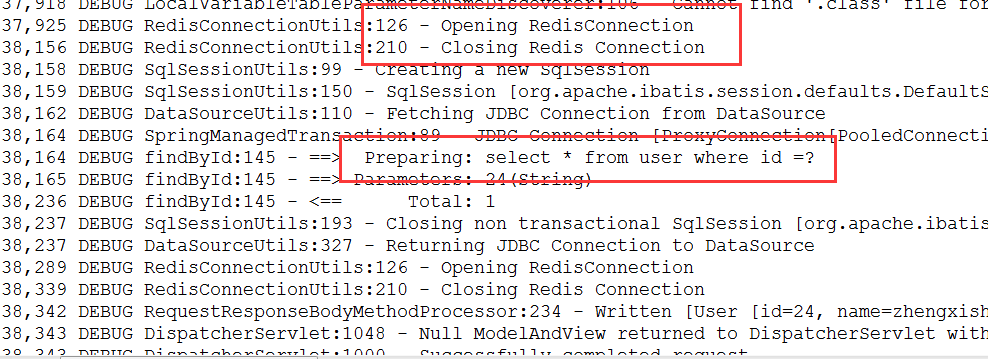
通过控制台输出信息我们可以知道,这次执行了数据库查询,并开启了Redis缓存查询结果。接下来我们再次查询user表中id=24的数据,观察控制台,如下:

通过控制台输出信息我们可以知道,这次并没有执行数据库查询,而是从Redis缓存中查询,并返回查询结果。我们查看redis中的信息,如下:

方法finduser方法使用了注解@Cacheable(key="#p0"),即将id作为redis中的key值。当我们更新数据的时候,应该使用@CachePut(key="#p0")进行缓存数据的更新,否则将查询到脏数据。
转自 :https://www.cnblogs.com/gdpuzxs/p/7222309.html
sprinboot+redis的更多相关文章
- linux上安装redis的踩坑过程
redis用处很广泛,我不再啰嗦了,我按照网上教程想在linux上安装下,开始了踩坑过程,网上买了一个linux centos7.3,滴滴云的,巨坑无比啊,不建议大家用这家的! redis 为4.0, ...
- springboot(十二)-分布式锁(redis)
什么是分布式锁? 要介绍分布式锁,首先要提到与分布式锁相对应的是线程锁.进程锁. 线程锁:主要用来给方法.代码块加锁.当某个方法或代码使用锁,在同一时刻仅有一个线程执行该方法或该代码段.线程锁只在同一 ...
- Centos 7 redis、tomcat、Spring Boot添加开机自启服务
一.redis添加开机自启 1.添加服务配置文件 [root@test system]# vim /etc/systemd/system/redis-server.service 2.服务配置文件内容 ...
- 使用redis构建可靠分布式锁
关于分布式锁的概念,具体实现方式,直接参阅下面两个帖子,这里就不多介绍了. 分布式锁的多种实现方式 分布式锁总结 对于分布式锁的几种实现方式的优劣,这里再列举下 1. 数据库实现方式 优点:易理解 缺 ...
- Ignite性能测试以及对redis的对比
测试方法 为了对Ignite做一个基本了解,做了一个性能测试,测试方法也比较简单主要是针对client模式,因为这种方法和使用redis的方式特别像.测试方法很简单主要是下面几点: 不作参数优化,默认 ...
- mac osx 安装redis扩展
1 php -v查看php版本 2 brew search php|grep redis 搜索对应的redis ps:如果没有brew 就根据http://brew.sh安装 3 brew ins ...
- Redis/HBase/Tair比较
KV系统对比表 对比维度 Redis Redis Cluster Medis Hbase Tair 访问模式 支持Value大小 理论上不超过1GB(建议不超过1MB) 理论上可配置(默认配置1 ...
- Redis数据库
Redis是k-v型数据库的典范,设计思想及数据结构实现都值得学习. 1.数据类型 value支持五种数据类型:1.字符串(strings)2.字符串列表(lists)3.字符串集合(sets)4.有 ...
- redis 学习笔记(2)
redis-cluster 简介 redis-cluster是一个分布式.容错的redis实现,redis-cluster通过将各个单独的redis实例通过特定的协议连接到一起实现了分布式.集群化的目 ...
随机推荐
- CentOS 6安装Oracle 11gR2数据库
1.安装环境--- 操作系统:CentOS release 6.8 (Final) oracle:Oracle Database 11g Enterprise Edition Release 11.2 ...
- eureka-4-eureka server 高可用
Eureka Server 可以通过运行多个实例并相互注册实现高可用部署.Eureka Server 实例之间会彼此增量同步信息,确保所有节点信息一致. 关键点: 配置: eureka.client. ...
- 实现一个简单的lazyman
function lazyman(name) { return new lazyman.fn.init(name); } lazyman.fn = lazyman.prototype = { cons ...
- tensorflow_gpu-1.2.1-cp35-cp35m-win_amd64.whl文件怎么安装?
当你从迅雷下载之后,怎么样来安装上面的文件呢? 这也是一个问题,对于新手来说,是不知道的.其实比较简单,如下: 用命令:pip install tensorflow_gpu-1.2.1-cp35-c ...
- Redis的高可用技术方案
引言: redis是广为使用的缓存解决方案,本文将给出基于Sequential的高可用方案,自动进行主从的切换,在master节点down机之后,透明的进行切换. 主从节点的设置方案 设置主节点red ...
- EasyPusher/EasyDarwin支持H.265 RTSP/RTP直播推流与分发播放
前言描述 随着大屏时代和高清时代的到来,人们已经不再满足于VGA.CIF这种小分辨率了,取而代之的是720P.1080P.4K级的视频传输,虽然我们国家的基础带宽一直在上升,但普遍情况下,传输高清视频 ...
- ICE:slice语言常识整理
ICE:Slice语言(二)--源文件和词法规则: 文件命名 Slice的源文件以.ice为扩展名. 对于大小写不区分的系统(例如DOS),文件的扩展名可以大写,也可以小写,例如Cli ...
- linux vim 命令使用
基本上vim可以分为三种状态,分别是命令模式(command mode).插入模式(Insert mode)和底行模式(last line mode) 模式切换方法 在命令模式输入“i”,进入插入模式 ...
- 【剑指offer】两个链表的第一个公共结点,C++实现
原创文章,转载请注明出处! 博客文章索引地址 # 题目 #举例 如果两个单向链表有公共的节点,那么这两个链表从第一个公共结点开始,之后所有结点都是重合的,不可能再出现分叉.拓扑结构如下图所示: # 思 ...
- 编程之美Ex1——求二进制中1的个数
又被阿里机考虐了一次,决定改变策略开始刷题T^T 一个字节(8bit)的无符号整型,求其二进制中的“1”的个数,算法执行效率尽可能高. 最先想到的移位操作,末尾位&00000001,然后右移, ...