
[Training Video - 6] [File Reading] [Java] Read Excel File Using Apache POI API
读取以下两种格式的Excel : *.xls and *.xlsx
用Apache POI API来实现,需要用到 HSSF 和 XSSF 的类库
HSSF is the POI Project's pure Java implementation of the Excel '97(-2007) (.xls) file format.
XSSF is the POI Project's pure Java implementation of the Excel 2007 OOXML (.xlsx) file format.

These 4 JARs are needed to read excel:
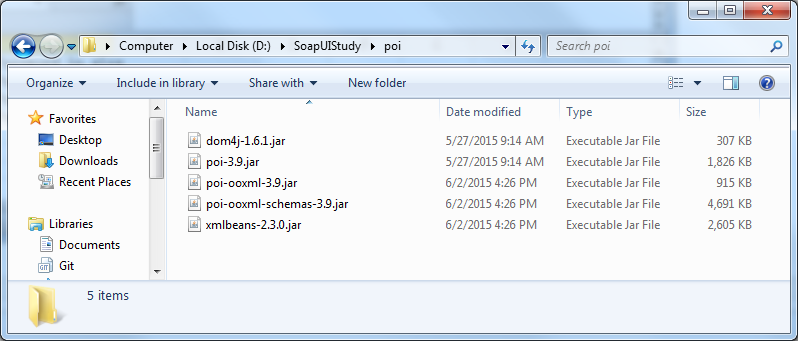
将这四个JAR包加入到Java Build Path里面去

Java code to read Excel :
package com.file.properties;

import java.io.*;

import java.util.Iterator;

import org.apache.poi.hssf.usermodel.HSSFSheet;

import org.apache.poi.hssf.usermodel.HSSFWorkbook;

import org.apache.poi.ss.usermodel.Cell;

import org.apache.poi.ss.usermodel.Row;

import org.apache.poi.xssf.usermodel.XSSFSheet;

import org.apache.poi.xssf.usermodel.XSSFWorkbook;

class ReadExcel

{

static void readXlsx(File inputFile)

{

try

{

        // Get the workbook instance for XLSX file

        XSSFWorkbook wb = new XSSFWorkbook(new FileInputStream(inputFile));

        // Get first sheet from the workbook

        XSSFSheet sheet = wb.getSheetAt(0);

        Row row;

        Cell cell;

        // Iterate through each rows from first sheet

        Iterator<Row> rowIterator = sheet.iterator();

        while (rowIterator.hasNext())

        {

                row = rowIterator.next();

                // For each row, iterate through each columns

                Iterator<Cell> cellIterator = row.cellIterator();

                while (cellIterator.hasNext())

                {

                cell = cellIterator.next();

                switch (cell.getCellType())

                {

                case Cell.CELL_TYPE_BOOLEAN:

                        System.out.println(cell.getBooleanCellValue());

                        break;

                case Cell.CELL_TYPE_NUMERIC:

                        System.out.println(cell.getNumericCellValue());

                        break;

                case Cell.CELL_TYPE_STRING:

                        System.out.println(cell.getStringCellValue());

                        break;

                case Cell.CELL_TYPE_BLANK:

                        System.out.println(" ");

                        break;

                default:

                        System.out.println(cell);

                }

                }

        }

}

catch (Exception e)

{

        System.err.println("Exception :" + e.getMessage());

}

}

static void readXls(File inputFile)

{

try

{

        // Get the workbook instance for XLS file

        HSSFWorkbook workbook = new HSSFWorkbook(new FileInputStream(inputFile));

        // Get first sheet from the workbook

        HSSFSheet sheet = workbook.getSheetAt(0);

        Cell cell;

        Row row;

        // Iterate through each rows from first sheet

        Iterator<Row> rowIterator = sheet.iterator();

        while (rowIterator.hasNext())

        {

                row = rowIterator.next();

                // For each row, iterate through each columns

                Iterator<Cell> cellIterator = row.cellIterator();

                while (cellIterator.hasNext())

                {

                cell = cellIterator.next();

                switch (cell.getCellType())

                {

                case Cell.CELL_TYPE_BOOLEAN:

                        System.out.println(cell.getBooleanCellValue());

                        break;

                case Cell.CELL_TYPE_NUMERIC:

                        System.out.println(cell.getNumericCellValue());

                        break;

                case Cell.CELL_TYPE_STRING:

                        System.out.println(cell.getStringCellValue());

                        break;

                case Cell.CELL_TYPE_BLANK:

                        System.out.println(" ");

                        break;

                default:

                        System.out.println(cell);

                }

                }

        }

}

catch (FileNotFoundException e)

{

        System.err.println("Exception" + e.getMessage());

}

catch (IOException e)

{

        System.err.println("Exception" + e.getMessage());

}

}

public static void main(String[] args)

{

        File inputFile = new File("D:\\SoapUIStudy\\input.xls");

        File inputFile2 = new File("D:\\SoapUIStudy\\input.xlsx");

        readXls(inputFile);

        readXlsx(inputFile2);

}

}
Result :
User in xls
Password in xls
U1
P1
U2
P2
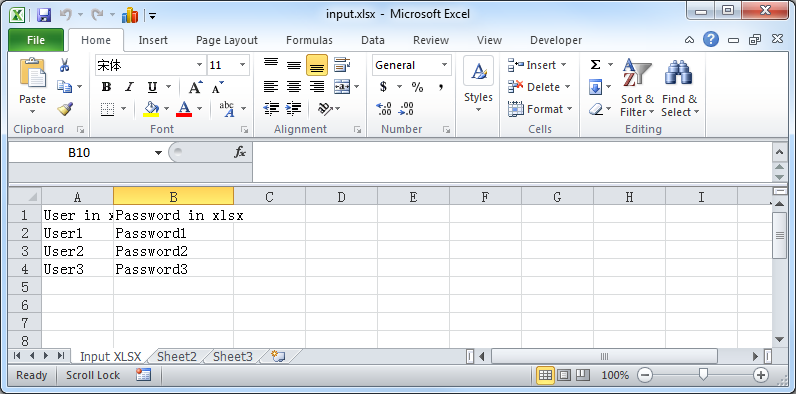
User in xlsx
Password in xlsx
User1
Password1
User2
Password2
User3
Password3
[Training Video - 6] [File Reading] [Java] Read Excel File Using Apache POI API的更多相关文章
- [Training Video - 6] [File Reading] [Java] Read Properties file
package com.file.properties; import java.io.FileInputStream; import java.util.Properties; public cla ...
- [Training Video - 6] [File Reading] [Java] Create and Write Excel File Using Apache POI API
package com.file.properties; import java.io.File; import java.io.FileNotFoundException; import java. ...
- Apache POI – Reading and Writing Excel file in Java
来源于:https://www.mkyong.com/java/apache-poi-reading-and-writing-excel-file-in-java/ In this article, ...
- java 读取excel 2007 .xlsx文件 poi实现
工作需要读取excel里面的行内容,使用java实现较为简单. 在最开始,尝试使用 jxl-2.6.12 来实现读取excel 的行内容.但是按照网上的方法,程序根本无法正确处理文件流.经过谷姐的一番 ...
- Java对Excel数据处理(利用POI解析Excel)
前言 研究生复试结束我在学校官网上看到了全校按姓氏排列的拟录取名单,但是官网并没有给出每个人的专业,只有学号,另外还知道本专业的复试名单,所以我想知道对于本专业的拟录取名单.具体做法就是,扫描复试名单 ...
- java 在Excel中插入图片 POI实现
一.POI简介 Jakarta POI 是apache的子项目,目标是处理ole2对象.它提供了一组操纵Windows文档的Java API 目前比较成熟的是HSSF接口,处理MS Excel(97- ...
- Java读写Excel文件,利用POI
直接看工具类代码吧, package com.example.demo.util; import com.example.demo.entity.ExcelDataVO; import org.apa ...
- Java操作Excel工具类(poi)
分享一个自己做的poi工具类,写不是很完全,足够我自己当前使用,有兴趣的可以自行扩展 1 import org.apache.commons.lang3.exception.ExceptionUtil ...
- [转]How to insert a row between two rows in an existing excel with HSSF (Apache POI)
本文转自:http://stackoverflow.com/questions/5785724/how-to-insert-a-row-between-two-rows-in-an-existing- ...
随机推荐
- dom4j使用的小例子
product.xml: <?xml version="1.0" encoding="UTF-8"?> <root> <produ ...
- python多标签分类模版
from sklearn.multioutput import MultiOutputClassifier from sklearn.ensemble import RandomForestClass ...
- [Java][Web]ServletContext 方法的应用
由于一个 Web 应用中的所有 Servlet 共享同一个 ServletContext 对象,所以多个 Servlet 通过 ServletContext 对象实现数据共享. ServletCont ...
- Window下安装Memecached
原创,如有转载请注明来处! memcached是一套分布式的快取系统,当初是Danga Interactive为了LiveJournal所发展的,但被许多软件(如MediaWiki)所使用.这是一套开 ...
- 项目中Map端数据处理不均匀性分析
Map任务的不均匀性 最近发现Map端数据越来越不均匀,而处理输入的数据,写到本地磁盘的数据量都差不多,我们随便拿出来两个attempt任务(当前map数量为64个),33和45,33的counter ...
- 【UVA】10935 Throwing cards away I(STL队列)
题目 题目 分析 练习STL 代码 #include <bits/stdc++.h> using namespace std; int main() { int n; wh ...
- 快速安装laravel和依赖
http://pkg.phpcomposer.com CMD敲命令: composer config -g repositories.packagist composer http://packagi ...
- kafka 高可靠
1.集群高可靠 ①搭建kafka集群(略) ②重点配置项(每个broker配置相同,只有broker.id不一样) broker.id=1 当前机器在集群中的唯一标识,和zookeeper的m ...
- 【转】C#事件、委托、回调的用法与区别
原文地址:http://blog.csdn.net/huang9012/article/details/38753305 事件包括:事件发送者.事件接收者和事件处理程序.关于事件,我们首要知道的是事件 ...
- WinForm多线程+委托防止界面卡死
1.当有大量数据需要计算.显示在界面或者调用sleep函数时,容易导致界面卡死,可以采用多线程加委托的方法解决 using System; using System.Collections.Gener ...