
Apache POI – Reading and Writing Excel file in Java
来源于:https://www.mkyong.com/java/apache-poi-reading-and-writing-excel-file-in-java/
In this article, we will discuss about how to read and write an excel file using Apache POI
1. Basic definitions for Apache POI library
This section briefly describe about basic classes used during Excel Read and Write.
HSSFis prefixed before the class name to indicate operations related to a Microsoft Excel 2003 file.XSSFis prefixed before the class name to indicate operations related to a Microsoft Excel 2007 file or later.XSSFWorkbookandHSSFWorkbookare classes which act as an Excel WorkbookHSSFSheetandXSSFSheetare classes which act as an Excel WorksheetRowdefines an Excel rowCelldefines an Excel cell addressed in reference to a row.
2. Download Apache POI
Apache POI library is easily available using Maven Dependencies.
<dependency>

  <groupId>org.apache.poi</groupId>

  <artifactId>poi-ooxml</artifactId>

  <version>3.15</version>

</dependency>
3. Apache POI library – Writing a Simple Excel
The below code shows how to write a simple Excel file using Apache POI libraries. The code uses a 2 dimensional data array to hold the data. The data is written to a XSSFWorkbook object. XSSFSheet is the work sheet being worked on. The code is as shown below:
package com.mkyong;

import org.apache.poi.ss.usermodel.Cell;

import org.apache.poi.ss.usermodel.Row;

import org.apache.poi.xssf.usermodel.XSSFSheet;

import org.apache.poi.xssf.usermodel.XSSFWorkbook;

import java.io.FileNotFoundException;

import java.io.FileOutputStream;

import java.io.IOException;

public class ApachePOIExcelWrite {

    private static final String FILE_NAME = "/tmp/MyFirstExcel.xlsx";

    public static void main(String[] args) {

        XSSFWorkbook workbook = new XSSFWorkbook();

        XSSFSheet sheet = workbook.createSheet("Datatypes in Java");

        Object[][] datatypes = {

                {"Datatype", "Type", "Size(in bytes)"},

                {"int", "Primitive", 2},

                {"float", "Primitive", 4},

                {"double", "Primitive", 8},

                {"char", "Primitive", 1},

                {"String", "Non-Primitive", "No fixed size"}

        };

        int rowNum = 0;

        System.out.println("Creating excel");

        for (Object[] datatype : datatypes) {

            Row row = sheet.createRow(rowNum++);

            int colNum = 0;

            for (Object field : datatype) {

                Cell cell = row.createCell(colNum++);

                if (field instanceof String) {

                    cell.setCellValue((String) field);

                } else if (field instanceof Integer) {

                    cell.setCellValue((Integer) field);

                }

            }

        }

        try {

            FileOutputStream outputStream = new FileOutputStream(FILE_NAME);

            workbook.write(outputStream);

            workbook.close();

        } catch (FileNotFoundException e) {

            e.printStackTrace();

        } catch (IOException e) {

            e.printStackTrace();

        }

        System.out.println("Done");

    }

}
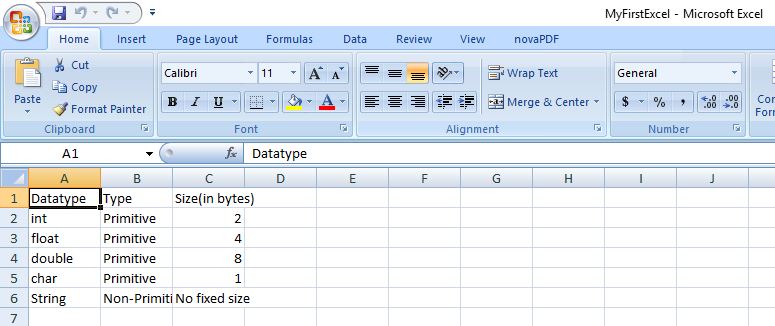
On executing the above code, you get below excel as an output.
4. Apache POI library – Reading an Excel file
The below code explains how to read an Excel file using Apache POI libraries. The function getCellTypeEnum is deprecated in version 3.15 and will be renamed to getCellType from version 4.0 onwards.
package com.mkyong;

import org.apache.poi.ss.usermodel.*;

import org.apache.poi.xssf.usermodel.XSSFWorkbook;

import java.io.File;

import java.io.FileInputStream;

import java.io.FileNotFoundException;

import java.io.IOException;

import java.util.Iterator;

public class ApachePOIExcelRead {

    private static final String FILE_NAME = "/tmp/MyFirstExcel.xlsx";

    public static void main(String[] args) {

        try {

            FileInputStream excelFile = new FileInputStream(new File(FILE_NAME));

            Workbook workbook = new XSSFWorkbook(excelFile);

            Sheet datatypeSheet = workbook.getSheetAt(0);

            Iterator<Row> iterator = datatypeSheet.iterator();

            while (iterator.hasNext()) {

                Row currentRow = iterator.next();

                Iterator<Cell> cellIterator = currentRow.iterator();

                while (cellIterator.hasNext()) {

                    Cell currentCell = cellIterator.next();

                    //getCellTypeEnum shown as deprecated for version 3.15

                    //getCellTypeEnum ill be renamed to getCellType starting from version 4.0

                    if (currentCell.getCellTypeEnum() == CellType.STRING) {

                        System.out.print(currentCell.getStringCellValue() + "--");

                    } else if (currentCell.getCellTypeEnum() == CellType.NUMERIC) {

                        System.out.print(currentCell.getNumericCellValue() + "--");

                    }

                }

                System.out.println();

            }

        } catch (FileNotFoundException e) {

            e.printStackTrace();

        } catch (IOException e) {

            e.printStackTrace();

        }

    }

}
On executing the above code, you get the below output.
Datatype--Type--Size(in bytes)--

int--Primitive--2.0--

float--Primitive--4.0--

double--Primitive--8.0--

char--Primitive--1.0--

String--Non-Primitive--No fixed size--
References
- Details about deprecation of getCellTypeEnum
- Apache POI reference regarding Deprecation
- Apache POI Maven Repo
- Apache POI API docs
Apache POI – Reading and Writing Excel file in Java的更多相关文章
- Read / Write Excel file in Java using Apache POI
Read / Write Excel file in Java using Apache POI 2014-04-18 BY DINESH LEAVE A COMMENT About a year o ...
- 【Java】使用Apache POI生成和解析Excel文件
概述 Excel是我们平时工作中比较常用的用于存储二维表数据的,JAVA也可以直接对Excel进行操作,分别有jxl和poi,2种方式. HSSF is the POI Project's pure ...
- apache poi根据模板导出excel
需要预先新建编辑好一个excel文件,设置好样式. 编辑好输出的数据,根据excel坐标一一对应. 支持列表数据输出,列表中列合并. 代码如下: package com.icourt.util; im ...
- java使用org.apache.poi读取与保存EXCEL文件
一.读EXCEL文件 package com.ruijie.wis.cloud.utils; import java.io.FileInputStream; import java.io.FileNo ...
- 利用Apache POI 实现简单的Excel表格导出
1.利用POI API实现简单的Excel表格导出 首先假设一个学生实体类: package com.sun.poi.domain; import java.io.Serializable; impo ...
- Java 使用Apache POI读取和写入Excel表格
1,引入所用的包 <dependency> <groupId>org.apache.poi</groupId> <artifactId>poi-ooxm ...
- 使用Apache poi来编写导出excel的工具类
在JavaWeb开发的需求中,我们会经常看到导出excel的功能需求,然后java并没有提供操作office文档的功能,这个时候我们就需要使用额外的组件来帮助我们完成这项功能了. 很高兴Apache基 ...
- 转:Apache POI Tutorial
Welcome to Apache POI Tutorial. Sometimes we need to read data from Microsoft Excel Files or we need ...
- 如何用Apache POI操作Excel文件-----如何在已有的Excel文件中插入一行新的数据?
在POI的第一节入门中,我们提供了两个简单的例子,一个是如何用Apache POI新建一个工作薄,另外一个例子是,如果用Apache POI新建一个工作表.那么在这个章节里面,我将会给大家演示一下,如 ...
随机推荐
- Using platform encoding (GBK actually) to copy filtered resources, i.e. build is platform dependent!
执行Maven Install打包的时候,提示以下警告信息: [WARNING] Using platform encoding (GBK actually) to copy filtered res ...
- 求助关于jquery easyUI中的treegrid组件,请各位帮忙给个思路,谢谢啦
现在项目中用到jquery easyUI中的treegrid组件,已经可以正常显示了.但是在保存的时候遇到问题,页面上参照官网的例子可以在页面更新,但是怎么获取编辑后的数据进而保存到数据库呢?
- struts2中的namespace意义
<package name="user" namespace="/user" extends="struts-default"> ...
- 《精通Ext JS 》
<精通Ext JS > 基本信息 原书名:Mastering Ext JS 作者: (巴西)Loiane Groner 译者: 卢俊祥 丛书名: 图灵程序设计丛书 出版社:人民邮电出版社 ...
- python垃圾回收杂谈
当创建对象时Python立即向操作系统请求内存.每当对象的引用数减为0,Python垃圾回收器立刻挺身而出,立即将其释放,把内存还给操作系统.在Python中,每个对象都保存了一个称为引用计数的整数值 ...
- java使用省略号代替多参数(参数类型... 参数名)
J2SE 1.5提供了“Varargs”机制.借助这一机制,可以定义能和多个实参相匹配的形参.从而,可以用一种更简单的方式,来传递个数可变的实参.本文介绍这一机制的使用方法,以及这一机制与数组.泛型. ...
- 新鲜出炉!9个超高分辨率的iPhone 6原型素材打包下载
iPhone 6 出场,设计师又有得忙活了,但是新鲜的资源你们在哪里?!今天我们收集了一组精致的iPhone 6 模型素材,超高分辨率,多种视图,全都打包完毕,点一下就可以拿回家!赶紧来取吧!—— ...
- Java中正则匹配性能测试
工作中经常会用到在文本中每行检索某种pattern,刚才测试了三种方式,发现实际性能和预想的有区别 方式1: 直接字符串的matches方法,[string.matches("\\d+&qu ...
- 【Linux】Linux中 “there are stopped jobs”问题的解决方案
在用管理员执行一个命令后,我用Ctrl+Z把命令转移到了后台天.导致我无法退出root的. 输入命令:logout终端显示:There are stopped jobs. 解决方法:输入命令:jobs ...
- Learning How To Code Neural Networks
原文:https://medium.com/learning-new-stuff/how-to-learn-neural-networks-758b78f2736e#.ly5wpz44d This i ...