
SpringBoot 之 Mybatis 逆向工程
今天给大家介绍在
spring- boot项目中如何使用maven插件逆向工程生成Mybatis代码。pom.xml 添加依赖和插件<dependency>
<groupId>org.mybatis.spring.boot</groupId>
<artifactId>mybatis-spring-boot-starter</artifactId>
<version>1.3.0</version>
</dependency> <build>
<plugins>
<plugin>
<groupId>org.springframework.boot</groupId>
<artifactId>spring-boot-maven-plugin</artifactId>
</plugin>
<plugin>
<groupId>org.mybatis.generator</groupId>
<artifactId>mybatis-generator-maven-plugin</artifactId>
<version>1.3.2</version>
<configuration>
<configurationFile>${basedir}/src/main/resources/generator/generatorConfig.xml</configurationFile>
<overwrite>true</overwrite>
<verbose>true</verbose>
</configuration>
<dependencies>
<dependency>
<groupId>mysql</groupId>
<artifactId>mysql-connector-java</artifactId>
<version>5.1.29</version>
<scope>runtime</scope>
</dependency>
</dependencies>
</plugin>
<plugin>
<groupId>org.jacoco</groupId>
<artifactId>jacoco-maven-plugin</artifactId>
<version>0.8.2</version>
<executions>
<execution>
<id>pre-test</id>
<goals>
<goal>prepare-agent</goal>
</goals>
</execution>
<execution>
<id>pre-test</id>
<phase>test</phase>
<goals>
<goal>report</goal>
</goals>
</execution>
<execution>
<id>post-test-aggregate</id>
<phase>test</phase>
<goals>
<goal>report-aggregate</goal>
</goals>
</execution>
</executions>
</plugin>
</plugins>
</build>
上图还配置了 jacoco 插件,为了使用看代码单元测试的覆盖率,不需要的同学可以去掉此插件。
在 resources 根目录下创建 generator 文件夹,再在此文件夹下创建 generatorConfig.xml。<?xml version="1.0" encoding="UTF-8"?>
<!DOCTYPE generatorConfiguration
PUBLIC "-//mybatis.org//DTD MyBatis Generator Configuration 1.0//EN"
"http://mybatis.org/dtd/mybatis-generator-config_1_0.dtd">
<generatorConfiguration>
<context id="DB2Tables" targetRuntime="MyBatis3">
<commentGenerator>
<property name="suppressDate" value="true"/>
<!-- 是否去除自动生成的注释 -->
<property name="suppressAllComments" value="true"/>
</commentGenerator>
<!--数据库链接信息 -->
<jdbcConnection driverClass="com.mysql.jdbc.Driver"
connectionURL="jdbc:mysql://localhost:3306/parse_json"
userId="root"
password="root">
</jdbcConnection>
<javaTypeResolver>
<!-- 是否使用bigDecimal, false可自动转化以下类型(Long, Integer, Short, etc.) -->
<property name="forceBigDecimals" value="false"/>
</javaTypeResolver>
<!-- 生成实体类的包名和位置 ,targetPackage指的是包名,targetProject值得是路径位置-->
<javaModelGenerator targetPackage="com.rookie.model" targetProject="src/main/java">
<property name="enableSubPackages" value="true"/>
<property name="trimStrings" value="true"/>
</javaModelGenerator>
<!-- 生成映射文件的包名和位置-->
<sqlMapGenerator targetPackage="main.resources.com.rookie.mapper" targetProject="src">
<property name="enableSubPackages" value="true"/>
</sqlMapGenerator>
<!-- 生成DAO的包名和位置-->
<javaClientGenerator type="XMLMAPPER" targetPackage="com.rookie.mapper" targetProject="src/main/java">
<property name="enableSubPackages" value="true"/>
</javaClientGenerator>
<!-- 要生成的表 tableName是数据库中的表名或视图名 domainObjectName是实体类名-->
<table tableName="input_file_path" domainObjectName="FilePathDO"
enableCountByExample="false" enableUpdateByExample="false"
enableDeleteByExample="false" enableSelectByExample="false"
selectByExampleQueryId="false">
</table>
</context>
</generatorConfiguration>
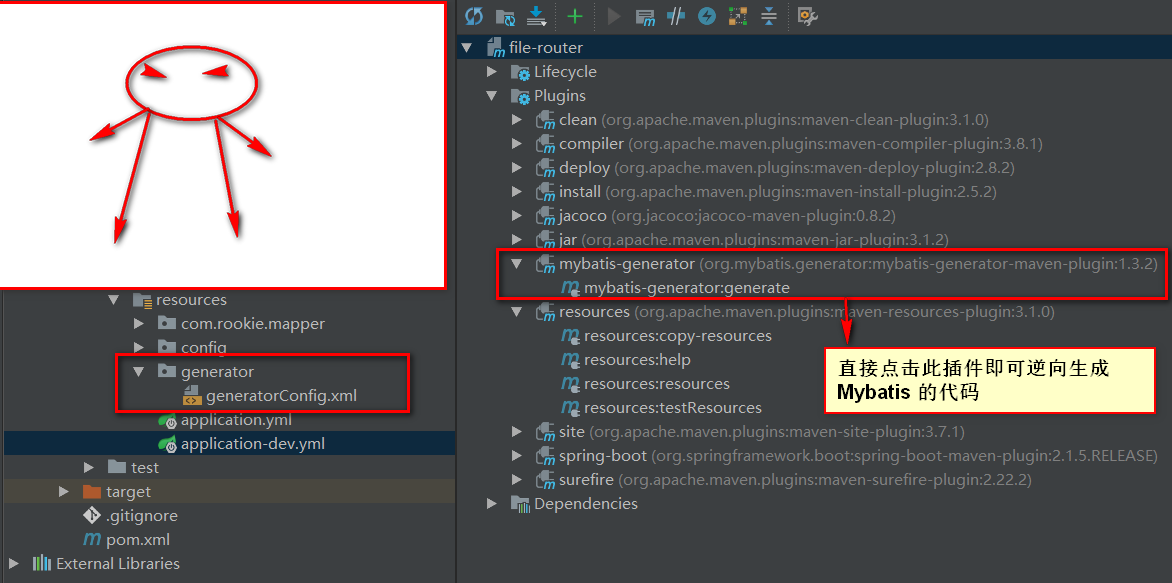
项目结构如图。按照如图所示,点击插件生成即可。
SpringBoot 之 Mybatis 逆向工程的更多相关文章
- springboot中mybatis逆向工程与分页的应用
最近在项目中应用到springboot与mybatis,在进行整合过程中遇到一些坑,在此将其整理出来,便于以后查阅与复习. 项目运行环境为:eclispe+jdk1.8+maven 一.搭建Sprin ...
- SpringBoot 3.SpringBoot 整合 MyBatis 逆向工程以及 MyBatis 通用 Mapper
一.添加所需依赖,当前完整的pom文件如下: <project xmlns="http://maven.apache.org/POM/4.0.0" xmlns:xsi=&qu ...
- springboot集成mybatis(逆向工程),热部署以及整合Swagger2
本文是作者原创,版权归作者所有.若要转载,请注明出处. springboot集成mybatis和mybatis-generator插件 1.新建Springboot项目(略) 2.导入相关依赖 < ...
- Springboot的Mybatis逆向工程
1.pom.xml添加mybatis和逆向插件依赖: <dependency> <groupId>org.mybatis.spring.boot</groupId> ...
- idea+springboot+mybatis逆向工程
前提:使用idea开发,基于springboot.用到了mybatis的逆向工程 因为之前用eclipse开发ssm比较多,现在转idea 使用springboot 踩了一些坑,在这记录一下~ 注意事 ...
- SpringBoot (四) - 整合Mybatis,逆向工程,JPA
1.SpringBoot整合MyBatis 1.1 application.yml # 数据源配置 spring: datasource: driver-class-name: com.mysql.c ...
- springboot整合mybatis增删改查(三):mybatis逆向工程
上一篇已经把项目基本框架完善,接下来就是利用Mybatis Generator逆向工程进行mybatis的整合. 我们在创建项目开始的时候已经勾选web,mybatis,sql等,但是这些依赖还是不够 ...
- SpringBoot系列——MyBatis整合
前言 MyBatis官网:http://www.mybatis.org/mybatis-3/zh/index.html 本文记录springboot与mybatis的整合实例:1.以注解方式:2.手写 ...
- mybatis逆向工程(MyBatis Generator)
mybatis逆向工程(MyBatis Generator) 1. 什么是mybatis逆向工程 mybatis官方为了提高开发效率,提高自动对单表生成sql,包括 :mapper.xml.mappe ...
随机推荐
- C++如何阻止一个类被实例化
(1)定义一个无用的抽象函数,使得类成为抽象类 (2)将构造函数定义为private. 为什么要这样做? 一些工具类,没有被实例化的必要.
- {"timestamp":"2019-11-12T02:39:28.949+0000","status":415,"error":"Unsupported Media Type","message":"Content type 'text/plain;charset=UTF-8' not supported","path":&quo
在Jmeter运行http请求时报错: {"timestamp":"2019-11-12T02:39:28.949+0000","status&quo ...
- HDU 6326 Problem H Monster Hunter
\(\mathtt{Problem H}\) \(\mathtt{Monster}\) \(\mathtt{Hunter}\) \(\mathcal{Description}\) 题目 给定一棵 \( ...
- 设置overflow:auto无效的解决办法
做项目中经常要用到滚动条,有时候给div设置overflow无效. 遇到这样的问题,只需要在 F12 Elements面板检查一下要设置overflow的元素的宽高是否大于父级元素宽高. (overf ...
- php自动生成不重复的id
PHP uniqid()函数可用于生成不重复的唯一标识符,该函数基于微秒级当前时间戳.在高并发或者间隔时长极短(如循环代码)的情况下,会出现大量重复数据.即使使用了第二个参数,也会重复,最好的方案是结 ...
- 使用SpringBoot AOP 记录操作日志、异常日志
平时我们在做项目时经常需要对一些重要功能操作记录日志,方便以后跟踪是谁在操作此功能:我们在操作某些功能时也有可能会发生异常,但是每次发生异常要定位原因我们都要到服务器去查询日志才能找到,而且也不能对发 ...
- php 实现的功能
1.php写日志函数 (如:前端请求日志记录) : https://www.cnblogs.com/lvchenfeng/p/6794822.html 2.php中(服务器)使用CURL实现GET和P ...
- Java-Class-FC:java.util.Optional
ylbtech-Java-Class-FC:java.util.Optional 1.返回顶部 2.返回顶部 1.1. import java.util.Optional; 1.2.1. @Api ...
- 20、formAdd,javascript实现动态添加
<!DOCTYPE html> <html> <head> <meta charset="UTF-8"> <title> ...
- requests_html爬虫小练习
爬取豆瓣TOP250 from requests_html import HTMLSession #新建一个html文件,将相应的代码放入,运行查看结果,如果页面全部渲染则直接根据页面信息获得数据: ...